| Windows 7: Libraries Folder - Add or Remove from Navigation Pane |
04 Nov 2009
|
#9 | | 64-bit Windows 7 Ultimate SP1 & Windows 8 Enterprise Texas |
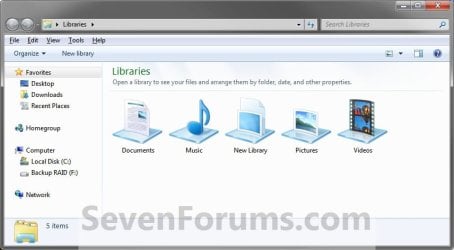
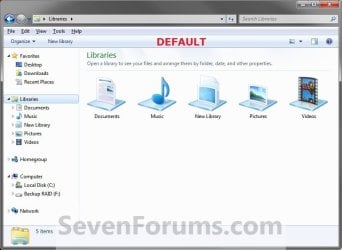
Libraries Folder - Add or Remove from Navigation Pane How to Add or Remove the "Libraries" Folder from the Windows 7 Navigation Pane
Last edited by Brink; 1 Week Ago at 10:39 PM..
| My System Specs |
| Computer type PC/Desktop System Manufacturer/Model Number Self built custom OS 64-bit Windows 7 Ultimate SP1 & Windows 8 Enterprise CPU Intel i7-3930K 3.2 Ghz (O/C 4 Ghz) Motherboard ASRock X79 Extreme11 Memory 32 GB (8GBx4) G.SKILL DDR3 Quad PC3-19200 2400MHz Graphics Card Sapphire HD5870 Eyefinity 6 2GB Sound Card SB Recon 3Di Integrated Chip Monitor(s) Displays 3x 27" Asus VE278Q Screen Resolution 1920x1080 Keyboard Logitech Cordless Desktop MX 5500 Revolution Mouse Logitech Cordless Desktop MX 5500 Revolution PSU OCZ Series Gold OCZZ1000M 1000W Case Thermaltake Level 10 GT Snow Edition Cooling Corsair Hydro H100 Hard Drives 256GB OCZ Vector
160GB OCZ RevoDrive X2
2 x 1TB Samsung HDD HD154UI SATA Internet Speed 50 Mb/s Download and 2 Mb/s Upload Other Info Microsoft LifeCam Cinema
Lite-On iHBS212 12x BD Writer
Samsung CLX-3175FW Printer
Netgear WNDR3800 Router
Motorola SBG6580 Cable Modem
2x APC Back-UPS XS 1500 |
10 Jan 2010
|
#10 | | Windows 7 Professional x64 SP1 |
Now that we have disabled the libraries, is there a way to make the "Documents, Pictures, Music, etc" link in the start menu point to the actual user folders and not the libraries? | My System Specs |
| OS Windows 7 Professional x64 SP1 CPU Intel Core2 Quad Q6600 @3.2 Ghz Motherboard Gigabyte GA-EP45-UD3R Memory 4x Kingston HyperX DDR2 1066 1GB Graphics Card ATI Radeon HD 3650 512MB Sound Card Realtek HD Audio ALC889A Onboard Monitor(s) Displays 19" Acer X193w+ Screen Resolution 1680 x 1050 Keyboard Logitech LX310 Cordless Desktop Mouse Logitech LX310 Cordless Desktop PSU Rosewill Stallion Series RD500-2SB 500W Case Thermaltake Armor Series VA8003BWS Black Full Tower Case Cooling Arctic Cooling Freezer 7 Pro Hard Drives Western Digital Caviar Blue WD6400AAKS 640GB SATAII Internet Speed AT&T DSL Extreme 6.0 Other Info Lite-On iHAS220-06 DVD Burner with LightScribe,
Koutech IO-PU520 PCI to USB2.0 Card,
AZiO BTD-V201 USB 2.0 Micro Bluetooth Adapter,
Rosewill RCR-IC001 USB 2.0 Card Reader,
Logitech X-230 2.1 Speaker System
SanDisk Cruzer 8GB ReadyBoost Drive |
11 Jan 2010
|
#11 | | 64-bit Windows 7 Ultimate SP1 & Windows 8 Enterprise Texas |
Hello Connor, and welcome to Seven Forums.
You could set your user folder (Personal folder) in the Start Menu to "display as a menu" and open the user folders from there to have them open at the C:\Users\(user-name) folders location instead.
Hope this helps,
Shawn | My System Specs | | Computer type PC/Desktop System Manufacturer/Model Number Self built custom OS 64-bit Windows 7 Ultimate SP1 & Windows 8 Enterprise CPU Intel i7-3930K 3.2 Ghz (O/C 4 Ghz) Motherboard ASRock X79 Extreme11 Memory 32 GB (8GBx4) G.SKILL DDR3 Quad PC3-19200 2400MHz Graphics Card Sapphire HD5870 Eyefinity 6 2GB Sound Card SB Recon 3Di Integrated Chip Monitor(s) Displays 3x 27" Asus VE278Q Screen Resolution 1920x1080 Keyboard Logitech Cordless Desktop MX 5500 Revolution Mouse Logitech Cordless Desktop MX 5500 Revolution PSU OCZ Series Gold OCZZ1000M 1000W Case Thermaltake Level 10 GT Snow Edition Cooling Corsair Hydro H100 Hard Drives 256GB OCZ Vector
160GB OCZ RevoDrive X2
2 x 1TB Samsung HDD HD154UI SATA Internet Speed 50 Mb/s Download and 2 Mb/s Upload Other Info Microsoft LifeCam Cinema
Lite-On iHBS212 12x BD Writer
Samsung CLX-3175FW Printer
Netgear WNDR3800 Router
Motorola SBG6580 Cable Modem
2x APC Back-UPS XS 1500 |
04 Feb 2010
|
#12 | | Windows 7 x86 Moscow, Russia |
Thanks. Like Windows 7, but really dislike some of these thingyies) | My System Specs | | OS Windows 7 x86 CPU E6600 Motherboard Asus p5v-vm ultra Memory 2gb Graphics Card asus 8800gts Sound Card ac'97 Monitor(s) Displays Nec 195wxm Keyboard Mitsumi classic keyboard w/t 14 extra multi-media keys Mouse MS Wheel mouse optical Case ATX Cooling 2x 120mm coolers Hard Drives WD st3500630a sata 500gb
WD mybook 1tb
WD passport 160gb
Maxtor onetouch II 300gb Internet Speed i pay for 4mbps channel but really doesn't get that high ;) |
05 Feb 2010
|
#13 | | |
Restore Libraries to Original Position in Nav Pane? Good, succinct instructions, but I have a slightly different problem which I haven't found anywhere online yet.
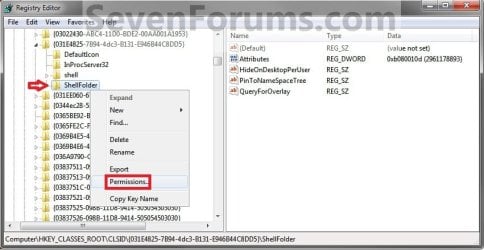
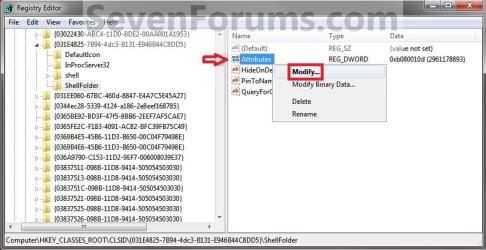
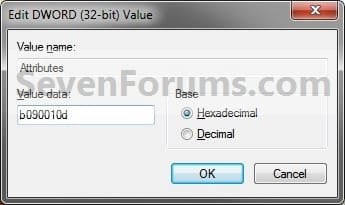
Somehow my Libraries folder wound up in my Desktop folder in the Nav Pane (and I have an unremovable Libraries icon on my desktop to prove it!) I think I tried to put a shortcut to it on the desktop, but moved the actual metafolder there instead. (Seemed like a good idea at the time, but then realized I don't need or want it there.) I checked the registry, and the Attributes value you described is already xb080010d.
How do I get it back in the default location, on its own between Favorites and Desktop? (And off my desktop!)
Thanks. | My System Specs | | System Manufacturer/Model Number Dell StudioXPS 8000 OS Windows 7 CPU Core i5 750 Memory 6GB ddr3 Graphics Card Nvidia GeForce GT220 Sound Card on MB Monitor(s) Displays acer X213W Hard Drives 750GB |
05 Feb 2010
|
#14 | | 64-bit Windows 7 Ultimate SP1 & Windows 8 Enterprise Texas |
Hello Nick, and welcome to Seven Forums.
You should be able to do a system restore using a restore point dated before this happened to undo and fix them.
Hope this helps,
Shawn | My System Specs | | Computer type PC/Desktop System Manufacturer/Model Number Self built custom OS 64-bit Windows 7 Ultimate SP1 & Windows 8 Enterprise CPU Intel i7-3930K 3.2 Ghz (O/C 4 Ghz) Motherboard ASRock X79 Extreme11 Memory 32 GB (8GBx4) G.SKILL DDR3 Quad PC3-19200 2400MHz Graphics Card Sapphire HD5870 Eyefinity 6 2GB Sound Card SB Recon 3Di Integrated Chip Monitor(s) Displays 3x 27" Asus VE278Q Screen Resolution 1920x1080 Keyboard Logitech Cordless Desktop MX 5500 Revolution Mouse Logitech Cordless Desktop MX 5500 Revolution PSU OCZ Series Gold OCZZ1000M 1000W Case Thermaltake Level 10 GT Snow Edition Cooling Corsair Hydro H100 Hard Drives 256GB OCZ Vector
160GB OCZ RevoDrive X2
2 x 1TB Samsung HDD HD154UI SATA Internet Speed 50 Mb/s Download and 2 Mb/s Upload Other Info Microsoft LifeCam Cinema
Lite-On iHBS212 12x BD Writer
Samsung CLX-3175FW Printer
Netgear WNDR3800 Router
Motorola SBG6580 Cable Modem
2x APC Back-UPS XS 1500 |
05 Feb 2010
|
#15 | | |
Wish I'd thought of that when I first noticed it. A lot of water has flowed under the bridge since then, and I can't remember when I noticed it anyway. Happened while setting up new computer. during past week. Any other ideas?
Dell tech suggested repair install, then gave me bum directions on how to do it. I saw good info on this site, tho.
Thanks.
Nick | My System Specs | | System Manufacturer/Model Number Dell StudioXPS 8000 OS Windows 7 CPU Core i5 750 Memory 6GB ddr3 Graphics Card Nvidia GeForce GT220 Sound Card on MB Monitor(s) Displays acer X213W Hard Drives 750GB |
05 Feb 2010
|
#16 | | 64-bit Windows 7 Ultimate SP1 & Windows 8 Enterprise Texas |
Yes, a repair install should be able to fix it for you as well. | My System Specs | | Computer type PC/Desktop System Manufacturer/Model Number Self built custom OS 64-bit Windows 7 Ultimate SP1 & Windows 8 Enterprise CPU Intel i7-3930K 3.2 Ghz (O/C 4 Ghz) Motherboard ASRock X79 Extreme11 Memory 32 GB (8GBx4) G.SKILL DDR3 Quad PC3-19200 2400MHz Graphics Card Sapphire HD5870 Eyefinity 6 2GB Sound Card SB Recon 3Di Integrated Chip Monitor(s) Displays 3x 27" Asus VE278Q Screen Resolution 1920x1080 Keyboard Logitech Cordless Desktop MX 5500 Revolution Mouse Logitech Cordless Desktop MX 5500 Revolution PSU OCZ Series Gold OCZZ1000M 1000W Case Thermaltake Level 10 GT Snow Edition Cooling Corsair Hydro H100 Hard Drives 256GB OCZ Vector
160GB OCZ RevoDrive X2
2 x 1TB Samsung HDD HD154UI SATA Internet Speed 50 Mb/s Download and 2 Mb/s Upload Other Info Microsoft LifeCam Cinema
Lite-On iHBS212 12x BD Writer
Samsung CLX-3175FW Printer
Netgear WNDR3800 Router
Motorola SBG6580 Cable Modem
2x APC Back-UPS XS 1500 |
09 Feb 2010
|
#17 | | |
Hello, I too tired of having Libraries and Homegroup taking up realestate in my explorer view. I searched for and found a registry hack to get rid of them (actually "homegroup" was just settings, no reg hack). Then I discovered the downside of my boldness. For me it is that "my documents" does NOT appear by default in"open" or "save as" dialogue boxes. I have to go searching down through the whole tree for them. For example, to save a playlist from Media Player 11 I have to drill to, "C:\Users\John\Music\Playlists", and it won't return there by default the next time. (Why I'm useing MP11 is a whole 'nother story!!) I didn't save a registry backup so I don't know how to undo my "fix". If I could, Then I'd youse your registry change instead. Maybe you can help? Below is the registry hack I applied. If you can tell me how to undo it. I'll use yours. If not, well, guess I'll live with it.
[-HKEY_LOCAL_MACHINE\SOFTWARE\Microsoft\Windows\CurrentVersion\Explorer\Desktop\NameSpace\{031E4825-7B94-4dc3-B131-E946B44C8DD5}]
[-HKEY_CLASSES_ROOT\CLSID\{031E4825-7B94-4dc3-B131-E946B44C8DD5}]
[-HKEY_LOCAL_MACHINE\SOFTWARE\Classes\CLSID\{031E4825-7B94-4dc3-B131-E946B44C8DD5}]
[-HKEY_LOCAL_MACHINE\SOFTWARE\Microsoft\Windows\CurrentVersion\Explorer\FolderDescriptions\{2112AB0A-C86A-4ffe-A368-0DE96E47012E}]
[-HKEY_LOCAL_MACHINE\SOFTWARE\Microsoft\Windows\CurrentVersion\Explorer\FolderDescriptions\{491E922F-5643-4af4-A7EB-4E7A138D8174}]
[-HKEY_LOCAL_MACHINE\SOFTWARE\Microsoft\Windows\CurrentVersion\Explorer\FolderDescriptions\{7b0db17d-9cd2-4a93-9733-46cc89022e7c}]
[-HKEY_LOCAL_MACHINE\SOFTWARE\Microsoft\Windows\CurrentVersion\Explorer\FolderDescriptions\{A302545D-DEFF-464b-ABE8-61C8648D939B}]
[-HKEY_LOCAL_MACHINE\SOFTWARE\Microsoft\Windows\CurrentVersion\Explorer\FolderDescriptions\{A990AE9F-A03B-4e80-94BC-9912D7504104}]
[HKEY_LOCAL_MACHINE\SOFTWARE\Microsoft\Windows\CurrentVersion\Explorer\HideDesktopIcons\NewStartPanel]
“{031E4825-7B94-4dc3-B131-E946B44C8DD5}”=- | My System Specs | | |
09 Feb 2010
|
#18 | | 64-bit Windows 7 Ultimate SP1 & Windows 8 Enterprise Texas |
Hello John,
Are you able to do a system restore using a restore point dated before this was applied to undo and fix them?
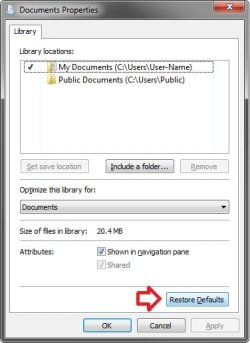
If not, then the REG file in the ZIP download below should restore the default settings of these for you.
Hope this helps,
Shawn | My System Specs | | Computer type PC/Desktop System Manufacturer/Model Number Self built custom OS 64-bit Windows 7 Ultimate SP1 & Windows 8 Enterprise CPU Intel i7-3930K 3.2 Ghz (O/C 4 Ghz) Motherboard ASRock X79 Extreme11 Memory 32 GB (8GBx4) G.SKILL DDR3 Quad PC3-19200 2400MHz Graphics Card Sapphire HD5870 Eyefinity 6 2GB Sound Card SB Recon 3Di Integrated Chip Monitor(s) Displays 3x 27" Asus VE278Q Screen Resolution 1920x1080 Keyboard Logitech Cordless Desktop MX 5500 Revolution Mouse Logitech Cordless Desktop MX 5500 Revolution PSU OCZ Series Gold OCZZ1000M 1000W Case Thermaltake Level 10 GT Snow Edition Cooling Corsair Hydro H100 Hard Drives 256GB OCZ Vector
160GB OCZ RevoDrive X2
2 x 1TB Samsung HDD HD154UI SATA Internet Speed 50 Mb/s Download and 2 Mb/s Upload Other Info Microsoft LifeCam Cinema
Lite-On iHBS212 12x BD Writer
Samsung CLX-3175FW Printer
Netgear WNDR3800 Router
Motorola SBG6580 Cable Modem
2x APC Back-UPS XS 1500 |
10 Feb 2010
|
#19 | | |
No, by the time I realized the limitations of my registry hack I didn't have a system restore back that far. Whats with windows 7 anyway and their extreme limitation on available system restores?? The "restore previous version" for individual files is useless!
Oh, yes, and thanks for the fix in the zip file. Hope it works, I haven't applied it yet! | My System Specs | | Libraries Folder - Add or Remove from Navigation Pane problems? All times are GMT -5. The time now is 08:30 AM. | |