| Windows 7: Shortcut Arrow - Change, Remove, or Restore |
06 Feb 2009
|
#179 | | 64-bit Windows 7 Ultimate SP1 & Windows 8 Enterprise Texas |
Shortcut Arrow - Change, Remove, or Restore How to Change, Remove, or Restore the Shortcut Arrow Overlay Icon in Windows
Last edited by Brink; 4 Weeks Ago at 10:19 AM..
| My System Specs |
| Computer type PC/Desktop System Manufacturer/Model Number Self built custom OS 64-bit Windows 7 Ultimate SP1 & Windows 8 Enterprise CPU Intel i7-3930K 3.2 Ghz (O/C 4 Ghz) Motherboard ASRock X79 Extreme11 Memory 32 GB (8GBx4) G.SKILL DDR3 Quad PC3-19200 2400MHz Graphics Card Sapphire HD5870 Eyefinity 6 2GB Sound Card SB Recon 3Di Integrated Chip Monitor(s) Displays 3x 27" Asus VE278Q Screen Resolution 1920x1080 Keyboard Logitech Cordless Desktop MX 5500 Revolution Mouse Logitech Cordless Desktop MX 5500 Revolution PSU OCZ Series Gold OCZZ1000M 1000W Case Thermaltake Level 10 GT Snow Edition Cooling Corsair Hydro H100 Hard Drives 256GB OCZ Vector
160GB OCZ RevoDrive X2
2 x 1TB Samsung HDD HD154UI SATA Internet Speed 50 Mb/s Download and 2 Mb/s Upload Other Info Microsoft LifeCam Cinema
Lite-On iHBS212 12x BD Writer
Samsung CLX-3175FW Printer
Netgear WNDR3800 Router
Motorola SBG6580 Cable Modem
2x APC Back-UPS XS 1500 |
25 Aug 2012
|
#180 | | 64-bit Windows 7 Ultimate SP1 & Windows 8 Enterprise Texas |
Hello Ted,
All options work in Windows 8 as well. | My System Specs |
| Computer type PC/Desktop System Manufacturer/Model Number Self built custom OS 64-bit Windows 7 Ultimate SP1 & Windows 8 Enterprise CPU Intel i7-3930K 3.2 Ghz (O/C 4 Ghz) Motherboard ASRock X79 Extreme11 Memory 32 GB (8GBx4) G.SKILL DDR3 Quad PC3-19200 2400MHz Graphics Card Sapphire HD5870 Eyefinity 6 2GB Sound Card SB Recon 3Di Integrated Chip Monitor(s) Displays 3x 27" Asus VE278Q Screen Resolution 1920x1080 Keyboard Logitech Cordless Desktop MX 5500 Revolution Mouse Logitech Cordless Desktop MX 5500 Revolution PSU OCZ Series Gold OCZZ1000M 1000W Case Thermaltake Level 10 GT Snow Edition Cooling Corsair Hydro H100 Hard Drives 256GB OCZ Vector
160GB OCZ RevoDrive X2
2 x 1TB Samsung HDD HD154UI SATA Internet Speed 50 Mb/s Download and 2 Mb/s Upload Other Info Microsoft LifeCam Cinema
Lite-On iHBS212 12x BD Writer
Samsung CLX-3175FW Printer
Netgear WNDR3800 Router
Motorola SBG6580 Cable Modem
2x APC Back-UPS XS 1500 |
16 Sep 2012
|
#181 | | |
shell number for no arrow Hi,
The shell number for option two that will give you no arrow is 49.
That is the blank area in the icon list of the dll file.
To check that, pick any shortcut file on your desktop (any file you can change the icon will do actually), choose 'change icon and then browse to the shell32.dll and open. Counting from left and down the columns starting with 0, 29 (thus the shell32.dll,29 in the regedit option) comes to the tiny arrow. Continue to count until you get to a blank space (mine was 49, 50, 51, and 52). Any of the blank numbers will eliminate the arrow.
Option two works, no need to run programs or point to blank icos. You can back up the key by exporting it. I named mine 'no arrow.reg'. That way if I have to re-install down the line, I just merge the file and done! | My System Specs | | |
02 Oct 2012
|
#182 | | |
Just a quick thanks to Brink (and everyone else) for helping with the Windows 7 shortcut arrow. I found it to be one of the more annoying graphical changes from XP to Vista and Win 7. Three years posting support for this - that's dedication Brink. Thx again! | My System Specs | | OS Windows 7 Ultimate X64 |
02 Oct 2012
|
#183 | | 64-bit Windows 7 Ultimate SP1 & Windows 8 Enterprise Texas |
You're most welcome nineball, and welcome to Seven Forums. I'm glad that it was able to help. | My System Specs | | Computer type PC/Desktop System Manufacturer/Model Number Self built custom OS 64-bit Windows 7 Ultimate SP1 & Windows 8 Enterprise CPU Intel i7-3930K 3.2 Ghz (O/C 4 Ghz) Motherboard ASRock X79 Extreme11 Memory 32 GB (8GBx4) G.SKILL DDR3 Quad PC3-19200 2400MHz Graphics Card Sapphire HD5870 Eyefinity 6 2GB Sound Card SB Recon 3Di Integrated Chip Monitor(s) Displays 3x 27" Asus VE278Q Screen Resolution 1920x1080 Keyboard Logitech Cordless Desktop MX 5500 Revolution Mouse Logitech Cordless Desktop MX 5500 Revolution PSU OCZ Series Gold OCZZ1000M 1000W Case Thermaltake Level 10 GT Snow Edition Cooling Corsair Hydro H100 Hard Drives 256GB OCZ Vector
160GB OCZ RevoDrive X2
2 x 1TB Samsung HDD HD154UI SATA Internet Speed 50 Mb/s Download and 2 Mb/s Upload Other Info Microsoft LifeCam Cinema
Lite-On iHBS212 12x BD Writer
Samsung CLX-3175FW Printer
Netgear WNDR3800 Router
Motorola SBG6580 Cable Modem
2x APC Back-UPS XS 1500 |
24 Oct 2012
|
#184 | | |
all or nothing - the arrow removal removes the image Alas, neither approach worked for me!
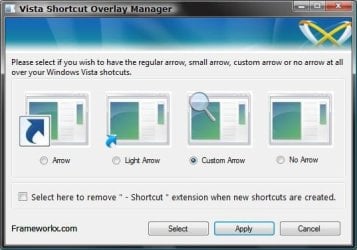
The Vista Shortcut Manager (FxVisor64.msi) apparently expects Vista, not Windows 7, since it consistently fails when I try to commit (Apply) the selection. I get 'Unhandled exception... ...The system cannot find the file specified' That's too bad, because it looked like the better, more complete solution (since I also do not want the "Shortcut" extension to the name.
So, I tried Option 3 (since I've had very good luck to date with Registry modifiers downloaded from sevenforumns), but it not only eliminated the arrow, but it also replaced the image of the target folder/file with a generic icon (and this shortcut icon could not be modified with the RightClick->Properties interface).
Fortunately, the Default_LINK_(Shortcut).reg modifier did recover things for me.
This is the second Windows 7 machine I've customized in about a year, and I am pretty sure that I found another way to eliminate the shortcut arrows the first time around (along with the "Shortcut" name extension). Any pointers would be appreciated! ... I will do some more searching on my own as well, of course.
Thanks! | My System Specs | | System Manufacturer/Model Number Hewlett-Packard OS Windows 7 Professional CPU Intel Core i5 Motherboard ? Memory 6G Graphics Card ? Sound Card ? Monitor(s) Displays laptop Hard Drives 600G |
24 Oct 2012
|
#185 | | 64-bit Windows 7 Ultimate SP1 & Windows 8 Enterprise Texas |
Hello Jdub,
Are you sure that you are using the correct 32-bit or 64-bit version of Vista Shortcut Manager for your same 32-bit or 64-bit Windows 7? System Type - 32-bit (x86) or 64-bit (x64) If you have 32-bit Windows 7 installed, then you must use the 32-bit Vista Shortcut Manager (fxvisor32.msi).
If you have 64-bit Windows 7 installed, then you must use the 64-bit Vista Shortcut Manager (fxvisor64.msi).
Hope this helps,
Shawn | My System Specs | | Computer type PC/Desktop System Manufacturer/Model Number Self built custom OS 64-bit Windows 7 Ultimate SP1 & Windows 8 Enterprise CPU Intel i7-3930K 3.2 Ghz (O/C 4 Ghz) Motherboard ASRock X79 Extreme11 Memory 32 GB (8GBx4) G.SKILL DDR3 Quad PC3-19200 2400MHz Graphics Card Sapphire HD5870 Eyefinity 6 2GB Sound Card SB Recon 3Di Integrated Chip Monitor(s) Displays 3x 27" Asus VE278Q Screen Resolution 1920x1080 Keyboard Logitech Cordless Desktop MX 5500 Revolution Mouse Logitech Cordless Desktop MX 5500 Revolution PSU OCZ Series Gold OCZZ1000M 1000W Case Thermaltake Level 10 GT Snow Edition Cooling Corsair Hydro H100 Hard Drives 256GB OCZ Vector
160GB OCZ RevoDrive X2
2 x 1TB Samsung HDD HD154UI SATA Internet Speed 50 Mb/s Download and 2 Mb/s Upload Other Info Microsoft LifeCam Cinema
Lite-On iHBS212 12x BD Writer
Samsung CLX-3175FW Printer
Netgear WNDR3800 Router
Motorola SBG6580 Cable Modem
2x APC Back-UPS XS 1500 |
03 Dec 2012
|
#186 | | Windows 7 Professional x64 |
They're baaaack! Hi!
I need help with this... I have used this shortcut arrow fix (using a "light arrows" image I found online two years ago, in .ico format) in Windows 7 Pro x64, with no issues at all... it has always worked perfectly, and still does, on my desktop shortcuts.
But recently, I've noticed that the default arrows appear now, whenever I attempt to save an image or document:
What have I done to cause the default arrows to show when saving something, and yet, the tiny arrows I chose still appear on my desktop shortcuts?
I have tried everything I can think of to fix this issue... help, please?
Thank you
Last edited by Brink; 04 Dec 2012 at 12:16 AM..
Reason: embedded image
| My System Specs | | OS Windows 7 Professional x64 |
04 Dec 2012
|
#187 | | 64-bit Windows 7 Ultimate SP1 & Windows 8 Enterprise Texas |
Hello CCx, and welcome to Seven Forums.
You might see if restoring the default shortcut arrow to reset it, then reapplying your custom one may help.
Hope this helps, 
Shawn | My System Specs | | Computer type PC/Desktop System Manufacturer/Model Number Self built custom OS 64-bit Windows 7 Ultimate SP1 & Windows 8 Enterprise CPU Intel i7-3930K 3.2 Ghz (O/C 4 Ghz) Motherboard ASRock X79 Extreme11 Memory 32 GB (8GBx4) G.SKILL DDR3 Quad PC3-19200 2400MHz Graphics Card Sapphire HD5870 Eyefinity 6 2GB Sound Card SB Recon 3Di Integrated Chip Monitor(s) Displays 3x 27" Asus VE278Q Screen Resolution 1920x1080 Keyboard Logitech Cordless Desktop MX 5500 Revolution Mouse Logitech Cordless Desktop MX 5500 Revolution PSU OCZ Series Gold OCZZ1000M 1000W Case Thermaltake Level 10 GT Snow Edition Cooling Corsair Hydro H100 Hard Drives 256GB OCZ Vector
160GB OCZ RevoDrive X2
2 x 1TB Samsung HDD HD154UI SATA Internet Speed 50 Mb/s Download and 2 Mb/s Upload Other Info Microsoft LifeCam Cinema
Lite-On iHBS212 12x BD Writer
Samsung CLX-3175FW Printer
Netgear WNDR3800 Router
Motorola SBG6580 Cable Modem
2x APC Back-UPS XS 1500 |
04 Dec 2012
|
#188 | | Windows 7 Professional x64 |
Hi Shawn... I tried that once, and it didn't make any difference. Now I CAN'T uninstall the custom overlay - it won't go away, in spite of several attempts to uninstall it. I've got a problem here, lol | My System Specs | | OS Windows 7 Professional x64 |
04 Dec 2012
|
#189 | | 64-bit Windows 7 Ultimate SP1 & Windows 8 Enterprise Texas |
I'm assuming that you already did step 3 in OPTION THREE, and checked OPTION TWO to delete the registry entry for the icon if there?
Did changing the icon using OPTION ONE not change it? | My System Specs | | Computer type PC/Desktop System Manufacturer/Model Number Self built custom OS 64-bit Windows 7 Ultimate SP1 & Windows 8 Enterprise CPU Intel i7-3930K 3.2 Ghz (O/C 4 Ghz) Motherboard ASRock X79 Extreme11 Memory 32 GB (8GBx4) G.SKILL DDR3 Quad PC3-19200 2400MHz Graphics Card Sapphire HD5870 Eyefinity 6 2GB Sound Card SB Recon 3Di Integrated Chip Monitor(s) Displays 3x 27" Asus VE278Q Screen Resolution 1920x1080 Keyboard Logitech Cordless Desktop MX 5500 Revolution Mouse Logitech Cordless Desktop MX 5500 Revolution PSU OCZ Series Gold OCZZ1000M 1000W Case Thermaltake Level 10 GT Snow Edition Cooling Corsair Hydro H100 Hard Drives 256GB OCZ Vector
160GB OCZ RevoDrive X2
2 x 1TB Samsung HDD HD154UI SATA Internet Speed 50 Mb/s Download and 2 Mb/s Upload Other Info Microsoft LifeCam Cinema
Lite-On iHBS212 12x BD Writer
Samsung CLX-3175FW Printer
Netgear WNDR3800 Router
Motorola SBG6580 Cable Modem
2x APC Back-UPS XS 1500 Shortcut Arrow - Change, Remove, or Restore problems? All times are GMT -5. The time now is 05:34 AM. | |