
Windows 7 Forums Search
Welcome to Windows 7 Forums. Our forum is dedicated to helping you find solutions with any problems, errors or issues you are experiencing with Windows 7. The Windows 7 forum also covers news and updates and has an extensive Windows 7 tutorial section that covers a wide range of tips and tricks.


Windows 7 - Clear Desktop by Shaking a Window


Clear Desktop by Shaking a Window

How to Clear the Desktop with Aero Shake in Windows 7
Published by Brink
11-06-2008
Default Clear Desktop by Shaking a Window

How to Clear the Desktop with Aero Shake in Windows 7

information   Information
This will show you how to clear the desktop to only have one window that you want showing instead in Window 7.
Note   Note
When you clear the desktop of all but the one window, the other opened windows are minimized to the taskbar. If you have multiple monitors, then it will clear the desktop on all of them as well.
warning   Warning
Aero Requirements to be Enabled in Windows 7

NOTE: If Aero is not enabled, then Aero Shake will not work even when enabled or turned on.
  • Aero is not included in Windows 7 Starter or Home Basic, so you must have Windows 7 Home Premium, Professional, Ultimate, or Enterprise installed.
  • 1 GHz 32-bit or 64-bit processor
  • 1 GB of system memory
  • A graphics card with support for DirectX 9 graphics with at least 128 MB of memory.
  • The graphics card must support Pixel Shader 2.0 and the Windows Display Driver Model (WDDM).
  • The Desktop Window Manager Session Manager and Themes Services need to be set as Started and Automatic.
  • You must be have True Color (32 bit) set instead of High Color (16 bit).
  • Desktop composition needs to be enabled (checked) in Visual Effects.
  • Refresh or update your WEI score.


Here's How:
1. To Clear the Desktop -
A) Left click and hold on the Title Bar of the window you only want to show on the desktop. (See screenshot below)
NOTE: For example, the window with a red box on the title bar in the screenshot.

B) Shake the window a bit by draging it left and right some quickly.
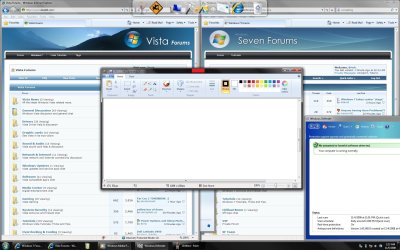
Clear Desktop by Shaking a Window-full_desktop.jpg
C) When the desktop clears, drop (release left click) the window. (See screenshot below)
Clear Desktop by Shaking a Window-clear_desktop.jpg
2. To Restore the Desktop -
NOTE: This restores the desktop to the way it was before you cleared it in step 1. This will not restore minimized windows on the taskbar unless they have been cleared (shrunk) in step 1.
A) Left click and hold on the Title Bar of the same window from step 1. (See screenshot below)

B) Shake the window a bit by draging it left and right some quickly again.
Click image for larger version

Name:	Clear_Desktop.jpg
Views:	1954
Size:	639.6 KB
ID:	335
C) When the minimized windows return to the desktop, drop (release left click) the window. (See screenshot below step 1B)
That's it,
Shawn


Published by
Administrator

Join Date: Oct 2008
Location: Texas
Posts: 34,499
Brink has a reputation beyond reputeBrink has a reputation beyond reputeBrink has a reputation beyond repute
Brink has a reputation beyond reputeBrink has a reputation beyond reputeBrink has a reputation beyond reputeBrink has a reputation beyond reputeBrink has a reputation beyond reputeBrink has a reputation beyond reputeBrink has a reputation beyond reputeBrink has a reputation beyond reputeBrink has a reputation beyond reputeBrink has a reputation beyond reputeBrink has a reputation beyond reputeBrink has a reputation beyond reputeBrink has a reputation beyond reputeBrink has a reputation beyond repute

Tutorial Tools
11-06-2008   #1
echrada


Windows 7 Ultimate x64


Thanks Brink that works a treat, wouldn't have guessed that in a million years.

My System SpecsSystem Spec
11-06-2008   #2
Brink


Windows 7 Ultimate x64 SP1


You're welcome Echrada. It is a handy little feature in Windows 7.

Shawn
My System SpecsSystem Spec
11-06-2008   #3
mansrm81


Windows 7 Ultimate x64/ Windows Vista Ultimate x64


Didn't even know that was a new feature.
My System SpecsSystem Spec
.


11-06-2008   #4
smarteyeball


7 Ultimate x64


I discovered the maximize/minimize function but didn't know about the shaking part. It's very handy

Ta Shawn. Keep 'em coming
My System SpecsSystem Spec
11-09-2008   #5
z3r010


Windows 7 Ultimate x64 SP1


It would be nice if it only cleared the monitor you shake in rather than all of them
My System SpecsSystem Spec
11-09-2008   #6
Brink


Windows 7 Ultimate x64 SP1


I didn't even look for that. A warning box has been added.

Thanks John.
My System SpecsSystem Spec
11-09-2008   #7
linuzo


Windows 7 Build 7100


Wow that is a neat feature, I wouldn't have thought about shaking your window.. I guess it's more designed for the touch screen effect when moving things around.
My System SpecsSystem Spec
11-09-2008   #8
Brink


Windows 7 Ultimate x64 SP1


Hi Linuzo,

LOL, that was exactly where this feature came from.

Shawn
My System SpecsSystem Spec
11-16-2008   #9
nawito


windows 7


Didn't even know that feature this is very good holy 7.
My System SpecsSystem Spec
Comment

Clear Desktop by Shaking a Window problems?


Tutorial Tools


Similar Threads for: Clear Desktop by Shaking a Window
Windows 7 Tutorial Category
help me my monitor shaking General Discussion
Clear font on desktop dilemna General Discussion
Shaking Windows General Discussion
Desktop Icons shaking/blinking General Discussion
Shaking the active window General Discussion


All times are GMT -5. The time now is 05:37 AM.


Windows 7 Forums is an independent web site and has not been authorized,
sponsored, or otherwise approved by Microsoft Corporation.
"Windows 7" and related materials are trademarks of Microsoft Corp.
© Designer Media Ltd
  

1 2 3 4 5 6 7 8 9 10 11 12 13 14 15 16 17 18 19 20 21 22 23 24 25 26 27 28 29 30