Windows 7 Forums


Windows 7: Local Group Policy Editor - Open


Local Group Policy Editor - Open

How to Open the Local Group Policy Editor in Windows 7
Published 07 Feb 2009
Published by

Featured Tutorial

System Preparation Tool - Use to Customize Windows

How to Use Sysprep to Customize Windows 7 and Windows 8

Clean Reinstall - Factory OEM Windows 7

How to Clean Reinstall a Factory OEM Windows 7

Microsoft Account Primary Alias Email Address - Change

How to Change your Microsoft Account Primary Alias Email Address

Safe Internet Browsing

How to safely operate on the internet and stay free from malware infections

Screen Capture and Video Editing in High Quality


Restore Point - Add "Create Restore Point" to Context Menu in Windows

How to Add "Create Restore Point" to Context Menu in XP, Vista, Windows 7, and Windows 8
How to Open the Local Group Policy Editor in Windows 7

information   Information
This will show you how to open the Local Group Policy Editor in Windows 7.

To search for a group policy or for it's registry key, value, and etc..., see:

Group Policy Search

and

Download Details - Microsoft Download Center - Group Policy Settings Reference for Windows and Windows Server


Note   Note
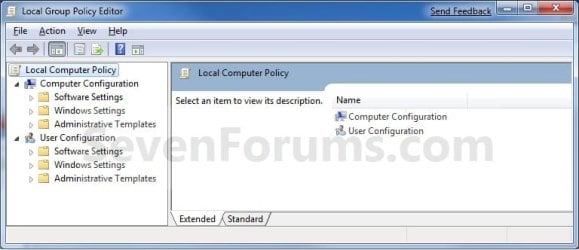
The Local Group Policy Editor is a Microsoft Management Console (MMC) snap-in that provides a single user interface through which all the Computer Configuration and User Configuration settings of Local Group Policy objects can be managed for your computer.
  • Computer Configuration
    Administrators can use Computer Configuration to set policies that are applied to computer, regardless of who logs on to the computers. Computer Configuration typically contains sub-items for software settings, Windows settings, and administrative templates.
  • User Configuration
    Administrators can use User Configuration to set policies that apply to users, regardless of which computer they log on to. User Configuration typically contains sub-items for software settings, Windows settings, and administrative templates.
By default the Local Group Policy Editor is applied to all users unless you use a specific users or groups, or all users except administrators Local Group Policy Editor to apply User Configuration policies.


warning   Warning
  • You will need to be an administrator to open the Local Group Policy Editor.
  • The Local Group Policy Editor is only available in the Windows 7 Professional, Ultimate, and Enterprise editions.
  • The Local Group Policy Editor feature is not included in the Windows 7 Starter, Home Basic, and Home Premium editions.

EXAMPLE: Local Group Policy Editor
Local Group Policy Editor - Open-group_policy.jpg

Here's How:
1. Open the Start menu, and type gpedit.msc in the search line and press Enter. (See screenshot below)
NOTE: This file is located at C:\Windows\System32\gpedit.msc.
Local Group Policy Editor - Open-start_menu.jpg
2. If prompted by UAC, click on Yes.

3. You can now set and manage the Local Group Policies on your computer to how you want them.
NOTE: For more details and information about how to use the Local Group Policy Editor, click on the blue ? toolbar icon. (See screenshot below)
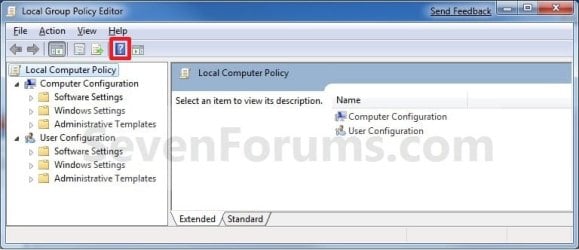
Local Group Policy Editor - Open-group_policy_help.jpg
That's it,
Shawn


Need more help? Try searching our extensive help and support site.
Loading
01 Nov 2009   #1
markg2

Windows 7


Trying to open local groups policy to alter the admin creds to allow for global access per our chat in another thread.

However, 'Running' gpedit.msc results in 'cannot find.' Following the path: C:\Windows\System32\gpedit.msc in explorer I only find gpedit.dll.

Any other suggestions on opening this thing?

Thanks,


Mark
My System SpecsSystem Spec

01 Nov 2009   #2
Brink

64-bit Windows 7 Ultimate SP1 & Windows 8 Enterprise
Texas


Hello Mark,

What edition of Windows 7 do you have installed? It sounds like you have an edition that does not have gpedit.msc incuded. See warning box at the top of the tutorial for more on this.
My System SpecsSystem Spec
02 Nov 2009   #3
markg2

Windows 7


Ah, I have the Home Premium--sorry for not reading carefully.

Under User Account Settings, Change User Account, I have Administrator checked off versus Regular User. Are we saying that under this version of the OS that is the best I can do insofar as a 'global guy' with all seeing powers and I cannot get into the Properties to increase power?

Thanks,

Mark
My System SpecsSystem Spec
.


02 Nov 2009   #4
Brink

64-bit Windows 7 Ultimate SP1 & Windows 8 Enterprise
Texas


Mark,

No, it just means that everything will have to be done manually through the registry instead in that edition. The only problem is that is not as easy since you have to give a very specific thing you wanted to do, but that's to be posted in a separate thread to keep this one on topic.

As adminstrator, that account should have global access now.
My System SpecsSystem Spec
16 Nov 2009   #5
crimson

Windows 7 Retail


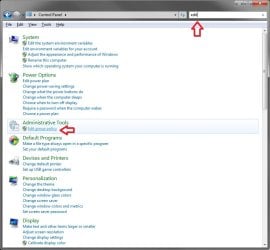
I just typed "edit group policy" in the search. Isn't there a way to navigate to it in control panel?
My System SpecsSystem Spec
16 Nov 2009   #6
Brink

64-bit Windows 7 Ultimate SP1 & Windows 8 Enterprise
Texas


Hi Crimson,

That works just as well as the searching for the file name. You can do a search with "edit" in the Control Panel to get the same result though.
Local Group Policy Editor - Open-control_panel.jpg
Personally, I just created a shortcut from the C:\Windows\System32\gpedit.msc file, and use it to make it easier to open from.

Hope this helps,
Shawn
My System SpecsSystem Spec
29 Dec 2009   #7
homepremium

windows 7 home premium


I have the same problem as Mark there, I can't seem to find the correct thread to help me do this in Home Premium. Can somebody point me in the correct direction?
My System SpecsSystem Spec
29 Dec 2009   #8
Brink

64-bit Windows 7 Ultimate SP1 & Windows 8 Enterprise
Texas


Hello HomePremium,

Sorry, but the Local Group Policy (gpedit.msc) is not available in the Windows 7 Home Premium edition. See red warning box at top for more on this. Unfortunately, you will have to manually do what you are wanting in the registry instead.

If you post what you need in the appropriate forum that best fits the subject, I'm sure that one of us may be able to help you with what needs to be changed in the registry for it.
My System SpecsSystem Spec
18 Jan 2010   #9
kjmcdonald

Windows 7


Is there a way to permanently add the gpedit.msc to the Computer Management console?

I know I could add a shortcut to the startmenu, but It's a snap-in right? It seems like I should be able to put it in 'Computer Management' right next to Task Scheduler, Event Viewer, Disk Management, etc.

No?

-Kyle
My System SpecsSystem Spec
Comment

 Local Group Policy Editor - Open problems?


Tutorial Tools


Similar help and support threads for: Local Group Policy Editor - Open
Windows 7 Tutorial Category
Local Group Policy Editor Question General Discussion
Can't access Local Group Policy Editor General Discussion
local group policy editor General Discussion
Can't find Local Group Policy editor Performance & Maintenance
Group Policy Editor or Local Security Policy System Security


All times are GMT -5. The time now is 11:50 PM.


Seven Forums Android App Seven Forums IOS App Follow us on Facebook

Windows 7 Forums is an independent web site and has not been authorized,
sponsored, or otherwise approved by Microsoft Corporation.
"Windows 7" and related materials are trademarks of Microsoft Corp.
© Designer Media Ltd
  

1 2 3 4 5 6 7 8 9 10 11 12 13 14 15 16 17 18 19 20 21 22 23 24 25 26 27 28 29 30 31 32