
How to Search in Windows 7
Information
This will show you how to do a Search and Advanced Search for files and folders in Windows 7 through the Start Menu and Windows Explorer.
Note
Before doing a search in Windows 7, you should make sure that you have set your Search Options for the What to search, How to search, and When searching non-indexed locations settings. If you have the index enabled (it is by default), then you should also have any locations and file types added to be indexed so they will be included in the search results when doing a search. If the files have been recently changed, then the index may not have finshed updating yet and you will need to manually rebuild the index to force it to update now.
To be able to search in libraries, the Windows Search service needs to be Started and set to Automatic. Libraries require it's included folders to also be added to the index to be tracked properly even though they will still open properly.
To be able to search in libraries, the Windows Search service needs to be Started and set to Automatic. Libraries require it's included folders to also be added to the index to be tracked properly even though they will still open properly.
Tip
For some advanced searching techniques, see:
OPTION ONE
Search in the Start Menu
Note
You can use the search box line in the Start menu to find files, folders, programs, and e‑mail messages stored on your computer. When searching from the Start menu, only files that have been indexed will appear in search results.
You can also adjust these settings below in the Customize Start Menu settings for what is to be included in the search from the Start Menu Search box.
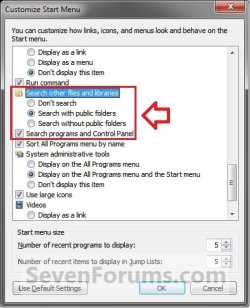
You can also adjust these settings below in the Customize Start Menu settings for what is to be included in the search from the Start Menu Search box.
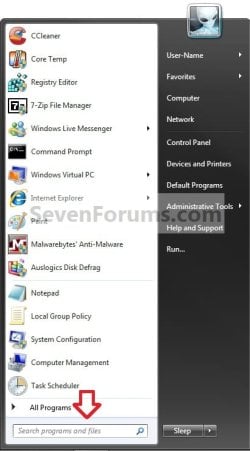
1. Open the Start Menu, and type a word or part of a word for what you want to search for in the Search box. (See screenshot below)
NOTE: As you type, items that match your text will appear on the Start menu. The search is based on text in the file name, text in the file, tags, and other file properties.
2. You will now see the search results for what you search for. (See screenshot below)
NOTE: You can also click on the See more results link to see more search results in a Windows Explorer window like in OPTION TWO below.
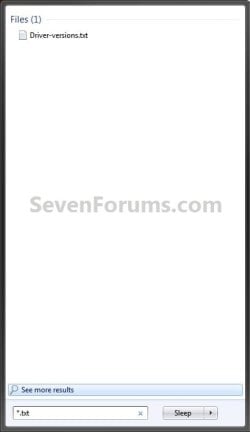

3. You can now just click on a search result to open it. (See screenshot above)
OPTION TWO
Search in Windows Explorer
NOTE: This will allow you to do a search for any item from within a selected drive or folder location of your choice in Windows Explorer.
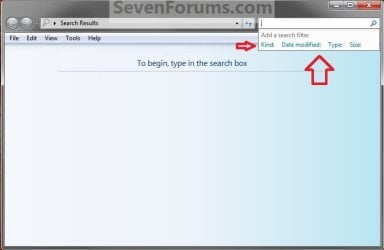
1. Press the F3 key or Windows Key + F keys. (See screenshot below)
NOTE: This Search Results window gives you the same search results as the Start Menu in OPTION ONE.
A) Go to step 3.
OR
2. Open Windows Explorer, and navigate to where (ex: drive or folder) you want to search in and open it.
NOTE: When searching a drive or folder in Windows Explorer, Windows only searches from within the currently opened drive or folder location and its subfolders. Windows does not search outside this search path.
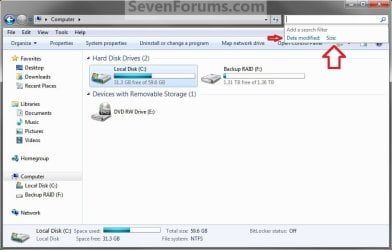
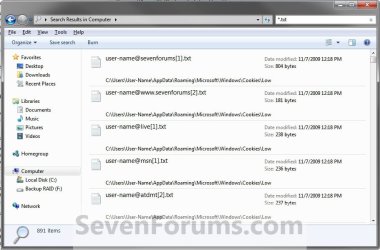
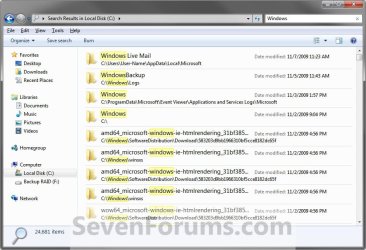
3. Type a word or part of a word for what you want to search for in the Search box at the top right corner in Windows Explorer. (See screenshots below)
NOTE: As you type, the contents of the folder or library are filtered to reflect each successive character you type. When you see the file that you want, stop typing. You will also see the word you type in highlighted in the search results.

Tip
Using Search Filters
NOTE: If you're searching for a file based on one or more of its properties (such as a tag or the date the file was last modified), you can use search filters to specify the property in your search.
- Click in the Search box, and select a listed search filter that you want to add to narrow the search results with.
- Depending on the search filter selected, choose a value to be used for this search filter.

- You can repeat these steps to add more search filters to build complex searches on multiple properties. Each time that you click a search filter or value, the search filter terms are automatically added to the search box.
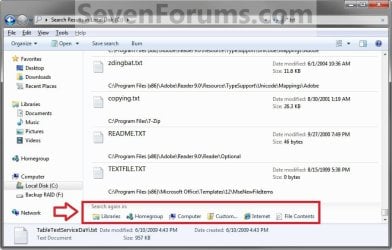
NOTE: If you can't find what you're looking for in the search results from this current Windows Explorer location, then you can expand the search to include different locations.
- After doing a search, scroll to the bottom of the search results list. Under Search again in, do one of the following:
- Click Libraries to search across every library.
- Click Computer to search across your entire computer. This is the way to search for files that aren't indexed (such as system or program files). However, be aware that the search will be slower.
- Click Custom to search specific locations.
- Click Internet to search online, using your default web browser and your default search provider.
That's it,
Shawn
Related Tutorials
- How to Change or Restore the Default Windows 7 Search Options
- How to Add or Remove Windows 7 Index Locations
- How to Add or Remove a File Type from the Windows 7 Index
- How to Rebuild the Windows 7 Index
- Windows 7 OpenSearch Federation Providers
- How to Pin Libraries to Search and See More Results in Start Menu
- How to Pin Search Connectors to Search and See More Results in Start Menu
- How to Add or Remove "See more results" Link in Start Menu Search Box
- How to Add Search Internet Link to the Windows 7 Start Menu Search Box
- How to Turn Windows 7 Search On or Off
- How to Create a Search Shortcut in Windows 7
- How to Save a Search in Windows 7
- How to Enable or Disable Windows 7 Explorer Recent Search Box Suggestions
- How to Change the Size of the Windows 7 Explorer Address and Search Bar
- How to Edit or Reset Windows 7 Explorer Recent Search Box Suggestions
- How to Create a Search and Indexing Troubleshoot Shortcut in Windows 7
- How to Add, Change, or Remove File Details Properties in Windows 7
- How to Enable or Disable the Search Index in Vista and Windows 7
- How to Have More Accurate Search Results in Windows 7 and Vista
- How to Search in Internet Explorer 9
- How to Configure and Fully Utilize Windows 7 Search
- How to Create a Shortcut to Search the Web for a File/Folder Name from Windows Explorer
- How to Add "Search" to "My Computer" Context Menu in Vista and Windows 7
- How to Add "Search" to Context Menu in Windows 7 and Windows 8
- How to Change the Action "When typing into list view" in Windows File Explorer
- How to Use Windows Search Filters and Operators to get better Search Results in Windows 7
Last edited:


