How to Fix Missing Vista Hard Disk Partition Letter in Windows 7
Information
This will show you how to fix the missing already installed Windows Vista hard disk partition in Windows 7 when you have just installed Windows 7 from boot to dual or multi boot with Vista.
Note
This will also work for a missing XP hard drive partition in Windows 7 as well.
Tip
If you install Windows 7 from within Vista to the other partition or drive instead, then Vista should show up in Windows 7 then. However, installing Windows 7 from within Vista instead of at boot may not always install properly if something in Vista interferes during installation.
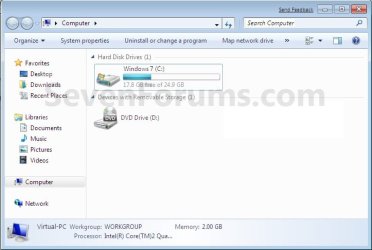
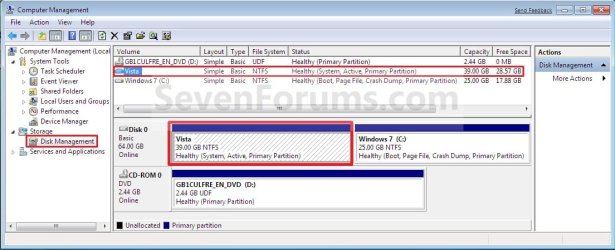
EXAMPLE: Missing Vista Hard Disk Partition Letter in Windows 7
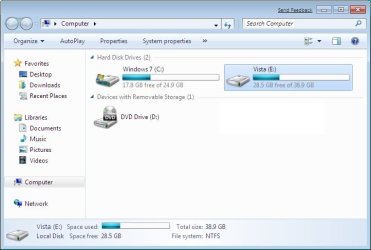
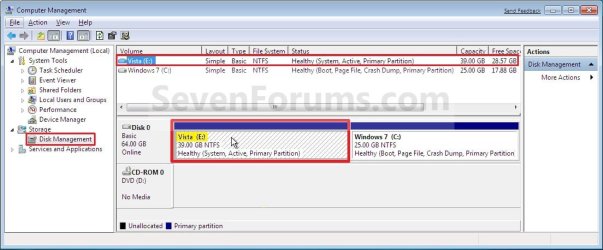
NOTE: The left screenshot is in the Computer window, and the right screenshot is in Disk Management.
Here's How:
1. Open the Control Panel (All Items view), and click on the Administrative Tools icon, then close the Control Panel window.
2. Click on Computer Management in Administrative Tools.
3. If prompted by UAC, click on Yes. Close the Administrative Tools window.
4. In the left pane under Storage, click on Disk Management. (See screenshot below step 5)
5. In the right pane, right click on the Vista hard disk partition that is missing it's drive letter, then click on Change Drive Letter and Paths. (See screenshot below)

6. Click on the Add button. (See screenshot below)

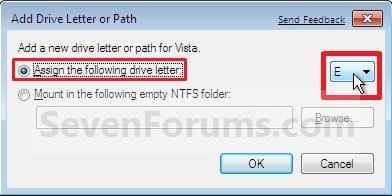
7. Select (dot) Assign the following drive letter, then select a drive letter you want to have assigned to the Vista disk partition and click on OK. (See screenshot below)
8. The Vista Hard Disk Partition will now show up in Windows 7. (See screenshots below)
NOTE: The left screenshot is in the Computer window, and the right screenshot is in Disk Management.
That's it,
Shawn
Related Tutorials
- How to Setup a Dual Boot Installation with Windows 7 and XP
- How to Setup a Dual Boot Installation with Windows 7 and Vista
- How to Shrink a Partition or Volume in Windows 7
- How to Extend a Partition or Volume in Windows 7
- How to Setup Windows 7 to Boot from a VHD (Virtual Hard Disk)
- How to Do a Clean Installation with Windows 7
- How to Show Windows 7 Computer Drive Letters Before or After Drive Name
- How to Hide or Show Empty Drives in Windows 7 Computer Folder
- How to Rename a Drive in Vista, Windows 7, and Windows 8
- How to Change a Drive Icon in Windows 7
- How to Add, Change, or Remove a Drive Letter in Vista, Windows 7, and Windows 8
Last edited: