
How to Automatically Log On a User Account at Windows 7 Startup
Information
This will show you how to select or change a user account to have Windows 7 automatically log on to at startup.
Note
- If you only have one user account that is not password protected on the computer, then Windows 7 will automatically log on to that account at startup.
- If you have more than one user account and the user account that you want to have Windows 7 log on to automatically at startup does not have a created password, then leave the password fields blank in step 6 below.
Warning
This can only be done while logged on to an administrator account. It cannot be done from within a standard account.
If you change the password for the user account you have set to have Windows 7 automatically log on to, then you will also need to change it here as well.
Setting your computer to automatically log on to a user account at startup could pose a security risk if you share the computer or there are other people about that could use your computer. If your computer logs on automatically, they will have the same access as whatever user account you have set to be logged on to at start up.
If you change the password for the user account you have set to have Windows 7 automatically log on to, then you will also need to change it here as well.
Setting your computer to automatically log on to a user account at startup could pose a security risk if you share the computer or there are other people about that could use your computer. If your computer logs on automatically, they will have the same access as whatever user account you have set to be logged on to at start up.
Tip
Microsoft has made available a hotfix that will resolve a problem where the taskbar customizations are lost and reset to defaults when automatic logon is enabled in Windows 7 and Windows Server 2008 R2.
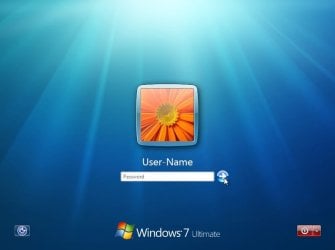
NOTE: With Automatic Log On, you will not see this anymore. Windows 7 will boot into the desktop of the selected user account instead.
OPTION ONE
To Turn On or Off Automatic Log On at Startup in Netplwiz
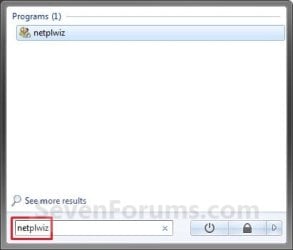
1. Open the Start Menu, type netplwiz in the search box, and press Enter. (see screenshots below)

2. Do step 3, 4, or 5 below for what you would like to do.
3. To Turn On Automatic Log On for a User Account
A) Check the Users must enter a user name and password to use this computer box. (see screenshot below)
Note
If your computer is joined to a domain, then you will not have the Users must enter a user name and password to use this computer option.
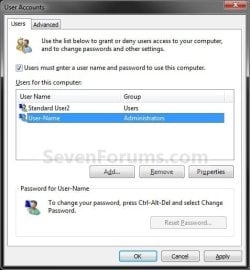
B) Click on the user account name, that you want to have automatically log on at startup, to highlight it. (see screenshot above)
C) Uncheck the Users must enter a user name and password to use this computer box. (see screenshot below)
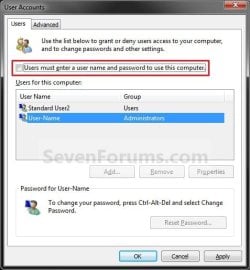
D) Click on OK, and go to step 6 below. (see screenshot above)
4. To Turn Off Automatic Log On
A) Check the Users must enter a user name and password to use this computer box. (see screenshot below step 3A)
B) Click on OK. (see screenshot below step 3A)
C) You are finished.
5. To Change the User Account to Automatically Log On to
NOTE: For this step, you would have already had a user account selected to log on to automatically in step 3.
A) Check the Users must enter a user name and password to use this computer box, and click on the Apply button. (see screenshot below step 3A)
Note
If your computer is joined to a domain, then you will not have the Users must enter a user name and password to use this computer option.
B) Select the other user account name, that you want to have automatically log on at startup instead, to highlight it.
C) Uncheck the Users must enter a user name and password to use this computer box. (see screenshot below step 3C)
D) Click on OK, and go to step 6 below. (see screenshot below step 3C)
6. Enter the User Account Password
A) In the Password field, enter the selected user account's password. (See screenshot below)
NOTE: If the user account does not have a password, then leave this field empty. See the WARNING at the top of the tutorial.
B) In the Confirm Password field, enter the selected user account's password again to confirm that it is the same as in step 6A above.
C) Click on OK.

OPTION TWO
To Turn On or Off Automatic Log On at Startup in Registry Editor
Warning
:busted: This option is not as secure as using OPTION ONE above.
It is recommended to use OPTION ONE above if you are able to instead. OPTION ONE will save the password in the Credential Manager where it's encrypted and cannot be viewed by anyone.
This option (OPTION TWO) will save the entered password (steps 4G-4H) in the DefaultPassword string value in Registry Editor where it can be seen by anyone with access.
It is recommended to use OPTION ONE above if you are able to instead. OPTION ONE will save the password in the Credential Manager where it's encrypted and cannot be viewed by anyone.
This option (OPTION TWO) will save the entered password (steps 4G-4H) in the DefaultPassword string value in Registry Editor where it can be seen by anyone with access.
1. Press the :winkey: + R keys to open the Run dialog, type regedit, and click on OK.
2. In Registry Editor, navigate to the location below. (see screenshot below)
HKEY_LOCAL_MACHINE\SOFTWARE\Microsoft\Windows NT\CurrentVersion\Winlogon
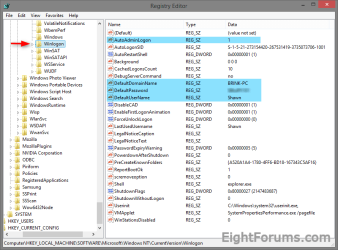
3. Do step 4 or 5 below for what you would like to do.
4. To Turn On Automatic Log On for a Domain, Local, or Microsoft Account
NOTE: You could also use this step to change what user account you would like Windows 8 to sign-in to automatically at startup.
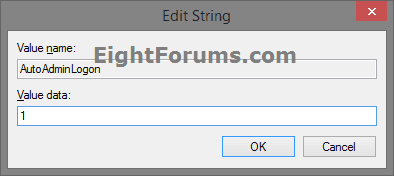
A) In the right pane on Winlogon, double click/tap on the AutoAdminLogon string value to modify it. (see screenshot below step 2)
B) Type 1, and click/tap on OK. (see screenshot below)
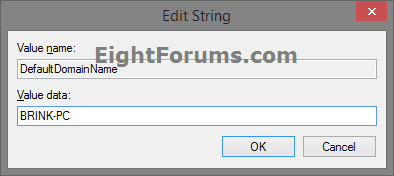
C) Double click/tap on the DefaultDomainName string value to modify it. (see screenshot below step 2)
D) Type the computer name (if local) or domain name, and click/tap on OK. (see screenshot below)
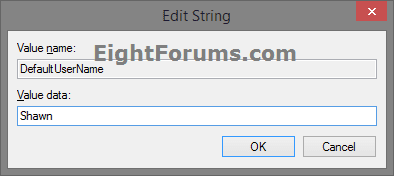
E) Double click/tap on the DefaultUserName string value to modify it. (see screenshot below step 2)
F) Type the user name (ex: Shawn) of the account you want to automatically be signed in to at startup, and click/tap on OK. (see screenshot below)
NOTE: This will be the same name as the user account's C:\Users\(UserName) profile folder.
G) Double click/tap on the DefaultPassword string value to modify it. (see screenshot below step 2)
NOTE: If you do not have a DefaultPassword string value, then right click or press and hold on an empty area in the right pane of the Winlogon key, click/tap on New and String Value, type DefaultPassword, and press Enter.
H) Type the password of the user account you want to automatically be signed in to at startup, and click/tap on OK. (see screenshot below)
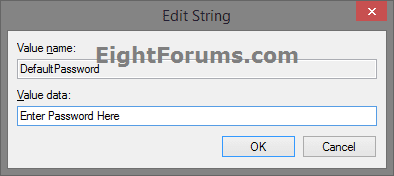
I) Go to step 6 below.
5. To Turn Off Automatic Log On for All Users
A) In the right pane on Winlogon, double click/tap on the AutoAdminLogon string value to modify it. (see screenshot below step 2)
B) Type 0 (zero), and click/tap on OK. (see screenshot below step 4B)
C) Right click or press and hold on the DefaultPassword string value, and click/tap on Delete. (see screenshot below step 2)
NOTE: If you do not have a DefaultPassword string value, then that's ok, and go to step 6 below.
D) Click/tap on Yes to confirm. (see screenshot below)
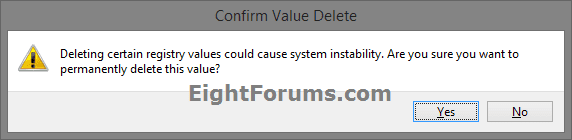
E) Go to step 6 below.
6. When finished, close Registry Editor.
That's it,
Shawn
Related Tutorials
- How to Temporarily Bypass Automatic Logon at Startup in Windows
- How to Enable or Disable Require Password on Wakeup in Windows 7
- How to Enable or Disable Windows 7 Screen Saver Password Protection
- How to Create a Password for a Windows 7 User Account
- How to Enable or Disable Secure Logon CTRL+ALT+DELETE in Windows 7
- How to Add Advanced User Accounts to the Windows 7 Control Panel
- How to Change the Windows 7 Log On Screen Background
- How to Change the Windows 7 Log On Screen Text Shadow
- How to Make Windows 7 Require a User Name and Password at Log On
- How to Add or Remove Ease of Access Center from Windows 7 Log On Screen
- How to Set Account Lockout Threshold for Invalid Logon Attempts
- How to Set Account Lockout Duration for Locked Out User Accounts
- How to Set the Reset Account Lockout Counter After Setting
- How to Create a Advanced User Accounts Shortcut in Windows 7
- How to Display Information About Previous Logons During User Logon in Vista and Windows 7
- How to Turn On or Off Automatic Log On for a Remote Desktop Connection
- Allow or Prevent Remote Desktop Connection Clients to Automatically Log On to Host Computer
Last edited:


