Windows 7 Forums Search
Welcome to Windows 7 Forums. Our forum is dedicated to helping you find solutions with any problems, errors or issues you are experiencing with Windows 7. The Windows 7 forum also covers news and updates and has an extensive Windows 7 tutorial section that covers a wide range of tips and tricks.


Windows 7 - Windows Live Messenger - Taskbar or Notification Icon


02-10-2009   #9
Brink


Windows 7 Ultimate x64 SP1


Windows Live Messenger - Taskbar or Notification Icon

How to Have Windows Live Messenger with a Windows 7 Taskbar or Tray Icon

...


Last edited by Brink; 04-04-2011 at 12:47 AM..
My System SpecsSystem Spec
07-23-2009   #10
rakcs


vista 32bit - win 7 RC


what's wrong with having it run in compatibility mode? that's perfectly fine. if it crashes when you have the watermark remover patch, then blame the watermark remover. the watermark is meant to be there, it doesn't bug me at all.

plus, having it in the superbar makes it easier to manage your contacts. it takes to clicks in the tray and only one in the superbar. where's the annoyance?

My System SpecsSystem Spec
08-03-2009   #11
Reidicus


WIndows 7


Sweet, thanks. This is great. Kudos!
My System SpecsSystem Spec
08-03-2009   #12
Brink


Windows 7 Ultimate x64 SP1


You're welcome Reidicus, and welcome to Seven Forums.

Shawn
My System SpecsSystem Spec
08-03-2009   #13
matt_0978


Windows 7 Ultimate 64Bit


specifically Vista compatibilty Brink, not sp1 or sp2?
My System SpecsSystem Spec
.


08-03-2009   #14
Brink


Windows 7 Ultimate x64 SP1


Hello Matt,

You can use either one of the Vista options. They will all work fine.
My System SpecsSystem Spec
08-06-2009   #15
iLachva


Windows 7


thanks mate ! I don't like WLM pin on my taskbar.
My System SpecsSystem Spec
08-06-2009   #16
Brink


Windows 7 Ultimate x64 SP1


You're welcome iLachva, and welcome to Seven Forums.

Shawn
My System SpecsSystem Spec
10-04-2009   #17
Timewarpone


Windows 7 Ultimate x64


Didn't work for me

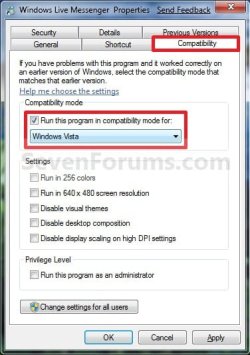
I tried to move the Live Messenger as described. The instructions say to choose Windows Vista under compatability. I did this and my desktop went haywire. I was lucky I could do a restore and it fixed the appearance. (Everything was distorted, off color and faded). I thought about doing it again so this time I am letting you know that there were 3 different Vista choices under compatability. 1.) Windows Vista, (2.) Windows Vista Service Pack 1 . (3.) Windows Vista Service Pack 2. Should I have tried number 2 or 3 instead?? I am very good at following printed directions. I did EXACTLY as described above. Thanks in advance for your help.

Vince
My System SpecsSystem Spec
10-05-2009   #18
Brink


Windows 7 Ultimate x64 SP1


Hello Vince, and welcome to Seven Forums.

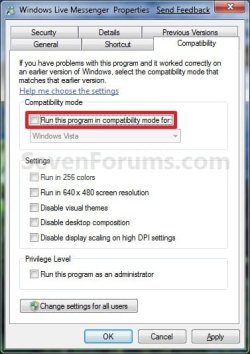
You would use the Windows Vista option like in the screenshot under step 4. Did you have WLM closed while doing this?
My System SpecsSystem Spec
10-05-2009   #19
Lebon14


Windows 7 Home Premium x64 SP1


Putting it in Vista compatibility mode also remove the red flasshing signal if somone posts something in a conversation... can be annoying.
My System SpecsSystem Spec
Comment

Windows Live Messenger - Taskbar or Notification Icon problems?


Tutorial Tools


Similar Threads for: Windows Live Messenger - Taskbar or Notification Icon
Windows 7 Tutorial Category
Solved Remove MSN Messenger icon from taskbar? Customization
Check Box -> Show icon in taskbar notification area when connected is Network & Sharing
Windows Live Messenger ( taskbar problem ) Software
Losing Icon From Taskbar's Notification Area General Discussion
Taskbar notification area icon spacing Customization


All times are GMT -5. The time now is 09:40 AM.


Windows 7 Forums is an independent web site and has not been authorized,
sponsored, or otherwise approved by Microsoft Corporation.
"Windows 7" and related materials are trademarks of Microsoft Corp.
© Designer Media Ltd
  

1 2 3 4 5 6 7 8 9 10 11 12 13 14 15 16 17 18 19 20 21 22 23 24 25 26 27 28 29 30