Windows 7 Forums Search
Welcome to Windows 7 Forums. Our forum is dedicated to helping you find solutions with any problems, errors or issues you are experiencing with Windows 7. The Windows 7 forum also covers news and updates and has an extensive Windows 7 tutorial section that covers a wide range of tips and tricks.


Windows 7 - Windows Live Messenger - Taskbar or Notification Icon


02-10-2009   #19
Brink


Windows 7 Ultimate x64 SP1


Windows Live Messenger - Taskbar or Notification Icon

How to Have Windows Live Messenger with a Windows 7 Taskbar or Tray Icon

...


Last edited by Brink; 04-04-2011 at 12:47 AM..
My System SpecsSystem Spec
10-06-2009   #20
Timewarpone


Windows 7 Ultimate x64


Thanks for the info but when I went to the link you posted for Live Messenger 8.1 I tried to download the program but all I got was "UNABLE TO FIND PAGE"

Vince

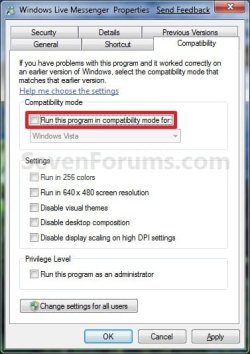
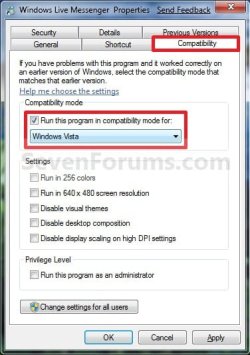
Thinking back, I am almost sure it was closed. But maybe not. If I do it again should I choose Vista, Vista Service Pack 1 or Vista Service Pack 2 under compatability mode?? Or does it matter?? I will make a note of making sure it is "off"

My System SpecsSystem Spec
10-06-2009   #21
Brink


Windows 7 Ultimate x64 SP1


Hello Timewarpone, and welcome to Seven Forums.

The link for Windows Live Messenger is here: Messenger - Windows Live

You would select Windows Vista (step 3) in Compatibility Mode.

Hope this helps,
Shawn
My System SpecsSystem Spec
10-07-2009   #22
Timewarpone


Windows 7 Ultimate x64


I went to the Live Messenger Site and tried downloading it but the version I already have on my computer is the latest version. I will try compatability mode Vista Service pack 3 and I will make sure messenger is off and I set a restore point to be sure.

Thanks,
Vince
My System SpecsSystem Spec
10-08-2009   #23
Timewarpone


Windows 7 Ultimate x64


First off, I misread the post about downloading messenger 8.1 I didn't realize that 8.1 was an older version of messenger. Second, I closed messenger live before using the compatibility mode (Vista Service Pack 3) and it worked fine this time. I like this a lot better than before.

Thanks,
Vince
My System SpecsSystem Spec
.


10-08-2009   #24
Brink


Windows 7 Ultimate x64 SP1


You're welcome Vince. I'm happy to hear that you got the new one installed and like it.
My System SpecsSystem Spec
11-18-2009   #25
pokka


Windows 7 Ultimate


Thank you very much.
The solution work for me.
My System SpecsSystem Spec
11-18-2009   #26
Brink


Windows 7 Ultimate x64 SP1


You're most welcome Pokka.
My System SpecsSystem Spec
11-19-2009   #27
Timewarpone


Windows 7 Ultimate x64


There seems to be something going on with live messenger. After I ran it in Vista Compatability mode it showed up it the taskbar next to the clock after I booted up my computer, like I wanted. This was several weeks ago. About 10 days to 2 weeks ago it stopped showing up in the taskbar. I now have to go to all programs and click on the live messenger icon then it appears. I ran MSCONFIG and clicked on startup and live messenger was checked. Why doesn't live messenger appear in the taskbar after I boot up my computer??
My System SpecsSystem Spec
11-19-2009   #28
Brink


Windows 7 Ultimate x64 SP1


Hello Timewarpone,

I'm not sure why. You might see if uninstalling and reinstalling WLM may help.
My System SpecsSystem Spec
11-20-2009   #29
Timewarpone


Windows 7 Ultimate x64


I will try that. How about anything in the options, sign-in section I should consider??
My System SpecsSystem Spec
Comment

Windows Live Messenger - Taskbar or Notification Icon problems?


Tutorial Tools


Similar Threads for: Windows Live Messenger - Taskbar or Notification Icon
Windows 7 Tutorial Category
Solved Remove MSN Messenger icon from taskbar? Customization
Check Box -> Show icon in taskbar notification area when connected is Network & Sharing
Windows Live Messenger ( taskbar problem ) Software
Losing Icon From Taskbar's Notification Area General Discussion
Taskbar notification area icon spacing Customization


All times are GMT -5. The time now is 09:42 AM.


Windows 7 Forums is an independent web site and has not been authorized,
sponsored, or otherwise approved by Microsoft Corporation.
"Windows 7" and related materials are trademarks of Microsoft Corp.
© Designer Media Ltd
  

1 2 3 4 5 6 7 8 9 10 11 12 13 14 15 16 17 18 19 20 21 22 23 24 25 26 27 28 29 30