
Windows 7 Forums Search
Welcome to Windows 7 Forums. Our forum is dedicated to helping you find solutions with any problems, errors or issues you are experiencing with Windows 7. The Windows 7 forum also covers news and updates and has an extensive Windows 7 tutorial section that covers a wide range of tips and tricks.


Windows 7 - Windows Live Mail - Import Windows 7 and Vista Contacts


Windows Live Mail - Import Windows 7 and Vista Contacts

How to Import Vista and Windows 7 Contacts and Contact Groups into Windows Live Mail
Published by Brink
02-11-2009
Default Windows Live Mail - Import Windows 7 and Vista Contacts

How to Import Vista and Windows 7 Contacts and Contact Groups into Windows Live Mail

information   Information
This will show you how to import your contacts and contact groups from Vista into Windows Live Mail that is in Windows 7.

Note   Note
If you already have your contacts saved (step 2), then Windows Live Mail will automatically import them after installing and opening Windows Live Mail the first time.

Tip   Tip
You can get information on how to download the latest version of Windows Live Mail here.

warning   Warning
In Contact Groups from Vista Windows Mail, only the contacts that are also included as normal Contacts will be imported into Windows Live Mail. Contacts that were created for the Contact Group only will not be imported into Windows Live Mail. You will need to write these down and manually add them back into Windows Live Mail.


Here's How:
1. To Import Windows 7 Contacts and Contact Groups into Windows Live Mail
A) Go to step 3.
2. To Import Vista Contacts and Contact Groups
NOTE: This is if you wanted to import your contacts and contact groups from Vista into Windows 7 first, then import them into Windows Live Mail that you have installed in Windows 7.
A) In Vista, navigate to the C:\Users\(user name)\Contacts folder, then copy all of your contacts and contact groups to something (ex: DVD, USB drive, etc...) to use to save into Windows 7 from. (see screenshot below)
WARNING: Be sure to read the warning box about Contacts that were created only for the Contact Group.
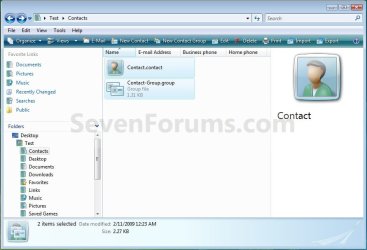
Windows Live Mail - Import Windows 7 and Vista Contacts-vista_contacts.jpg
B) In Windows 7, copy the Vista contacts and contact groups into your C:\Users\(user name)\Contacts folder. (See screenshot below)
NOTE: If you already have your contacts saved here, then Windows Live Mail will automatically import them after installing and opening Windows Live Mail the first time.
Windows Live Mail - Import Windows 7 and Vista Contacts-windows7_contacts.jpg
3. Open Windows Live Mail.

4. In the left folder pane towards the bottom left of Windows Live Mail, click on Contacts. (see screenshot below)
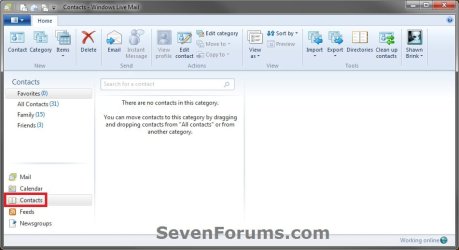
Windows Live Mail - Import Windows 7 and Vista Contacts-wlm-1.jpg
5. In the Windows Live Mail Contacts window, click on the Import ribbon icon, and click on Address book for current Windows user. (see screenshot below)
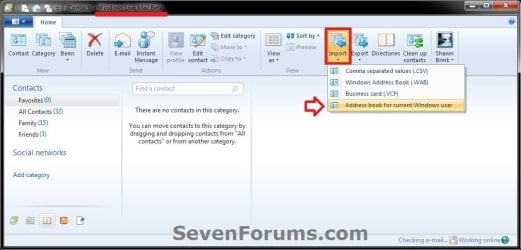
Windows Live Mail - Import Windows 7 and Vista Contacts-wlm_wave-4_beta-import.jpg
6. Click on OK. (see screenshot below)
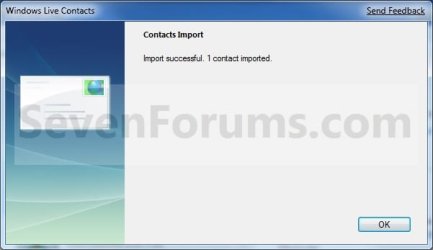
Windows Live Mail - Import Windows 7 and Vista Contacts-import-2.jpg
7. The Vista or Windows 7 contacts and contact groups are now imported into Windows Live Mail. (see screenshot below)
Windows Live Mail - Import Windows 7 and Vista Contacts-import.jpgWindows Live Mail - Import Windows 7 and Vista Contacts-contact_groups.jpg
That's it,
Shawn


Published by
Brink's Avatar
Administrator

Join Date: Oct 2008
Location: Texas
Posts: 37,303

Tutorial Tools
02-20-2011   #1
thinktank24


windows 7 64 bit


thanks forthat shaun

much appreciated

My System SpecsSystem Spec
02-20-2011   #2
Brink


Windows 7 Ultimate x64 SP1


You're most welcome Thinktank.
My System SpecsSystem Spec
01-31-2012   #3
coolhand


Windows 7 64 bit


Shawn: I have done exactly what you've described to import contacts from Vista Windows Mail into Win 7 Windows Live mail - with problems resulting. I have 16 folders (groups) of contacts, containing approx 500 contacts, and about 350 contacts not categorized. The first time I tried the process, I transferred 15 of 16 contact groups, and about 850 total contacts. Since one group was missing, I deleted everything and tried again. Now when I go though the process, I transfer only 2 of 16 contact groups (folders) and about 850 contacts go into the preset "all contacts" folder. I have deleted all contacts and re transferred with the same results. How do I transfer all the groups and contacts accurately, at this point?

Thanks for any help
coolhand

Last edited by coolhand; 01-31-2012 at 09:17 PM.. Reason: clarification
My System SpecsSystem Spec
.


01-31-2012   #4
Brink


Windows 7 Ultimate x64 SP1


Hello Coolhand, and welcome to Seven Forums.

Were these contacts that were added to a group, or were they contacts Created for Group Only like in the red warning box at the top of the tutorial?

Do you by chance have these contacts and contact groups tied to a Windows Live account (ex: hotmail)? If so, Windows Live Mail has a feature to transfer all contacts from the Live account into Windows Live Mail automatically.
My System SpecsSystem Spec
Comment

 Windows Live Mail - Import Windows 7 and Vista Contacts problems?


Tutorial Tools


Similar Threads for: Windows Live Mail - Import Windows 7 and Vista Contacts
Windows 7 Tutorial Category
Outlook Express to Live Mail import problem: split contacts Browsers & Mail
Windows Live Mail - Export and Import Contacts Tutorials
Vista Windows Mail to Live import? Browsers & Mail
Import contacts to Live Mail, How? Browsers & Mail
Cant' Import Multiple VCF Live Mail Contacts Software


All times are GMT -5. The time now is 02:35 AM.


Windows 7 Forums is an independent web site and has not been authorized,
sponsored, or otherwise approved by Microsoft Corporation.
"Windows 7" and related materials are trademarks of Microsoft Corp.
© Designer Media Ltd
  

1 2 3 4 5 6 7 8 9 10 11 12 13 14 15 16 17 18 19 20 21 22 23 24 25 26 27 28 29 30