
New
#20
Hidden Files and Folders - Show or Hide
-
-
New #21
Note
Tutorial Update:
Added Option Two and Option Three to be able to hide or show system files with a REG file download, or manually through the Registry Editor.
-
New #22
hi friend
when i show hidden files from Folder Options and apply then nothing happend .
Check mark is not working and can i get back it to the orignal position without registry patches.
Thanks
Thanks for reply the highlited Options in screen shot are not working
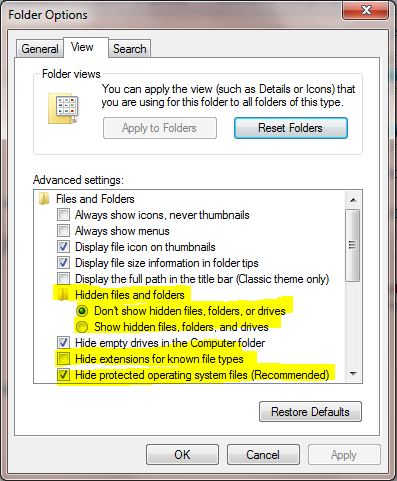
Last edited by asad ali; 02 Oct 2010 at 06:26.
-
New #23
Hello Asad ali, and welcome to Seven Forums.
Could you post back a screenshot of this? It may help better determine what may be wrong. :)
-
New #24
How do make hidden folders permanently unhidden?
I have gone to folder options and changed to show hidden folders, which works but I want them to show as a normal folder... not grayed out. I don't ever want them to show as a hidden folder. How do I correct in Windows 7?
Thanks
UPDATE: Found in folder, right click, properties, uncheck hidden.
File and Folder - Hide or Unhide
-
New #25
Mike Oldfield fan? - YouTube - The exorcist soundtrack-Tubular bells
Anyways glad to hear you got the issue resolved.
-
New #26
Thanks...now here is my issue.
Yeah I love Mike Oldfield...Tubular Bells is my favorite piece of music.
Thanks for your help again!Last edited by Brink; 28 Apr 2011 at 23:17.
-
New #27
TubularBell,
Can you post a screenshot so that we can which folders are grayed out? It's important for us to exactly which ones are. ::
-
New #28
Alright. Got hidden issue resolved....one more thing about favorites.
Thanks to all for help. I know NOTHING about computers. This laptop is my first one. I got it 7 months ago.
As I have stated, I got a virus. I THINK I got rid of it. Let's hope.
My favorites list is gone. When I try to readd a favorite to my favorites list, I get a message that says "The name you have entered for the shortcut already exists on your favorites menu. Would you like to override it?"
This means my favorites list is somewhere and I can't find it. Where is my "favorites menu" so I can repopulate my favorites listings?
ALSO, I keep getting Windows updates OVER AND OVER...I keep rebooting and still get them. I restored my computer to 04/12/11 to get back what I lost. Would this be why? They don't configure when it reboots, and I'm afraid this is the virus. What do I do?
Thanks again.
-
New #29
TubularBell,
I'm glad to hear that the hidden issue is sorted.
Your Favorites folder is located at C:\Users\(user-name)\Favorites.

 Quote
Quote
Related Discussions