|
Welcome to Windows 7 Forums. Our forum is dedicated to helping you find solutions with any problems, errors or issues you are experiencing with Windows 7. The Windows 7 forum also covers news and updates and has an extensive Windows 7 tutorial section that covers a wide range of tips and tricks.
Windows 7 - Hidden Files and Folders - Show or Hide Hidden Files and Folders - Show or Hide How to Show or Hide All Hidden Files, Folders, and Drives in Windows 7
Published by Brink
11-07-2008
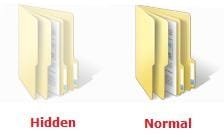
| Hidden Files and Folders - Show or Hide How to Show or Hide All Hidden Files, Folders, and Drives in Windows 7  Information This will show you how to have all hidden files, folders, and drives to show or don't show in Windows 7. These are set to be hidden by default in Windows 7.  Note When you have these hidden files, folders, and drives set to show, the icon shows as transparent to indicate that they are set as hidden. EXAMPLE: A Hidden and Normal Folder EXAMPLE: A Hidden Protected Operating System File OPTION ONE

Through Folder Options
NOTE: This option only affects the current user. 1. Open Folder Options. 2. To Show Hidden Files, Folders, and Drives NOTE: This will also allow hidden drives to show despite if Hide empty drives in the Computer folder is checked.A) Select (dot) Show hidden files, folders, and drives. (See screenshot below) B) Click on the Apply button.
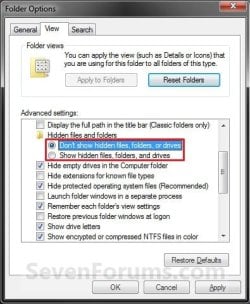
3. To Don't Show Hidden Files, Folders, and DrivesA) Select (dot) Don't Show hidden files, folders, and drives. (See screenshot above)
B) Click on the Apply button. 4. To Show Protected Operating System Files NOTE: For example, desktop.ini files.A) Do step 2.
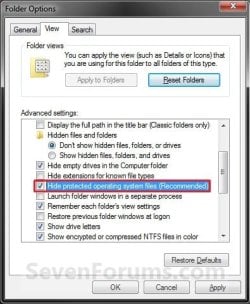
B) Uncheck the Hide protected operating system files box. (See screenshot below step 5B)
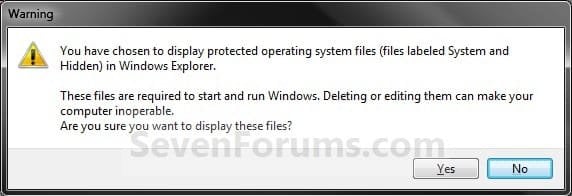
C) Click on Yes to confirm. (See screenshot below) D) Go to step 6. 5. To Hide Protected Operating System FilesA) Do step 3.
B) Check the Hide protected operating system files box. (See screenshot below)
6. Click on OK. (See screenshot above) OPTION TWO
Using a REG File Download
NOTE: This option affects all users on the computer by using the HKCU location and removing the HKLM location in the registry from OPTION THREE automatically. You must be logged in as an administrator to be able to merge the REG files below successfully. 1. To Show Hidden Files, Folders, and Drives NOTE: This will also allow hidden drives to show despite if Hide empty drives in the Computer folder is checked.A) Click on the Download button below to download the file below.Show_hidden_files_folders_and_drives.reg  B) Go to step 5. 2. To Don't Show Hidden Files, Folders, and Drives A) Click on the Download button below to download the file below.Don't_show_hidden_files_folders_and_drives.reg  B) Go to step 5. 3. To Show Protected Operating System Files NOTE: For example, desktop.ini files.A) Do step 1.
B) Click on the Download button below to download the file below.Show_protected_operating_system_files.reg  C) Go to step 5. 4. To Hide Protected Operating System Files A) Click on the Download button below to download the file below.Hide_protected_operating_system_files.reg 
5. Click on Save, and save the .reg file to the desktop. 6. Right click on the downloaded .reg file and click on Merge. 7. Click on Run, Yes, Yes, and OK when prompted. 8. Log off and log on, or restart the computer to apply. 9. When done, you can delete the downloaded .reg file if you like. OPTION THREE
Manually in Registry Editor
1. Open the Start Menu, then type regedit in the search line and press enter. 2. If prompted by UAC, then click on Yes. 3. In regedit, navigate to the location below. (see screenshot below)For Current User Only: HKEY_CURRENT_USER\Software\Microsoft\Windows\CurrentVersion\Explorer\Advanced For All Users: (Must be logged in as an administrator to be able to do) HKEY_LOCAL_MACHINE\SOFTWARE\Microsoft\Windows\CurrentVersion\Explorer\Advanced  4. To Show Hidden Files, Folders, and Drives NOTE: This will also allow hidden drives to show despite if Hide empty drives in the Computer folderis checked.A) In the right pane of Advanced, right click on Hidden and click on Modify. (see screenshot above)
B) Type 1 and click on OK. (see screenshot below) C) Go to step 8. 5. To Don't Show Hidden Files, Folders, and Drives A) In the right pane of Advanced, right click on Hidden and click on Modify. (see screenshot below step 3)
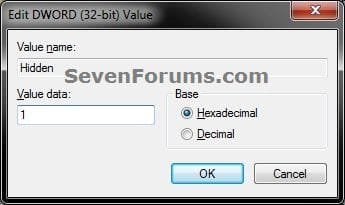
B) Type 0 and click on OK. (see screenshot below step 4B)
C) Go to step 8. 6. To Show Protected Operating System Files NOTE: For example, desktop.ini files.A) Do step 4.
B) In the right pane of Advanced, right click on ShowSuperHidden and click on Modify. (see screenshot below step 3)
C) Type 1 and click on OK. (see screenshot below step 7B)
D) Go to step 8. 7. To Hide Protected Operating System Files A) In the right pane of Advanced, right click on ShowSuperHidden and click on Modify. (see screenshot below step 3)
B) Type 0 and click on OK. (see screenshot below )
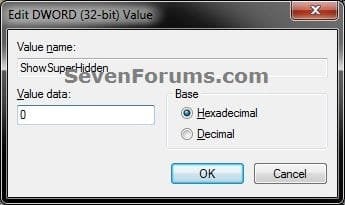
8. Close regedit. 9. Log off and log on, or restart the computer to apply. That's it,
Shawn |  Published by | | Administrator Join Date: Oct 2008 Location: Texas Posts: 37,303 | |
 Tutorial Tools | | | | | | | | | |
05-11-2009
|
#1 | | |
Hi Shawn, i often use this to hide some files from other users on my pc. Is there a way to create a shortcut on the desktop to hide or unhide files or folders?
| My System Specs | | System Manufacturer/Model Number Compaq OS Windows 7 Ultimate x64 CPU Intel core 2 duo T 5550 @ 1.83 GHz Motherboard Intel 965 express mobile chipset Memory 3 GB DR 2 @ 667 MHz Graphics Card Onboard with approx 512 MB RAM Sound Card Onboard Monitor(s) Displays 15"4 inch widescreen Hard Drives 160 GB SATA WD. Internet Speed sucks |
05-11-2009
|
#2 | | Windows 7 Ultimate x64 SP1 |
Hello Dinesh,
I have not tested this in Windows 7 yet, but I found this that may work for you. Keyboard Ninja: Toggle Hidden Files with a Shortcut Key in Windows :: the How-To Geek
Hope this helps,
Shawn | My System Specs | | System Manufacturer/Model Number Self built custom OS Windows 7 Ultimate x64 SP1 CPU Intel i7-980X 3.3 Ghz (3.48 Ghz OC'd) Motherboard ASUS P6X58D Premium Memory 12 GB (2GBx6) DDR3 PC3-16000 2000 MHz Kingston HyperX Graphics Card Sapphire HD5870 Eyefinity 6 2GB Sound Card Realtek HD Audio ALC889 Integrated Chip Monitor(s) Displays 3x 27" Asus VE278Q Screen Resolution 1920x1080 Keyboard Logitech Cordless Desktop MX 5500 Revolution Mouse Logitech Cordless Desktop MX 5500 Revolution PSU OCZ Series Gold OCZZ1000M 1000W Case Corsair Obsidian 800D Cooling Thermalright Ultra 120 Extreme Copper CPU heat sink w/120 MM Hard Drives 160GB OCZ RevoDrive X2
** 2 x 1TB Samsung HDD HD154UI SATA Internet Speed 50 Mb/s Download and 2 Mb/s Upload Other Info Microsoft LifeCam Cinema
** Lite-On iHBS212 12x BD Writer
** Samsung CLX-3175FW Printer
** Netgear WNDR3800 Router
** Motorola SBG6580 Cable Modem
** 2x APC Back-UPS XS 1500 |
05-11-2009
|
#3 | | |
Hi Shawn, good find but will it work with laptop too?
UPDATE:
great its working. thanks buddy. | My System Specs | | System Manufacturer/Model Number Compaq OS Windows 7 Ultimate x64 CPU Intel core 2 duo T 5550 @ 1.83 GHz Motherboard Intel 965 express mobile chipset Memory 3 GB DR 2 @ 667 MHz Graphics Card Onboard with approx 512 MB RAM Sound Card Onboard Monitor(s) Displays 15"4 inch widescreen Hard Drives 160 GB SATA WD. Internet Speed sucks |
05-11-2009
|
#4 | | Windows 7 Ultimate x64 SP1 |
You're welcome. | My System Specs | | System Manufacturer/Model Number Self built custom OS Windows 7 Ultimate x64 SP1 CPU Intel i7-980X 3.3 Ghz (3.48 Ghz OC'd) Motherboard ASUS P6X58D Premium Memory 12 GB (2GBx6) DDR3 PC3-16000 2000 MHz Kingston HyperX Graphics Card Sapphire HD5870 Eyefinity 6 2GB Sound Card Realtek HD Audio ALC889 Integrated Chip Monitor(s) Displays 3x 27" Asus VE278Q Screen Resolution 1920x1080 Keyboard Logitech Cordless Desktop MX 5500 Revolution Mouse Logitech Cordless Desktop MX 5500 Revolution PSU OCZ Series Gold OCZZ1000M 1000W Case Corsair Obsidian 800D Cooling Thermalright Ultra 120 Extreme Copper CPU heat sink w/120 MM Hard Drives 160GB OCZ RevoDrive X2
** 2 x 1TB Samsung HDD HD154UI SATA Internet Speed 50 Mb/s Download and 2 Mb/s Upload Other Info Microsoft LifeCam Cinema
** Lite-On iHBS212 12x BD Writer
** Samsung CLX-3175FW Printer
** Netgear WNDR3800 Router
** Motorola SBG6580 Cable Modem
** 2x APC Back-UPS XS 1500 |
08-14-2009
|
#5 | | Windows 7 (in evaluation mode) and Windows XP Professional |
Show Hidden Files being applied systemwide I usually enable the option to show hidden files on each pc I build for myself, under XP this setting only seems to affect the individual folder for which I choose to apply it to, under Windows 7 however it seems that this setting gets applied systemwide to every folder regardless of which folder you are actually editing the folder view options for, does anyone know how to enable it only for the folders I specifically select it for (using the folder view options doesn't narrow it down, did that and that's how I found out it applies systemwide to all folders INCLUDING MY DESKTOP)? I don't like seeing 2 desktop.ini files showing up on my desktop, I tried to go into windows explorer and select the desktop folder and 'hide hidden files' but then it hides them on all folders on my system (extremely annoying), which completely defeats the purpose of choosing to display hidden files on all of my other folders.
Thanks for any help you can provide,
bartman2589 | My System Specs | | System Manufacturer/Model Number Custom Built OS Windows 7 (in evaluation mode) and Windows XP Professional CPU Intel Pentium 4 2.8 Ghz w/Hyperthreading Motherboard Intel D865GLC Memory 3.0 Gigabytes Graphics Card nVidia 7600GS AGP Sound Card OEM on board audio Monitor(s) Displays Acer X193w 19" widescreen lcd PSU Antec 450 wat Case Antec Cooling Air Cooled Hard Drives Maxtor 300 Gigabyte SATA
2x Western Digital 160 Gigabyte ATA (PATA)
Seagate 80 Gigabyte ATA (PATA) |
08-14-2009
|
#6 | | Windows 7 Ultimate x64 SP1 |
Hello Bartman, and welcome to Seven Forums.
You can leave protected operating system files hidden (Step 5) to not have the desktop.ini files displayed, but leave system files unhidden (Step 2) to see the rest of them.
Hope this helps,
Shawn | My System Specs | | System Manufacturer/Model Number Self built custom OS Windows 7 Ultimate x64 SP1 CPU Intel i7-980X 3.3 Ghz (3.48 Ghz OC'd) Motherboard ASUS P6X58D Premium Memory 12 GB (2GBx6) DDR3 PC3-16000 2000 MHz Kingston HyperX Graphics Card Sapphire HD5870 Eyefinity 6 2GB Sound Card Realtek HD Audio ALC889 Integrated Chip Monitor(s) Displays 3x 27" Asus VE278Q Screen Resolution 1920x1080 Keyboard Logitech Cordless Desktop MX 5500 Revolution Mouse Logitech Cordless Desktop MX 5500 Revolution PSU OCZ Series Gold OCZZ1000M 1000W Case Corsair Obsidian 800D Cooling Thermalright Ultra 120 Extreme Copper CPU heat sink w/120 MM Hard Drives 160GB OCZ RevoDrive X2
** 2 x 1TB Samsung HDD HD154UI SATA Internet Speed 50 Mb/s Download and 2 Mb/s Upload Other Info Microsoft LifeCam Cinema
** Lite-On iHBS212 12x BD Writer
** Samsung CLX-3175FW Printer
** Netgear WNDR3800 Router
** Motorola SBG6580 Cable Modem
** 2x APC Back-UPS XS 1500 |
08-15-2009
|
#7 | | Windows 7 (in evaluation mode) and Windows XP Professional |
RE: Show Hidden Files being applied systemwide Brink thanks for taking the time to reply, however I was hoping for a solution that would allow me to still have the system files visible (i.e. fix the behavior of the 'show hidden files' option so that it functions on a per folder basis the way it does in XP). I like many others consider myself to be a 'power user' of sorts and sometimes find myself having to modify various system files in order to get the desired behavior out of windows, having the system files hidden is quite annoying in my opinion (as is Windows 7's decision to not allow me to grant myself full permissions on the files in the Windows folder, that part totally pisses me off). Thanks again for taking the time to reply however. I guess I'll have to wait for Micro$haft to hopefully fix this behavior in a service pack (god knows many system admins would probably want it to work the way I want it to).
Thanks,
bartman2589 | My System Specs | | System Manufacturer/Model Number Custom Built OS Windows 7 (in evaluation mode) and Windows XP Professional CPU Intel Pentium 4 2.8 Ghz w/Hyperthreading Motherboard Intel D865GLC Memory 3.0 Gigabytes Graphics Card nVidia 7600GS AGP Sound Card OEM on board audio Monitor(s) Displays Acer X193w 19" widescreen lcd PSU Antec 450 wat Case Antec Cooling Air Cooled Hard Drives Maxtor 300 Gigabyte SATA
2x Western Digital 160 Gigabyte ATA (PATA)
Seagate 80 Gigabyte ATA (PATA) |
08-15-2009
|
#8 | | Windows 7 Ultimate x64 SP1 |
Sorry Bartman,
This is how is in Vista and Windows 7. It is unlikely to change. | My System Specs | | System Manufacturer/Model Number Self built custom OS Windows 7 Ultimate x64 SP1 CPU Intel i7-980X 3.3 Ghz (3.48 Ghz OC'd) Motherboard ASUS P6X58D Premium Memory 12 GB (2GBx6) DDR3 PC3-16000 2000 MHz Kingston HyperX Graphics Card Sapphire HD5870 Eyefinity 6 2GB Sound Card Realtek HD Audio ALC889 Integrated Chip Monitor(s) Displays 3x 27" Asus VE278Q Screen Resolution 1920x1080 Keyboard Logitech Cordless Desktop MX 5500 Revolution Mouse Logitech Cordless Desktop MX 5500 Revolution PSU OCZ Series Gold OCZZ1000M 1000W Case Corsair Obsidian 800D Cooling Thermalright Ultra 120 Extreme Copper CPU heat sink w/120 MM Hard Drives 160GB OCZ RevoDrive X2
** 2 x 1TB Samsung HDD HD154UI SATA Internet Speed 50 Mb/s Download and 2 Mb/s Upload Other Info Microsoft LifeCam Cinema
** Lite-On iHBS212 12x BD Writer
** Samsung CLX-3175FW Printer
** Netgear WNDR3800 Router
** Motorola SBG6580 Cable Modem
** 2x APC Back-UPS XS 1500 |
08-26-2009
|
#9 | | windows 7 rtm ultimate build 7600 x86 |
share hidden folders this is a very general tip guys...
u can easily share all ur files n folders with other computers connected in same domain and thats how i hope u all know.
but to share d hidden file or folders just one thing u have do is just rename that file or folder by adding a"$" symbol at last of its original name without any blank space.
for eg:
if d name of a folder is"music", just rename it by"music$".
but the person or d pc with which u r sharing ur hiddenn files must know ur hidden files/folders locations.
this tip is 4 windows xp.
i dont know whether it works upon other operating systems or not. | My System Specs | | System Manufacturer/Model Number self build/assembled OS windows 7 rtm ultimate build 7600 x86 CPU intel pentium 4 HT 3GHz Motherboard intel 945 GZ Micro 775 SE Memory 1 gb transcend 667 Mhz Graphics Card Nvidea 8400 GS 512 MB Sound Card realtek inbuild Monitor(s) Displays 23" samsung syncmaster P2370MS full HD 1080p Screen Resolution 1920x1080 Keyboard Microsoft Mouse Microsoft PSU Zebronics 450W Case trendsonic Cooling two extra fans taken from damaged PSUs Hard Drives hitachi 160gb sata+Samsung 500gb sata Internet Speed 512Kbps Hidden Files and Folders - Show or Hide problems? All times are GMT -5. The time now is 02:35 AM. |  |