
How to Show or Hide All Hidden Files, Folders, and Drives in Vista, Windows 7, and Windows 8
Information
This tutorial will show you how to have all hidden files, folders, and drives to show or don't show in Windows 7. These are set to be hidden by default in Vista, Windows 7, and Windows 8.
Note
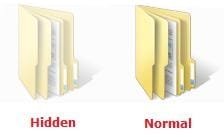
When you have these hidden files, folders, and drives set to show, the icon shows as transparent to indicate that they are set as hidden.
EXAMPLE: A Hidden and Normal Folder
EXAMPLE: A Hidden Protected Operating System File

OPTION ONE
To Hide or Show Hidden Files using Folder Options
NOTE: This option only affects the current user. 1. Open Folder Options.
2. To Show Hidden Files, Folders, and Drives
NOTE: This will also allow hidden drives to show despite if Hide empty drives in the Computer folder is checked. A) Select (dot) Show hidden files, folders, and drives. (See screenshot below)
B) Click on the Apply button.
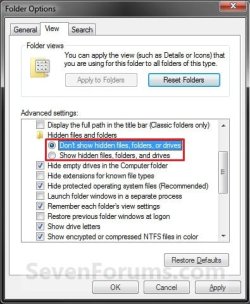
3. To Don't Show Hidden Files, Folders, and Drives A) Select (dot) Don't Show hidden files, folders, and drives. (See screenshot above)
B) Click on the Apply button.
4. To Show Protected Operating System Files
NOTE: For example, desktop.ini files. A) If you have not already, do step 2.
B) Uncheck the Hide protected operating system files box. (See screenshot below step 5B)
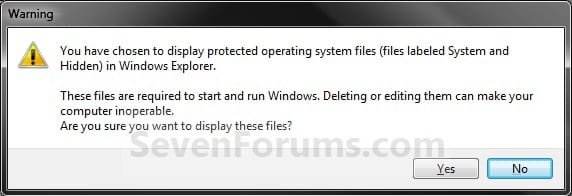
C) Click/tap on Yes to confirm, and go to step 6 below. (See screenshot below)
 5. To Hide Protected Operating System Files A) Check the Hide protected operating system files box, and go to step 6 below. (See screenshot below)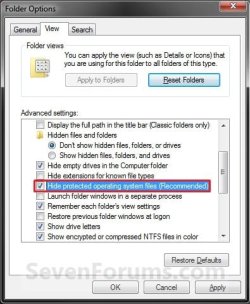
6. Click/tap on OK. (See screenshot above)
OPTION TWO
To Hide or Show Hidden Files using a BAT File Download
NOTE: This option only affects the current user. 1. To Show Hidden Files, Folders, and Drives
NOTE: This will also allow hidden drives to show despite if Hide empty drives in the Computer folder is checked. A) Click on the Download button below to download the file below. Show_hidden_files_folders_and_drives.bat
Download
B) Go to step 5.
2. To Don't Show Hidden Files, Folders, and Drives A) Click on the Download button below to download the file below. Don't_show_hidden_files_folders_and_drives.bat
Download
B) Go to step 5.
3. To Show Protected Operating System Files
NOTE: For example, desktop.ini files. This also applies step 1. A) Click on the Download button below to download the file below. Show_protected_operating_system_files.bat
Download
B) Go to step 5.
4. To Hide Protected Operating System Files A) Click on the Download button below to download the file below. Hide_protected_operating_system_files.bat
Download
5. Save the .bat file to your desktop, and run it.
6. If prompted, click/tap on Run.
NOTE: If you like, you can stop getting the Run prompt by unblocking the downloaded .bat file.
7. You will now notice a command prompt quckly open and close while applying the changes to your registry.
8. When finished, you can delete the downloaded .bat file(s) if you like.
OPTION THREE
To Hide or Show Hidden Files using Registry Editor
2. If prompted by UAC, then click on Yes.
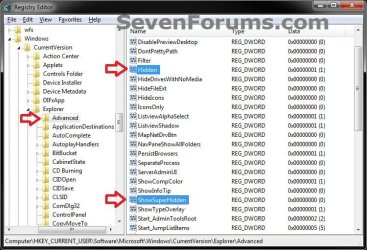
3. In regedit, navigate to the location below. (see screenshot below) For Current User Only:
HKEY_CURRENT_USER\Software\Microsoft\Windows\CurrentVersion\Explorer\Advanced
For All Users: (Must be logged in as an administrator to be able to do this option)
HKEY_LOCAL_MACHINE\SOFTWARE\Microsoft\Windows\CurrentVersion\Explorer\Advanced
4. To Show Hidden Files, Folders, and Drives
NOTE: This will also allow hidden drives to show despite if Hide empty drives in the Computer folderis checked. A) In the right pane of Advanced, right click on Hidden and click on Modify. (see screenshot above)
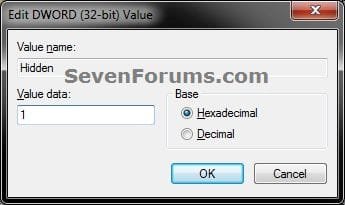
B) Type 1 and click on OK. (see screenshot below)
C) Go to step 8.
5. To Don't Show Hidden Files, Folders, and Drives A) In the right pane of Advanced, right click on Hidden and click on Modify. (see screenshot below step 3)
B) Type 0 and click on OK. (see screenshot below step 4B)
C) Go to step 8.
6. To Show Protected Operating System Files
NOTE: For example, desktop.ini files. A) Do step 4.
B) In the right pane of Advanced, right click on ShowSuperHidden and click on Modify. (see screenshot below step 3)
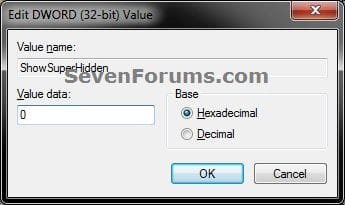
C) Type 1 and click on OK. (see screenshot below step 7B)
D) Go to step 8.
7. To Hide Protected Operating System Files A) In the right pane of Advanced, right click on ShowSuperHidden and click on Modify. (see screenshot below step 3)
B) Type 0 and click on OK. (see screenshot below )
8. Close regedit.
9. Log off and log on, or restart the computer to apply.
That's it,
Shawn
Related Tutorials
- How to Open Folder Options in Windows 7
- How to Hide or Show Empty Drives in Windows 7 Computer Folder
- How to Hide or Unhide a File or Folder in Vista, Windows 7, and Windows 8
- How to Add or Remove "Hidden Files and Folders" from Folder Options in Vista, Windows 7, and Windows 8
- How to Add "Show/Hide Hidden Files" to Context Menu in Vista, Windows 7, and Windows 8
- How to Add "Hide" and "Unhide" to File and Folder Context Menu in Vista, Windows 7, and Windows 8
- How to Fix Libraries when Hidden and Empty in Windows 7
- How to Add "List Hidden Files" to Context Menu in Vista, Windows 7, and Windows 8
Attachments
Last edited:


