
How to Add or Remove Homegroup from Navigation Pane in Windows 7
Information
This will show you how to add or remove Homegroup in the Windows Explorer Navigation Pane in Windows 7.
Warning
- You can only do this while logged into an administrator account.
- This will affect all user account's on the computer.
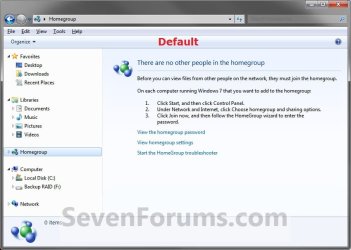
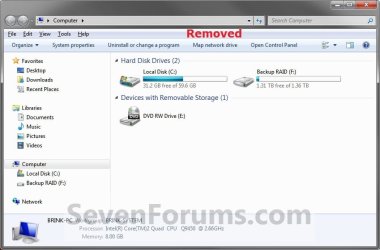
NOTE: This is Homegroup added (default) (left screenshot below) and removed (right screenshot below) from the Navigation Pane.
Here's How:
1. Open the Start Menu and type regedit.exe in the search line, then press enter.
2. If prompted by UAC, then click on Yes.
3. In Regedit, go to the location below: (See screenshot below step 4)
Code:
HKEY_CLASSES_ROOT\CLSID\{B4FB3F98-C1EA-428d-A78A-D1F5659CBA93}\ShellFolder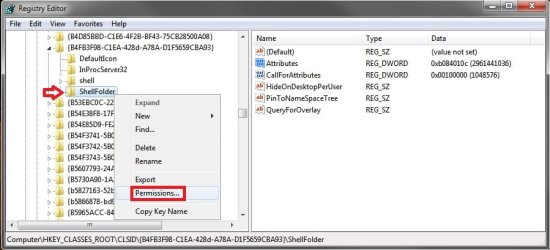
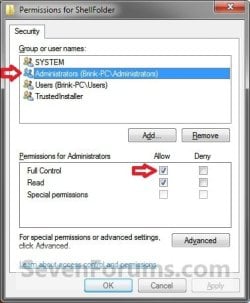
5. At the top, select the Administrators group. At the bottom, check the Allow box to the right of Full Control and click on OK. (See screenshot below)
6. In the right pane of regedit, right click on Attributes and click on Modify. (See screenshot below)

7. To Add Homegroup to the Navigation Pane
NOTE: This is the default setting.
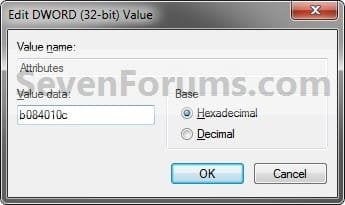
A) Type in b084010c and click on OK. (see screenshot below)
B) Go to step 9.
8. To Remove Homegroup from the Navigation Pane
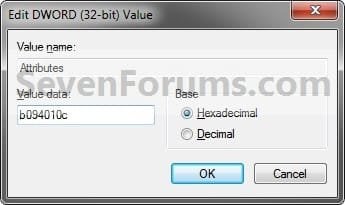
A) Type in b094010c and click on OK. (see screenshot below)
9. If you have 64-bit Windows 7 Installed
Note
CREDIT TO: Kookster for this addition.
To also add or remove Homegroup from the "Open" and "Save as" type windows as well in 64-bit Windows 7, you will also need to do this step.
If you have a 32-bit Windows 7 installed, then skip this step since doing steps 1 to 7/8 will add or remove Homegroup from the "Open" and "Save as" type windows as well.
To also add or remove Homegroup from the "Open" and "Save as" type windows as well in 64-bit Windows 7, you will also need to do this step.
If you have a 32-bit Windows 7 installed, then skip this step since doing steps 1 to 7/8 will add or remove Homegroup from the "Open" and "Save as" type windows as well.
A) In Regedit, go to the location below:
Code:
HKEY_LOCAL_MACHINE\SOFTWARE\Wow6432Node\Classes\CLSID\{B4FB3F98-C1EA-428d-A78A-D1F5659CBA93}\ShellFolderB) Repeat steps 4 to 7/8 above.
10. Close regedit.
11. Restart the computer to fully apply.
That's it,
Shawn
Related Tutorials
- How to Add or Remove the "Libraries" Folder from the Windows 7 Navigation Pane
- How to Add or Remove "Favorites" from the Windows 7 Navigation Pane
- How to Add or Remove "Computer" from the Windows 7 Navigation Pane
- How to Add or Remove "Network" from the Windows 7 Navigation Pane
- How to Add or Remove "Control Panel" from the Windows 7 Navigation Pane
- How to Add or Remove your "User Folder" from the Windows 7 Navigation Pane
- How to Add or Remove the "Recycle Bin" from the Windows 7 Navigation Pane
- How to Add or Remove the "HomeGroup" Desktop Icon in Windows 7
- How to Change the Default HomeGroup Icon in Windows 7
- How to Link your Live ID and Share Files in Windows 7 HomeGroup
- How to Show or Not Show All Folders in the Windows 7 Navigation Pane
- How to Turn On or Off Expand to Current Folder in Windows 7 Navigation Pane
- How to View or Print Your Windows 7 Homegroup Password
- How to Change the Windows 7 Homegroup Password
- How to Create a Homegroup in Windows 7
- How to Join or Add a Computer to a Windows 7 Homegroup
- How to Leave a Windows 7 Homegroup
- How to Change Windows 7 Homegroup File and Folder Sharing Settings
- How to Turn the Navigation Pane On or Off in Windows 7
- How to Create a HomeGroup Troubleshoot Shortcut in Windows 7
- How to Rename "Homegroup" in the Windows 7 Explorer Navigation Pane
- How to Create a HomeGroup Settings Shortcut in Windows 7
- How to Create a HomeGroup Folder Shortcut in Windows 7
Last edited:

 , home group and other links were getting really annoying, especially when i opened a small open or save file dialogue, i couldn't see my favorites because the space was taken up by homegroup and


