Windows 7 Forums


Windows 7: Grouped Taskbar Icon - Windows Stacked or Side by Side


Grouped Taskbar Icon - Windows Stacked or Side by Side

How to Show Windows Stacked or Side by Side in a Windows 7 Grouped Taskbar Icon
Published 21 Nov 2009
Published by

Featured Tutorial

Clean Reinstall - Factory OEM Windows 7

How to Clean Reinstall a Factory OEM Windows 7

Microsoft Outlook Desktop Shortcut - Create

How to Create a Special Outlook Desktop (Office XP style) Shortcut

Microsoft Accounts - Link

How to Link your Microsoft Accounts

Dual Boot - Windows 7 and Linux

How to Correctly Setup a Dual Boot with Windows 7 and LinuxMint13

Clean Up Factory Bloatware


Secunia ONLINE Software Inspector

How to Scan for Common Software Vulnerabilities
How to Show Windows Stacked or Side by Side in a Windows 7 Grouped Taskbar Icon


information   Information
This will show you how to Show windows stacked or Show windows side by side in a grouped taskbar icon in Windows 7.
This will not work if you do not have taskbar grouping enabled.

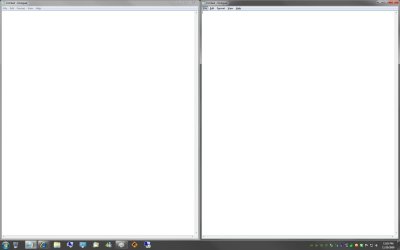
EXAMPLE: "Show windows stacked" (left) and "Show windows side by side" (right)
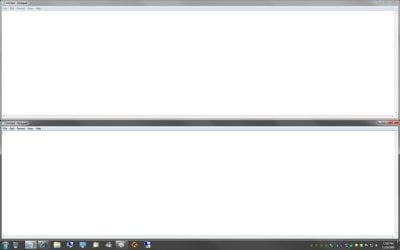
Grouped Taskbar Icon - Windows Stacked or Side by Side-stacked.jpgGrouped Taskbar Icon - Windows Stacked or Side by Side-side_by_side.jpg

Here's How:
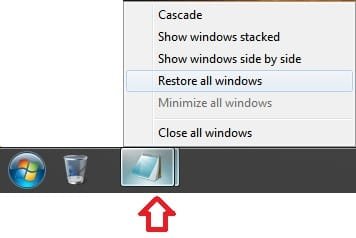
1. Press and hold Shift and right click on the grouped icon, then click on either Show windows stacked or Show windows side by side.
Grouped Taskbar Icon - Windows Stacked or Side by Side-grouped_taskbar_icon.jpg
That's it,
Shawn


Need more help? Try searching our extensive help and support site.
Loading
Comment

 Grouped Taskbar Icon - Windows Stacked or Side by Side problems?


Tutorial Tools


Similar help and support threads for: Grouped Taskbar Icon - Windows Stacked or Side by Side
Windows 7 Tutorial Category
windows logs in to a black screen, programs have side by side config General Discussion
Unable to boot Windows after installing linux to run side by side Installation & Setup
W7 Taskbar 'Show Windows Side by Side' Prob. General Discussion
Side by side: UI changes from Windows 7 beta to build 7057 News
Side by side: UI changes from Windows 7 beta to build 7048 News


All times are GMT -5. The time now is 10:49 PM.


Seven Forums Android App Seven Forums IOS App Follow us on Facebook

Windows 7 Forums is an independent web site and has not been authorized,
sponsored, or otherwise approved by Microsoft Corporation.
"Windows 7" and related materials are trademarks of Microsoft Corp.
© Designer Media Ltd
  

1 2 3 4 5 6 7 8 9 10 11 12 13 14 15 16 17 18 19 20 21 22 23 24 25 26 27 28 29 30 31 32