| Windows 7: Open Application Toolbar and Context Menu Icon - Fix |
23 Nov 2009
|
#9 | | 64-bit Windows 7 Ultimate SP1 & Windows 8 Enterprise Texas |
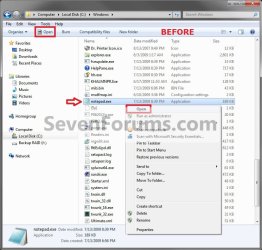
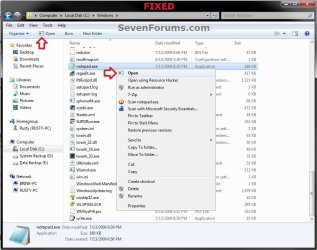
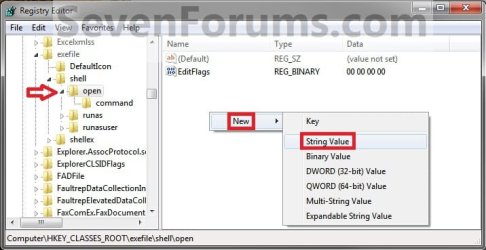
Open Application Toolbar and Context Menu Icon - Fix How to Fix the Windows Explorer "Open" Application Toolbar and Context Menu Icon in Windows 7
Last edited by Brink; 06 Nov 2011 at 12:51 PM..
| My System Specs |
| Computer type PC/Desktop System Manufacturer/Model Number Self built custom OS 64-bit Windows 7 Ultimate SP1 & Windows 8 Enterprise CPU Intel i7-3930K 3.2 Ghz (O/C 4 Ghz) Motherboard ASRock X79 Extreme11 Memory 32 GB (8GBx4) G.SKILL DDR3 Quad PC3-19200 2400MHz Graphics Card Sapphire HD5870 Eyefinity 6 2GB Sound Card SB Recon 3Di Integrated Chip Monitor(s) Displays 3x 27" Asus VE278Q Screen Resolution 1920x1080 Keyboard Logitech Cordless Desktop MX 5500 Revolution Mouse Logitech Cordless Desktop MX 5500 Revolution PSU OCZ Series Gold OCZZ1000M 1000W Case Thermaltake Level 10 GT Snow Edition Cooling Corsair Hydro H100 Hard Drives 256GB OCZ Vector
160GB OCZ RevoDrive X2
2 x 1TB Samsung HDD HD154UI SATA Internet Speed 50 Mb/s Download and 2 Mb/s Upload Other Info Microsoft LifeCam Cinema
Lite-On iHBS212 12x BD Writer
Samsung CLX-3175FW Printer
Netgear WNDR3800 Router
Motorola SBG6580 Cable Modem
2x APC Back-UPS XS 1500 |
08 Jun 2010
|
#11 | | 64-bit Windows 7 Ultimate SP1 & Windows 8 Enterprise Texas |
Hello Wildclip, and welcome to Seven Forums.
Who are you referring to, and for which file? | My System Specs | | Computer type PC/Desktop System Manufacturer/Model Number Self built custom OS 64-bit Windows 7 Ultimate SP1 & Windows 8 Enterprise CPU Intel i7-3930K 3.2 Ghz (O/C 4 Ghz) Motherboard ASRock X79 Extreme11 Memory 32 GB (8GBx4) G.SKILL DDR3 Quad PC3-19200 2400MHz Graphics Card Sapphire HD5870 Eyefinity 6 2GB Sound Card SB Recon 3Di Integrated Chip Monitor(s) Displays 3x 27" Asus VE278Q Screen Resolution 1920x1080 Keyboard Logitech Cordless Desktop MX 5500 Revolution Mouse Logitech Cordless Desktop MX 5500 Revolution PSU OCZ Series Gold OCZZ1000M 1000W Case Thermaltake Level 10 GT Snow Edition Cooling Corsair Hydro H100 Hard Drives 256GB OCZ Vector
160GB OCZ RevoDrive X2
2 x 1TB Samsung HDD HD154UI SATA Internet Speed 50 Mb/s Download and 2 Mb/s Upload Other Info Microsoft LifeCam Cinema
Lite-On iHBS212 12x BD Writer
Samsung CLX-3175FW Printer
Netgear WNDR3800 Router
Motorola SBG6580 Cable Modem
2x APC Back-UPS XS 1500 |
09 Jun 2010
|
#12 | | |
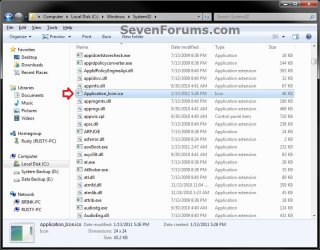
The file mentioned by Greg here Quote: However, I did manage to hack it another way. I used an old and very small .exe file, stripped out the code leaving nothing but the icon resources and came up with this to get the same icon for both locations.
More than likely, I'm leaving it the default Mickey Soft Doofus way since hovering .dll files and maybe some others would need tweaking as well to get rid of the generic icon | My System Specs | | |
19 Jun 2010
|
#13 | | Win7 Home Premium x64 SP1, Archlinux x86_64 Naranjito, PR |
Thanks Shawn, was looking for something like this..wrong icon thing bothered me. | My System Specs | | OS Win7 Home Premium x64 SP1, Archlinux x86_64 |
19 Jun 2010
|
#14 | | 64-bit Windows 7 Ultimate SP1 & Windows 8 Enterprise Texas |
You're welcome Matt. Yeah, that bothered me as well. | My System Specs | | Computer type PC/Desktop System Manufacturer/Model Number Self built custom OS 64-bit Windows 7 Ultimate SP1 & Windows 8 Enterprise CPU Intel i7-3930K 3.2 Ghz (O/C 4 Ghz) Motherboard ASRock X79 Extreme11 Memory 32 GB (8GBx4) G.SKILL DDR3 Quad PC3-19200 2400MHz Graphics Card Sapphire HD5870 Eyefinity 6 2GB Sound Card SB Recon 3Di Integrated Chip Monitor(s) Displays 3x 27" Asus VE278Q Screen Resolution 1920x1080 Keyboard Logitech Cordless Desktop MX 5500 Revolution Mouse Logitech Cordless Desktop MX 5500 Revolution PSU OCZ Series Gold OCZZ1000M 1000W Case Thermaltake Level 10 GT Snow Edition Cooling Corsair Hydro H100 Hard Drives 256GB OCZ Vector
160GB OCZ RevoDrive X2
2 x 1TB Samsung HDD HD154UI SATA Internet Speed 50 Mb/s Download and 2 Mb/s Upload Other Info Microsoft LifeCam Cinema
Lite-On iHBS212 12x BD Writer
Samsung CLX-3175FW Printer
Netgear WNDR3800 Router
Motorola SBG6580 Cable Modem
2x APC Back-UPS XS 1500 |
19 Jun 2010
|
#15 | | Windows 7 Professional 32-bit (6.1, Build 7600) A l a b a m a |

Quote: Originally Posted by Wildclip Can you upload that dummy file you used ? Sorry, I didn't see that you had requested this. I think this is the file but not for sure. If it's not, it may still have some of the resources left in which couldn't be much considering it's file size. appico.zip | My System Specs | | System Manufacturer/Model Number Averatec 6130HS-20 OS Windows 7 Professional 32-bit (6.1, Build 7600) CPU Intel(R) Pentium(R) 4 3.00 GHz HT Memory 2.0 GB Graphics Card ATI Mobility Radeon 9600 64MB Sound Card Realtek AC'97 Audio Screen Resolution 1280 x 800 Mouse Targus PAWM10 Wireless Optical Laptop Mouse Cooling 20 Inch Box Fan Hard Drives Seagate 96023A 60GB 7200RPM -
Seagate FreeAgentDesktop 250GB |
20 Jun 2010
|
#16 | | Windows 7 Home Premium x64 |

Quote: Originally Posted by Greg S 
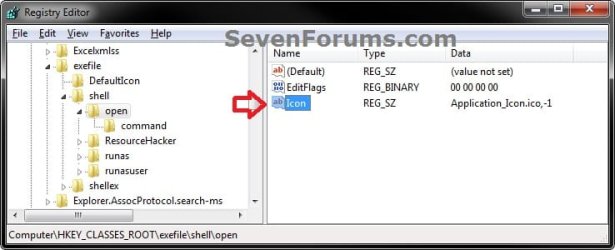
Quote: Originally Posted by Wildclip Can you upload that dummy file you used ? Sorry, I didn't see that you had requested this. I think this is the file but not for sure. If it's not, it may still have some of the resources left in which couldn't be much considering it's file size. Attachment 79806 It seems to be the right file, as it only has that one icon in it. However, when I create the registry entry to use the icon in the "appico.exe" file, only the context menu icon changes. The Explorer bar icon remains that broken white icon! It's very strange  !
I'm running a 64-bit system. Did you create any other entries to get it like how you had in your screenshot?
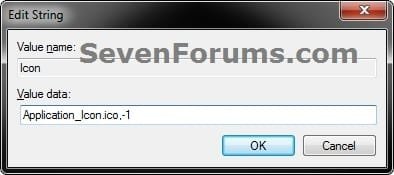
Update: Nevermind, I got it working correctly! It turned out I was referencing the wrong icon number (e.g. "appico.exe,#") in my registry entry. I opened the file with a resource editor and found that the right number was 102, so my final entry was "appico.exe,-102"
Cheers!
Last edited by Misfortune; 20 Jun 2010 at 02:00 PM..
Reason: Problem Solved!
| My System Specs | | OS Windows 7 Home Premium x64 |
20 Jun 2010
|
#17 | | Windows 7 Professional 32-bit (6.1, Build 7600) A l a b a m a |

Quote: Originally Posted by Misfortune 
Quote: Originally Posted by Greg S 
Quote: Originally Posted by Wildclip Can you upload that dummy file you used ? Sorry, I didn't see that you had requested this. I think this is the file but not for sure. If it's not, it may still have some of the resources left in which couldn't be much considering it's file size. Attachment 79806 It seems to be the right file, as it only has that one icon in it. However, when I create the registry entry to use the icon in the "appico.exe" file, only the context menu icon changes. The Explorer bar icon remains that broken white icon! It's very strange  !
I'm running a 64-bit system. Did you create any other entries to get it like how you had in your screenshot?
Update: Nevermind, I got it working correctly! It turned out I was referencing the wrong icon number (e.g. "appico.exe,#") in my registry entry. I opened the file with a resource editor and found that the right number was 102, so my final entry was "appico.exe,-102"
Cheers! OK great. I wasn't for sure if it was the right one and now that you mention, at the time I edited more than one version and may have changed the actual resource number. It appears you know what you are doing considering you opened it up to find the exact library number for reference. Glad it worked for you. It may be possible to reduce the size of the file more even though it's fairly small now. I just haven't spent any time playing with it. | My System Specs | | System Manufacturer/Model Number Averatec 6130HS-20 OS Windows 7 Professional 32-bit (6.1, Build 7600) CPU Intel(R) Pentium(R) 4 3.00 GHz HT Memory 2.0 GB Graphics Card ATI Mobility Radeon 9600 64MB Sound Card Realtek AC'97 Audio Screen Resolution 1280 x 800 Mouse Targus PAWM10 Wireless Optical Laptop Mouse Cooling 20 Inch Box Fan Hard Drives Seagate 96023A 60GB 7200RPM -
Seagate FreeAgentDesktop 250GB |
31 Aug 2010
|
#18 | | |

Quote: Originally Posted by Greg S Well it looks like the toolbar icon always defaults to the first icon in the library. The context menu item Open gets the one specified in the registry. As of right now, I've decided on this one "explorer.exe,-251". The explorer icon in the toolbar makes more sense to me than flip 3d. I did this, but I didn't like the arrows in context menu, in fact I didn't want any icon in context menu I liked it with just the text so I opened explorer.exe in ResHacker and replaced that icon with a blank one, voila.  Of course u can replace it with any icon even put in the same explorer icon u have in toolbar.
Using your dummy exe file I couldn't get anywhere, but gave me that idea so thank you and Brink of course. | My System Specs | | |
01 Sep 2010
|
#19 | | Windows 7 Professional 32-bit (6.1, Build 7600) A l a b a m a |

Quote: Originally Posted by Japa 
Quote: Originally Posted by Greg S Well it looks like the toolbar icon always defaults to the first icon in the library. The context menu item Open gets the one specified in the registry. As of right now, I've decided on this one "explorer.exe,-251". The explorer icon in the toolbar makes more sense to me than flip 3d. I did this, but I didn't like the arrows in context menu, in fact I didn't want any icon in context menu I liked it with just the text so I opened explorer.exe in ResHacker and replaced that icon with a blank one, voila.  Of course u can replace it with any icon even put in the same explorer icon u have in toolbar.
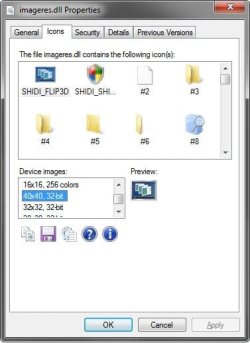
Using your dummy exe file I couldn't get anywhere, but gave me that idea so thank you and Brink of course. If you wanted a blank icon, imageres.dll has one inside of it. I think it's 121. | My System Specs | | System Manufacturer/Model Number Averatec 6130HS-20 OS Windows 7 Professional 32-bit (6.1, Build 7600) CPU Intel(R) Pentium(R) 4 3.00 GHz HT Memory 2.0 GB Graphics Card ATI Mobility Radeon 9600 64MB Sound Card Realtek AC'97 Audio Screen Resolution 1280 x 800 Mouse Targus PAWM10 Wireless Optical Laptop Mouse Cooling 20 Inch Box Fan Hard Drives Seagate 96023A 60GB 7200RPM -
Seagate FreeAgentDesktop 250GB Open Application Toolbar and Context Menu Icon - Fix problems? All times are GMT -5. The time now is 09:55 PM. | |