Open Application Toolbar and Context Menu Icon - Fix

How to Fix the Windows Explorer "Open" Application Toolbar and Context Menu Icon in Windows 7

   Information
This will show you how to fix the Windows Explorer Open application toolbar and context menu icon when you select an application (ex: EXE) file in Windows Explorer to the correct icon in Windows 7.


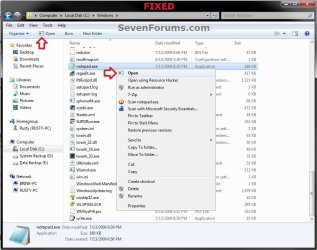
EXAMPLE: Open application Toolbar and Context Menu icon
NOTE: This is before and after you fix the icon when you have an application (ex: .exe) file selected in Windows Explorer.
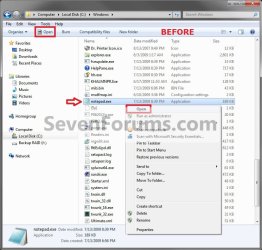
Before.jpg

Fixed.jpg


Here's How: 1. Click on the Download button below to download the file below. Application_Icon.zip

Download


2. Click on Save, and save the .zip file to the desktop.

3. Open the Zip file, and extract the Application_Icon.ico file to your desktop.

4. Right click on the extracted Application_Icon.ico file, and click on Properties, General tab, and on the Unblock button. (see screenshot below)
NOTE: If you do not have a Unblock button under the General tab, then the file is already unblocked and you can continue on to step 5. Unblock.jpg
5. Move the downloaded Application_Icon.ico file into the C:\Windows\System32 folder. (see screenshot below) System32.jpg
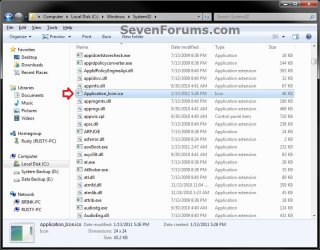
6. If prompted, click on Continue and Yes to approve moving the .ico file. Afterwards, do either step 7 or 8 below.

7. To Automatically Fix the Icon with a REG File Download
A) Click on the Download button below to download the file below. Fix_Open_Toolbar_Context_Menu_Icon.reg


Download


B) Click on Save, and save the .reg file to the desktop.

C) Right click on the downloaded .reg file and click on Merge.

D) Click on Run, Yes, Yes, and OK when prompted.

E) When done, you can delete the downloaded .reg file if you like.

F) Go to step 9.
8. To Manually Fix the Icon in Registry Editor
NOTE: This option will also allow you to use a custom icon of your own instead if you like. A) Open the Start Menu, then type regedit and press Enter.

B) If prompted by UAC, then click on Yes.
C) In regedit, go to: (see screenshot below step 8D) HKEY_CLASSES_ROOT\exefile\shell\open
D) In the right pane, right click on a empty space and click on New and String Value. (see screenshot below) Step2.jpg
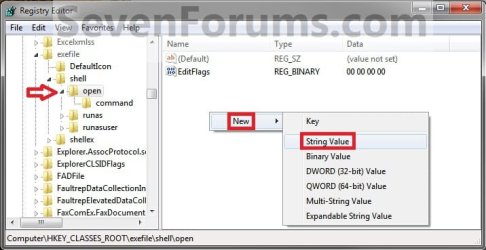
E) Type Icon and press enter. (see screenshot below) Step3.jpg
F) In the right pane, right click on Icon and click on Modify. (See screenshot below) Step4.jpg
G) Copy and Past the location below into the Edit String box and click on OK. (See screenshot below)
NOTE: If you like, you could also enter the full path of a different icon (.ico file) that you would like to use instead with ",-1" (no quotes) at the end like below.
%Windir%\System32\Application_Icon.ico,-1
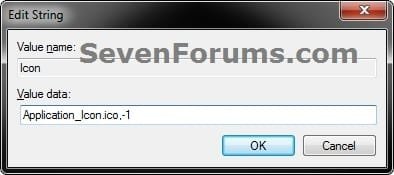
Modify.jpg
H) Regedit will now look this. (see screenshot below)
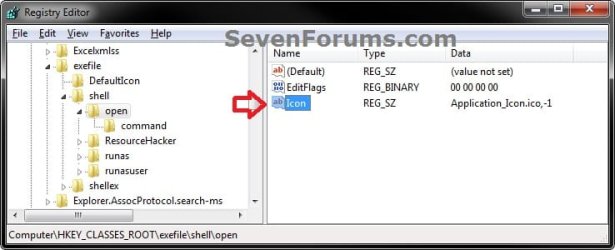
Step6.jpg
I) Close regedit.
9. If you have not already, close and reopen all Windows Explorer windows to apply.
That's it,
Shawn
 

Attachments

Last edited:
Okay

Just to check.
- You didn't rename the .ico file did you and it is unblocked
- For sure its in C:\Windows\System32
- You merged the .reg file and rebooted/Logged on-off

You could manually check in regedit that the key is there and is identical to the manual method in Shawns tutorial. If all the above is correct rerun the icon cache rebuild just to be sure.

To be honest I'm out of suggestions. Brink may be able to add something when hes online later as he created the tutorial.

Sorry mate I see no reason why it wouldn't have worked for you.
Double check the above and let us know. :rolleyes:

At last, it worked like a charm.
I knew it, I had done this fix many times on my 32bit OS, but I stumbled when I found I can't fix it as before. It was tricky. I was using Tera Copy as my Copy handler. I thought I copied Application_icon.ico to system32, when I was rechecking the file by pasting the file again, Tera Copy shows that the file already exists in System32 and asks me whether it wanted to overwrite it. So, I was sure, the file really exists there. But, when I checked System32 folder manually, the file doesn't exist! I was :eek: & :confused:! Then I disabled Tera Copy and used the default Windows file copy handler & the file copied without any prompt to overwrite it.
Then I killed the Explorer.exe process and started it again. Voila!!!:party:

The problem solved. But, I'm still confused with Tera Copy's response. Why it didn't copy the file and asks me to overwrite the file which in fact the file doesn't exist.Unusual!

Thanks to Danny & Brink for helping me.
Again, Brink, you're doing a fantastic job as Microsoft Valued Pro & being Site's Admin.

Take Care

Thats good news not only for you but for my sanity also :confused:
 

My Computer

Computer Manufacturer/Model Number
acer aspire 5935g
OS
Windows 7 Home Premium x64 SP1
CPU
intel(R)core(TM)2 duo CPU T6600 @ 2.20GHz
Motherboard
intel gm45/gm47 revision 07
Memory
3 gb ddr3
Graphics Card(s)
ati radeon hd4570/512mb
Monitor(s) Displays
lop156wh2-tle1 15.3 flat
Screen Resolution
1366x768
Hard Drives
OCZ-Agility3 60gig ssd
320gig external hdd
500gig external hdd
Mouse
Optical
Internet Speed
30Mbps Down/30Mbps Up
Hello Drugo,

It's just that way by default in Windows 7. It's a minor little bug.

The first icon in the icon library of the default file that Windows 7 uses for this icon just happens to be that one. The tutorial uses a workaround to change this so that it will use the "Application_Icon.ico" instead. :)
 

My Computer

Computer type
PC/Desktop
Computer Manufacturer/Model Number
Self built custom
OS
64-bit Windows 11 Pro for Workstations
CPU
Intel i7-8700K OC'd to 5 GHz
Motherboard
ASUS ROG Maximus XI Formula Z390
Memory
64 GB (4x16GB) G.SKILL TridentZ RGB DDR4 3600 MHz
Graphics Card(s)
ASUS ROG-STRIX-GTX1080TI-O11G-GAMING
Sound Card
Integrated
Monitor(s) Displays
2 x Samsung Odyssey G7 27"
Screen Resolution
2560x1440
Hard Drives
1TB Samsung 990 PRO M.2,
4TB Samsung 990 PRO PRO M.2,
TerraMaster F8 SSD Plus NAS
PSU
Seasonic Prime Titanium 850W
Case
Thermaltake Core P3
Cooling
Corsair Hydro H115i
Keyboard
Logitech wireless K800
Mouse
Logitech MX Master 4
Internet Speed
2 Gb/s Download and 100 Mb/s Upload
Antivirus
Malwarebyte Anti-Malware Premium
Browser
Google Chrome
Other Info
Logitech Z625 speaker system,
Logitech BRIO 4K Pro webcam,
HP Color LaserJet Pro MFP M477fdn,
APC SMART-UPS RT 1000 XL - SURT1000XLI,
Galaxy S23 Plus phone
Hello Drugo,

It's just that way by default in Windows 7. It's a minor little bug.

The first icon in the icon library of the default file that Windows 7 uses for this icon just happens to be that one. The tutorial uses a workaround to change this so that it will use the "Application_Icon.ico" instead. :)
thanks Brink, you are number one! :thumbsup:

microsoft should pay you gold

do you think future hotfixes would fix it?

for now i use your great fix!
again can't give you reputation :( :(
thanks
 

My Computer

Computer type
PC/Desktop
OS
windows 7 ultimate 64bit
You're most welcome Drugo. It might get fixed one day by an update. :)
 

My Computer

Computer type
PC/Desktop
Computer Manufacturer/Model Number
Self built custom
OS
64-bit Windows 11 Pro for Workstations
CPU
Intel i7-8700K OC'd to 5 GHz
Motherboard
ASUS ROG Maximus XI Formula Z390
Memory
64 GB (4x16GB) G.SKILL TridentZ RGB DDR4 3600 MHz
Graphics Card(s)
ASUS ROG-STRIX-GTX1080TI-O11G-GAMING
Sound Card
Integrated
Monitor(s) Displays
2 x Samsung Odyssey G7 27"
Screen Resolution
2560x1440
Hard Drives
1TB Samsung 990 PRO M.2,
4TB Samsung 990 PRO PRO M.2,
TerraMaster F8 SSD Plus NAS
PSU
Seasonic Prime Titanium 850W
Case
Thermaltake Core P3
Cooling
Corsair Hydro H115i
Keyboard
Logitech wireless K800
Mouse
Logitech MX Master 4
Internet Speed
2 Gb/s Download and 100 Mb/s Upload
Antivirus
Malwarebyte Anti-Malware Premium
Browser
Google Chrome
Other Info
Logitech Z625 speaker system,
Logitech BRIO 4K Pro webcam,
HP Color LaserJet Pro MFP M477fdn,
APC SMART-UPS RT 1000 XL - SURT1000XLI,
Galaxy S23 Plus phone
Alternative version with empty context-menu (just "Open") and program icon for the toolbar. More standard look ;)


Copy dummy_icon in C:\Windows and set it as

Windows Registry Editor Version 5.00

[HKEY_CLASSES_ROOT\exefile\shell\open]
"EditFlags"=hex:00,00,00,00
"Icon"="%WINDIR%\\dummy_icon,-17"
 

Attachments

Last edited:

My Computer

Computer type
Laptop
Computer Manufacturer/Model Number
MSI GX660-262it
OS
Windows 7 Home Premium x64 SP1
CPU
Intel Core i7 840QM
Memory
8GB DDR3 1333MHz
Graphics Card(s)
ATI Mobility HD 7970M 2GB DDR5
Screen Resolution
1920x1080
Hard Drives
Intel SSDSA2CT040G3
Hybrid ST750LX0ST750LX003
Antivirus
360 Internet Security
Browser
IE10
Thank you for the addition hexaae. :)
 

My Computer

Computer type
PC/Desktop
Computer Manufacturer/Model Number
Self built custom
OS
64-bit Windows 11 Pro for Workstations
CPU
Intel i7-8700K OC'd to 5 GHz
Motherboard
ASUS ROG Maximus XI Formula Z390
Memory
64 GB (4x16GB) G.SKILL TridentZ RGB DDR4 3600 MHz
Graphics Card(s)
ASUS ROG-STRIX-GTX1080TI-O11G-GAMING
Sound Card
Integrated
Monitor(s) Displays
2 x Samsung Odyssey G7 27"
Screen Resolution
2560x1440
Hard Drives
1TB Samsung 990 PRO M.2,
4TB Samsung 990 PRO PRO M.2,
TerraMaster F8 SSD Plus NAS
PSU
Seasonic Prime Titanium 850W
Case
Thermaltake Core P3
Cooling
Corsair Hydro H115i
Keyboard
Logitech wireless K800
Mouse
Logitech MX Master 4
Internet Speed
2 Gb/s Download and 100 Mb/s Upload
Antivirus
Malwarebyte Anti-Malware Premium
Browser
Google Chrome
Other Info
Logitech Z625 speaker system,
Logitech BRIO 4K Pro webcam,
HP Color LaserJet Pro MFP M477fdn,
APC SMART-UPS RT 1000 XL - SURT1000XLI,
Galaxy S23 Plus phone
Add path to .ico file in registry key

Brink (or anybody else who knows)

When adding the path to an .ico file (or to an icon in an .exe or .dll file) in the registry key; for example in step 8 of the tutorial it says something like:

NOTE
: If you like, you could also enter the full path of a different icon (.ico file) that you would like to use instead with ",-1" (no quotes) at the end like below.

%Windir%\System32\Application_Icon.ico,-1,

or you might use

%Windir%\System32\imageres.dll,-15

Why do you put a minus sign ("-") in front of the number that is the icon number in the file?

I've used IconViewer to look thru many .exe and .dll files in search of icons and — while the icons almost always have a number (some just say mainicon instead of having a number) — I've never seen an icon number with a minus sign in front of it.

Also, I've seen other Icon entries in the registry that have a positive number, or 0, or no number at all.
For example:

Icon............. REG_SZ......... explorer.exe,9
(Default) ..... REG_SZ......... C:\Program Files\WinRAR\WinRAR.exe,0
Icon............. REG_SZ......... regedit.exe

So....... Why the minus sign ?

Thank you.
 

My Computer

OS
Windows 7 Home Premium 64 bit
Hello modernmaid,

I just like using the minus to specify the icon to use. Usually not specifying to use the main (default) icon of the file is fine though. Just a personal preference. :)
 

My Computer

Computer type
PC/Desktop
Computer Manufacturer/Model Number
Self built custom
OS
64-bit Windows 11 Pro for Workstations
CPU
Intel i7-8700K OC'd to 5 GHz
Motherboard
ASUS ROG Maximus XI Formula Z390
Memory
64 GB (4x16GB) G.SKILL TridentZ RGB DDR4 3600 MHz
Graphics Card(s)
ASUS ROG-STRIX-GTX1080TI-O11G-GAMING
Sound Card
Integrated
Monitor(s) Displays
2 x Samsung Odyssey G7 27"
Screen Resolution
2560x1440
Hard Drives
1TB Samsung 990 PRO M.2,
4TB Samsung 990 PRO PRO M.2,
TerraMaster F8 SSD Plus NAS
PSU
Seasonic Prime Titanium 850W
Case
Thermaltake Core P3
Cooling
Corsair Hydro H115i
Keyboard
Logitech wireless K800
Mouse
Logitech MX Master 4
Internet Speed
2 Gb/s Download and 100 Mb/s Upload
Antivirus
Malwarebyte Anti-Malware Premium
Browser
Google Chrome
Other Info
Logitech Z625 speaker system,
Logitech BRIO 4K Pro webcam,
HP Color LaserJet Pro MFP M477fdn,
APC SMART-UPS RT 1000 XL - SURT1000XLI,
Galaxy S23 Plus phone
Holy... ive had this stupid little nagging problem for over a year now... just chalked it up to being broken and tried to move on... thank you, thank you!
 

My Computer

Computer Manufacturer/Model Number
ASUS Essentio CG5270 Intel Core 2 Quad Q8300 @ 2.5GHz Desktop PC
OS
Windows 7 Ultimate x64
CPU
Intel(R) Core(TM)2 Quad CPU Q8300 @ 2.50GHz
Motherboard
Base Board CG5270
Memory
8gb DDR2
Graphics Card(s)
NVIDIA GeForce 8400 GS
Sound Card
(1) USB Audio Device (2) High Definition Audio Device
Monitor(s) Displays
Dual 40" Samsung 1080p HDTV
Screen Resolution
1920 x 1080 x 32 bits (4294967296 colors) @ 60 Hz
Hard Drives
(1) Hitachi HDT721010SLA360 ATA Device
931.51 GB

(2) Hitachi HDT725025VLA380 ATA Device
232.88 GB
Keyboard
Saitek Cyborg
Mouse
Logitech G500
You're most welcome Kira, and welcome to Seven Forums. :)
 

My Computer

Computer type
PC/Desktop
Computer Manufacturer/Model Number
Self built custom
OS
64-bit Windows 11 Pro for Workstations
CPU
Intel i7-8700K OC'd to 5 GHz
Motherboard
ASUS ROG Maximus XI Formula Z390
Memory
64 GB (4x16GB) G.SKILL TridentZ RGB DDR4 3600 MHz
Graphics Card(s)
ASUS ROG-STRIX-GTX1080TI-O11G-GAMING
Sound Card
Integrated
Monitor(s) Displays
2 x Samsung Odyssey G7 27"
Screen Resolution
2560x1440
Hard Drives
1TB Samsung 990 PRO M.2,
4TB Samsung 990 PRO PRO M.2,
TerraMaster F8 SSD Plus NAS
PSU
Seasonic Prime Titanium 850W
Case
Thermaltake Core P3
Cooling
Corsair Hydro H115i
Keyboard
Logitech wireless K800
Mouse
Logitech MX Master 4
Internet Speed
2 Gb/s Download and 100 Mb/s Upload
Antivirus
Malwarebyte Anti-Malware Premium
Browser
Google Chrome
Other Info
Logitech Z625 speaker system,
Logitech BRIO 4K Pro webcam,
HP Color LaserJet Pro MFP M477fdn,
APC SMART-UPS RT 1000 XL - SURT1000XLI,
Galaxy S23 Plus phone
I know this is WAY WAY WAY late, but I was testing out (for fun) the Win7 64bit and it has the same missing icon (no surprise there). Anyway I tried the fix as outlined in this thread, but it didn't work for me. I finally found the missing icon in C:\Windows\SysWOW64 and changed the registry entry appropriately. Hope this helps with other 64bit users, because I couldn't find anything about it online.

Edit: And I guess I was a little lazy and frustrated, leading me to skip most of this thread, which might have already contained the fix. I basically used Everything to search for the 'missing' icon and edited the path accordingly. But thanks for all the hard work for putting the initial guide together.
 
Last edited:

My Computer

Computer type
PC/Desktop
Computer Manufacturer/Model Number
Custom Build
OS
Windows 7 Ultimate 64-bit
CPU
AMD Athlon II X2 260
Motherboard
M5A78L-M LX (AM3R2)
Memory
4.00GB Dual Channel DDR3 @ 669MHz (9-9-9-24)
Graphics Card(s)
ATI AMD Radeon 5700 Series (Gigabyte)
Hard Drives
931GB Western Digital WDC WD10EARS-003BB1 ATA Device
465GB Western Digital WDC WD5000AAKX-603CA0 ATA Device
930GB Western Digital WD My Book 1110 USB Device (USB
Antivirus
Microsoft Security Essentials
Browser
Chrome (Primary), TOR (Secondary)
Hello geekrawk, and welcome to Seven Forums.

The tutorial should have worked for you in 64-bit Windows 7 as well.

Did it not work in anything specific, or not at all for you?
 

My Computer

Computer type
PC/Desktop
Computer Manufacturer/Model Number
Self built custom
OS
64-bit Windows 11 Pro for Workstations
CPU
Intel i7-8700K OC'd to 5 GHz
Motherboard
ASUS ROG Maximus XI Formula Z390
Memory
64 GB (4x16GB) G.SKILL TridentZ RGB DDR4 3600 MHz
Graphics Card(s)
ASUS ROG-STRIX-GTX1080TI-O11G-GAMING
Sound Card
Integrated
Monitor(s) Displays
2 x Samsung Odyssey G7 27"
Screen Resolution
2560x1440
Hard Drives
1TB Samsung 990 PRO M.2,
4TB Samsung 990 PRO PRO M.2,
TerraMaster F8 SSD Plus NAS
PSU
Seasonic Prime Titanium 850W
Case
Thermaltake Core P3
Cooling
Corsair Hydro H115i
Keyboard
Logitech wireless K800
Mouse
Logitech MX Master 4
Internet Speed
2 Gb/s Download and 100 Mb/s Upload
Antivirus
Malwarebyte Anti-Malware Premium
Browser
Google Chrome
Other Info
Logitech Z625 speaker system,
Logitech BRIO 4K Pro webcam,
HP Color LaserJet Pro MFP M477fdn,
APC SMART-UPS RT 1000 XL - SURT1000XLI,
Galaxy S23 Plus phone
Hello Brink and thanks for the welcome :)

For all of the 6 or 7 attempts, there was no 'improvement'. The icon didn't stick. I rebooted and even (amateurishly) used a registry cleaner between attempts.

I forgot to mention the 'open' icon was already on my machine. something suddenly 'made' me do a search on my local drive and lo and behold, there it was like magic. then it was just the simple matter of pointing the registry entry to the new location.
 
Last edited:

My Computer

Computer type
PC/Desktop
Computer Manufacturer/Model Number
Custom Build
OS
Windows 7 Ultimate 64-bit
CPU
AMD Athlon II X2 260
Motherboard
M5A78L-M LX (AM3R2)
Memory
4.00GB Dual Channel DDR3 @ 669MHz (9-9-9-24)
Graphics Card(s)
ATI AMD Radeon 5700 Series (Gigabyte)
Hard Drives
931GB Western Digital WDC WD10EARS-003BB1 ATA Device
465GB Western Digital WDC WD5000AAKX-603CA0 ATA Device
930GB Western Digital WD My Book 1110 USB Device (USB
Antivirus
Microsoft Security Essentials
Browser
Chrome (Primary), TOR (Secondary)
Ah, ok. You just needed to adjust the registry for where you saved the icon file at then. :)
 

My Computer

Computer type
PC/Desktop
Computer Manufacturer/Model Number
Self built custom
OS
64-bit Windows 11 Pro for Workstations
CPU
Intel i7-8700K OC'd to 5 GHz
Motherboard
ASUS ROG Maximus XI Formula Z390
Memory
64 GB (4x16GB) G.SKILL TridentZ RGB DDR4 3600 MHz
Graphics Card(s)
ASUS ROG-STRIX-GTX1080TI-O11G-GAMING
Sound Card
Integrated
Monitor(s) Displays
2 x Samsung Odyssey G7 27"
Screen Resolution
2560x1440
Hard Drives
1TB Samsung 990 PRO M.2,
4TB Samsung 990 PRO PRO M.2,
TerraMaster F8 SSD Plus NAS
PSU
Seasonic Prime Titanium 850W
Case
Thermaltake Core P3
Cooling
Corsair Hydro H115i
Keyboard
Logitech wireless K800
Mouse
Logitech MX Master 4
Internet Speed
2 Gb/s Download and 100 Mb/s Upload
Antivirus
Malwarebyte Anti-Malware Premium
Browser
Google Chrome
Other Info
Logitech Z625 speaker system,
Logitech BRIO 4K Pro webcam,
HP Color LaserJet Pro MFP M477fdn,
APC SMART-UPS RT 1000 XL - SURT1000XLI,
Galaxy S23 Plus phone
That's the thing.. I don't remember putting the .ico file in C:\Windows\SysWow64 in the first placel. I followed the tutorial step by step, putting the .ico file in the correct folder.

Ah well, probably not a good idea to reformat and tweak your PC while your going through a manic phase and the meds aren't working, except the one that makes your forgetful :)
 

My Computer

Computer type
PC/Desktop
Computer Manufacturer/Model Number
Custom Build
OS
Windows 7 Ultimate 64-bit
CPU
AMD Athlon II X2 260
Motherboard
M5A78L-M LX (AM3R2)
Memory
4.00GB Dual Channel DDR3 @ 669MHz (9-9-9-24)
Graphics Card(s)
ATI AMD Radeon 5700 Series (Gigabyte)
Hard Drives
931GB Western Digital WDC WD10EARS-003BB1 ATA Device
465GB Western Digital WDC WD5000AAKX-603CA0 ATA Device
930GB Western Digital WD My Book 1110 USB Device (USB
Antivirus
Microsoft Security Essentials
Browser
Chrome (Primary), TOR (Secondary)
Yeah, forgetting can be a good thing sometimes. :o
 

My Computer

Computer type
PC/Desktop
Computer Manufacturer/Model Number
Self built custom
OS
64-bit Windows 11 Pro for Workstations
CPU
Intel i7-8700K OC'd to 5 GHz
Motherboard
ASUS ROG Maximus XI Formula Z390
Memory
64 GB (4x16GB) G.SKILL TridentZ RGB DDR4 3600 MHz
Graphics Card(s)
ASUS ROG-STRIX-GTX1080TI-O11G-GAMING
Sound Card
Integrated
Monitor(s) Displays
2 x Samsung Odyssey G7 27"
Screen Resolution
2560x1440
Hard Drives
1TB Samsung 990 PRO M.2,
4TB Samsung 990 PRO PRO M.2,
TerraMaster F8 SSD Plus NAS
PSU
Seasonic Prime Titanium 850W
Case
Thermaltake Core P3
Cooling
Corsair Hydro H115i
Keyboard
Logitech wireless K800
Mouse
Logitech MX Master 4
Internet Speed
2 Gb/s Download and 100 Mb/s Upload
Antivirus
Malwarebyte Anti-Malware Premium
Browser
Google Chrome
Other Info
Logitech Z625 speaker system,
Logitech BRIO 4K Pro webcam,
HP Color LaserJet Pro MFP M477fdn,
APC SMART-UPS RT 1000 XL - SURT1000XLI,
Galaxy S23 Plus phone
Adding the icon to system32 and then altering the registry file had no effect.
Finally I ended up using the explorer.exe,-251, and works well.

I think the author should edit his original post to include the imgress.dll/explorer fix

Again the number wouldn't matter, because you would get the cascade windows icon always

Anyhow, Thank you Brink and Greg S, you guys are amazing :D
 
Last edited by a moderator:

My Computer

Computer type
PC/Desktop
Computer Manufacturer/Model Number
Custom Build
OS
Windows 7 Ultimate 64bit
CPU
Intel i7 4790
Memory
16 GB DDR3
Graphics Card(s)
Asus GTX 970
Back
Top