Open Application Toolbar and Context Menu Icon - Fix

How to Fix the Windows Explorer "Open" Application Toolbar and Context Menu Icon in Windows 7

   Information
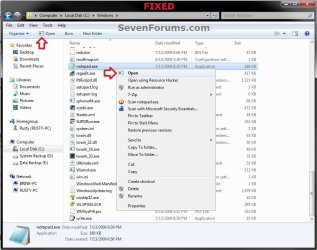
This will show you how to fix the Windows Explorer Open application toolbar and context menu icon when you select an application (ex: EXE) file in Windows Explorer to the correct icon in Windows 7.


EXAMPLE: Open application Toolbar and Context Menu icon
NOTE: This is before and after you fix the icon when you have an application (ex: .exe) file selected in Windows Explorer.
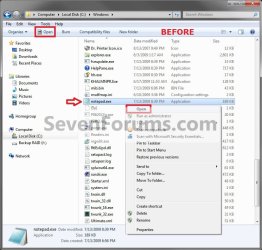
Before.jpg

Fixed.jpg


Here's How: 1. Click on the Download button below to download the file below. Application_Icon.zip

Download


2. Click on Save, and save the .zip file to the desktop.

3. Open the Zip file, and extract the Application_Icon.ico file to your desktop.

4. Right click on the extracted Application_Icon.ico file, and click on Properties, General tab, and on the Unblock button. (see screenshot below)
NOTE: If you do not have a Unblock button under the General tab, then the file is already unblocked and you can continue on to step 5. Unblock.jpg
5. Move the downloaded Application_Icon.ico file into the C:\Windows\System32 folder. (see screenshot below) System32.jpg
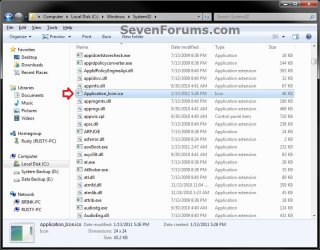
6. If prompted, click on Continue and Yes to approve moving the .ico file. Afterwards, do either step 7 or 8 below.

7. To Automatically Fix the Icon with a REG File Download
A) Click on the Download button below to download the file below. Fix_Open_Toolbar_Context_Menu_Icon.reg


Download


B) Click on Save, and save the .reg file to the desktop.

C) Right click on the downloaded .reg file and click on Merge.

D) Click on Run, Yes, Yes, and OK when prompted.

E) When done, you can delete the downloaded .reg file if you like.

F) Go to step 9.
8. To Manually Fix the Icon in Registry Editor
NOTE: This option will also allow you to use a custom icon of your own instead if you like. A) Open the Start Menu, then type regedit and press Enter.

B) If prompted by UAC, then click on Yes.
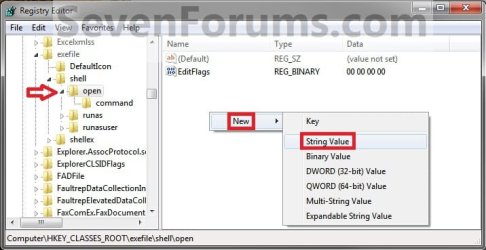
C) In regedit, go to: (see screenshot below step 8D) HKEY_CLASSES_ROOT\exefile\shell\open
D) In the right pane, right click on a empty space and click on New and String Value. (see screenshot below) Step2.jpg
E) Type Icon and press enter. (see screenshot below) Step3.jpg
F) In the right pane, right click on Icon and click on Modify. (See screenshot below) Step4.jpg
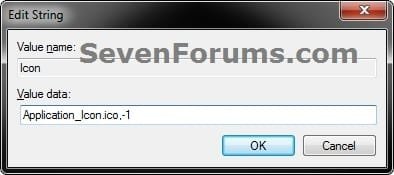
G) Copy and Past the location below into the Edit String box and click on OK. (See screenshot below)
NOTE: If you like, you could also enter the full path of a different icon (.ico file) that you would like to use instead with ",-1" (no quotes) at the end like below.
%Windir%\System32\Application_Icon.ico,-1
Modify.jpg
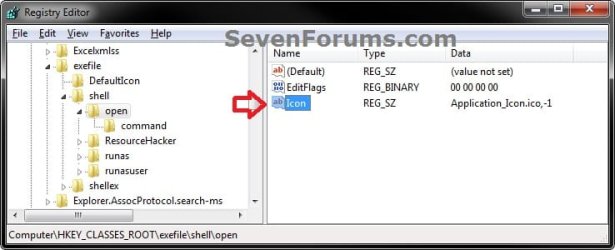
H) Regedit will now look this. (see screenshot below)
Step6.jpg
I) Close regedit.
9. If you have not already, close and reopen all Windows Explorer windows to apply.
That's it,
Shawn
 

Attachments

Last edited:
Hi Brink, is the icon in this fix for the .exe files only? In other words, if one applies this fix and hovers over a .mp3 file in explorer will the fix icon appear or the default wmplayer.exe icon?
 

My Computer

Computer Manufacturer/Model Number
Averatec 6130HS-20
OS
Windows 7 Professional 32-bit (6.1, Build 7600)
CPU
Intel(R) Pentium(R) 4 3.00 GHz HT
Memory
2.0 GB
Graphics Card(s)
ATI Mobility Radeon 9600 64MB
Sound Card
Realtek AC'97 Audio
Screen Resolution
1280 x 800
Hard Drives
Seagate 96023A 60GB 7200RPM -
Seagate FreeAgentDesktop 250GB
Cooling
20 Inch Box Fan
Mouse
Targus PAWM10 Wireless Optical Laptop Mouse
Hello Greg,

Yes, it's only for EXE files. For MP3 files, you would get the Windows Media Player icon with Play instead of Open. :)
 

My Computer

Computer type
PC/Desktop
Computer Manufacturer/Model Number
Self built custom
OS
64-bit Windows 11 Pro for Workstations
CPU
Intel i7-8700K OC'd to 5 GHz
Motherboard
ASUS ROG Maximus XI Formula Z390
Memory
64 GB (4x16GB) G.SKILL TridentZ RGB DDR4 3600 MHz
Graphics Card(s)
ASUS ROG-STRIX-GTX1080TI-O11G-GAMING
Sound Card
Integrated
Monitor(s) Displays
2 x Samsung Odyssey G7 27"
Screen Resolution
2560x1440
Hard Drives
1TB Samsung 990 PRO M.2,
4TB Samsung 990 PRO PRO M.2,
TerraMaster F8 SSD Plus NAS
PSU
Seasonic Prime Titanium 850W
Case
Thermaltake Core P3
Cooling
Corsair Hydro H115i
Keyboard
Logitech wireless K800
Mouse
Logitech MX Master 4
Internet Speed
2 Gb/s Download and 100 Mb/s Upload
Antivirus
Malwarebyte Anti-Malware Premium
Browser
Google Chrome
Other Info
Logitech Z625 speaker system,
Logitech BRIO 4K Pro webcam,
HP Color LaserJet Pro MFP M477fdn,
APC SMART-UPS RT 1000 XL - SURT1000XLI,
Galaxy S23 Plus phone
Hello Greg,

Yes, it's only for EXE files. For MP3 files, you would get the Windows Media Player icon with Play instead of Open. :)

OK thanks. One more question, why does the context menu item Open have the correct icon but the toolbar in explorer is using the flip 3-d switch windows icon?
 

My Computer

Computer Manufacturer/Model Number
Averatec 6130HS-20
OS
Windows 7 Professional 32-bit (6.1, Build 7600)
CPU
Intel(R) Pentium(R) 4 3.00 GHz HT
Memory
2.0 GB
Graphics Card(s)
ATI Mobility Radeon 9600 64MB
Sound Card
Realtek AC'97 Audio
Screen Resolution
1280 x 800
Hard Drives
Seagate 96023A 60GB 7200RPM -
Seagate FreeAgentDesktop 250GB
Cooling
20 Inch Box Fan
Mouse
Targus PAWM10 Wireless Optical Laptop Mouse
LOL, that just seems to be the way MS has for it some reason even though the application icon is selected for it. Strange I know. :confused:
 

My Computer

Computer type
PC/Desktop
Computer Manufacturer/Model Number
Self built custom
OS
64-bit Windows 11 Pro for Workstations
CPU
Intel i7-8700K OC'd to 5 GHz
Motherboard
ASUS ROG Maximus XI Formula Z390
Memory
64 GB (4x16GB) G.SKILL TridentZ RGB DDR4 3600 MHz
Graphics Card(s)
ASUS ROG-STRIX-GTX1080TI-O11G-GAMING
Sound Card
Integrated
Monitor(s) Displays
2 x Samsung Odyssey G7 27"
Screen Resolution
2560x1440
Hard Drives
1TB Samsung 990 PRO M.2,
4TB Samsung 990 PRO PRO M.2,
TerraMaster F8 SSD Plus NAS
PSU
Seasonic Prime Titanium 850W
Case
Thermaltake Core P3
Cooling
Corsair Hydro H115i
Keyboard
Logitech wireless K800
Mouse
Logitech MX Master 4
Internet Speed
2 Gb/s Download and 100 Mb/s Upload
Antivirus
Malwarebyte Anti-Malware Premium
Browser
Google Chrome
Other Info
Logitech Z625 speaker system,
Logitech BRIO 4K Pro webcam,
HP Color LaserJet Pro MFP M477fdn,
APC SMART-UPS RT 1000 XL - SURT1000XLI,
Galaxy S23 Plus phone
LOL, that just seems to be the way MS has for it some reason even though the application icon is selected for it. Strange I know. :confused:
I'm stroking away on it with no Joy so far. I notice that the switch windows icon is the first visually listed in Imageres.dll when searching it for changing an icon to a shortcut. I viewed Imageres.dll in ResHacker and noticed that Icon Group 15 carries the appropriate app icon. What is the meaning of that, as of right now, Nothing,lol.

I wonder if anyone has made up a list of numbers and their corresponding icons in Imageres.dll?
 

My Computer

Computer Manufacturer/Model Number
Averatec 6130HS-20
OS
Windows 7 Professional 32-bit (6.1, Build 7600)
CPU
Intel(R) Pentium(R) 4 3.00 GHz HT
Memory
2.0 GB
Graphics Card(s)
ATI Mobility Radeon 9600 64MB
Sound Card
Realtek AC'97 Audio
Screen Resolution
1280 x 800
Hard Drives
Seagate 96023A 60GB 7200RPM -
Seagate FreeAgentDesktop 250GB
Cooling
20 Inch Box Fan
Mouse
Targus PAWM10 Wireless Optical Laptop Mouse
Greg,

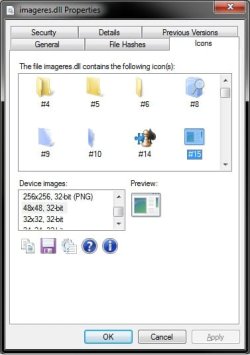
You can install IconViewer (with run as administrator) to add a Icons tab to the properties page of Imageres.dll. It will then give you all of the icon numbers in that file. :)

Properties.jpg
 

My Computer

Computer type
PC/Desktop
Computer Manufacturer/Model Number
Self built custom
OS
64-bit Windows 11 Pro for Workstations
CPU
Intel i7-8700K OC'd to 5 GHz
Motherboard
ASUS ROG Maximus XI Formula Z390
Memory
64 GB (4x16GB) G.SKILL TridentZ RGB DDR4 3600 MHz
Graphics Card(s)
ASUS ROG-STRIX-GTX1080TI-O11G-GAMING
Sound Card
Integrated
Monitor(s) Displays
2 x Samsung Odyssey G7 27"
Screen Resolution
2560x1440
Hard Drives
1TB Samsung 990 PRO M.2,
4TB Samsung 990 PRO PRO M.2,
TerraMaster F8 SSD Plus NAS
PSU
Seasonic Prime Titanium 850W
Case
Thermaltake Core P3
Cooling
Corsair Hydro H115i
Keyboard
Logitech wireless K800
Mouse
Logitech MX Master 4
Internet Speed
2 Gb/s Download and 100 Mb/s Upload
Antivirus
Malwarebyte Anti-Malware Premium
Browser
Google Chrome
Other Info
Logitech Z625 speaker system,
Logitech BRIO 4K Pro webcam,
HP Color LaserJet Pro MFP M477fdn,
APC SMART-UPS RT 1000 XL - SURT1000XLI,
Galaxy S23 Plus phone
Greg,

You can install IconViewer (with run as administrator) to add a Icons tab to the properties page of Imageres.dll. It will then give you all of the icon numbers in that file. :)

Excellent!
 

My Computer

Computer Manufacturer/Model Number
Averatec 6130HS-20
OS
Windows 7 Professional 32-bit (6.1, Build 7600)
CPU
Intel(R) Pentium(R) 4 3.00 GHz HT
Memory
2.0 GB
Graphics Card(s)
ATI Mobility Radeon 9600 64MB
Sound Card
Realtek AC'97 Audio
Screen Resolution
1280 x 800
Hard Drives
Seagate 96023A 60GB 7200RPM -
Seagate FreeAgentDesktop 250GB
Cooling
20 Inch Box Fan
Mouse
Targus PAWM10 Wireless Optical Laptop Mouse
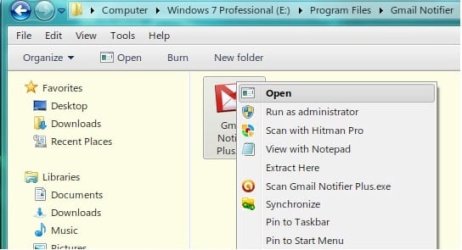
Well it looks like the toolbar icon always defaults to the first icon in the library. The context menu item Open gets the one specified in the registry. As of right now, I've decided on this one "explorer.exe,-251". The explorer icon in the toolbar makes more sense to me than flip 3d.

Untitled.jpg

However, I did manage to hack it another way. I used an old and very small .exe file, stripped out the code leaving nothing but the icon resources and came up with this to get the same icon for both locations.

Untitled2.jpg

More than likely, I'm leaving it the default Mickey Soft Doofus way since hovering .dll files and maybe some others would need tweaking as well to get rid of the generic icon
 

My Computer

Computer Manufacturer/Model Number
Averatec 6130HS-20
OS
Windows 7 Professional 32-bit (6.1, Build 7600)
CPU
Intel(R) Pentium(R) 4 3.00 GHz HT
Memory
2.0 GB
Graphics Card(s)
ATI Mobility Radeon 9600 64MB
Sound Card
Realtek AC'97 Audio
Screen Resolution
1280 x 800
Hard Drives
Seagate 96023A 60GB 7200RPM -
Seagate FreeAgentDesktop 250GB
Cooling
20 Inch Box Fan
Mouse
Targus PAWM10 Wireless Optical Laptop Mouse
That's a great alternative. :)
 

My Computer

Computer type
PC/Desktop
Computer Manufacturer/Model Number
Self built custom
OS
64-bit Windows 11 Pro for Workstations
CPU
Intel i7-8700K OC'd to 5 GHz
Motherboard
ASUS ROG Maximus XI Formula Z390
Memory
64 GB (4x16GB) G.SKILL TridentZ RGB DDR4 3600 MHz
Graphics Card(s)
ASUS ROG-STRIX-GTX1080TI-O11G-GAMING
Sound Card
Integrated
Monitor(s) Displays
2 x Samsung Odyssey G7 27"
Screen Resolution
2560x1440
Hard Drives
1TB Samsung 990 PRO M.2,
4TB Samsung 990 PRO PRO M.2,
TerraMaster F8 SSD Plus NAS
PSU
Seasonic Prime Titanium 850W
Case
Thermaltake Core P3
Cooling
Corsair Hydro H115i
Keyboard
Logitech wireless K800
Mouse
Logitech MX Master 4
Internet Speed
2 Gb/s Download and 100 Mb/s Upload
Antivirus
Malwarebyte Anti-Malware Premium
Browser
Google Chrome
Other Info
Logitech Z625 speaker system,
Logitech BRIO 4K Pro webcam,
HP Color LaserJet Pro MFP M477fdn,
APC SMART-UPS RT 1000 XL - SURT1000XLI,
Galaxy S23 Plus phone
Hello Wildclip, and welcome to Seven Forums.

Who are you referring to, and for which file? :)
 

My Computer

Computer type
PC/Desktop
Computer Manufacturer/Model Number
Self built custom
OS
64-bit Windows 11 Pro for Workstations
CPU
Intel i7-8700K OC'd to 5 GHz
Motherboard
ASUS ROG Maximus XI Formula Z390
Memory
64 GB (4x16GB) G.SKILL TridentZ RGB DDR4 3600 MHz
Graphics Card(s)
ASUS ROG-STRIX-GTX1080TI-O11G-GAMING
Sound Card
Integrated
Monitor(s) Displays
2 x Samsung Odyssey G7 27"
Screen Resolution
2560x1440
Hard Drives
1TB Samsung 990 PRO M.2,
4TB Samsung 990 PRO PRO M.2,
TerraMaster F8 SSD Plus NAS
PSU
Seasonic Prime Titanium 850W
Case
Thermaltake Core P3
Cooling
Corsair Hydro H115i
Keyboard
Logitech wireless K800
Mouse
Logitech MX Master 4
Internet Speed
2 Gb/s Download and 100 Mb/s Upload
Antivirus
Malwarebyte Anti-Malware Premium
Browser
Google Chrome
Other Info
Logitech Z625 speaker system,
Logitech BRIO 4K Pro webcam,
HP Color LaserJet Pro MFP M477fdn,
APC SMART-UPS RT 1000 XL - SURT1000XLI,
Galaxy S23 Plus phone
  • Like
Reactions: Nem
The file mentioned by Greg here
However, I did manage to hack it another way. I used an old and very small .exe file, stripped out the code leaving nothing but the icon resources and came up with this to get the same icon for both locations.


More than likely, I'm leaving it the default Mickey Soft Doofus way since hovering .dll files and maybe some others would need tweaking as well to get rid of the generic icon
 

My Computer

OS
Windows 7
Thanks Shawn, was looking for something like this..wrong icon thing bothered me.
 

My Computer

Computer type
PC/Desktop
OS
Win7 Home Premium x64 SP1, Archlinux x86_64. Elementary Luna
You're welcome Matt. Yeah, that bothered me as well. :)
 

My Computer

Computer type
PC/Desktop
Computer Manufacturer/Model Number
Self built custom
OS
64-bit Windows 11 Pro for Workstations
CPU
Intel i7-8700K OC'd to 5 GHz
Motherboard
ASUS ROG Maximus XI Formula Z390
Memory
64 GB (4x16GB) G.SKILL TridentZ RGB DDR4 3600 MHz
Graphics Card(s)
ASUS ROG-STRIX-GTX1080TI-O11G-GAMING
Sound Card
Integrated
Monitor(s) Displays
2 x Samsung Odyssey G7 27"
Screen Resolution
2560x1440
Hard Drives
1TB Samsung 990 PRO M.2,
4TB Samsung 990 PRO PRO M.2,
TerraMaster F8 SSD Plus NAS
PSU
Seasonic Prime Titanium 850W
Case
Thermaltake Core P3
Cooling
Corsair Hydro H115i
Keyboard
Logitech wireless K800
Mouse
Logitech MX Master 4
Internet Speed
2 Gb/s Download and 100 Mb/s Upload
Antivirus
Malwarebyte Anti-Malware Premium
Browser
Google Chrome
Other Info
Logitech Z625 speaker system,
Logitech BRIO 4K Pro webcam,
HP Color LaserJet Pro MFP M477fdn,
APC SMART-UPS RT 1000 XL - SURT1000XLI,
Galaxy S23 Plus phone
Can you upload that dummy file you used ?

Sorry, I didn't see that you had requested this. I think this is the file but not for sure. If it's not, it may still have some of the resources left in which couldn't be much considering it's file size.

View attachment appico.zip
 

My Computer

Computer Manufacturer/Model Number
Averatec 6130HS-20
OS
Windows 7 Professional 32-bit (6.1, Build 7600)
CPU
Intel(R) Pentium(R) 4 3.00 GHz HT
Memory
2.0 GB
Graphics Card(s)
ATI Mobility Radeon 9600 64MB
Sound Card
Realtek AC'97 Audio
Screen Resolution
1280 x 800
Hard Drives
Seagate 96023A 60GB 7200RPM -
Seagate FreeAgentDesktop 250GB
Cooling
20 Inch Box Fan
Mouse
Targus PAWM10 Wireless Optical Laptop Mouse
Can you upload that dummy file you used ?

Sorry, I didn't see that you had requested this. I think this is the file but not for sure. If it's not, it may still have some of the resources left in which couldn't be much considering it's file size.

View attachment 79806
It seems to be the right file, as it only has that one icon in it. However, when I create the registry entry to use the icon in the "appico.exe" file, only the context menu icon changes. The Explorer bar icon remains that broken white icon! It's very strange :shock:!

I'm running a 64-bit system. Did you create any other entries to get it like how you had in your screenshot?


Update: Nevermind, I got it working correctly! It turned out I was referencing the wrong icon number (e.g. "appico.exe,#") in my registry entry. I opened the file with a resource editor and found that the right number was 102, so my final entry was "appico.exe,-102"

Cheers!
 
Last edited:

My Computer

OS
Windows 7 Home Premium x64
Can you upload that dummy file you used ?

Sorry, I didn't see that you had requested this. I think this is the file but not for sure. If it's not, it may still have some of the resources left in which couldn't be much considering it's file size.

View attachment 79806
It seems to be the right file, as it only has that one icon in it. However, when I create the registry entry to use the icon in the "appico.exe" file, only the context menu icon changes. The Explorer bar icon remains that broken white icon! It's very strange :shock:!

I'm running a 64-bit system. Did you create any other entries to get it like how you had in your screenshot?


Update: Nevermind, I got it working correctly! It turned out I was referencing the wrong icon number (e.g. "appico.exe,#") in my registry entry. I opened the file with a resource editor and found that the right number was 102, so my final entry was "appico.exe,-102"

Cheers!

OK great. I wasn't for sure if it was the right one and now that you mention, at the time I edited more than one version and may have changed the actual resource number. It appears you know what you are doing considering you opened it up to find the exact library number for reference. Glad it worked for you. It may be possible to reduce the size of the file more even though it's fairly small now. I just haven't spent any time playing with it.
 

My Computer

Computer Manufacturer/Model Number
Averatec 6130HS-20
OS
Windows 7 Professional 32-bit (6.1, Build 7600)
CPU
Intel(R) Pentium(R) 4 3.00 GHz HT
Memory
2.0 GB
Graphics Card(s)
ATI Mobility Radeon 9600 64MB
Sound Card
Realtek AC'97 Audio
Screen Resolution
1280 x 800
Hard Drives
Seagate 96023A 60GB 7200RPM -
Seagate FreeAgentDesktop 250GB
Cooling
20 Inch Box Fan
Mouse
Targus PAWM10 Wireless Optical Laptop Mouse
Well it looks like the toolbar icon always defaults to the first icon in the library. The context menu item Open gets the one specified in the registry. As of right now, I've decided on this one "explorer.exe,-251". The explorer icon in the toolbar makes more sense to me than flip 3d.

I did this, but I didn't like the arrows in context menu, in fact I didn't want any icon in context menu I liked it with just the text so I opened explorer.exe in ResHacker and replaced that icon with a blank one, voila. :D Of course u can replace it with any icon even put in the same explorer icon u have in toolbar.

Using your dummy exe file I couldn't get anywhere, but gave me that idea so thank you and Brink of course.
 

My Computer

OS
Windows 7
Well it looks like the toolbar icon always defaults to the first icon in the library. The context menu item Open gets the one specified in the registry. As of right now, I've decided on this one "explorer.exe,-251". The explorer icon in the toolbar makes more sense to me than flip 3d.

I did this, but I didn't like the arrows in context menu, in fact I didn't want any icon in context menu I liked it with just the text so I opened explorer.exe in ResHacker and replaced that icon with a blank one, voila. :D Of course u can replace it with any icon even put in the same explorer icon u have in toolbar.

Using your dummy exe file I couldn't get anywhere, but gave me that idea so thank you and Brink of course.

If you wanted a blank icon, imageres.dll has one inside of it. I think it's 121.
 

My Computer

Computer Manufacturer/Model Number
Averatec 6130HS-20
OS
Windows 7 Professional 32-bit (6.1, Build 7600)
CPU
Intel(R) Pentium(R) 4 3.00 GHz HT
Memory
2.0 GB
Graphics Card(s)
ATI Mobility Radeon 9600 64MB
Sound Card
Realtek AC'97 Audio
Screen Resolution
1280 x 800
Hard Drives
Seagate 96023A 60GB 7200RPM -
Seagate FreeAgentDesktop 250GB
Cooling
20 Inch Box Fan
Mouse
Targus PAWM10 Wireless Optical Laptop Mouse
Back
Top