| | Welcome to Windows 7 Forums. Our forum is dedicated to helping you find solutions with any problems, errors or issues you are experiencing with Windows 7. The Windows 7 forum also covers news and updates and has an extensive Windows 7 tutorial section that covers a wide range of tips and tricks. | Windows 7 - Context Menu - Right Click vs Shift Right Click
|
11-08-2008
|
#9 | | Windows 7 Ultimate x64 SP1 |
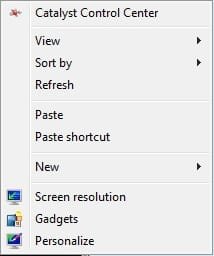
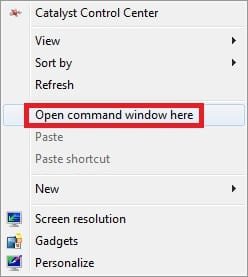
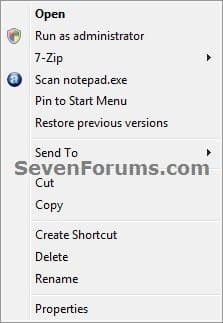
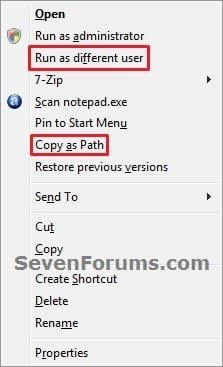
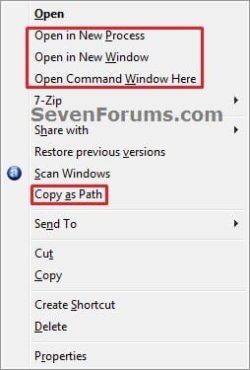
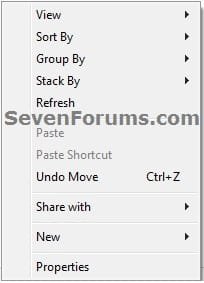
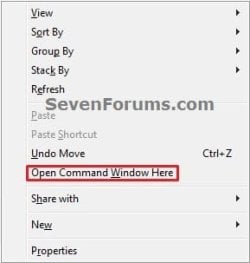
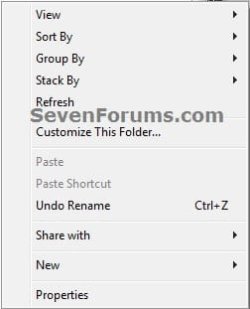
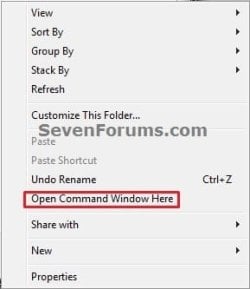
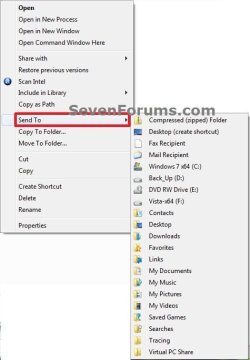
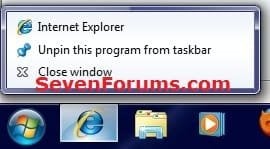
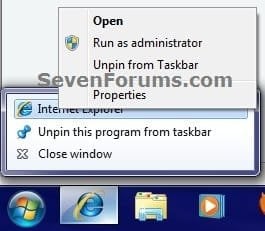
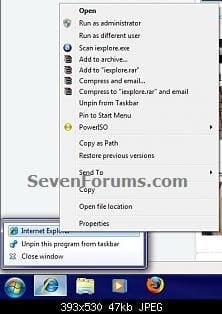
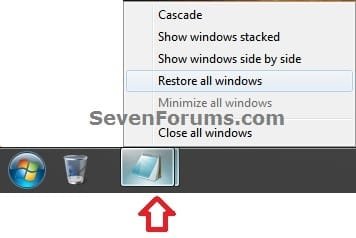
Context Menu - Right Click vs Shift Right Click How to Expand the Windows 7 Context Menu for More Options
Last edited by Brink; 3 Weeks Ago at 12:07 AM..
| My System Specs | | System Manufacturer/Model Number Self built custom OS Windows 7 Ultimate x64 SP1 CPU Intel i7-980X 3.3 Ghz (3.48 Ghz OC'd) Motherboard ASUS P6X58D Premium Memory 12 GB (2GBx6) DDR3 PC3-16000 2000 MHz Kingston HyperX Graphics Card Sapphire HD5870 Eyefinity 6 2GB Sound Card Realtek HD Audio ALC889 Integrated Chip Monitor(s) Displays 3x 27" Asus VE278Q Screen Resolution 1920x1080 Keyboard Logitech Cordless Desktop MX 5500 Revolution Mouse Logitech Cordless Desktop MX 5500 Revolution PSU OCZ Series Gold OCZZ1000M 1000W Case Corsair Obsidian 800D Cooling Thermalright Ultra 120 Extreme Copper CPU heat sink w/120 MM Hard Drives 160GB OCZ RevoDrive X2
** 2 x 1TB Samsung HDD HD154UI SATA Internet Speed 50 Mb/s Download and 2 Mb/s Upload Other Info Microsoft LifeCam Cinema
** Lite-On iHBS212 12x BD Writer
** Samsung CLX-3175FW Printer
** Netgear WNDR3800 Router
** Motorola SBG6580 Cable Modem
** 2x APC Back-UPS XS 1500 |
12-03-2009
|
#10 | | |

Quote: Originally Posted by Greg S 
Quote: Originally Posted by Chappy I wonder if there's a way to make this behaviour the default one...instead of having to hold the Shift key and right click, just right click for the expanded context menu. I'll have to look thru the contextmenuhandlers an see if this can be accomplished. Yes, find in the registry the one you always want to show, in the right hand pane, delete the string value "Extended" Hey! I'm not very familiar with the registry (at least not enough to browse it and find stuff), but I wouldn't mind having the right-click on open windows in my taskbar to be default 'shifted'. Where can I find the taskbar 'Extended' in the registry? Thanks. | My System Specs | | |
12-30-2009
|
#11 | | |
I'm sorry if this has been answered in another thread but I haven't seen a solution anywhere.
1) Is there a way to have the right-click context menu pop up where you right click instead of always above the program?
2) If not, is there a way to permanently enable the shift + right click behavior for the Windows 7 taskbar without having to hold shift down? I find the location of the new context menus to be annoying. I like the old way where the menu would pop up where I right click and not always in the same spot above the taskbar. | My System Specs | | System Manufacturer/Model Number Self built OS Win7 HP x64 CPU Intel i7 920 @ 4GHz Motherboard Asus P6T Delux Memory 6GB OCZ DDR3 Graphics Card HD4870 1GB Sound Card On board Monitor(s) Displays 24" BenQ PSU Corsair 850w Case Cosmos Cooling H50 liquid cooling Hard Drives 2x WD640
1x WD 1TB |
12-31-2009
|
#12 | | |
Thanks Thanks Greg S. This was the only thing that was driving me nuts with Windows 7. Now it is perfect! I am a programmer and work a lot in the CMD window!
Happy New Year to you and everyone else! Be Safe!! | My System Specs | | |
01-01-2010
|
#13 | | |

Quote: Originally Posted by LAUBO 
Quote: Originally Posted by Greg S 
Quote: Originally Posted by Chappy I wonder if there's a way to make this behaviour the default one...instead of having to hold the Shift key and right click, just right click for the expanded context menu. I'll have to look thru the contextmenuhandlers an see if this can be accomplished. Yes, find in the registry the one you always want to show, in the right hand pane, delete the string value "Extended" Hey! I'm not very familiar with the registry (at least not enough to browse it and find stuff), but I wouldn't mind having the right-click on open windows in my taskbar to be default 'shifted'. Where can I find the taskbar 'Extended' in the registry? Thanks. 
Quote: Originally Posted by tazenman Thanks Greg S. This was the only thing that was driving me nuts with Windows 7. Now it is perfect! I am a programmer and work a lot in the CMD window!
Happy New Year to you and everyone else! Be Safe!!
Hey dude, as I mentioned earlier, I'm not familiar enough with the registry to find my own solution. Can you help me? Where is the string value "Extended" located?
Happy 2010! | My System Specs | | |
01-01-2010
|
#14 | | Windows 7 Professional 32-bit (6.1, Build 7600) |

Quote: Originally Posted by LAUBO 
Quote: Originally Posted by Greg S Yes, find in the registry the one you always want to show, in the right hand pane, delete the string value "Extended" Hey! I'm not very familiar with the registry (at least not enough to browse it and find stuff), but I wouldn't mind having the right-click on open windows in my taskbar to be default 'shifted'. Where can I find the taskbar 'Extended' in the registry? Thanks. 
Quote: Originally Posted by tazenman Thanks Greg S. This was the only thing that was driving me nuts with Windows 7. Now it is perfect! I am a programmer and work a lot in the CMD window!
Happy New Year to you and everyone else! Be Safe!!
Hey dude, as I mentioned earlier, I'm not familiar enough with the registry to find my own solution. Can you help me? Where is the string value "Extended" located?
Happy 2010! I'm not in Win 7 at the moment. I've searched for something that might make it easier for you. Have a look at this brief outline on ShellMenuView Access and Customize Windows 7's Extended Context Menu - TechSpot
lol, I'm glad I searched that for you because I've used ShellMenuView before and never noticed the extended menu part of it. | My System Specs | | System Manufacturer/Model Number Averatec 6130HS-20 OS Windows 7 Professional 32-bit (6.1, Build 7600) CPU Intel(R) Pentium(R) 4 3.00 GHz HT Memory 2.0 GB Graphics Card ATI Mobility Radeon 9600 64MB Sound Card Realtek AC'97 Audio Screen Resolution 1280 x 800 Mouse Targus PAWM10 Wireless Optical Laptop Mouse Cooling 20 Inch Box Fan Hard Drives Seagate 96023A 60GB 7200RPM -
Seagate FreeAgentDesktop 250GB |
3 Weeks Ago
|
#16 | | Windows 7 Ultimate SP1 (64 bit), Windows XP SP3, Ubuntu 10.04 |
As usual, nice work Brink.
I knew about the command window trick, but I didn't realise that there were so many other hidden options. | My System Specs | | System Manufacturer/Model Number n/a OS Windows 7 Ultimate SP1 (64 bit), Windows XP SP3, Ubuntu 10.04 CPU AMD Phenom II x6 1055T, 2.8 GHz Motherboard ASRock 880GMH-LE/USB3 Memory 4 GB DDR3 1333 G-Skill Graphics Card NVIDIA GeForce 8500 GT Sound Card Realtek? Monitor(s) Displays Analog Silicon Graphics Screen Resolution 1600x1200 Mouse Wired Optical Case Tower Hard Drives Western Digital 1 TB (SATA), Western Digital 1.5 TB (SATA) Internet Speed DSL Other Info System Upgraded - 2011-05-21, 2010-07-14
HDD Upgraded - 2010-08-11 |
3 Weeks Ago
|
#17 | | Windows 7 Ultimate x64 SP1 |
Thank you Lehnerus. | My System Specs | | System Manufacturer/Model Number Self built custom OS Windows 7 Ultimate x64 SP1 CPU Intel i7-980X 3.3 Ghz (3.48 Ghz OC'd) Motherboard ASUS P6X58D Premium Memory 12 GB (2GBx6) DDR3 PC3-16000 2000 MHz Kingston HyperX Graphics Card Sapphire HD5870 Eyefinity 6 2GB Sound Card Realtek HD Audio ALC889 Integrated Chip Monitor(s) Displays 3x 27" Asus VE278Q Screen Resolution 1920x1080 Keyboard Logitech Cordless Desktop MX 5500 Revolution Mouse Logitech Cordless Desktop MX 5500 Revolution PSU OCZ Series Gold OCZZ1000M 1000W Case Corsair Obsidian 800D Cooling Thermalright Ultra 120 Extreme Copper CPU heat sink w/120 MM Hard Drives 160GB OCZ RevoDrive X2
** 2 x 1TB Samsung HDD HD154UI SATA Internet Speed 50 Mb/s Download and 2 Mb/s Upload Other Info Microsoft LifeCam Cinema
** Lite-On iHBS212 12x BD Writer
** Samsung CLX-3175FW Printer
** Netgear WNDR3800 Router
** Motorola SBG6580 Cable Modem
** 2x APC Back-UPS XS 1500 |
3 Weeks Ago
|
#18 | | Windows 7 Ultimate SP1 (64 bit), Windows XP SP3, Ubuntu 10.04 |
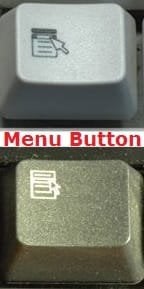
Keyboard Menu button This also works using the "Menu button" on the keyboard (i.e. "Shift + Menu button" also brings up the extended context menu).
Last edited by lehnerus2000; 3 Weeks Ago at 08:18 PM..
Reason: Title
| My System Specs | | System Manufacturer/Model Number n/a OS Windows 7 Ultimate SP1 (64 bit), Windows XP SP3, Ubuntu 10.04 CPU AMD Phenom II x6 1055T, 2.8 GHz Motherboard ASRock 880GMH-LE/USB3 Memory 4 GB DDR3 1333 G-Skill Graphics Card NVIDIA GeForce 8500 GT Sound Card Realtek? Monitor(s) Displays Analog Silicon Graphics Screen Resolution 1600x1200 Mouse Wired Optical Case Tower Hard Drives Western Digital 1 TB (SATA), Western Digital 1.5 TB (SATA) Internet Speed DSL Other Info System Upgraded - 2011-05-21, 2010-07-14
HDD Upgraded - 2010-08-11 |
3 Weeks Ago
|
#19 | | Windows 7 Ultimate x64 SP1 |
Thank you Lehnerus. I forgot about that one. Added. | My System Specs | | System Manufacturer/Model Number Self built custom OS Windows 7 Ultimate x64 SP1 CPU Intel i7-980X 3.3 Ghz (3.48 Ghz OC'd) Motherboard ASUS P6X58D Premium Memory 12 GB (2GBx6) DDR3 PC3-16000 2000 MHz Kingston HyperX Graphics Card Sapphire HD5870 Eyefinity 6 2GB Sound Card Realtek HD Audio ALC889 Integrated Chip Monitor(s) Displays 3x 27" Asus VE278Q Screen Resolution 1920x1080 Keyboard Logitech Cordless Desktop MX 5500 Revolution Mouse Logitech Cordless Desktop MX 5500 Revolution PSU OCZ Series Gold OCZZ1000M 1000W Case Corsair Obsidian 800D Cooling Thermalright Ultra 120 Extreme Copper CPU heat sink w/120 MM Hard Drives 160GB OCZ RevoDrive X2
** 2 x 1TB Samsung HDD HD154UI SATA Internet Speed 50 Mb/s Download and 2 Mb/s Upload Other Info Microsoft LifeCam Cinema
** Lite-On iHBS212 12x BD Writer
** Samsung CLX-3175FW Printer
** Netgear WNDR3800 Router
** Motorola SBG6580 Cable Modem
** 2x APC Back-UPS XS 1500 Context Menu - Right Click vs Shift Right Click problems? All times are GMT -5. The time now is 06:28 AM. |  |