Windows 7 Forums


Windows 7: Context Menu - Right Click vs Shift Right Click


Context Menu - Right Click vs Shift Right Click

How to Expand the Windows 7 Context Menu for More Options
Published 08 Nov 2008
Published by

Featured Tutorial

User Profile - Customize During Installation

How to Customize Default User Profile in Audit Mode

System Preparation Tool - Use to Customize Windows

How to Use Sysprep to Customize Windows 7 and Windows 8

Microsoft Account Primary Alias Email Address - Change

How to Change your Microsoft Account Primary Alias Email Address

Dual Boot - Windows 7 and Linux

How to Correctly Setup a Dual Boot with Windows 7 and LinuxMint13

Restore Point - Add "Create Restore Point" to Context Menu in Windows

How to Add "Create Restore Point" to Context Menu in XP, Vista, Windows 7, and Windows 8

Emergency Kit - save your files from a dead OS

How to Create and Use a Linux Mint Mate USB Flash Drive to Recover your Files
How to Expand the Windows 7 Context Menu for More Options

information   Information
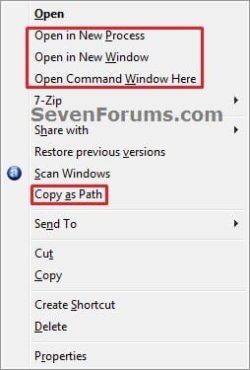
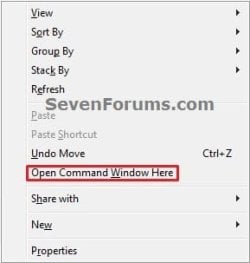
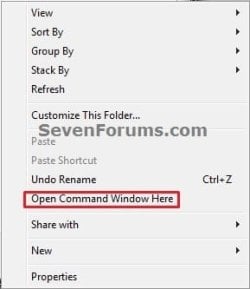
This will show you how to expand the Windows 7 context menu to see more available options to select from for a file, folder, desktop, Windows Explorer root window, Windows Explorer window, and the Send To menu.


Here's How:


Note   Note
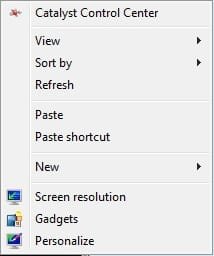
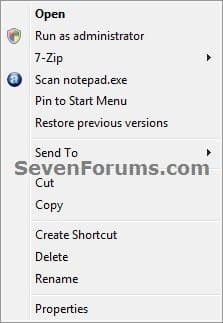
  • Default Context Menu (Left screenshots below)
    • Right click on item.
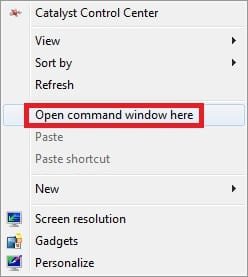
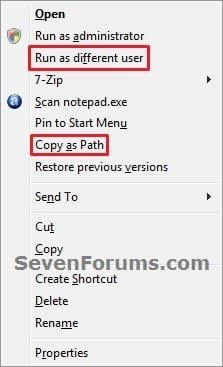
  • Expanded Context Menu (Right screenshots below)
    • Press Shift and hold while right clicking on item.
    • Select the item, and press Shift + Menu button on keyboard (if available)
      NOTE: Sometimes you may also need to press the FN (function) key along with the Menu button.
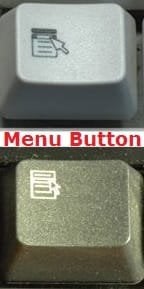
Name:  Menu-button.jpg
Views: 6554
Size:  16.5 KB
1. Desktop Context Menu
Name:  Desktop.jpg
Views: 11975
Size:  16.6 KBName:  Desktop-Shift.jpg
Views: 12168
Size:  19.7 KB
2. File Context Menu
Name:  File_Right_Click.jpg
Views: 44443
Size:  20.5 KBContext Menu - Right Click vs Shift Right Click-file_shift_right_click.jpg
3. Folder Context Menu
Name:  Folder_Right_Click.jpg
Views: 44340
Size:  20.2 KBContext Menu - Right Click vs Shift Right Click-folder_shift_right_click.jpg
4. Windows Explorer Root Window Context Menu
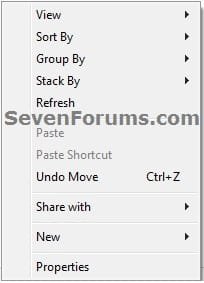
Name:  Windows-Explorer-1_Right_Click.jpg
Views: 44090
Size:  16.8 KBName:  Windows-Explorer-1_Shift_Right_Click.jpg
Views: 44238
Size:  21.6 KB
5. Windows Explorer Window Context Menu
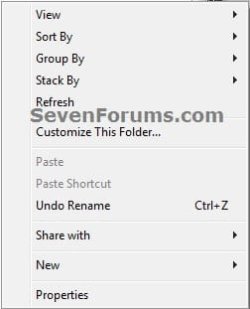
Name:  Windows-Explorer-2_Right_Click.jpg
Views: 44026
Size:  20.1 KBContext Menu - Right Click vs Shift Right Click-windows-explorer-2_shift_right_click.jpg
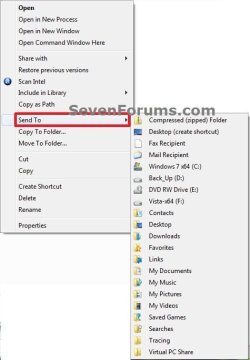
6. File or Folder "Send To" Context Menu
Context Menu - Right Click vs Shift Right Click-send_to.jpgContext Menu - Right Click vs Shift Right Click-send_to_shift.jpg
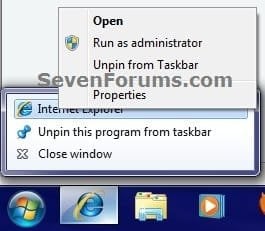
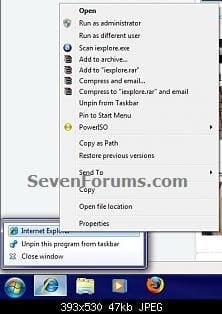
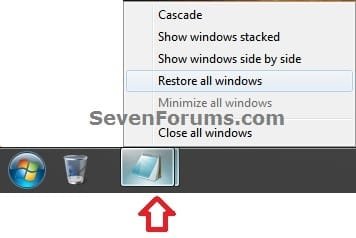
7. Taskbar Icon Context Menu
NOTE: This addition by Mr GRiM.
Right Click:
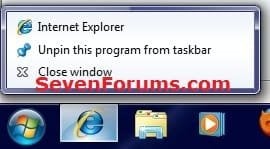
Name:  Normal.jpg
Views: 44072
Size:  18.3 KBName:  normal_2.jpg
Views: 44030
Size:  24.6 KB

Shift + Right Click or Shift + Menu button
Name:  Shift.jpg
Views: 43968
Size:  14.6 KBName:  Shift_2.jpg
Views: 43711
Size:  25.9 KB

Context Menu - Right Click vs Shift Right Click-grouped_taskbar_icon.jpg

Need more help? Try searching our extensive help and support site.
Loading
25 Jan 2009   #1
Chappy

Vista Ult 64bit - Windows 7 Ult 7264 64bit
Frozen North


Hey Shawn

I wonder if there's a way to make this behaviour the default one...instead of having to hold the Shift key and right click, just right click for the expanded context menu. I'll have to look thru the contextmenuhandlers an see if this can be accomplished.

My System SpecsSystem Spec

04 Feb 2009   #2
Mark

Windows 7 Ultimate Vista Ultimate x64
QLD, Cairns


Here are some more extras when using Shift + Right Click

Without Shift

With Shift

Last edited by Brink; 13 Oct 2010 at 10:54 AM.. Reason: removed images
My System SpecsSystem Spec
04 Feb 2009   #3
Brink

64-bit Windows 7 Ultimate SP1 & Windows 8 Enterprise
Texas


Thank you Mr GRiM.

Added.
My System SpecsSystem Spec
.


04 Feb 2009   #4
Mark

Windows 7 Ultimate Vista Ultimate x64
QLD, Cairns


Your welcome Shawn.
My System SpecsSystem Spec
15 Feb 2009   #5
limneos

Windows 7 RC 7100 32bit/64bit
 
 
Send To - Reveal All Hidden User Folders

Right click on a file and hover over Send To.You will see a limited number of available locations to Send To. Repeat while holding down the shift key. Now you will see all available locations revealed.

That's it.
Limneos

Last edited by Brink; 13 Oct 2010 at 10:53 AM.. Reason: removed images
My System SpecsSystem Spec
15 Feb 2009   #6
NosferatuX

Windows 7 Build 7048 x64


This is a good one! Nice find Limneos.
My System SpecsSystem Spec
15 Feb 2009   #7
Brink

64-bit Windows 7 Ultimate SP1 & Windows 8 Enterprise
Texas


Limneos,

Thank you for the addition. It has been added.
My System SpecsSystem Spec
15 Feb 2009   #8
limneos

Windows 7 RC 7100 32bit/64bit


Your welcome, Shawn!

Since it's embedded here, I would like to add that if you type in start -> search: shell:sendto , it opens the SendTo folder without having to navigate to the whole path
(C:\Users\youruser name\AppData\Roaming\Microsoft\Windows\SendTo) , where you can drag and drop or paste new shortcuts for the SendTo menu.

Cheers

Last edited by Brink; 13 Oct 2010 at 10:54 AM.. Reason: removed images
My System SpecsSystem Spec
25 Nov 2009   #9
Greg S

Windows 7 Professional 32-bit (6.1, Build 7600)
A l a b a m a


Quote   Quote: Originally Posted by Chappy View Post
I wonder if there's a way to make this behaviour the default one...instead of having to hold the Shift key and right click, just right click for the expanded context menu. I'll have to look thru the contextmenuhandlers an see if this can be accomplished.
Yes, find in the registry the one you always want to show, in the right hand pane, delete the string value "Extended"
My System SpecsSystem Spec
Comment

 Context Menu - Right Click vs Shift Right Click problems?


Tutorial Tools


Similar help and support threads for: Context Menu - Right Click vs Shift Right Click
Windows 7 Tutorial Category
Solved The right-click context menu and 7-Zip Software
Left click brings up right click context menu on desktop General Discussion
Open in New Process - With or Without Shift+Right Click Context Menu Tutorials
Run as Different User - With or Without Shift+Right Click Context Menu Tutorials
Taskbar menu right click instead of shift+right click? Customization


All times are GMT -5. The time now is 08:10 AM.


Seven Forums Android App Seven Forums IOS App Follow us on Facebook

Windows 7 Forums is an independent web site and has not been authorized,
sponsored, or otherwise approved by Microsoft Corporation.
"Windows 7" and related materials are trademarks of Microsoft Corp.
© Designer Media Ltd
  

1 2 3 4 5 6 7 8 9 10 11 12 13 14 15 16 17 18 19 20 21 22 23 24 25 26 27 28 29 30 31 32