
How to Extract Files from the Windows 7 Installation DVD
Information
This will show you how to extract original files from the retail Windows 7 installation DVD. You can then use these extracted files to replace missing or corrupted system files in your current Windows 7 installation.
Note
Normally you will find out that you have corrupted system files that cannot be repaired after your run a sfc /scannow command and look at it's log report.
Tip
If you do not have a Windows 7 with SP1 installation disc, then you can download the latest official Windows 7 with SP1 ISO file at the link below, then create an installation DVD or USB with it.
Microsoft: Windows 7 Direct Download Links
Microsoft: Windows 7 Direct Download Links
Here's How:
1. Download and install the same free 32-bit or 64-bit 7-Zip program version as your 32-bit or 64-bit Windows 7.
2. Use Compatibiliy Mode on the 7-Zip shortcut and check the Run this program as an administrator box.
3. Run 7-Zip, then click on Tools and Options on the menu bar. Next, select (highlight) .wim, and click on the plus button for All users, and click on OK. (See screenshots below)

4. Insert your retail Windows 7 installation disc into the DVD drive and wait for it to be recognized.
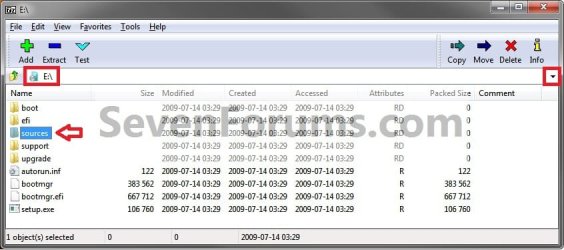
5. In 7-Zip, navigate to your DVD drive letter (ex: E: ) that has the Windows 7 installation disc in it, and double click on the Sources folder. (See screenshot below)
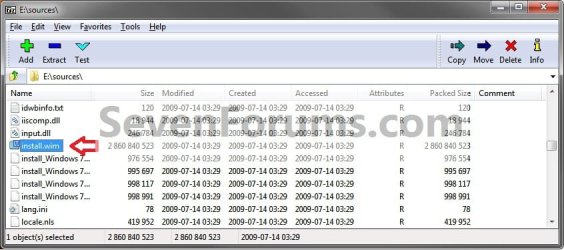
6. Scroll down and double click on the install.wim file. (See screenshot below)
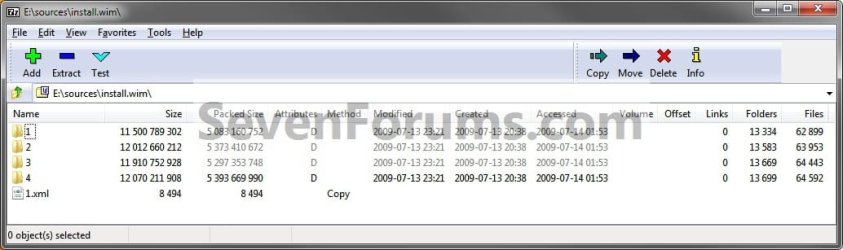
7. You will now see this for a few seconds as it opens. (See screenshot below)

8. Each numbered folder is a different edition of Windows 7. They will vary depending on what type of Windows 7 installation DVD you have. To see what edition is for each numbered folder, select the 1.xml file and click on the Extract button on the toolbar. (See screenshots below)
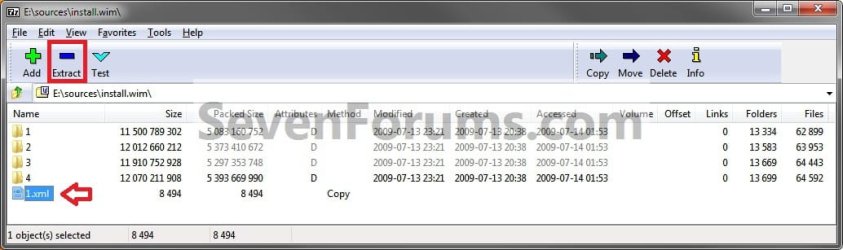
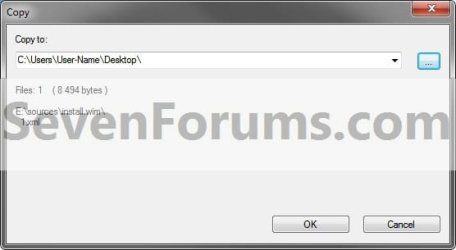
9. Copy the 1.xml file to your desktop. (See screenshot below)
10. Open the 1.xml file on the desktop. Look for the <IMAGE INDEX="#"> entry and the <NAME>edition</NAME> entry a bit under it in the code (highlighted in red below) to see what Windows 7 edition is for each numbered folder in step 8. (See code box below with an example 1.xml file)
NOTE: This file will open in Internet Explorer by default.
Code:
[URL="file:///C:/Users/User-Name/Desktop/1.xml#"]-[/URL] <WIM>
  <TOTALBYTES>2860826557</TOTALBYTES>
[URL="file:///C:/Users/User-Name/Desktop/1.xml#"][B][COLOR=red]-[/COLOR][/B][/URL][B][COLOR=red] <IMAGE INDEX="1">[/COLOR][/B]
  <DIRCOUNT>13290</DIRCOUNT>
  <FILECOUNT>62943</FILECOUNT>
  <TOTALBYTES>11500789302</TOTALBYTES>
[URL="file:///C:/Users/User-Name/Desktop/1.xml#"]-[/URL] <CREATIONTIME>
  <HIGHPART>0x01CA0446</HIGHPART>
  <LOWPART>0xE89FF88A</LOWPART>
  </CREATIONTIME>
[URL="file:///C:/Users/User-Name/Desktop/1.xml#"]-[/URL] <LASTMODIFICATIONTIME>
  <HIGHPART>0x01CA045F</HIGHPART>
  <LOWPART>0x3C8C7A24</LOWPART>
  </LASTMODIFICATIONTIME>
[URL="file:///C:/Users/User-Name/Desktop/1.xml#"]-[/URL] <WINDOWS>
  <ARCH>9</ARCH>
  <PRODUCTNAME>Microsoft® Windows® Operating System</PRODUCTNAME>
  <EDITIONID>HomeBasic</EDITIONID>
  <INSTALLATIONTYPE>Client</INSTALLATIONTYPE>
  <HAL>acpiapic</HAL>
  <PRODUCTTYPE>WinNT</PRODUCTTYPE>
  <PRODUCTSUITE>Terminal Server</PRODUCTSUITE>
[URL="file:///C:/Users/User-Name/Desktop/1.xml#"]-[/URL] <LANGUAGES>
  <LANGUAGE>en-US</LANGUAGE>
  <DEFAULT>en-US</DEFAULT>
  </LANGUAGES>
[URL="file:///C:/Users/User-Name/Desktop/1.xml#"]-[/URL] <VERSION>
  <MAJOR>6</MAJOR>
  <MINOR>1</MINOR>
  <BUILD>7600</BUILD>
  <SPBUILD>16385</SPBUILD>
  <SPLEVEL>0</SPLEVEL>
  </VERSION>
  <SYSTEMROOT>WINDOWS</SYSTEMROOT>
  </WINDOWS>
[B][COLOR=red]<NAME>Windows 7 HOMEBASIC</NAME>[/COLOR][/B]
  <DESCRIPTION>Windows 7 HOMEBASIC</DESCRIPTION>
  <FLAGS>HomeBasic</FLAGS>
  <HARDLINKBYTES>4516930990</HARDLINKBYTES>
  <DISPLAYNAME>Windows 7 Home Basic</DISPLAYNAME>
  <DISPLAYDESCRIPTION>Windows 7 Home Basic</DISPLAYDESCRIPTION>
  </IMAGE>
[URL="file:///C:/Users/User-Name/Desktop/1.xml#"][B][COLOR=red]-[/COLOR][/B][/URL][B][COLOR=red] <IMAGE INDEX="2">[/COLOR][/B]
  <DIRCOUNT>13539</DIRCOUNT>
  <FILECOUNT>63997</FILECOUNT>
  <TOTALBYTES>12012660212</TOTALBYTES>
[URL="file:///C:/Users/User-Name/Desktop/1.xml#"]-[/URL] <CREATIONTIME>
  <HIGHPART>0x01CA0446</HIGHPART>
  <LOWPART>0xE89FF88A</LOWPART>
  </CREATIONTIME>
[URL="file:///C:/Users/User-Name/Desktop/1.xml#"]-[/URL] <LASTMODIFICATIONTIME>
  <HIGHPART>0x01CA045F</HIGHPART>
  <LOWPART>0x5C029E16</LOWPART>
  </LASTMODIFICATIONTIME>
[URL="file:///C:/Users/User-Name/Desktop/1.xml#"]-[/URL] <WINDOWS>
  <ARCH>9</ARCH>
  <PRODUCTNAME>Microsoft® Windows® Operating System</PRODUCTNAME>
  <EDITIONID>HomePremium</EDITIONID>
  <INSTALLATIONTYPE>Client</INSTALLATIONTYPE>
  <HAL>acpiapic</HAL>
  <PRODUCTTYPE>WinNT</PRODUCTTYPE>
  <PRODUCTSUITE>Terminal Server</PRODUCTSUITE>
[URL="file:///C:/Users/User-Name/Desktop/1.xml#"]-[/URL] <LANGUAGES>
  <LANGUAGE>en-US</LANGUAGE>
  <DEFAULT>en-US</DEFAULT>
  </LANGUAGES>
[URL="file:///C:/Users/User-Name/Desktop/1.xml#"]-[/URL] <VERSION>
  <MAJOR>6</MAJOR>
  <MINOR>1</MINOR>
  <BUILD>7600</BUILD>
  <SPBUILD>16385</SPBUILD>
  <SPLEVEL>0</SPLEVEL>
  </VERSION>
  <SYSTEMROOT>WINDOWS</SYSTEMROOT>
  </WINDOWS>
  [B][COLOR=red]<NAME>Windows 7 HOMEPREMIUM</NAME>[/COLOR][/B]
  <DESCRIPTION>Windows 7 HOMEPREMIUM</DESCRIPTION>
  <FLAGS>HomePremium</FLAGS>
  <HARDLINKBYTES>4931998179</HARDLINKBYTES>
  <DISPLAYNAME>Windows 7 Home Premium</DISPLAYNAME>
  <DISPLAYDESCRIPTION>Windows 7 Home Premium</DISPLAYDESCRIPTION>
  </IMAGE>
[URL="file:///C:/Users/User-Name/Desktop/1.xml#"][B][COLOR=red]-[/COLOR][/B][/URL][B][COLOR=red] <IMAGE INDEX="3">[/COLOR][/B]
  <DIRCOUNT>13625</DIRCOUNT>
  <FILECOUNT>64487</FILECOUNT>
  <TOTALBYTES>11910752928</TOTALBYTES>
[URL="file:///C:/Users/User-Name/Desktop/1.xml#"]-[/URL] <CREATIONTIME>
  <HIGHPART>0x01CA0446</HIGHPART>
  <LOWPART>0xE89FF88A</LOWPART>
  </CREATIONTIME>
[URL="file:///C:/Users/User-Name/Desktop/1.xml#"]-[/URL] <LASTMODIFICATIONTIME>
  <HIGHPART>0x01CA045F</HIGHPART>
  <LOWPART>0x79D2BCF7</LOWPART>
  </LASTMODIFICATIONTIME>
[URL="file:///C:/Users/User-Name/Desktop/1.xml#"]-[/URL] <WINDOWS>
  <ARCH>9</ARCH>
  <PRODUCTNAME>Microsoft® Windows® Operating System</PRODUCTNAME>
  <EDITIONID>Professional</EDITIONID>
  <INSTALLATIONTYPE>Client</INSTALLATIONTYPE>
  <HAL>acpiapic</HAL>
  <PRODUCTTYPE>WinNT</PRODUCTTYPE>
  <PRODUCTSUITE>Terminal Server</PRODUCTSUITE>
[URL="file:///C:/Users/User-Name/Desktop/1.xml#"]-[/URL] <LANGUAGES>
  <LANGUAGE>en-US</LANGUAGE>
  <DEFAULT>en-US</DEFAULT>
  </LANGUAGES>
[URL="file:///C:/Users/User-Name/Desktop/1.xml#"]-[/URL] <VERSION>
  <MAJOR>6</MAJOR>
  <MINOR>1</MINOR>
  <BUILD>7600</BUILD>
  <SPBUILD>16385</SPBUILD>
  <SPLEVEL>0</SPLEVEL>
  </VERSION>
  <SYSTEMROOT>WINDOWS</SYSTEMROOT>
  </WINDOWS>
  [B][COLOR=red]<NAME>Windows 7 PROFESSIONAL</NAME>[/COLOR][/B]
  <DESCRIPTION>Windows 7 PROFESSIONAL</DESCRIPTION>
  <FLAGS>Professional</FLAGS>
  <HARDLINKBYTES>4804037542</HARDLINKBYTES>
  <DISPLAYNAME>Windows 7 Professional</DISPLAYNAME>
  <DISPLAYDESCRIPTION>Windows 7 Professional</DISPLAYDESCRIPTION>
  </IMAGE>
[URL="file:///C:/Users/User-Name/Desktop/1.xml#"][B][COLOR=red]-[/COLOR][/B][/URL][B][COLOR=red] <IMAGE INDEX="4">[/COLOR][/B]
  <DIRCOUNT>13655</DIRCOUNT>
  <FILECOUNT>64636</FILECOUNT>
  <TOTALBYTES>12070211908</TOTALBYTES>
[URL="file:///C:/Users/User-Name/Desktop/1.xml#"]-[/URL] <CREATIONTIME>
  <HIGHPART>0x01CA0446</HIGHPART>
  <LOWPART>0xE89FF88A</LOWPART>
  </CREATIONTIME>
[URL="file:///C:/Users/User-Name/Desktop/1.xml#"]-[/URL] <LASTMODIFICATIONTIME>
  <HIGHPART>0x01CA045F</HIGHPART>
   <LOWPART>0x97ECC597</LOWPART>
  </LASTMODIFICATIONTIME>
[URL="file:///C:/Users/User-Name/Desktop/1.xml#"]-[/URL] <WINDOWS>
  <ARCH>9</ARCH>
  <PRODUCTNAME>Microsoft® Windows® Operating System</PRODUCTNAME>
  <EDITIONID>Ultimate</EDITIONID>
  <INSTALLATIONTYPE>Client</INSTALLATIONTYPE>
  <HAL>acpiapic</HAL>
  <PRODUCTTYPE>WinNT</PRODUCTTYPE>
  <PRODUCTSUITE>Terminal Server</PRODUCTSUITE>
[URL="file:///C:/Users/User-Name/Desktop/1.xml#"]-[/URL] <LANGUAGES>
  <LANGUAGE>en-US</LANGUAGE>
  <DEFAULT>en-US</DEFAULT>
  </LANGUAGES>
[URL="file:///C:/Users/User-Name/Desktop/1.xml#"]-[/URL] <VERSION>
  <MAJOR>6</MAJOR>
  <MINOR>1</MINOR>
  <BUILD>7600</BUILD>
  <SPBUILD>16385</SPBUILD>
  <SPLEVEL>0</SPLEVEL>
  </VERSION>
  <SYSTEMROOT>WINDOWS</SYSTEMROOT>
  </WINDOWS>
  [B][COLOR=red]<NAME>Windows 7 ULTIMATE</NAME>[/COLOR][/B]
  <DESCRIPTION>Windows 7 ULTIMATE</DESCRIPTION>
  <FLAGS>Ultimate</FLAGS>
  <HARDLINKBYTES>4963044302</HARDLINKBYTES>
  <DISPLAYNAME>Windows 7 Ultimate</DISPLAYNAME>
  <DISPLAYDESCRIPTION>Windows 7 Ultimate</DISPLAYDESCRIPTION>
  </IMAGE>
  </WIM>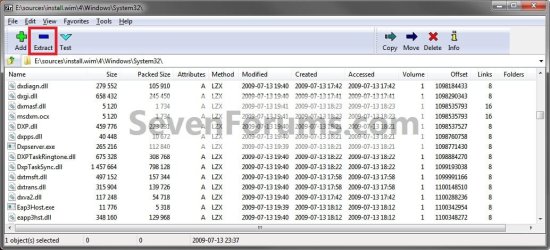
12. Verify that each extracted file is unblocked. You can now use the extracted files to copy and replace your missing or corrupted system files in your currently installed Windows 7.
Tip
You will need to take ownership and set permissions to "Allow" your account "Full Control" of the original file in your current installation before you will be allowed to replace it with the extracted copy.
If the system file is in use and you are unable to replace it with the extracted copy, then:
For example:
If the extracted replacement uDWM.DLL is on my desktop, then I would use type this in the command prompt at boot and press enter.
Copy /Y "C:\Users\User-name\Desktop\uDWM.dll" "C:\Windows\System32\uDWM.dll"
If the system file is in use and you are unable to replace it with the extracted copy, then:
- Open a Command Prompt at boot.
- Do steps 4B to 4D in this tutorial first to verify the drive letter of your Windows 7 drive. It's not always C: at boot.
- Type in the command below to copy and replace the original file with the extracted replacement file.
For example:
If the extracted replacement uDWM.DLL is on my desktop, then I would use type this in the command prompt at boot and press enter.
Copy /Y "C:\Users\User-name\Desktop\uDWM.dll" "C:\Windows\System32\uDWM.dll"
That's it,
Shawn
Related Tutorials
- How to Repair Windows 7 System Files with System File Checker
- How to Run Disk Check in Windows 7
- How to Do a System Restore in Windows 7
- How to Do a Repair Install to Fix Windows 7
- How to Create a Windows 7 System Repair Disc
- How to Extract Files from Windows 7 System Image using Virtual PC
- How to Extract Windows 7 System Image Files Using Disk Management
- How to Manually Extract Files from a Backup in Vista and Windows 7
- How to Extract Files and Folders from System Restore Points in Windows 7 and Vista
Last edited:


 LOL
LOL 


