
How to Run Disk Check in Windows 7
Information
This will show you how to run Check Disk or chkdsk in Windows 7 to check a selected hard disk for file system errors and bad sectors on it.
Note
Running a check disk may take a bit depending on the size of the selected hard disk. For faster and better results, do not use your computer while check disk is checking for errors.
You will have a choice to scan only, scan for and attempt to fix errors, scan for and attempt recovery of bad sectors, or scan for and attempt to fix errors and recovery of bad sectors.
You will have a choice to scan only, scan for and attempt to fix errors, scan for and attempt recovery of bad sectors, or scan for and attempt to fix errors and recovery of bad sectors.
Tip
Solutions to Common Check Disk (chkdsk) Issues in Windows 7
OPTION ONE
To Run Chkdsk from Drive's Properties Page
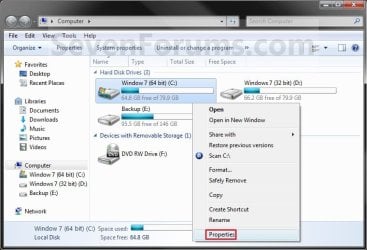
2. Right click the hard disk drive that you want to check, and click on Properties. (see screenshot below)
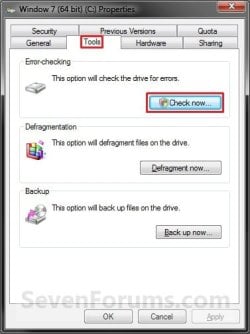
3. Click on the Tools tab, and click on the Check now button under Error-checking. (see screenshot below)
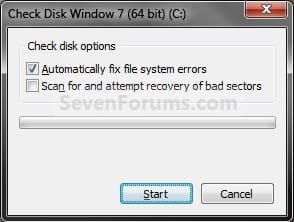
4. You will now see this window. Do the steps below for what you would like to do. (see screenshot below)
5. To Only Scan the Drive for Errors
NOTE: This will just give you a report if there are any drive errors or not, and will not attempt to fix them. A) Leave both boxes unchecked and click on the Start button. (see screenshot below step 4)
6. To Only Scan and Attempt Recovery of Bad Sectors
NOTE: This scan attempts to find and repair physical errors on the hard disk itself, and it can take much longer to complete. A) uncheck the Automatically fix file system errors box. (see screenshot below step 4)
B) Check the Scan for and attempt recovery of bad sectors box.
7. To Only Scan and Automatically Attempt to Fix Errors
NOTE: This will automatically attempt to repair problems with files and folders that the scan detects. A) Check the Automatically fix file system errors box. (see screenshot below step 4)
B) Uncheck the Scan for and attempt recovery of bad sectors box.
8. To Scan and Automatically Attempt to Fix Errors and Recover Bad Sectors
NOTE: This will scan for both file errors and physical errors (steps 6 and 7). It will then attempt to repair problems with files and folders, and recover physical errors. A) Check the Automatically fix file system errors box. (see screenshot below step 4)
B) Check the Scan for and attempt recovery of bad sectors box.
9. Click on the Start button, and do either step 10 or 11 below depending on if the drive is currently in use or not. (see screenshot below step 4)
10. If the selected hard disk is not in use, then you will see check disk start checking the disk now. (see screenshot below)
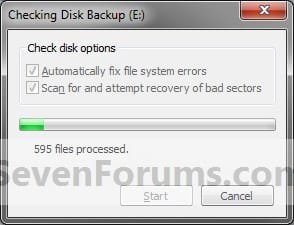
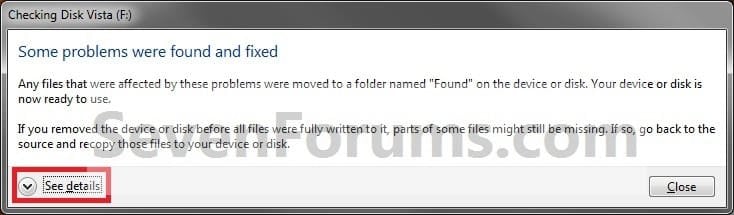
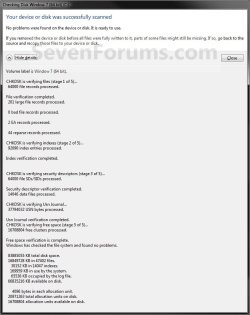
A) When the scan is complete, you will then see
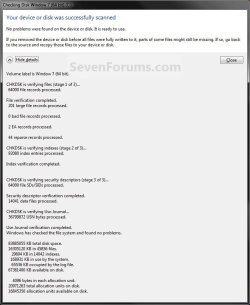
results similar to this. Click on Close. (see screenshots below)
B) Click on OK. (see screenshot below step 3)
C) Stop, you're done.
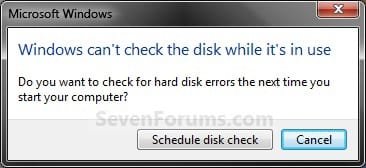
11. If the selected hard disk is in use, then click on the Schedule disk check button. (see screenshot below)
NOTE: If the hard disk that you selected in step 2 is in use (for example, the C: drive or partition that contains Windows 7), you'll be prompted to reschedule the disk check for the next time you restart your computer. Otherwise you will not see this window below.
A) Restart the computer.
B) During startup, you will only have 10 seconds to press a key to cancel the Disk Check from steps 7 or 8. (see screenshot below)
Warning
Once the Disk Check scan starts, DO NOT STOP the scan to prevent possible damage to the data on your hard drive.
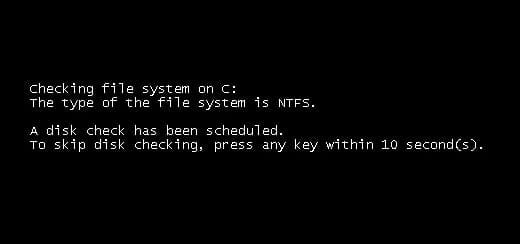
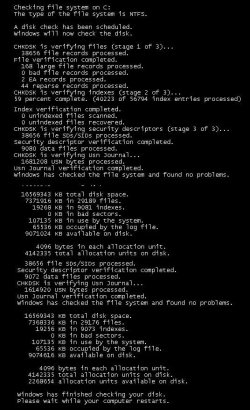
C) When the scan is complete you will see a report similar to this below briefly before the computer automatically restarts.
OPTION TWO
To Run Chkdsk from Command Prompt
NOTE: The chkdsk command can be used on a FAT32 or NTFS formatted disk. 1. Open a elevated command prompt or a command prompt at startup.
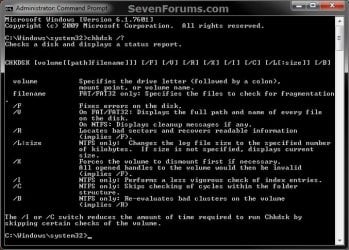
2. In the command prompt, type in the following command below followed by one or more switches that you would like to use below with a space between each switch and press Enter.
NOTE: For example, the most common command to run chkdsk on your C: drive is: chkdsk C: /F
chkdsk [drive letter]: [switches with space inbetween]
Switches that you can use in the command:
- /F - Fixes errors on the disk. The disk must be locked. If chkdsk cannot lock the drive, a message appears that asks you if you want to check the drive the next time you restart the computer. For example, on the C: drive.
- /V - Displays the name of each file in every directory as the disk is checked.
- /R - Locates bad sectors and recovers readable information. The disk must be locked. /r includes the functionality of /f, with the additional analysis of physical disk errors.
- /L:[size in KB] - Can only be used with a NTFS disk. Changes the chkdsk log file size to the number size in KB you type. If you omit the size parameter, typing /L by itself will display the current chkdsk log file size. For example, to have the default 65536 KB log file for the C: drive, you would type: chkdsk C: /F /L:65536
- /X - Forces the volume to dismount first, if necessary. All open handles to the drive are invalidated. /x also includes the functionality of /f.
- /I - Can only be used with a NTFS disk. Performs a less vigorous check of index entries, which reduces the amount of time required to run chkdsk.
- /C - Can only be used with a NTFS disk. Does not check cycles within the folder structure, which reduces the amount of time required to run chkdsk.
- /B - Can only be used with a NTFS disk. Clears the list of bad clusters on the volume and rescans all allocated and free clusters for errors. /b includes the functionality of /r. Use this parameter after imaging a volume to a new hard disk drive.
That's it,
Shawn
Related Tutorials
- How to Do a System Restore in Windows 7
- How to Repair Windows 7 System Files with System File Checker
- How to Extract Files from the Windows 7 Installation DVD
- How to See Windows 7 Reliability and Problem History with Reliability Monitor
- How to Run a Startup Repair in Windows 7
- How to Boot to the Advanced Boot Options in Windows 7
- How to Run the Memory Diagnostics Tool in Windows 7
- How to Boot to the System Recovery Options in Windows 7
- How to Turn the Windows 7 Disk Defragmenter Schedule On or Off
- How to Do a Repair Install to Fix Windows 7
- How to Use Windows 7 Disk Defragmenter
- How to Reset Check Disk to Not Run at Startup
- How to Use Extended Disk Cleanup in Windows 7
- How to Change the AUTOCHK Initiation Countdown Time in Windows 7
- How to Read the Event Viewer Log for Check Disk (chkdsk) in Windows
- How to Disable "Do you want to scan and fix Removable Drive" Prompt in Windows
Attachments
Last edited:


