
How to Create a "Control Panel All Tasks List" Shortcut in Windows 7 and Windows 8
Information
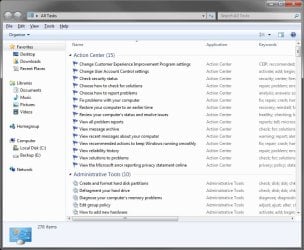
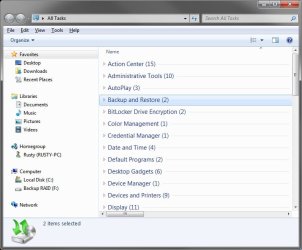
All Tasks (aka: GodMode) is a list of all Control Panel items.
This will show you how to create or download a Control Panel All Tasks List "God Mode" shortcut.
This will show you how to create or download a Control Panel All Tasks List "God Mode" shortcut.
Note
Credit belongs to our member Iggy for this tip.
Warning
If pinned to the taskbar, be sure to keep the Control Panel All Tasks List icon positioned (dragged) to the right of the default pinned Windows Explorer icon location on the taskbar. If it's to the left of it, then all opened Windows Explorer windows will have their thumbnail previews show in the pinned Control Panel All Tasks List icon instead.
EXAMPLE: Control Panel All Tasks List
NOTE: This will show you every task available in the Control Panel listed by category. Some of these are not normally displayed in the Control Panel.
OPTION ONE
To Download the "Control Panel All Tasks List" Shortcut
NOTE: This shortcut is the same one from OPTION TWO below.
1. Click on the Download button below to download the file below
Control_Panel_All_Tasks_List.zip
Download
2. Save the .zip file to the desktop.
3. Open the .zip file and extract (drag and drop) the Control Panel All Tasks List shortcut to the desktop.
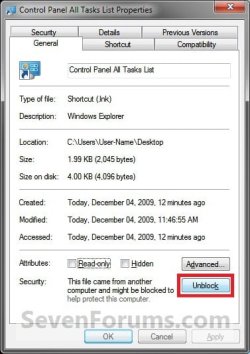
4. Right click on the Control Panel All Tasks List shortcut, and click on Properties, General tab, and on the Unblock button. (See screenshot below)
NOTE: If you do not have a Unblock button under the General tab, then the shortcut is already unblocked and you can continue on to step 5.
5. In Windows 7, you can now Pin to Taskbar or Pin to Start Menu, add to Quick Launch, assign a keyboard shortcut to it, or move this shortcut to where you like for easy use.
6. In Windows 8, you can Pin to Taskbar on desktop, Pin to Start screen, add to Quick Launch, assign a keyboard shortcut to it, or move this shortcut to where you like for easy use.
7. When finished, you can delete the downloaded .zip file on the desktop if you like, or save it to use again.
OPTION TWO
To Manually Create a "Control Panel All Tasks List" Shortcut
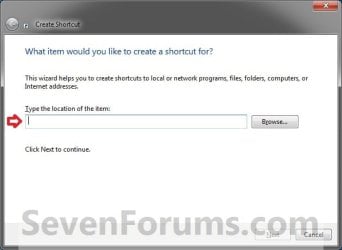
1. Right click on a empty area on desktop, and click on New and Shortcut.
2. Copy and paste the location below into the location area, and click on the Next button. (See screenshot below)
%windir%\explorer.exe shell:::{ED7BA470-8E54-465E-825C-99712043E01C}
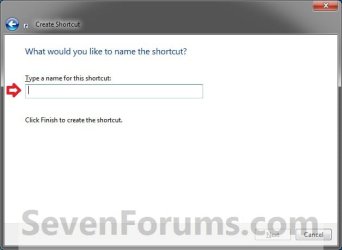
3. Type Control Panel All Tasks List for the name, and click on the Finish button. (See screenshot below)
NOTE: You can name this anything you would like though.
4. Right click on the new Control Panel All Tasks List shortcut on the Desktop and click on Properties.
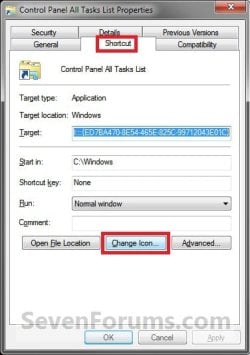
5. Click on the Shortcut tab, then click on the Change Icon button. (See screenshot below)
6. In the line under "Look for icons in this file", copy and paste the location below and press Enter. (See screenshot below)
%windir%\System32\imageres.dll
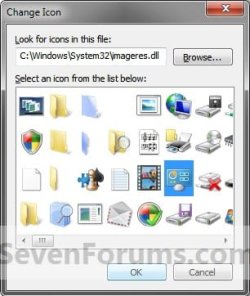
7. Select the icon highlighted in blue above and click on OK. (See screenshot above)
NOTE: You can use any icon that you would like instead though.
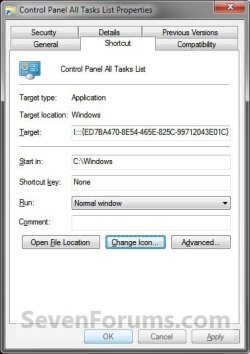
8. Click on OK. (See screenshot below)
9. In Windows 7, you can now Pin to Taskbar or Pin to Start Menu, add to Quick Launch, assign a keyboard shortcut to it, or move this shortcut to where you like for easy use.
10. In Windows 8, you can Pin to Taskbar on desktop, Pin to Start screen, add to Quick Launch, assign a keyboard shortcut to it, or move this shortcut to where you like for easy use.
OPTION THREE
To Manually Create a "Control Panel All Tasks List" Folder Shortcut
NOTE: This option will not have the Pin to Taskbar or Pin to Start Menu options in it's Properties page since it is treated like a folder in Windows 7 instead. However, it does allow you to use in say Opject Dock without the Windows Explorer issue.
1. Right click on your desktop, then click on New and Folder.
2. Copy the name below.
Control Panel All Tasks List.{ED7BA470-8E54-465E-825C-99712043E01C}
3. Right click on the New Folder, click on Rename, paste the name above, and press Enter.
4. You can now pin this folder to Start Menu (Windows 7 only), pin this folder to taskbar, or move it to where you like for easy use.
That's it,
Shawn
Related Tutorials
- How to Create a Control Panel All Tasks (GodMode) Toolbar in Windows 8 and 8.1
- How to Set a Default Control Panel View in Windows 7 and Windows 8
- How to Pin the Control Panel to the Windows 7 Taskbar
- Create a Control Panel Shortcut that Always Opens to Icons View in Windows 7 and Windows 8
- Create a Control Panel Shortcut that Always Opens to Category View in Windows 7 and Windows 8
- How to Add a "Control Panel" Cascading Desktop Context Menu in Windows 8
- How to Enable or Disable the Control Panel in Vista and Windows 7
- How to Enable or Disable Access to Control Panel and PC settings in Windows 8
- How to Hide or Show Icons in the Control Panel in Vista, Windows 7, and Windows 8
- How to Add or Remove "All Tasks" (God Mode) from Control Panel in Windows
- How to Create a "Search Settings" Shortcut in Windows 8
Attachments
Last edited:


