Windows 7 Forums


Windows 7: Power Efficiency Diagnostics Report


Power Efficiency Diagnostics Report

How to Run a Power Efficiency Diagnostics Report in Windows 7
Published 27 Feb 2009
Published by

Featured Tutorial

Chrome GPU Hardware Acceleration - Turn On or Off

How to Turn GPU "Hardware Acceleration" On or Off in Chrome

Emergency Kit - save your files from a dead OS

How to Create and Use a Linux Mint Mate USB Flash Drive to Recover your Files

Portable OS - Carry your OS on an External Drive

How to Create a Portable OS on an External Drive

Microsoft Outlook Desktop Shortcut - Create

How to Create a Special Outlook Desktop (Office XP style) Shortcut

System Preparation Tool - Use to Customize Windows

How to Use Sysprep to Customize Windows 7 and Windows 8

Microsoft Account "Two-step Verification" - Turn On or Off

How to Turn "Two-step Verification" On or Off for your Microsoft Account
How to Run a Power Efficiency Diagnostics Report in Windows 7

information   Information
This will show you how to run a power efficiency diagnostics report of your computer in Windows 7. This report will analyze your system for common energy efficiency and battery life problems, and report any errors, warnings, and informational details found.
warning   Warning
You should run this report when your computer is idle and with no open programs or documents for the best results.


Here's How:
1. Open a elevated command prompt.

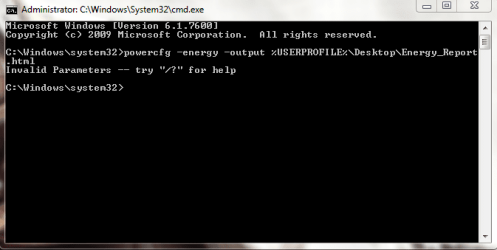
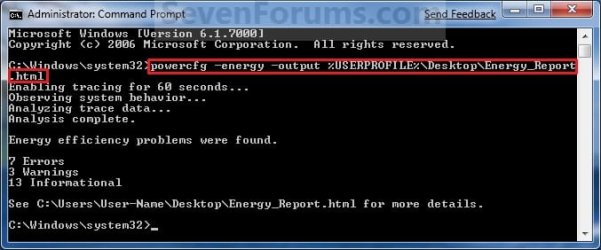
2. In the elevated command prompt, copy and paste the command below and press Enter. (see screenshot below)
NOTE: This will take 60 seconds to run by default. When done it will give you a quick report of any poroblems found and place a detailed Energy_Report.html file on your desktop.
powercfg -energy -output %USERPROFILE%\Desktop\Energy_Report.html

Note   Note
You could also change the command to be able to use your own location for where you want the Energy_Report.html file to be placed (outputted) at.

powercfg -energy -output "C:\Full Path\Energy_Report.html"
Power Efficiency Diagnostics Report-command.jpg
3. Double click on the Energy_Report.html file on your desktop to open and see the power efficiency diagnostics report in Internet Explorer. (See screenshot below)

Name:  HTML_File.jpg
Views: 25151
Size:  7.2 KB
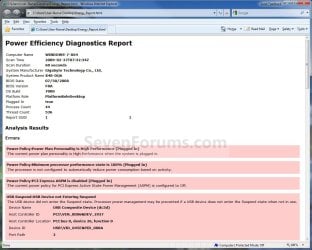
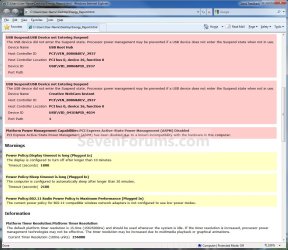
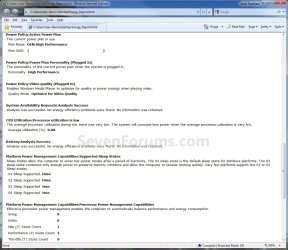
4. This is a copy of my power efficiency diagnostics report in Internet Explorer as an example of what you can see. (See screenshots below)
Power Efficiency Diagnostics Report-page1.jpg
Power Efficiency Diagnostics Report-page2.jpg
Power Efficiency Diagnostics Report-page3.jpg
Power Efficiency Diagnostics Report-page4.jpg
That's it,
Shawn


Need more help? Try searching our extensive help and support site.
Loading
27 Feb 2009   #1
Dinesh

Windows® 8 Pro (64-bit)
Mumbai, India


helped me to check my laptop battery life.
Nice one Shawn.


Last edited by Dinesh; 27 Feb 2009 at 05:22 AM..
My System SpecsSystem Spec

27 Feb 2009   #2
Brink

64-bit Windows 7 Ultimate SP1 & Windows 8 Enterprise
Texas


Hello Dinesh.

Yeah, the -energy extension is a nice addition to the powercfg command in Windows 7. Very nice.
My System SpecsSystem Spec
15 Sep 2010   #3
hariharan

Windows Vista Home Premium x86, Home Premium x86


Is this option Available for Windows Vista?
My System SpecsSystem Spec
.


15 Sep 2010   #4
Brink

64-bit Windows 7 Ultimate SP1 & Windows 8 Enterprise
Texas


Hello Hariharan,

Sorry, but it's not available in Vista. It's a new feature in Windows 7.
My System SpecsSystem Spec
24 Nov 2010   #5
RJL24

Windows 7 Home Premium
Manhattan. NYC USA


OK now I have the report, but what do I do with it in order to correct the seeming USB issues? Please be very specific, as I require detailed instructions. Thanks in advance.
Attached Files
File Type: pdf Energy_Report 112410.pdf (62.1 KB, 169 views)
My System SpecsSystem Spec
24 Nov 2010   #6
Brink

64-bit Windows 7 Ultimate SP1 & Windows 8 Enterprise
Texas


Hello RJl24,

If you are referring to your issue that you posted at your thread below, then this report has nothing to do with that.

Something went amiss
My System SpecsSystem Spec
24 Nov 2010   #7
RJL24

Windows 7 Home Premium
Manhattan. NYC USA


Actually, that issue of something went amiss

Something went amiss

has been resolved, please see the thread.


This posting and report is something I did when analyzing the amiss problem, and discovered a new diagnostic tool.

I redid the analysis today.

In effect the posting I made above regarding the report is relevant to the report and has nothing to do with the previous posting about the haywire behavior of my computer which seems strongly to be linked to a defective USB hub.

But thanks for noting my previous post anyway.
My System SpecsSystem Spec
24 Nov 2010   #8
Brink

64-bit Windows 7 Ultimate SP1 & Windows 8 Enterprise
Texas


This report basically just lets you know what the USB device's power plan options are set as. I did not notice any issues in your report that were just normal for these devices though.
My System SpecsSystem Spec
24 Nov 2010   #9
RJL24

Windows 7 Home Premium
Manhattan. NYC USA


Thanks for your analysis. if it ain't broke: don't fix it.

Cheers,
RJL
My System SpecsSystem Spec
Comment

 Power Efficiency Diagnostics Report problems?


Tutorial Tools


Similar help and support threads for: Power Efficiency Diagnostics Report
Windows 7 Tutorial Category
Power config report Performance & Maintenance
Hard Drive diagnostics report bad sectors Performance & Maintenance
My Power Efficiency Diagnostics Report Performance & Maintenance
Problems generating a report with System diagnostics Software
The new efficiency General Discussion


All times are GMT -5. The time now is 03:31 AM.


Seven Forums Android App Seven Forums IOS App Follow us on Facebook

Windows 7 Forums is an independent web site and has not been authorized,
sponsored, or otherwise approved by Microsoft Corporation.
"Windows 7" and related materials are trademarks of Microsoft Corp.
© Designer Media Ltd
  

1 2 3 4 5 6 7 8 9 10 11 12 13 14 15 16 17 18 19 20 21 22 23 24 25 26 27 28 29 30 31 32