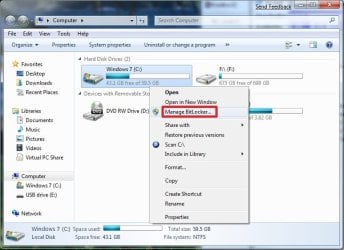
BitLocker Drive Encryption - Windows 7 Drive - Turn On or Off with no TPM

BitLocker Drive Encryption - Windows 7 Drive - Turn On or Off with no TPM

How to Turn On or Off BitLocker without a TPM for Windows 7 Drive


   Information
This will show you how to turn BitLocker Drive Encryption on or off for your Windows 7 or other operating system drive or partition when your computer does not have a Trusted Platform Module (TPM). When BitLocker Drive Encryption is turned on, you will be required to plug in the USB flash drive that contains the startup key before starting the computer to unlock the Windows 7 or other operating system drive or partition at startup.
   Note
When you add new files to the Windows 7 or other operating system drive or partition that is encrypted with BitLocker, BitLocker encrypts them automatically. Files remain encrypted only while they are stored in the encrypted drive. Files that are copied to another drive, partition, or computer are decrypted.
   Warning
REQUIREMENTS:
  • BitLocker is only available in the Windows 7 Ultimate and Enterprise editions.
  • A USB flash drive. BitLocker will store its key on the flash drive to use to unlock the Windows 7 drive at startup.
  • Have at least two partitions. One partition must include the drive Windows 7 is installed on and must be at least 400 MB. This is the drive that BitLocker will encrypt. The other partition is the active partition, which must remain unencrypted so that the computer can be started. If you have the 100 MB System Reserved partition that Windows 7 creates during installation on a blank drive or partition, then BitLocker will store the key on it instead. If your computer does not have two partitions, BitLocker will create them for you. Both partitions must be formatted with the NTFS file system.
  • A BIOS that supports USB devices during computer startup.


PREPARATION:

To Allow BitLocker without a TPM
   Note
You have the option to use the Local Group Policy Editor or a .reg file download to allow BitLocker to be able to encrypt the Windows 7 or other operating system drive or partition without a TPM and with a USB flash drive instead.

METHOD ONE:
Using Local Group Policy Editor
1. Open the Local Group Policy Editor.

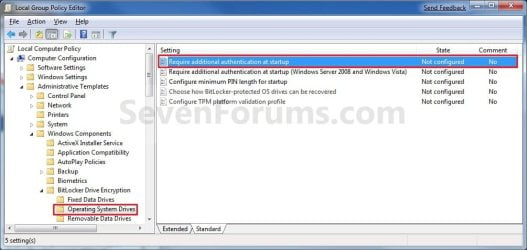
2. In the left pane, click on to expand Computer Configuration, Administrative Templates, Windows Components, BitLocker Drive Encryption, and Operating System Drives. (See screenshot below)
Group_Policy.jpg
3. In the right pane, right click on Require additional authentification at startup and click on Edit. (See screenshot above)

4. To Allow BitLocker without TPM
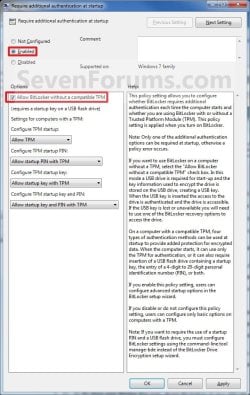
A) Select (dot) Enabled. (See screenshot below step 6)

B) Under the Options section, check the Allow Bitlocker without a compatible TPM box. (See screenshot below step 6)

C) Go to step 6.
5. To Undo Allow BitLocker without TPM
NOTE: This is optional. Unless you now have a TPM that you would like to use instead, it will not hurt anything to leave this set as in step 4 above.
A) You will need to do OPTION TWO below first to turn off BitLocker.

B) Select (dot) either Not Configured or Disabled. (See screenshot below step 6)
6. Click on OK. (See screenshot below)
Properties.jpg
7. Close the Local Group Policy Editor window.

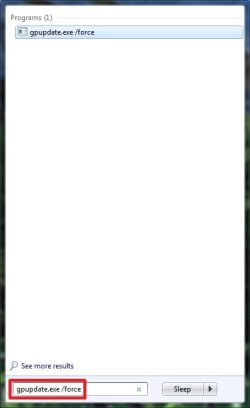
8. Open the Start menu, and type gpupdate.exe /force into the search line and press Enter. (See screenshot below)
Start_menu_Search.jpg
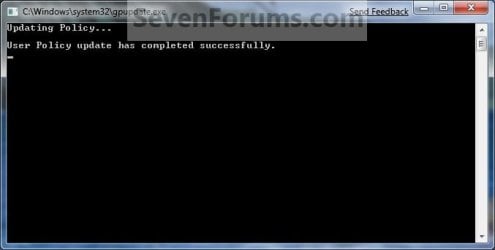
9. You will see this command prompt pop-up briefly, then go away when completey successfully. (See screenshot below)
Command.jpg
10. If you did step 4, then go to OPTION ONE to turn on BitLocker. If you did step 5, then you are done.


METHOD TWO:
Using a REG File Download
1. To Allow BitLocker without TPM
A) Click on the Download button below to download the file below.
Enable_No_TPM.zip

Download


B) Go to step 3.
2. To Undo Allow BitLocker without TPM
NOTE: This is optional. Unless you now have a TPM that you would like to use instead, it will not hurt anything to leave this set as in step 1 above.
A) You will need to do OPTION TWO below first to turn off BitLocker.

B) Click on the Download button below to download the file below.
Default_Require_TPM.zip

Download


3. Save the .zip file to your desktop.

4. Open the downloaded .zip file and extract the .reg file to the desktop.

5. Right click on extracted the .reg file and click on Merge.

6. Click on Run, Yes, Yes, and OK when prompted to approve the merge.

7. Restart the computer to apply.

8. When done, you can delete the downloaded .reg and .zip files if you like.

9. If you did step 1, then go to OPTION ONE to turn on BitLocker. If you did step 2, then you are done.


OPTION ONE

Turn On BitLocker to Encrypt Windows 7 Drive


1. Decide if you want 128-bit or 256-bit encryption.
NOTE: By default, Windows 7 will use AES encryption with 128-bit encryption keys and Diffuser unless changed already by you previously.

2. Plug in the USB flash drive that you want to use to have the startup and recovery key saved to.
NOTE: You will still be able to use the USB flash drive as normal. Just do not remove the BitLocker startup key file (step 7) that is used to unlock your Windows 7 at startup.

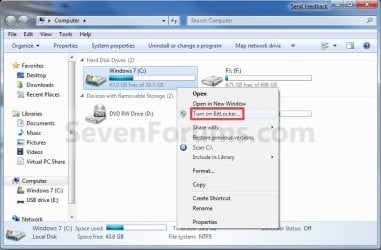
3. Open the Start menu and click on the Computer button, then right click on the Windows 7 or other operating system drive or partition letter and click on Turn on BitLocker. (See screenshot below)
Computer.jpg

A) Go to step 5.
OR

4. Open the Control Panel (icons view), and click on the BitLocker Drive Encryption icon.
A) Click on Turn On BitLocker for the Windows 7 or other operating system drive or partition letter. (See screenshot below)
Step1.jpg
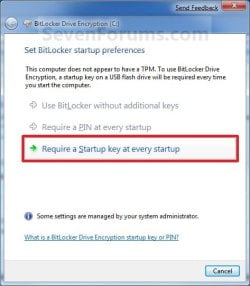
5. Select the Require a Startup key at every startup option. (See screenshot below)
NOTE: The Use BitLocker without additional key and Require PIN at every startup options are not available unless you have a TPM.
Step2.jpg
6. Select the USB flash drive from step 2, and click on the Save button. (See screenshot below)
Step3.jpg
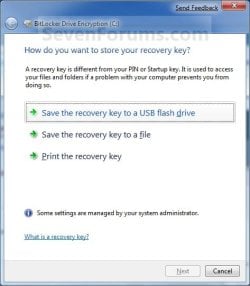
7. Select the Save the recovery key to a USB flash drive option. (See screenshot below)
NOTE: It is highly recommended that you do the other two options as well and save this key file somewhere safe. You will need the recovery key number to gain access to the encrypted Windows 7 or other operating system drive if you should lose or damage the USB flash drive with the startup key, or if BitLocker locks the drive.
Step4.jpg

A) Select the USB flash drive from step 2, and click on the Save button. (See screenshot below)
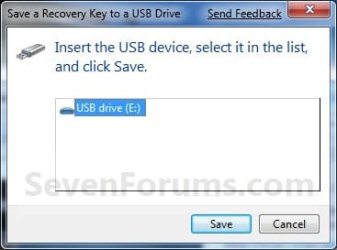
Step5.jpg
B) When finished, click on the Next button. (See screenshot below step 7)
8. Check the Run BitLocker system check box, then click on the Continue button. (See screenshot below)
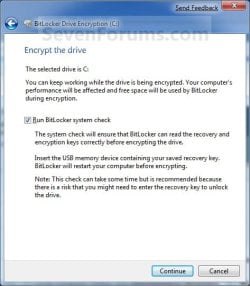
Step6.jpg
9. Click on the Restart Now button. (See screenshot below)
WARNING: This will restart your computer immediately. Close and save anything that you are working on first.
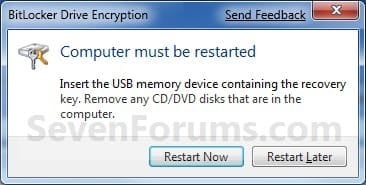
Step7.jpg
10. When the computer restarts, BitLocker will start encrypting the Windows 7 drive. Click on the BitLocker icon in the taskbar notification area (far right) to see the encryption status. (See screenshot below)
NOTE: This may take a while to finish.
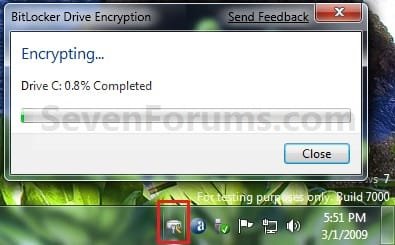
Step8.jpg
11. When BitLocker is finished, click on the Close button. (See screenshot below)
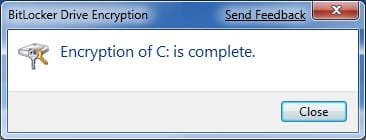
Step9.jpg
12. You will now have a Manage BitLocker option in the Control Panel and Computer for the encrypted drive. (See screenshots below)
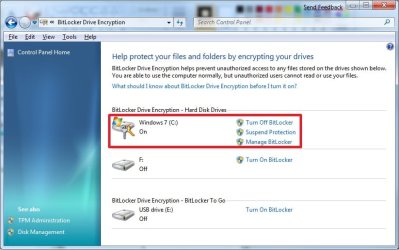
Step10A.jpg

Step10B.jpg

13. If you click on Manage BitLocker, these will be the options that you will have below. (See screenshot below)
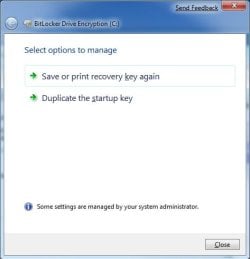
   Warning
It is highly recommended that you do one or both options below. You will need the recovery key number to gain access to the encrypted Windows 7 or other operating system drive if you should lose or damage the USB flash drive with the startup key, or if BitLocker locks the drive.


Step11.jpg
14. You're done. The Windows 7 or other operating system drive or partition is now encrypted with BitLocker Drive Encryption. You will now be required to plug in the USB flash drive that contains the startup key in order to unlock and startup Windows 7 or the other operating system.


OPTION TWO

Turn Off BitLocker to Decrypt Windows 7 Drive


NOTE: If you do not care about losing all data on the drive/partition, then formating or using the clean command will allso turn off BitLocker for the drive/partition.
1. Open the Control Panel (icons view), and click on the BitLocker Drive Encryption icon.

2. Click on Turn Off BitLocker for the Windows 7 or other operating system drive or partition letter that you want to turn off BitLocker with. (See screenshot below)
Off_Step1.jpg
3. Click on the Decrypt Drive button. (See screenshot below)
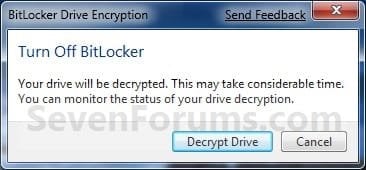
Off_Step2.jpg
4. BitLocker will now start decrypting the drive. Click on the BitLocker icon in the taskbar notification area (far right) to see the encryption status. (See screenshot below)
NOTE: This may take a while to finish.
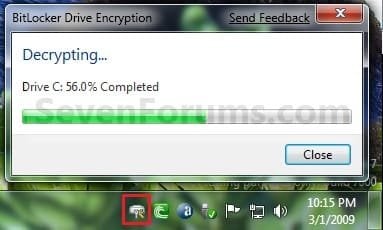
Off_Step3.jpg
5. When finished, click on the Close button. (See screenshot below)
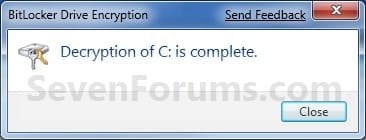
Off_Step4.jpg
6. The Control Panel and Computer will now have the Turn On BitLocker option again.
Step1.jpg

Computer.jpg

7. If you would like to restore the default Group Policy setting to have BitLocker use a TPM instead of a USB flash drive, then do METHOD ONE (step 5) or METHOD TWO (step 2) in the PREPARATION section at the top of the tutorial.

8. You're done. The Windows 7 drive or other operating system drive or partition is now decrypted.
That's it,
Shawn


Attachments

Last edited:
You're most welcome Kris. I'm sorry to hear that. I hope that you may be able to find an inexpensive solution.
 

My Computer My Computer

At a glance

64-bit Windows 11 Pro for WorkstationsIntel i7-8700K OC'd to 5 GHz64 GB (4x16GB) G.SKILL TridentZ RGB DDR4 3600...ASUS ROG-STRIX-GTX1080TI-O11G-GAMING
Computer type
PC/Desktop
Computer Manufacturer/Model Number
Self built custom
OS
64-bit Windows 11 Pro for Workstations
CPU
Intel i7-8700K OC'd to 5 GHz
Motherboard
ASUS ROG Maximus XI Formula Z390
Memory
64 GB (4x16GB) G.SKILL TridentZ RGB DDR4 3600 MHz
Graphics Card(s)
ASUS ROG-STRIX-GTX1080TI-O11G-GAMING
Sound Card
Integrated
Monitor(s) Displays
2 x Samsung Odyssey G7 27"
Screen Resolution
2560x1440
Hard Drives
1TB Samsung 990 PRO M.2,
4TB Samsung 990 PRO PRO M.2,
TerraMaster F8 SSD Plus NAS
PSU
Seasonic Prime Titanium 850W
Case
Thermaltake Core P3
Cooling
Corsair Hydro H115i
Keyboard
Logitech wireless K800
Mouse
Logitech MX Master 4
Internet Speed
2 Gb/s Download and 100 Mb/s Upload
Antivirus
Malwarebyte Anti-Malware Premium
Browser
Google Chrome
Other Info
Logitech Z625 speaker system,
Logitech BRIO 4K Pro webcam,
HP Color LaserJet Pro MFP M477fdn,
APC SMART-UPS RT 1000 XL - SURT1000XLI,
Galaxy S23 Plus phone
How big does the USB Drive have to be? I plan on buying a USB flash drive. I would like to know how big of one I need or how small.


Thank you
 
Last edited by a moderator:

My Computer My Computer

At a glance

Windows 7 Ultimate x64AMD Athlon(tm) II X4 630DDR3 2048 MB's/ PC3-10600 (1,333 MHz) (2 Cards)ATI Radeon HD 4200
Computer Manufacturer/Model Number
HP Pavilion p6000 series/Model p6654y
OS
Windows 7 Ultimate x64
CPU
AMD Athlon(tm) II X4 630
Motherboard
Socket AM3 (938)
Memory
DDR3 2048 MB's/ PC3-10600 (1,333 MHz) (2 Cards)
Graphics Card(s)
ATI Radeon HD 4200
Sound Card
Realtek High definition Audio
Monitor(s) Displays
PnP-Monitor (Standard) (I am using my Emerson TV)
Screen Resolution
1024 x 768 pixels at 75 Hz in true colors (32-bit)
Hard Drives
750.05 Gigabytes Usable Hard Drive Capacity
692.61 Gigabytes Hard Drive Free Space

hp DVD-RAM GH60L SATA CdRom Device [Optical drive]
YMAX magicJack USB Device [Optical drive]

Generic- Compact Flash USB Device [Hard drive] -- drive 2
Generic
PSU
250 Watts
Case
HP
Cooling
Fan
Keyboard
Logitech wireless wave combo MK550 (Came with mouse)
Mouse
Logitech wireless wave combo MK550 (Came with keyboard)
Internet Speed
DSL Download speed 15.06-mb/s Upload .49-mb/s ping 45ms
Other Info
HP Wireless 802.11 b/g/n PCIe Card
Hello Chiumiento, and welcome to Seven Forums.

The recpvery key file is not big at all. A 1 GB USB flash drive will be plenty big enough for this. :)
 

My Computer My Computer

At a glance

64-bit Windows 11 Pro for WorkstationsIntel i7-8700K OC'd to 5 GHz64 GB (4x16GB) G.SKILL TridentZ RGB DDR4 3600...ASUS ROG-STRIX-GTX1080TI-O11G-GAMING
Computer type
PC/Desktop
Computer Manufacturer/Model Number
Self built custom
OS
64-bit Windows 11 Pro for Workstations
CPU
Intel i7-8700K OC'd to 5 GHz
Motherboard
ASUS ROG Maximus XI Formula Z390
Memory
64 GB (4x16GB) G.SKILL TridentZ RGB DDR4 3600 MHz
Graphics Card(s)
ASUS ROG-STRIX-GTX1080TI-O11G-GAMING
Sound Card
Integrated
Monitor(s) Displays
2 x Samsung Odyssey G7 27"
Screen Resolution
2560x1440
Hard Drives
1TB Samsung 990 PRO M.2,
4TB Samsung 990 PRO PRO M.2,
TerraMaster F8 SSD Plus NAS
PSU
Seasonic Prime Titanium 850W
Case
Thermaltake Core P3
Cooling
Corsair Hydro H115i
Keyboard
Logitech wireless K800
Mouse
Logitech MX Master 4
Internet Speed
2 Gb/s Download and 100 Mb/s Upload
Antivirus
Malwarebyte Anti-Malware Premium
Browser
Google Chrome
Other Info
Logitech Z625 speaker system,
Logitech BRIO 4K Pro webcam,
HP Color LaserJet Pro MFP M477fdn,
APC SMART-UPS RT 1000 XL - SURT1000XLI,
Galaxy S23 Plus phone
USB flash drive size?

That is good to know. I was getting ready to buy one that is a good size one. I would also like to ask a question that does not have to do with this bit locker if I could. If I would want to go ahead and do a system back up. How much space would I need on a flash drive to do that? I know that is depends on how much stuff I have personally. But if you were to say a computer with not much on it. Also what exactly does the system back up save. Just my files? Like my pictures and my documents. Or does it save all my programs and how I have the whole computer setup. I would really like to know the answer to this. I do have quite a few programs on here. I have a 720 GB hard drive. I have 40.8 GB's of it used right now. Does that mean that I would need that much space to do a back up?

Thank you for the last answer. I can tell that this site is going to be very useful and helpful already.

Chiumiento​
 

My Computer My Computer

At a glance

Windows 7 Ultimate x64AMD Athlon(tm) II X4 630DDR3 2048 MB's/ PC3-10600 (1,333 MHz) (2 Cards)ATI Radeon HD 4200
Computer Manufacturer/Model Number
HP Pavilion p6000 series/Model p6654y
OS
Windows 7 Ultimate x64
CPU
AMD Athlon(tm) II X4 630
Motherboard
Socket AM3 (938)
Memory
DDR3 2048 MB's/ PC3-10600 (1,333 MHz) (2 Cards)
Graphics Card(s)
ATI Radeon HD 4200
Sound Card
Realtek High definition Audio
Monitor(s) Displays
PnP-Monitor (Standard) (I am using my Emerson TV)
Screen Resolution
1024 x 768 pixels at 75 Hz in true colors (32-bit)
Hard Drives
750.05 Gigabytes Usable Hard Drive Capacity
692.61 Gigabytes Hard Drive Free Space

hp DVD-RAM GH60L SATA CdRom Device [Optical drive]
YMAX magicJack USB Device [Optical drive]

Generic- Compact Flash USB Device [Hard drive] -- drive 2
Generic
PSU
250 Watts
Case
HP
Cooling
Fan
Keyboard
Logitech wireless wave combo MK550 (Came with mouse)
Mouse
Logitech wireless wave combo MK550 (Came with keyboard)
Internet Speed
DSL Download speed 15.06-mb/s Upload .49-mb/s ping 45ms
Other Info
HP Wireless 802.11 b/g/n PCIe Card
You're most welcome Chiumiento.

Yes, that would be correct. Whatever the size of the files that you are backing up is what you will need for the drive that you are backing it up to. Usually this will be way to much for a USB flash drive. Since you have a desktop, you would be better served with either adding a second internal HDD or connecting an external HDD to backup to instead.
 

My Computer My Computer

At a glance

64-bit Windows 11 Pro for WorkstationsIntel i7-8700K OC'd to 5 GHz64 GB (4x16GB) G.SKILL TridentZ RGB DDR4 3600...ASUS ROG-STRIX-GTX1080TI-O11G-GAMING
Computer type
PC/Desktop
Computer Manufacturer/Model Number
Self built custom
OS
64-bit Windows 11 Pro for Workstations
CPU
Intel i7-8700K OC'd to 5 GHz
Motherboard
ASUS ROG Maximus XI Formula Z390
Memory
64 GB (4x16GB) G.SKILL TridentZ RGB DDR4 3600 MHz
Graphics Card(s)
ASUS ROG-STRIX-GTX1080TI-O11G-GAMING
Sound Card
Integrated
Monitor(s) Displays
2 x Samsung Odyssey G7 27"
Screen Resolution
2560x1440
Hard Drives
1TB Samsung 990 PRO M.2,
4TB Samsung 990 PRO PRO M.2,
TerraMaster F8 SSD Plus NAS
PSU
Seasonic Prime Titanium 850W
Case
Thermaltake Core P3
Cooling
Corsair Hydro H115i
Keyboard
Logitech wireless K800
Mouse
Logitech MX Master 4
Internet Speed
2 Gb/s Download and 100 Mb/s Upload
Antivirus
Malwarebyte Anti-Malware Premium
Browser
Google Chrome
Other Info
Logitech Z625 speaker system,
Logitech BRIO 4K Pro webcam,
HP Color LaserJet Pro MFP M477fdn,
APC SMART-UPS RT 1000 XL - SURT1000XLI,
Galaxy S23 Plus phone
Question again

You're most welcome Chiumiento.

Yes, that would be correct. Whatever the size of the files that you are backing up is what you will need for the drive that you are backing it up to. Usually this will be way to much for a USB flash drive. Since you have a desktop, you would be better served with either adding a second internal HDD or connecting an external HDD to backup to instead.
Okay, thank you very much. One more thing I can ask you maybe. Is ounce I use the the flash drive for the bit locker encryption and if it does not use all the space on the flash drive. Can I use the other space that is left on it for other things. Like either pictures or saving documents or for anything period.
 

My Computer My Computer

At a glance

Windows 7 Ultimate x64AMD Athlon(tm) II X4 630DDR3 2048 MB's/ PC3-10600 (1,333 MHz) (2 Cards)ATI Radeon HD 4200
Computer Manufacturer/Model Number
HP Pavilion p6000 series/Model p6654y
OS
Windows 7 Ultimate x64
CPU
AMD Athlon(tm) II X4 630
Motherboard
Socket AM3 (938)
Memory
DDR3 2048 MB's/ PC3-10600 (1,333 MHz) (2 Cards)
Graphics Card(s)
ATI Radeon HD 4200
Sound Card
Realtek High definition Audio
Monitor(s) Displays
PnP-Monitor (Standard) (I am using my Emerson TV)
Screen Resolution
1024 x 768 pixels at 75 Hz in true colors (32-bit)
Hard Drives
750.05 Gigabytes Usable Hard Drive Capacity
692.61 Gigabytes Hard Drive Free Space

hp DVD-RAM GH60L SATA CdRom Device [Optical drive]
YMAX magicJack USB Device [Optical drive]

Generic- Compact Flash USB Device [Hard drive] -- drive 2
Generic
PSU
250 Watts
Case
HP
Cooling
Fan
Keyboard
Logitech wireless wave combo MK550 (Came with mouse)
Mouse
Logitech wireless wave combo MK550 (Came with keyboard)
Internet Speed
DSL Download speed 15.06-mb/s Upload .49-mb/s ping 45ms
Other Info
HP Wireless 802.11 b/g/n PCIe Card
Yes, you sure can. :)
 

My Computer My Computer

At a glance

64-bit Windows 11 Pro for WorkstationsIntel i7-8700K OC'd to 5 GHz64 GB (4x16GB) G.SKILL TridentZ RGB DDR4 3600...ASUS ROG-STRIX-GTX1080TI-O11G-GAMING
Computer type
PC/Desktop
Computer Manufacturer/Model Number
Self built custom
OS
64-bit Windows 11 Pro for Workstations
CPU
Intel i7-8700K OC'd to 5 GHz
Motherboard
ASUS ROG Maximus XI Formula Z390
Memory
64 GB (4x16GB) G.SKILL TridentZ RGB DDR4 3600 MHz
Graphics Card(s)
ASUS ROG-STRIX-GTX1080TI-O11G-GAMING
Sound Card
Integrated
Monitor(s) Displays
2 x Samsung Odyssey G7 27"
Screen Resolution
2560x1440
Hard Drives
1TB Samsung 990 PRO M.2,
4TB Samsung 990 PRO PRO M.2,
TerraMaster F8 SSD Plus NAS
PSU
Seasonic Prime Titanium 850W
Case
Thermaltake Core P3
Cooling
Corsair Hydro H115i
Keyboard
Logitech wireless K800
Mouse
Logitech MX Master 4
Internet Speed
2 Gb/s Download and 100 Mb/s Upload
Antivirus
Malwarebyte Anti-Malware Premium
Browser
Google Chrome
Other Info
Logitech Z625 speaker system,
Logitech BRIO 4K Pro webcam,
HP Color LaserJet Pro MFP M477fdn,
APC SMART-UPS RT 1000 XL - SURT1000XLI,
Galaxy S23 Plus phone
USB flash drive not found

I've got a strange situation. I can boot from USB. So my BIOS settings seem to be ok, looks like an active USB if I can boot from it... ?

But when I try to set bitlocker on on my C (W7 OS) partition, it does all the checks, all things in the tutorial proceed exactly as explained but when bitlocker restarts the system to encrypt C: for the first time.. it stops with the statement that it cannot find the usb flash with the startup key on it.

Any ideas?

Thx,
Mark
 

My Computer My Computer

At a glance

Windows 7 64b UltimateI7-2600 3.40GHz - testing various OC levels..2x 4Gb DDR3/1333GTX570 - testing OC levels
Computer Manufacturer/Model Number
custom build
OS
Windows 7 64b Ultimate
CPU
I7-2600 3.40GHz - testing various OC levels..
Motherboard
ASUS Sabretooth
Memory
2x 4Gb DDR3/1333
Graphics Card(s)
GTX570 - testing OC levels
Sound Card
motherboard 7.1 DIG.
Monitor(s) Displays
2x Ilyama 24" E2409HDS-B1 2ms/DVI
Screen Resolution
1920 x 1080
Hard Drives
120 GB Intel Elmcrest SSD
1 TB SATAII 7200RPM/32MB
External 2TB USB3
PSU
Corsair Pro HX850W
Cooling
Coolermaster Hyper V8
Keyboard
Logitech G110
Mouse
Logitech G700
Internet Speed
25Mb
Other Info
CPU: 7,7 RAM: 7,7 GTX: 7,9 GTX 3D : 7,9 SSD 7,6
Overall 7,6 ...... now to speed up the SSD... ;)

Also use a Dell XPS M1710 on Vista 32b
Asus LT on Vista 32
3 older machines still doing fine on Linux/ubuntu but not used much anymore...
Hello Mark,

Do you have the key in the root directory of the USB flash drive and not in any folder?
 

My Computer My Computer

At a glance

64-bit Windows 11 Pro for WorkstationsIntel i7-8700K OC'd to 5 GHz64 GB (4x16GB) G.SKILL TridentZ RGB DDR4 3600...ASUS ROG-STRIX-GTX1080TI-O11G-GAMING
Computer type
PC/Desktop
Computer Manufacturer/Model Number
Self built custom
OS
64-bit Windows 11 Pro for Workstations
CPU
Intel i7-8700K OC'd to 5 GHz
Motherboard
ASUS ROG Maximus XI Formula Z390
Memory
64 GB (4x16GB) G.SKILL TridentZ RGB DDR4 3600 MHz
Graphics Card(s)
ASUS ROG-STRIX-GTX1080TI-O11G-GAMING
Sound Card
Integrated
Monitor(s) Displays
2 x Samsung Odyssey G7 27"
Screen Resolution
2560x1440
Hard Drives
1TB Samsung 990 PRO M.2,
4TB Samsung 990 PRO PRO M.2,
TerraMaster F8 SSD Plus NAS
PSU
Seasonic Prime Titanium 850W
Case
Thermaltake Core P3
Cooling
Corsair Hydro H115i
Keyboard
Logitech wireless K800
Mouse
Logitech MX Master 4
Internet Speed
2 Gb/s Download and 100 Mb/s Upload
Antivirus
Malwarebyte Anti-Malware Premium
Browser
Google Chrome
Other Info
Logitech Z625 speaker system,
Logitech BRIO 4K Pro webcam,
HP Color LaserJet Pro MFP M477fdn,
APC SMART-UPS RT 1000 XL - SURT1000XLI,
Galaxy S23 Plus phone
Hello Mark,

Do you have the key in the root directory of the USB flash drive and not in any folder?

Yes, I think so... the usb doesn't have any dir's. I can see the repair key but I cant't see the startup key even though some space has been used for that. I assumed the startup key was a hidden file.
 

My Computer My Computer

At a glance

Windows 7 64b UltimateI7-2600 3.40GHz - testing various OC levels..2x 4Gb DDR3/1333GTX570 - testing OC levels
Computer Manufacturer/Model Number
custom build
OS
Windows 7 64b Ultimate
CPU
I7-2600 3.40GHz - testing various OC levels..
Motherboard
ASUS Sabretooth
Memory
2x 4Gb DDR3/1333
Graphics Card(s)
GTX570 - testing OC levels
Sound Card
motherboard 7.1 DIG.
Monitor(s) Displays
2x Ilyama 24" E2409HDS-B1 2ms/DVI
Screen Resolution
1920 x 1080
Hard Drives
120 GB Intel Elmcrest SSD
1 TB SATAII 7200RPM/32MB
External 2TB USB3
PSU
Corsair Pro HX850W
Cooling
Coolermaster Hyper V8
Keyboard
Logitech G110
Mouse
Logitech G700
Internet Speed
25Mb
Other Info
CPU: 7,7 RAM: 7,7 GTX: 7,9 GTX 3D : 7,9 SSD 7,6
Overall 7,6 ...... now to speed up the SSD... ;)

Also use a Dell XPS M1710 on Vista 32b
Asus LT on Vista 32
3 older machines still doing fine on Linux/ubuntu but not used much anymore...
You might start over and add the key to the USB flash key to see if it may have just gotten corrupted the first time.

In addition, what do you have the USB flash formated as? (ex: FAT32 or NTFS) You might try the opposite type to see if that may help.
 

My Computer My Computer

At a glance

64-bit Windows 11 Pro for WorkstationsIntel i7-8700K OC'd to 5 GHz64 GB (4x16GB) G.SKILL TridentZ RGB DDR4 3600...ASUS ROG-STRIX-GTX1080TI-O11G-GAMING
Computer type
PC/Desktop
Computer Manufacturer/Model Number
Self built custom
OS
64-bit Windows 11 Pro for Workstations
CPU
Intel i7-8700K OC'd to 5 GHz
Motherboard
ASUS ROG Maximus XI Formula Z390
Memory
64 GB (4x16GB) G.SKILL TridentZ RGB DDR4 3600 MHz
Graphics Card(s)
ASUS ROG-STRIX-GTX1080TI-O11G-GAMING
Sound Card
Integrated
Monitor(s) Displays
2 x Samsung Odyssey G7 27"
Screen Resolution
2560x1440
Hard Drives
1TB Samsung 990 PRO M.2,
4TB Samsung 990 PRO PRO M.2,
TerraMaster F8 SSD Plus NAS
PSU
Seasonic Prime Titanium 850W
Case
Thermaltake Core P3
Cooling
Corsair Hydro H115i
Keyboard
Logitech wireless K800
Mouse
Logitech MX Master 4
Internet Speed
2 Gb/s Download and 100 Mb/s Upload
Antivirus
Malwarebyte Anti-Malware Premium
Browser
Google Chrome
Other Info
Logitech Z625 speaker system,
Logitech BRIO 4K Pro webcam,
HP Color LaserJet Pro MFP M477fdn,
APC SMART-UPS RT 1000 XL - SURT1000XLI,
Galaxy S23 Plus phone
You might start over and add the key to the USB flash key to see if it may have just gotten corrupted the first time.

In addition, what do you have the USB flash formated as? (ex: FAT32 or NTFS) You might try the opposite type to see if that may help.

Ok... hadn't thought of that. It was fat. Formatting to NTFS now and I'll try again...thx.

Nope, that wasn't it. Still can't find the startup key... as if it does not read the usb at all.....
 
Last edited:

My Computer My Computer

At a glance

Windows 7 64b UltimateI7-2600 3.40GHz - testing various OC levels..2x 4Gb DDR3/1333GTX570 - testing OC levels
Computer Manufacturer/Model Number
custom build
OS
Windows 7 64b Ultimate
CPU
I7-2600 3.40GHz - testing various OC levels..
Motherboard
ASUS Sabretooth
Memory
2x 4Gb DDR3/1333
Graphics Card(s)
GTX570 - testing OC levels
Sound Card
motherboard 7.1 DIG.
Monitor(s) Displays
2x Ilyama 24" E2409HDS-B1 2ms/DVI
Screen Resolution
1920 x 1080
Hard Drives
120 GB Intel Elmcrest SSD
1 TB SATAII 7200RPM/32MB
External 2TB USB3
PSU
Corsair Pro HX850W
Cooling
Coolermaster Hyper V8
Keyboard
Logitech G110
Mouse
Logitech G700
Internet Speed
25Mb
Other Info
CPU: 7,7 RAM: 7,7 GTX: 7,9 GTX 3D : 7,9 SSD 7,6
Overall 7,6 ...... now to speed up the SSD... ;)

Also use a Dell XPS M1710 on Vista 32b
Asus LT on Vista 32
3 older machines still doing fine on Linux/ubuntu but not used much anymore...
Or, maybe I don't quite get it. I'm not getting a key (file) i can see, anywhere. I do get the screen where I'm asked to save the startup key on the USB stick. Which is the only option I get. After doing that the next step is the recovery file (which I print AND put on the USB). That I see on the USB. How can I force seeing the startup key it claims to create?
 

My Computer My Computer

At a glance

Windows 7 64b UltimateI7-2600 3.40GHz - testing various OC levels..2x 4Gb DDR3/1333GTX570 - testing OC levels
Computer Manufacturer/Model Number
custom build
OS
Windows 7 64b Ultimate
CPU
I7-2600 3.40GHz - testing various OC levels..
Motherboard
ASUS Sabretooth
Memory
2x 4Gb DDR3/1333
Graphics Card(s)
GTX570 - testing OC levels
Sound Card
motherboard 7.1 DIG.
Monitor(s) Displays
2x Ilyama 24" E2409HDS-B1 2ms/DVI
Screen Resolution
1920 x 1080
Hard Drives
120 GB Intel Elmcrest SSD
1 TB SATAII 7200RPM/32MB
External 2TB USB3
PSU
Corsair Pro HX850W
Cooling
Coolermaster Hyper V8
Keyboard
Logitech G110
Mouse
Logitech G700
Internet Speed
25Mb
Other Info
CPU: 7,7 RAM: 7,7 GTX: 7,9 GTX 3D : 7,9 SSD 7,6
Overall 7,6 ...... now to speed up the SSD... ;)

Also use a Dell XPS M1710 on Vista 32b
Asus LT on Vista 32
3 older machines still doing fine on Linux/ubuntu but not used much anymore...
Great tutorial. Can I use the Corsair Flash Padlock 2 USB flash drive - 8 GB to store the startup key on. This would be to add security to the usb startup stick incase its left liying about with the laptop.

Is it also possible to move the startup key to another usb after its created. As I have a few USB's and want to swap it around if my family want to borrow them. Can I just plug them in and copy and paste it to another drive, or do I have to go through bitlocker to do that?
 
Last edited by a moderator:

My Computer My Computer

At a glance

Windows 7 x32
OS
Windows 7 x32
Hello Digi, and welcome to Seven Forums.

It would be best to use steps 12 and 13 in OPTION ONE with the Duplicate the startup key option to add it to any other USB's that you like to make sure that they are properly copied over instead. This way you wouldn't have to worry about missing copying anything over. :)
 

My Computer My Computer

At a glance

64-bit Windows 11 Pro for WorkstationsIntel i7-8700K OC'd to 5 GHz64 GB (4x16GB) G.SKILL TridentZ RGB DDR4 3600...ASUS ROG-STRIX-GTX1080TI-O11G-GAMING
Computer type
PC/Desktop
Computer Manufacturer/Model Number
Self built custom
OS
64-bit Windows 11 Pro for Workstations
CPU
Intel i7-8700K OC'd to 5 GHz
Motherboard
ASUS ROG Maximus XI Formula Z390
Memory
64 GB (4x16GB) G.SKILL TridentZ RGB DDR4 3600 MHz
Graphics Card(s)
ASUS ROG-STRIX-GTX1080TI-O11G-GAMING
Sound Card
Integrated
Monitor(s) Displays
2 x Samsung Odyssey G7 27"
Screen Resolution
2560x1440
Hard Drives
1TB Samsung 990 PRO M.2,
4TB Samsung 990 PRO PRO M.2,
TerraMaster F8 SSD Plus NAS
PSU
Seasonic Prime Titanium 850W
Case
Thermaltake Core P3
Cooling
Corsair Hydro H115i
Keyboard
Logitech wireless K800
Mouse
Logitech MX Master 4
Internet Speed
2 Gb/s Download and 100 Mb/s Upload
Antivirus
Malwarebyte Anti-Malware Premium
Browser
Google Chrome
Other Info
Logitech Z625 speaker system,
Logitech BRIO 4K Pro webcam,
HP Color LaserJet Pro MFP M477fdn,
APC SMART-UPS RT 1000 XL - SURT1000XLI,
Galaxy S23 Plus phone
Great Thanks for the reply for the duplicate key. Will the corsair flash drive work with it? I dont think it would have problems as the pin system on the drive and doesnt require any software. And it works on most computers and games consoles. But I thought Id ask what you think?
 

My Computer My Computer

At a glance

Windows 7 x32
OS
Windows 7 x32
I never used that USB key before, but I wouldn't see any reason why it would work as well. You could give it a try and see. If not for some odd reason, you'll still have your other USB key to use instead.
 

My Computer My Computer

At a glance

64-bit Windows 11 Pro for WorkstationsIntel i7-8700K OC'd to 5 GHz64 GB (4x16GB) G.SKILL TridentZ RGB DDR4 3600...ASUS ROG-STRIX-GTX1080TI-O11G-GAMING
Computer type
PC/Desktop
Computer Manufacturer/Model Number
Self built custom
OS
64-bit Windows 11 Pro for Workstations
CPU
Intel i7-8700K OC'd to 5 GHz
Motherboard
ASUS ROG Maximus XI Formula Z390
Memory
64 GB (4x16GB) G.SKILL TridentZ RGB DDR4 3600 MHz
Graphics Card(s)
ASUS ROG-STRIX-GTX1080TI-O11G-GAMING
Sound Card
Integrated
Monitor(s) Displays
2 x Samsung Odyssey G7 27"
Screen Resolution
2560x1440
Hard Drives
1TB Samsung 990 PRO M.2,
4TB Samsung 990 PRO PRO M.2,
TerraMaster F8 SSD Plus NAS
PSU
Seasonic Prime Titanium 850W
Case
Thermaltake Core P3
Cooling
Corsair Hydro H115i
Keyboard
Logitech wireless K800
Mouse
Logitech MX Master 4
Internet Speed
2 Gb/s Download and 100 Mb/s Upload
Antivirus
Malwarebyte Anti-Malware Premium
Browser
Google Chrome
Other Info
Logitech Z625 speaker system,
Logitech BRIO 4K Pro webcam,
HP Color LaserJet Pro MFP M477fdn,
APC SMART-UPS RT 1000 XL - SURT1000XLI,
Galaxy S23 Plus phone
Cool, Thanks for the advice, thats what I thought too.
 

My Computer My Computer

At a glance

Windows 7 x32
OS
Windows 7 x32
You're welcome. Please let us know how it went. :)
 

My Computer My Computer

At a glance

64-bit Windows 11 Pro for WorkstationsIntel i7-8700K OC'd to 5 GHz64 GB (4x16GB) G.SKILL TridentZ RGB DDR4 3600...ASUS ROG-STRIX-GTX1080TI-O11G-GAMING
Computer type
PC/Desktop
Computer Manufacturer/Model Number
Self built custom
OS
64-bit Windows 11 Pro for Workstations
CPU
Intel i7-8700K OC'd to 5 GHz
Motherboard
ASUS ROG Maximus XI Formula Z390
Memory
64 GB (4x16GB) G.SKILL TridentZ RGB DDR4 3600 MHz
Graphics Card(s)
ASUS ROG-STRIX-GTX1080TI-O11G-GAMING
Sound Card
Integrated
Monitor(s) Displays
2 x Samsung Odyssey G7 27"
Screen Resolution
2560x1440
Hard Drives
1TB Samsung 990 PRO M.2,
4TB Samsung 990 PRO PRO M.2,
TerraMaster F8 SSD Plus NAS
PSU
Seasonic Prime Titanium 850W
Case
Thermaltake Core P3
Cooling
Corsair Hydro H115i
Keyboard
Logitech wireless K800
Mouse
Logitech MX Master 4
Internet Speed
2 Gb/s Download and 100 Mb/s Upload
Antivirus
Malwarebyte Anti-Malware Premium
Browser
Google Chrome
Other Info
Logitech Z625 speaker system,
Logitech BRIO 4K Pro webcam,
HP Color LaserJet Pro MFP M477fdn,
APC SMART-UPS RT 1000 XL - SURT1000XLI,
Galaxy S23 Plus phone
Brink, would it be possible for me to email myself the startup key and recovery key incase I ever need to get them?
 

My Computer My Computer

At a glance

Windows 7 x32
OS
Windows 7 x32
Back
Top