Windows 7 Forums


Windows 7: Open Command Window Here as Administrator


Open Command Window Here as Administrator

Add or Remove "Open Command Window Here as Administrator" to Context Menu
Published 16 Dec 2009
Published by

Featured Tutorial

Microsoft Account Primary Alias Email Address - Change

How to Change your Microsoft Account Primary Alias Email Address

User Profiles - Create and Move During Windows 7 Installation

How to Create User Accounts on another Partition or Disk During Windows 7 Installation

Microsoft Account "Two-step Verification" - Turn On or Off

How to Turn "Two-step Verification" On or Off for your Microsoft Account

Peppermint3 - Create Live CD/DVD/USB To Use For Emergency Backup

How to Perform an Emergency Data Backup When Windows 7 Will Not Boot

Windows 7 Installation - Transfer to a New Computer

How to Transfer your Complete Windows 7 Installation to a New Computer

Secunia ONLINE Software Inspector

How to Scan for Common Software Vulnerabilities
Add or Remove "Open Command Window Here as Administrator" to Context Menu

information   Information
This will show you how to add or remove Open Command Window Here as Administrator to the context menu of a folder, drive, and desktop of all users to open a elevated command prompt with the focus at the folder, drive, desktop location in Windows 7 and Windows 8.

You must be logged in as an administrator to be able to do the steps in this tutorial.

Note   Note
This is just like the Open Command Window Here context menu item, except that it opens a elevated "run as administrator" command prompt at the folder or drive location instead.

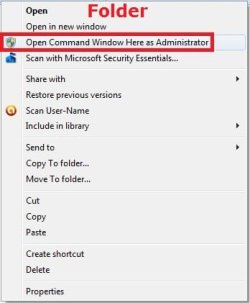
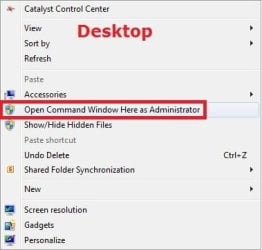
When added, you can right click on a folder or drive to see the Open Command Window Here as Administrator context menu item. You will then be prompted by UAC to click on YES or type in the administrator's password.

warning   Warning
This will not work with Library folders.

If you added the Take Ownership context menu item, then adding Open Command Window Here as Administrator will remove and replace it for folders and drives.


EXAMPLE: Open Command Window Here as Administrator
NOTE: This is the context menu with this added and you right click on a drive, folder, or on the desktop.
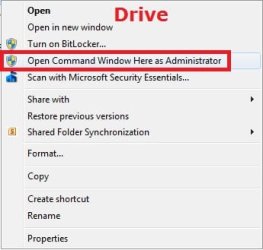
Open Command Window Here as Administrator-drive.jpgOpen Command Window Here as Administrator-folder.jpgOpen Command Window Here as Administrator-desktop.jpg


Here's How:
1. To Add "Open Command Window Here as Administrator" to Context Menu
A) Click/tap on the download button below to download the file below, and go to step 3 below.
Add_Open_Command_Window_Here_as_Administrator.reg
download
2. To Remove "Open Command Window Here as Administrator" from Context Menu
A) Click/tap on the download button below to download the file below, and go to step 3 below.
Remove_Open_Command_Window_Here_as_Administrator.reg
download
3. Save the .reg file to the desktop.

4. Double click/tap on the downloaded .reg file to merge it.

5. When prompted, click on Run, Yes (UAC), Yes, and OK to approve merging the .reg file.

6. You can now delete the downloaded .reg file if you like.
That's it
Shawn


Need more help? Try searching our extensive help and support site.
Loading
21 Mar 2010   #1
janmejaya

windows 7
india


thanks a lot
I was searching for it from a long tym to use attribute command line utility

My System SpecsSystem Spec

21 Mar 2010   #2
SIW2

Vista x64 / 7 X64


Don't you find that intereferes with any other runas context menu items, e.g. Take Ownership?
My System SpecsSystem Spec
04 Apr 2010   #3
bertie11

Windows 7


Hi Brink

When I click on the unzipped reg file all I get is Notepad opening up showing the detail of the patch. I can't make it merge into the registry.
Thanks.
My System SpecsSystem Spec
.


04 Apr 2010   #4
z3r010

Windows 8 Pro
Standish, Lancashire, England


Quote   Quote: Originally Posted by bertie11 View Post
Hi Brink

When I click on the unzipped reg file all I get is Notepad opening up showing the detail of the patch. I can't make it merge into the registry.
Thanks.
If you open regedit (type regedit in the start search bar then press enter) then from the regedit file menu select import and then select the downloaded reg file.
My System SpecsSystem Spec
04 Apr 2010   #5
Brink

64-bit Windows 7 Ultimate SP1 & Windows 8 Enterprise
Texas


Quote   Quote: Originally Posted by bertie11 View Post
Hi Brink

When I click on the unzipped reg file all I get is Notepad opening up showing the detail of the patch. I can't make it merge into the registry.
Thanks.

Hello Bertie,

It sounds like you have a improper association set for .reg file extensions. Double check in Default Programs to make sure that the .reg file extension has it's "Current Default" program set to Registry Editor (C:\Windows\regedit.exe).

Afterwards, see if you can merge the downloaded REG file.

Hope this helps,
Shawn
My System SpecsSystem Spec
05 Apr 2010   #6
bertie11

Windows 7


That fixed it!
Thanks Brink and Z3r010
My System SpecsSystem Spec
05 Apr 2010   #7
Brink

64-bit Windows 7 Ultimate SP1 & Windows 8 Enterprise
Texas


You're most welcome Bertie.
My System SpecsSystem Spec
20 Apr 2010   #8
guiLe

win7


nice tutor
very useful ...
My System SpecsSystem Spec
10 Jun 2010   #9
rover3500

windows 7 Premium
peterborough,Uk
 
 
I have an issue like brink

I know what brink means,if i put take ownership and this reg together,when i try to open a command prompt as admin,it just takes over the folder,and doesn't open a cmd window.
The reg entries are as follows if u have both installed:
@="cmd.exe /s /k pushd "%V""
and IsolatedCommand=cmd.exe /c takeown /f "%1" /r /d y && icacls "%1" /grant administrators:F /t

It seems to use the last command all the time.Also it would not let me merge from the reg file when i have take ownership installed,i had to manually put it in.It still shows on menu,but that's outside the key that has the command in the registry.
The only way i can get the open cmd window to work is to take out the isolated command line.
I've no idea why it does it this way,but it does for me,and prob Brink aswell.
Thanx for the info by the way.If i use a different grant admin reg 'hack',i can have both installed,just not with the take ownership for directory 'hack'.

I hope everyone knows what the hell i'm talking about...


Edit : i was mistaken,it won't work with the grant admin reg either,just takes over folder when i do cmd as admin.Had to take out.

Last edited by rover3500; 13 Jun 2010 at 03:28 AM..
My System SpecsSystem Spec
Comment

 Open Command Window Here as Administrator problems?


Tutorial Tools


Similar help and support threads for: Open Command Window Here as Administrator
Windows 7 Tutorial Category
Open Command Window Here - Add or Remove Tutorials
Open Command Window Here Tutorials
Open Command Window Here General Discussion
Problem open command Window(administrator) Network & Sharing
Solved Open elevated command window here General Discussion


All times are GMT -5. The time now is 02:13 AM.


Seven Forums Android App Seven Forums IOS App Follow us on Facebook

Windows 7 Forums is an independent web site and has not been authorized,
sponsored, or otherwise approved by Microsoft Corporation.
"Windows 7" and related materials are trademarks of Microsoft Corp.
© Designer Media Ltd
  

1 2 3 4 5 6 7 8 9 10 11 12 13 14 15 16 17 18 19 20 21 22 23 24 25 26 27 28 29 30 31 32