
How to Change Thumbnail Previews Border in Windows 7 and Windows 8
Information
This tutorial will show you how to change the border of thumbnail previews for image and video files to have either a drop shadow border, photo border, video sprockets border, or no border in Windows 7 and Windows 8.
Note
You will need to click on View or Views, on the Windows Explorer window Menu bar, and have it set to either Medium Icons, Large Icons, or Extra Large Icons to see a thumbnail preview of the file image as the icon.
For more on this, see:
For more on this, see:
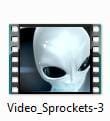
NOTE: The default border for thumbnails in Windows Explorer is the Photo_Border-2 image below.



OPTION ONE
To Change Thumbnail Borders using a REG File
1. Do step 2, 3, 4 or 5, and/or step 6, 7, 8, or 9 below for what you would like to do.
2. No Border for Images
A) Click/tap on the download button below to download the .reg file below, and go to step 10 below.
No_Border-0_Image.reg
Download
3. Drop Shadow Border for Images
A) Click/tap on the download button below to download the .reg file below, and go to step 10 below.
Drop_Shadow-1_Image.reg
Download
4. Photo Shadow Border for Images
NOTE: This is the default setting for images.
A) Click/tap on the download button below to download the .reg file below, and go to step 10 below.
Photo_Border-2_Image.reg
Download
5. Video Sprockets Border for Images
A) Click/tap on the download button below to download the .reg file below, and go to step 10 below.
Video_Sprockets-3_Image.reg
Download
AND/OR
6. No Border for Videos
A) Click/tap on the download button below to download the .reg file below, and go to step 10 below.
No_Border-0_video.reg
Download
7. Drop Shadow Border for Videos
A) Click/tap on the download button below to download the .reg file below, and go to step 10 below.
Drop_Shadow-1_video.reg
Download
8. Photo Shadow Border for Videos
A) Click/tap on the download button below to download the .reg file below, and go to step 10 below.
Photo_Border-2_video.reg
Download
9. Video Sprockets Border for Videos
NOTE: This is the default setting for images.
A) Click/tap on the download button below to download the .reg file below, and go to step 10 below.
Video_Sprockets-3_video.reg
Download
10. Save the .reg file to your Desktop.
11. Double click/tap on the downloaded .reg file to merge it.
12. If prompted, click/tap on Run, Yes (UAC), Yes, and OK to approve the merge.
13. Log off and log on, or restart the computer to apply.
14. When finished, you can delete the downloaded .reg file if you like.
OPTION TWO
To Change Thumbnail Borders in Registry Editor
1. Press the Windows + R keys to open the Run dialog, type regedit, and click/tap on OK.
2. If prompted by UAC, click on Yes.
3. In Registry Editor, navigate to the location below for what you want to change. (See screenshot below)
(For image borders)
HKEY_CLASSES_ROOT\SystemFileAssociations\image
(For video borders)
HKEY_CLASSES_ROOT\SystemFileAssociations\video

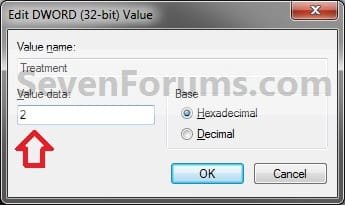
4. In the right pane of image and/or video, double click/tap on Treatment to modify it. (See screenshot above)
5. Type in the value data number in the table below for the border that you want for all thumbnail images to have for image and/or video files, and click/tap on OK. (See screenshot below table)
Note
See the example at the top of the tutorial to see what each border looks like.
2 is the default setting for image.
3 is the default setting for video.
Number
|
Border
0
| No Border
1 | Drop Shadow
2 | Photo
3 | Video Sprockets
2 is the default setting for image.
3 is the default setting for video.
1 | Drop Shadow
2 | Photo
3 | Video Sprockets
6. Close regedit.
7. Log off and log on, or restart the computer to apply.
That's it,
Shawn
Attachments
-
Drop_Shadow-1_Image.reg560 bytes · Views: 713
-
Drop_Shadow-1_video.reg560 bytes · Views: 964
-
No_Border-0_Image.reg560 bytes · Views: 1,048
-
No_Border-0_video.reg560 bytes · Views: 899
-
Photo_Border-2_Image.reg560 bytes · Views: 709
-
Photo_Border-2_video.reg560 bytes · Views: 619
-
Video_Sprockets-3_Image.reg560 bytes · Views: 632
-
Video_Sprockets-3_video.reg560 bytes · Views: 701
Last edited:


