|
Welcome to Windows 7 Forums. Our forum is dedicated to helping you find solutions with any problems, errors or issues you are experiencing with Windows 7. The Windows 7 forum also covers news and updates and has an extensive Windows 7 tutorial section that covers a wide range of tips and tricks.
Windows 7 - System Restore Point Shortcut |
11-13-2008
|
#59 | | Windows 7 Ultimate x64 SP1 |
System Restore Point Shortcut How to Make a "Create System Restore Point" Shortcut in Windows 7
Last edited by Brink; 04-18-2012 at 05:35 PM..
| My System Specs | | System Manufacturer/Model Number Self built custom OS Windows 7 Ultimate x64 SP1 CPU Intel i7-980X 3.3 Ghz (3.48 Ghz OC'd) Motherboard ASUS P6X58D Premium Memory 12 GB (2GBx6) DDR3 PC3-16000 2000 MHz Kingston HyperX Graphics Card Sapphire HD5870 Eyefinity 6 2GB Sound Card Realtek HD Audio ALC889 Integrated Chip Monitor(s) Displays 3x 27" Asus VE278Q Screen Resolution 1920x1080 Keyboard Logitech Cordless Desktop MX 5500 Revolution Mouse Logitech Cordless Desktop MX 5500 Revolution PSU OCZ Series Gold OCZZ1000M 1000W Case Corsair Obsidian 800D Cooling Thermalright Ultra 120 Extreme Copper CPU heat sink w/120 MM Hard Drives 160GB OCZ RevoDrive X2
** 2 x 1TB Samsung HDD HD154UI SATA Internet Speed 50 Mb/s Download and 2 Mb/s Upload Other Info Microsoft LifeCam Cinema
** Lite-On iHBS212 12x BD Writer
** Samsung CLX-3175FW Printer
** Netgear WNDR3800 Router
** Motorola SBG6580 Cable Modem
** 2x APC Back-UPS XS 1500 |
10-21-2010
|
#60 | | Windows 7 Ultimate x64 (Retail) |

Quote: Originally Posted by ToniB Thanks for the input/help but I did use the one with the name -- IMHO, not just only a few extra keystrokes, but also a great reminder of what was going on at the time. Yeah, you're right, the name one doesn't provide any confirmation of successful restore point creation either. I could have sworn it used to though, but I guess I was wrong about that.
I do have another short cut on my computer right click context menu (that I think I got from the utility I mentioned in my previous post) that brings up the system restore "restore files and settings" dialog with just one click (well two clicks if you count the click to bring up the right click context menu). That dialog contains the name of the last restore point created so it provides a two click way of checking and obtaining confirmation that the restore point that was just named was actually created. Of course one still doesn't know if the restore point will actually work as intended without successfully using it to do an actual restore. I have found on occasion that my system restore points fail to successfully restore, but most of the time they work. | My System Specs | | System Manufacturer/Model Number HP DV8t quad OS Windows 7 Ultimate x64 (Retail) CPU i7-Q 720 Motherboard Motherboard Chipset Intel Ibex Peak-M PM55, Intel Lynnfield Memory 6 GB Graphics Card nVidia GeForce GT 230M (1GB) Sound Card IDT High Definition Audio CODEC Monitor(s) Displays 18.4 inch HP Infinity FHD (Samsung 184HT03-001) Screen Resolution 1920 x 1080 Keyboard laptop Mouse Logitech VX Revolution Cooling Zalman NC-2000 notebook cooling pad Hard Drives Hitachi 500GB 7200 rpm (x2)
Seagate FreeAgent 1.5 TB External USB (x2)
Thermaltake BlacX eSATA/USB 2.0 3.5/2.5 HD dock Other Info Backup Unit: Lenovo T61p |
10-21-2010
|
#61 | | |
thanks for the tip - I'll look for that. That'll provide at least a bit more reassurance.
Not knowing if the restore point will actually work is frustrating but, with it that close at hand, remembering to do more restore points before significant events will be easier so hopefully one of the last several will work (or Windows 7's weekly one). | My System Specs | | |
10-24-2010
|
#62 | | Windows 7 Home Premium 64bit |
.zip files don't seem to be working Hi Shawn,
Hope you can help me. Neither the Create System Restore Point nor the Instant System Restore Point are working for me, and I'm sure it's because I have an Italian language version of Windows 7. I get the following message when I try to open Instant Restore Point:
Impossibile trovare il file di script C:\Program Files\Instant_Restore_Point\Instant_Restore_Point.vbs
which basically means that the file cannot be found. This is evidently because 'Program Files' is called 'Programmi (x86)' on my computer. Is there some way I can change the directory within the .vbs file (or where necessary), or do you know if I can find an Italian version of the .zip file?
Many thanks,
Florio | My System Specs | | OS Windows 7 Home Premium 64bit |
10-24-2010
|
#63 | | Windows 7 Ultimate x64 SP1 |
Hello Florio,
Yes, you can right click on the shortcut, click on Properties, change the Target to have the correct language version of the path to the VBS file, then click on OK to apply.
Hope this helps,
Shawn | My System Specs | | System Manufacturer/Model Number Self built custom OS Windows 7 Ultimate x64 SP1 CPU Intel i7-980X 3.3 Ghz (3.48 Ghz OC'd) Motherboard ASUS P6X58D Premium Memory 12 GB (2GBx6) DDR3 PC3-16000 2000 MHz Kingston HyperX Graphics Card Sapphire HD5870 Eyefinity 6 2GB Sound Card Realtek HD Audio ALC889 Integrated Chip Monitor(s) Displays 3x 27" Asus VE278Q Screen Resolution 1920x1080 Keyboard Logitech Cordless Desktop MX 5500 Revolution Mouse Logitech Cordless Desktop MX 5500 Revolution PSU OCZ Series Gold OCZZ1000M 1000W Case Corsair Obsidian 800D Cooling Thermalright Ultra 120 Extreme Copper CPU heat sink w/120 MM Hard Drives 160GB OCZ RevoDrive X2
** 2 x 1TB Samsung HDD HD154UI SATA Internet Speed 50 Mb/s Download and 2 Mb/s Upload Other Info Microsoft LifeCam Cinema
** Lite-On iHBS212 12x BD Writer
** Samsung CLX-3175FW Printer
** Netgear WNDR3800 Router
** Motorola SBG6580 Cable Modem
** 2x APC Back-UPS XS 1500 |
10-24-2010
|
#64 | | Windows 7 Home Premium 64bit |
Thanks very much, greatly appreciated!
Florio | My System Specs | | OS Windows 7 Home Premium 64bit |
10-24-2010
|
#65 | | Windows 7 Home Premium 64bit |
... spoke too soon! I cannot change the name. Even though I have indicated the correct directory, the new name [i.e., Programmi (x86) instead of Program Files (x86)] is apparently not valid. Any suggestions?
Florio | My System Specs | | OS Windows 7 Home Premium 64bit |
10-24-2010
|
#66 | | Windows 7 Ultimate x64 (Retail) |

Quote: Originally Posted by ToniB thanks for the tip - I'll look for that. That'll provide at least a bit more reassurance.
Not knowing if the restore point will actually work is frustrating but, with it that close at hand, remembering to do more restore points before significant events will be easier so hopefully one of the last several will work (or Windows 7's weekly one). Another thing I feel that should be mentioned here is that while system restore can be very handy, convenient and useful for many situations (when it works), it is in no way a substitute for having a system (preferably automatic requiring little or no user intervention) in place and operating to make regular real backups of your entire configuration (i.e., C drive) plus data (if the data is in a separate partition on another drive. Having such backups (hopefully recent) is very very helpful when for some reason it is impossible to boot into Windows or when any restore points fail to work properly (has happened to me) to fix the problem at hand.
I'm sure most people here probably already do make system and data backups in addition to using system restore but I thought I should mention it just in case. And, of course there are numerous threads in which the various methods and approaches for backing up are discussed. | My System Specs | | System Manufacturer/Model Number HP DV8t quad OS Windows 7 Ultimate x64 (Retail) CPU i7-Q 720 Motherboard Motherboard Chipset Intel Ibex Peak-M PM55, Intel Lynnfield Memory 6 GB Graphics Card nVidia GeForce GT 230M (1GB) Sound Card IDT High Definition Audio CODEC Monitor(s) Displays 18.4 inch HP Infinity FHD (Samsung 184HT03-001) Screen Resolution 1920 x 1080 Keyboard laptop Mouse Logitech VX Revolution Cooling Zalman NC-2000 notebook cooling pad Hard Drives Hitachi 500GB 7200 rpm (x2)
Seagate FreeAgent 1.5 TB External USB (x2)
Thermaltake BlacX eSATA/USB 2.0 3.5/2.5 HD dock Other Info Backup Unit: Lenovo T61p |
10-24-2010
|
#67 | | Windows 7 Ultimate x64 SP1 |

Quote: Originally Posted by Florio ... spoke too soon! I cannot change the name. Even though I have indicated the correct directory, the new name [i.e., Programmi (x86) instead of Program Files (x86)] is apparently not valid. Any suggestions?
Florio Florio,
Give this a try to see how it goes instead: - After the VBS file has been "unblocked", move the Instant_Restore_Point folder with the VBS file in it to the "Program Files" (Programmi) folder instead and not Programmi (x86).
- Afterwards see how the shortcut runs with either of the location in the Target field below.
"C:\Program Files\Instant_Restore_Point\Instant_Restore_Point.vbs" "C:\Programmi\Instant_Restore_Point\Instant_Restore_Point.vbs" If not, then right click on the VBS file from the location above, and click on Send To and Desktop (Create shortcut). Next, rename the shortcut to what you like, and change the shortcut icon to this below. %SystemRoot%\System32\rstrui.exe | My System Specs | | System Manufacturer/Model Number Self built custom OS Windows 7 Ultimate x64 SP1 CPU Intel i7-980X 3.3 Ghz (3.48 Ghz OC'd) Motherboard ASUS P6X58D Premium Memory 12 GB (2GBx6) DDR3 PC3-16000 2000 MHz Kingston HyperX Graphics Card Sapphire HD5870 Eyefinity 6 2GB Sound Card Realtek HD Audio ALC889 Integrated Chip Monitor(s) Displays 3x 27" Asus VE278Q Screen Resolution 1920x1080 Keyboard Logitech Cordless Desktop MX 5500 Revolution Mouse Logitech Cordless Desktop MX 5500 Revolution PSU OCZ Series Gold OCZZ1000M 1000W Case Corsair Obsidian 800D Cooling Thermalright Ultra 120 Extreme Copper CPU heat sink w/120 MM Hard Drives 160GB OCZ RevoDrive X2
** 2 x 1TB Samsung HDD HD154UI SATA Internet Speed 50 Mb/s Download and 2 Mb/s Upload Other Info Microsoft LifeCam Cinema
** Lite-On iHBS212 12x BD Writer
** Samsung CLX-3175FW Printer
** Netgear WNDR3800 Router
** Motorola SBG6580 Cable Modem
** 2x APC Back-UPS XS 1500 |
10-25-2010
|
#68 | | |
I have found that System Restore doesn't work more than about 60% of the time. Since I'm religious about backing things up, this doesn't kill me, but it can be a pain and for the majority of users who, being realistic, don't back up all that often, it can be a lot worse. Example: neither my brother nor his wife even own an external hard drive. They don't believe me when I tell them that they're playing with fire. At least she occasionally uses thumb drives, but not him - no way. | My System Specs | | System Manufacturer/Model Number Home Made OS Windows 7 Home Premium CPU Intel I5Core750 Motherboard Gigabyte P55A-UD3 Memory 6 GB Corsair DDR3 1600 Graphics Card Zotac GeForce 9600 GT Sound Card 7:1 on otherboard Monitor(s) Displays ViewSonic VG2030m (one of the last 4 by 3 monitors) Screen Resolution 1400 by 1050 (Native Resolution) Keyboard 400 v1.0 Mouse Logitech LX-8 PSU Thermaltake TR2 500W Case Cooler Master Elite 332 Cooling Thermaltake SpinQ Hard Drives 2 500 GB Western Digital SATA Internet Speed 9.82 Mbs download speed 1.87 Mbs Upload speed Other Info Monochrome Laser Printer -HP 1020
Ink-Jet color all in one without fax - Canon Pixma MP 170
500GB external portable hard drive - Iomega |
12-05-2010
|
#69 | | |
create a restore point works great! This shortcut works great for me!
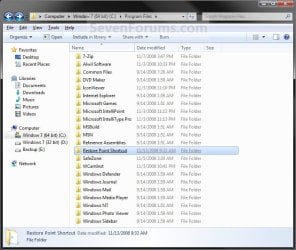
I found that when you unzip the files to the desktop, you must copy the "Restore Point Shortcut" FOLDER into C:\Program files (the path is longer, but this is just an example).
The "create a restore point" shortcut will NOT work if you just copy the (unzipped) .vbs script file into C:\Program files.
The above info is for anyone who thought they could "take a shortcut" -  - by just copying the file into C:\Program files ... (Like I did!).
I created a restore point for each of the five times I tested the shortcut right after installing it. I went to "System Restore" and confirmed that they were there, by looking at the recommended restore point and the "choose a different restore point" option. DOES ANYONE KNOW HOW TO TURN OFF THE UAC PROMPT JUST FOR THIS SCRIPT, so I can GET RIGHT TO IT?
Last edited by huntforit; 12-05-2010 at 03:30 AM..
Reason: grammatical error
| My System Specs | | OS Windows 7 Home Premium System Restore Point Shortcut problems? All times are GMT -5. The time now is 02:40 AM. |  |