
How to Personalize the Command Prompt Window
Information
Regular users of Window's Command Line Interpreter are familiar with modifications to suit their individual tastes, but casual users may become frustrated with the rigidity of the command line interpreter program and shy away from this useful tool.
This tutorial will show you how to change the options, fonts, layout, and color properties of the command prompt to customize them how you like.
This tutorial will show you how to change the options, fonts, layout, and color properties of the command prompt to customize them how you like.
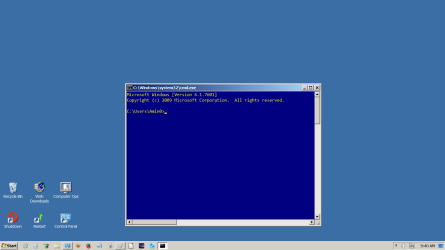
Example: This is how my Command Window looks now when open. You will see a screenshot at the end of each part showing the settings used to place it here.
LETS GET STARTED:
1. To open the Run dialog: Press the Windows key+R.
2. Type cmd, and press OK.
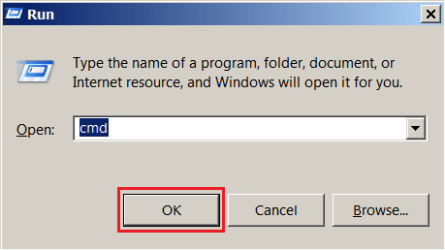
3. The command window will open.C:\Windows\system32\cmd.exe
4. Right click on the title bar to open the context menu, and click on Defaults.
Note
The reason you are using Defaults; It sets the default choices you make for the regular and Elevated Command Prompt windows. Using Properties only saves your personalization for that session.
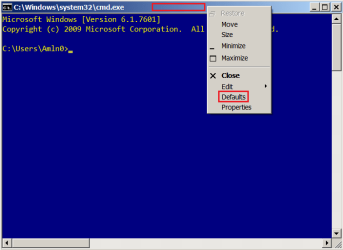
5. Now set the options, fonts, layout, and/or colors properties below to what you like.
- Part One: To Change Command Prompt Options
- Part Two: To Change Command Prompt Fonts
- Part Three: To Change Command Prompt Layout
- Part Four: To Change Command Prompt Colors
Part One
To Change Command Prompt Options
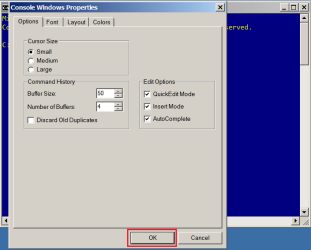
1. Cursor Size; Cursor size can be adjusted to Small, Medium or Large by clicking on the radio button to the left of the size. This can help if you are having problems seeing the blinking cursor.
2. Command History; Buffer Size can be adjusted from 1 to 999.
Whatever amount you set, saves that amount of previous commands. 50 is the default.
2a. Example when you tap F7 this is the keyboard key to access the buffer. Select with the arrow keys then press Enter to run that command.

Number of Buffers: You may have a need to have more than one Prompt window open at a time. This controls how many can be opened. It also has a range of 1 to 999, be aware though, the higher the number, the more RAM you will use.
Discard Old duplicates: Allows Windows to discard old duplicate commands.
3. Edit Options: QuickEdit Mode allows the use of your mouse to highlight areas of the prompt window, press Enter or the Return key and your highlight is copied to Notepad; Right click in Notepad and click on paste.
Insert Mode: Allows you to place the cursor anywhere within a command and add to a command after it instead of overwriting it.
AutoComplete: Type the first letter of a file then press the TAB key to see all the files that begin with that letter.
The wildcards, double asterisk *x* , and question mark x? are also allowed. Use the * * to represent any number of characters and the ? for a single character.
Part Two
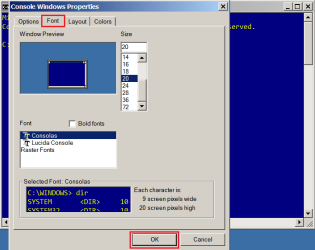
To Change Command Prompt Fonts
1. You have three choices of fonts. You can change their size and make them bold.
Part Three
To Change Command Prompt Layout
Note
All the values on this Tab will accept up to a four digit value. i.e. 9999
Tip
A helpful tip suggested by Layback Bear; Thank you Layback Bear!:
I have found a little trick that might be helpful:
*If you set*
The screen Width Buffer Size and the Windows Width size the same it will eliminate the need for the scroll bar at the bottom. It come in very handy so you don't have to scroll back and forth to see every thing.
I have found a little trick that might be helpful:
*If you set*
The screen Width Buffer Size and the Windows Width size the same it will eliminate the need for the scroll bar at the bottom. It come in very handy so you don't have to scroll back and forth to see every thing.
1. Screen Buffer Size; The higher the width value the less your command will go to a new line.
1a. The higher the Height value will increase how many lines you can scroll back to.
2. Window Size; The higher the Width value the wider the window.
2a. The higher the Height value the taller the window.
3. Window Position; The lower the Left value the more left the window is positioned.
3a. The lower the Top value the more the window rises on your desktop.
4. Let system position window; Since you're doing this to personalize the command prompt, leave this box un-checked.

Part Four
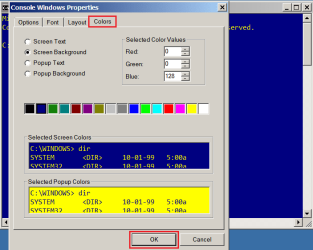
To Change Command Prompt Colors
1. Select the proper radio button to change the preset colors for text and background, click on the color of your choice in the color bar to select it.
2. The Popup Text and Background are the colors you'll see when you tap F7 to see the buffer in command history. I set this opposite to the normal screen to help me show the difference between the two.
3. If you know the color values of the colors you like, then you can input them manually.
That's all,
Steve
Related Tutorials
- How to Restore Command Prompt Default Personalization Settings in Windows
- How to Open a Command Prompt in Windows 7
- How to Open a Command Prompt at Startup in Windows 7
- How to Open a Elevated Command Prompt in Windows 7
- How to Enable Copy to Clipboard from the Windows 7 Command Prompt
- How to Use "Open Command Window Here" in Windows 7
- How to Add or Remove "Open Command Window Here" from the Context Menu
- Add or Remove "Open Command Window Here as Administrator" to the Context Menu
- How to Enable or Disable the Command Prompt in Vista and Windows 7
Last edited by a moderator:


