
How to Enable or Disable the Built-in Elevated Administrator Account in Windows 7
Information
This tutorial will show you how to enable or disable the built-in elevated Administrator account in Windows 7.
You must be logged in as an administrator to be able to do the options in this tutorial.
You must be logged in as an administrator to be able to do the options in this tutorial.
Note
Standard user (Users) - The standard account is an unelevated restricted users account. It can help protect your computer by preventing users from making changes that affect everyone who uses the computer, such as deleting files that are required for the computer to work. It is recommend to create a standard account for each user instead of an administrator account for the user. When you are logged on to Windows with a standard account, you can do almost anything that you can do with an administrator account, but if a standard user wanted to do something that requires elevated rights that affects other users of the computer, such as installing software or changing security settings, Windows will give the standard user a UAC prompt to enter the password of an administrator account for approval and confirmation before allowing the action.
administrator user - Is an unelevated administrator account that is created by default during the installation of Windows 7, or is already setup or you on a OEM (ex: Dell) computer. An administrator account has complete access to the computer, and can make any desired changes. To help make the computer more secure, this administrator account type will be prompted by UAC by default to give confirmation before allowed to make any changes that require elevated administrator rights. Such as those that affect the system, other users, or when running anything elevated (Run as Administrator) since running elevated will allow it to have access to the entire computer.
Built-in "Administrator" - Is the hidden elevated administrator account that has full unrestricted access rights and permission on the computer. By default, this elevated "Administrator" account is not prompted by UAC by default to provide confirmation before allowed to make any changes that require elevated administrator permissions since it is an elevated account.
administrator user - Is an unelevated administrator account that is created by default during the installation of Windows 7, or is already setup or you on a OEM (ex: Dell) computer. An administrator account has complete access to the computer, and can make any desired changes. To help make the computer more secure, this administrator account type will be prompted by UAC by default to give confirmation before allowed to make any changes that require elevated administrator rights. Such as those that affect the system, other users, or when running anything elevated (Run as Administrator) since running elevated will allow it to have access to the entire computer.
Built-in "Administrator" - Is the hidden elevated administrator account that has full unrestricted access rights and permission on the computer. By default, this elevated "Administrator" account is not prompted by UAC by default to provide confirmation before allowed to make any changes that require elevated administrator permissions since it is an elevated account.
Warning
If you enable the built-in Administrator account, then it is recommended to create a password for better security.
For additional security purposes, it is also not recommended to leave the built-in Administrator account always enabled, or to use it for everyday purposes.
For additional security purposes, it is also not recommended to leave the built-in Administrator account always enabled, or to use it for everyday purposes.
:note: For the updated Windows 10 tutorial, please see here: Administrator account - Enable or Disable in Windows 10 - Windows 10 User Accounts Tutorials
OPTION ONE
Enable built-in Administrator in Local Users and Groups
NOTE: This option will only be available in the Windows 7 Professional, Ultimate, and Enterprise editions.
1. Open the Local Users and Groups manager.
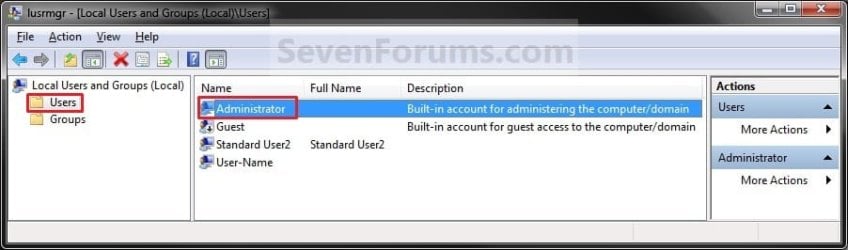
2. In the left pane, click on the Users folder. (See screenshot below step 3)
3. In the middle pane, right click on Administrator and click on Properties. (See screenshot below)
4. To Enable the Built-in Elevated Administrator Account
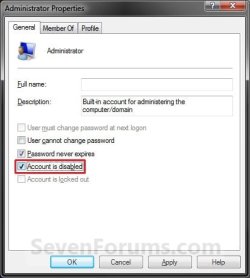
A) Uncheck the Account is disabled box. (See screenshot below step 6)
B) Go to step 6.
5. To Disable the Built-in Elevated Administrator Account
NOTE: This is the default setting.
A) Check the Account is disabled box. (See screenshot below step 6)
6. Click on OK. (See screenshot below)
7. Close the Local Users and Groups window. (See screenshot below step 3)
8. Log off, and you will now see the built-in Administrator account log on icon added (enabled) or removed (disabled) from the log on screen. (See screeenshot below)
NOTE: Click on the Administrator icon to log on to the built-in Administrator account.

OPTION TWO
Enable built-in Administrator in an Elevated Command Prompt
NOTE: This option can be used in all editions of Windows 7. If your Windows 7 uses another language than English, then you may need to translate the word administrator part of the commands below to your language to use instead.
1. Open an elevated command prompt, and do step 2, 3, or 4 below for what you want to do.
2. To Enable the Hidden Built-in Elevated Administrator Account
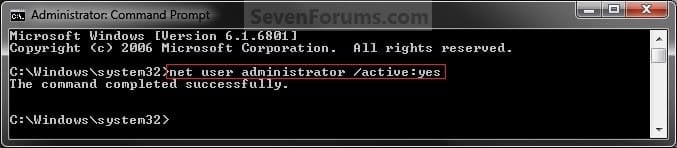
A) In the elevated command prompt, copy and paste the command below and press Enter, and go to step 5 below. (See screenshot below)
NOTE: If you had previously renamed the built-in "Administrator" account's name, then you will need to substitute administrator in the command below with the new name instead.
net user administrator /active:yes
3. To Enable the Hidden Built-in Elevated Administrator Account with Password
A) In the elevated command prompt, copy and paste the command below and press Enter, and go to step 5 below. (See screenshot below)
NOTE: If you had previously renamed the built-in "Administrator" account's name, then you will need to substitute administrator in the command below with the new name instead.
net user administrator password /active:yes
Note
Substitute password in the command above with the password you want to use to log on to the built-in Administrator account.
4. To Disable the Hidden Built-in Elevated Administrator Account
NOTE: This is the default setting.
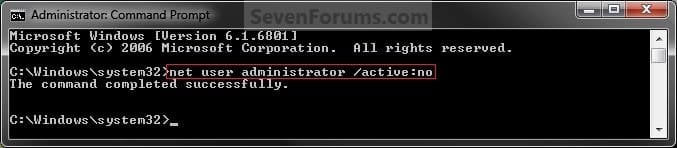
A) In the elevated command prompt, copy and paste the command below and press Enter, and go to step 5 below. (See screenshot below)
NOTE: If you had previously renamed the built-in "Administrator" account's name, then you will need to substitute administrator in the command below with the new name instead.
net user administrator /active:no
5. Close the elevated command prompt.
6. Log off, and you will now see the built-in Administrator account log on icon added (enabled) or removed (disabled) from the log on screen. (See screeenshot below)
NOTE: Click on the Administrator icon to log on to the built-in Administrator account.
OPTION THREE
Enable built-in Administrator in Local Security Policy
NOTE: This option will only be available in the Windows 7 Professional, Ultimate, and Enterprise editions.
1. Open the Local Security Policy editor.
2. In the left pane, expand Local Policies, and click on Security Options. (See screenshot below)
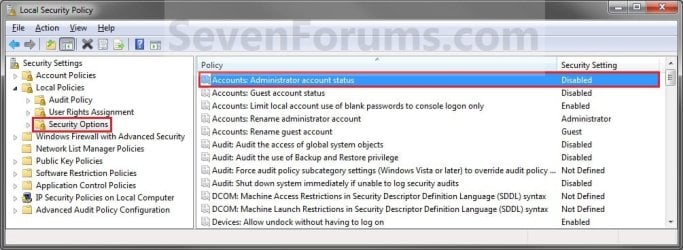
3. In the right pane, right click on Accounts: Administrator account status and click on Properties. (See screenshot above)
4. To Enable the Hidden Built-in Elevated Administrator Account
A) Select (dot) Enabled. (See screenshot below step 6)
B) Go to step 6.
5. To Disable the Hidden Built-in Elevated Administrator Account
NOTE: This is the default setting.
A) Select (dot) Disabled. (See screenshot below step 6)
6. Click on OK. (See screenshot below)
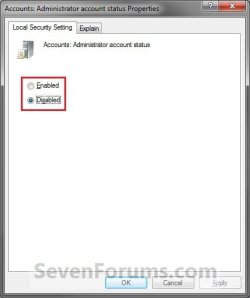
7. Close the Local Security Policy window. (See screenshot below step 2)
8. Log off, and you will now see the built-in Administrator account log on icon added (enabled) or removed (disabled) from the log on screen. (See screeenshot below)
NOTE: Click on the Administrator icon to log on to the built-in Administrator account.
OPTION FOUR
Enable built-in Administrator from System Recovery (WinRE) at Boot
1. For how, see: How to Enable the Built-in Administrator Account from WinRE
That's it,
Shawn
Related Tutorials
- How to Rename the Windows 7 Built-in Administrator Account
- How to Elevate All Administrator Accounts UAC Privilege Level
- How to Create a User Account in Windows 7
- How to Delete a User Account in Windows 7
- How to Create a Password for a Windows 7 User Account
- How to Turn the Guest Account On or Off in Windows 7
- How to Enable the Built-in Administrator Account from WinRE
- How to Change a User Account Type in Windows 7
- How to Enable or Disable a User Account in Windows 7
- How to Enable the Built-in Administrator Account in Windows XP Mode
- How to Reset User Profile of Built-in Administrator Account to Default in Windows
- Enable or Disable User Account Control (UAC) Prompt for Built-in Administrator in Windows
Last edited:


