
How to Setup a Dual Boot Installation with Windows 7 and Vista
Information
This will show you how to install Windows 7 and Vista to dual boot with when you already have either Windows 7 or Vista installed first.
Note
With a dual boot installaton, you will have two operating systems (OS) installed. When you start the computer, you will have the choice to choose which OS you would like to start up to. This method is the easiest way of doing a dual boot with these two operating systems.
Tip
When dual booting with another OS (ex: Vista or XP), you may not always have that OS partition show up in Computer with a driver letter in Windows 7. If this happens, then you will just need to add a drive letter to the OS (ex: Vista or XP) partition in Windows 7 Disk Management for it to show up in Computer with a driver letter.
Warning
Windows 7 Minimum Hardware Requirements:
NOTE: For more iformation on this, see: Windows 7 system requirements
NOTE: For more information, see: Microsoft Windows Vista: Recommended System Requirements
Vista Home Basic
NOTE: For more iformation on this, see: Windows 7 system requirements
- 1 GHz 32-bit or 64-bit processor
- 1 GB RAM for 32-bit Windows 7 OR 2 GB RAM for 64-bit Windows 7
- 16 GB available disk space 32-bit Windows 7 OR 20 GB for 64-bit Windows 7
- Support for DirectX 9 graphics with 128 MB memory (in order to enable Aero theme)
- DVD-R/W Drive
- Internet or phone access to activate Windows 7.
NOTE: For more information, see: Microsoft Windows Vista: Recommended System Requirements
Vista Home Basic
- Processor: 1GHz (32 or 64 bit)
- System Memory (RAM): 512MB
- Hard Drive: 20GB with 15GB available for Vista
- Video Card: 32MB Memory and DirectX 9 Support
- DVD-ROM Drive
- Processor: 1GHz (32 or 64 bit)
- System Memory (RAM): 1GB
- Hard Drive: 40GB with 15GB available for Vista
- Video Card: 128MB Memory, DirectX 9 Support with: WDDM Driver, Pixel Shader 2.0, 32bits per pixel
- DVD-ROM Drive
EXAMPLE: Windows Boot Manager
NOTE: This is the boot screen where you select what operating system that you would like to start. By default, you have 30 seconds to choose another operating system before the default operating system will start automatically.

Here's How:
1. If Installing Second OS on a Separate Hard Drive
NOTE: This is if you are going to install the second OS (Windows 7 or Vista) on a separate hard drive than the first OS in installed on.
A) Go to step 3.
2. If Installing Second OS on another Partition on the Same Hard Drive
NOTE: This is if you are going to install the second OS (Windows 7 or Vista) on a different partition on the same hard drive than the first OS is installed on.
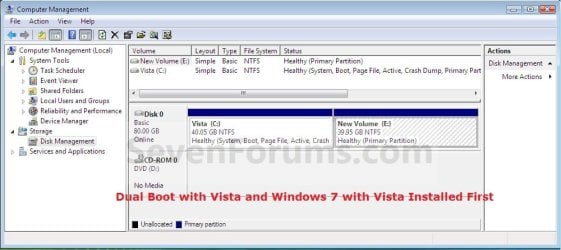
A) If Vista was installed first, then create a new partition for Windows 7 (second OS) to be installed on later if you do not already have one to use. (See screenshot below)
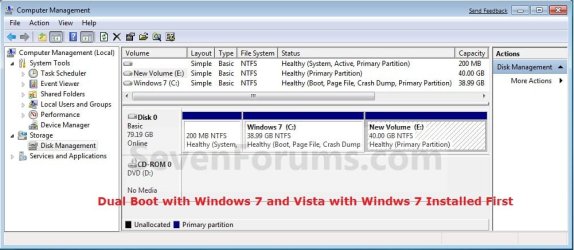
B) If Windows 7 was installed first, then create a new partition for Vista (second OS) to be installed on later if you do not already have one to use. (See screenshot below)
3. Insert the second OS (Windows 7 or Vista) installation DVD, and restart the computer to start installing it.
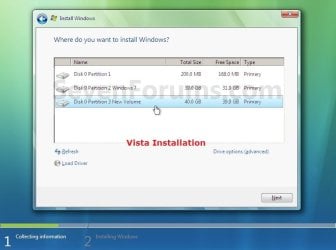
A) If Vista was installed first, then select the new partition (step 2A) or drive and do a clean install of Windows 7 (second OS) on it. (See screenshot below)

B) If Windows 7 was installed first, then select the new partition (step 2B) or drive and do a clean install of Vista (second OS) on it. (See screenshot below)
4. When the second OS is finished installing you will now have the option to select which OS to start to in the Windows Boot Manager screen at start up. (See example screenshot at the top of the tutorial)
NOTE: Whatever OS you install last will be the OS listed first in the Windows Boot Manager screen at startup.
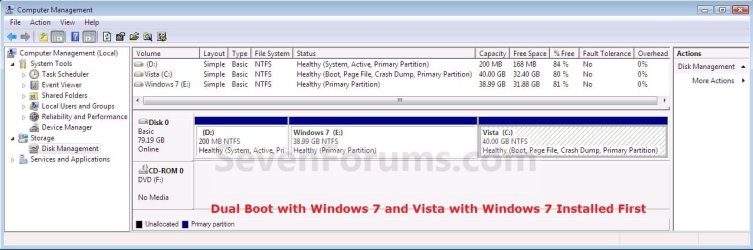
5. This is what you will see in Disk Management below if you installed the second OS on another partition on the same hard drive (step 2).
A) If Vista was installed first. (See screenshot below)
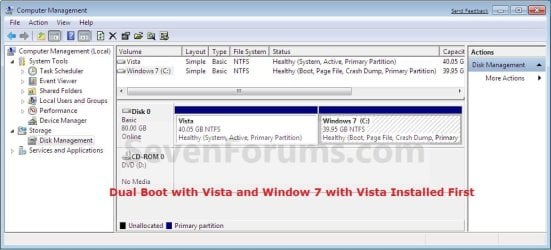
B) If Windows 7 was installed first. (See screenshot below)
That's it,
Shawn
Related Tutorials
- How to Use Windows 7 Upgrade Advisor
- How to Setup a Dual Boot Installation with Windows 7 and XP
- How to Setup a Dual Boot Installation with Windows Vista and XP
- How to Do a Dual Boot Installation with Windows 7 and Windows 8
- How to Dual Boot Windows 7 and Ubuntu
- How to Correctly Setup a Dual Boot with Windows 7 and LinuxMint13
- How to Change Time to Display Operating Systems at Boot in Windows 7
- How to Change the Listed OS Arrangement Order in Windows Boot Manager Screen
- How to Change the Default Operating System to Start in Windows 7
- How to Delete an Operating System Listed in Windows Boot Manager
- How to Change the OS Name in Windows Boot Manager
- How to Do a Clean Install with a Full Version of Vista
- How to Do a Clean Install of Vista with a Upgrade Version
- How to Do a Clean Installation with Windows 7
- How to Install Windows 7 FAST without a DVD or USB Device
- Install Windows 7 Without Using Any External Device
- How to Setup Windows 7 to Boot from a VHD (Virtual Hard Disk)
- How to Create a Windows 7 VHD at Boot to Start with from Boot
- How to Fix Missing Vista Hard Disk Partition Letter in Windows 7
- How to Do a Custom Installation of Windows 7
- How to Do a Custom Installation of Vista
- How to Recover a Partition Used by an Older OS in a Dual Boot
- How to Properly Delete a OS in a Dual Boot
Last edited:


