Menu Bar - Turn On or Off

How to Turn the Menu Bar On or Off in Windows 7

   Information
This will show you how to turn the Menu Bar on or off in Windows 7 for Windows Explorer, Internet Explorer, Firefox, and Windows Media Player. The Menu bar is turned off by default in Windows 7.

   Tip
The Menu Bar includes the File, Edit, View, Favorites (In IE only), Tools, and Help menu items.

Pressing the ALT key will temporarily display the Menu Bar as well. You can then press ALT + the underlined letter of the menu item. For example ALT + F to open the File menu etc....

   Note
The N and KN editions of Windows 7 have all the features that normally come with each individual Windows 7 edition, except for Windows Media Player 12 and related programs, such as Windows Media Center or Windows DVD Maker.

The N editions of Windows 7 allow you to choose your own media player and software required to manage and play CDs, DVDs, and other digital media files. If you choose to use Windows Media Player 12, downloading it, along with related software, is free. Download Media Feature Pack for Windows 7 N with Service Pack 1 and Windows 7 KN with Service Pack 1 (KB968211) from Official Microsoft Download Center

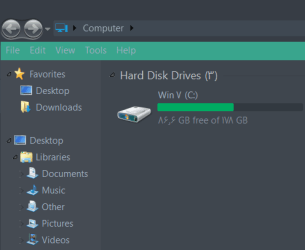
EXAMPLE: Menu Bar Turned On and Off in Windows Explorer WE_Enabled.jpg

WE_Disabled.jpg

EXAMPLE: Menu Bar Turned On and Off in Internet Explorer IE_Enabled.jpg

WE_Disabled.jpg


OPTION ONE

Turn Menu Bar On or Off in "Windows Explorer"

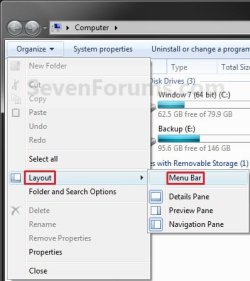
1. Through the Organize Toolbar Button A) Open a Windows Explorer Window.

B) Click on the Organize button and Layout. (See screenshot below)

C) To Turn On the Menu Bar - Click on Menu Bar to check it.

D) To Turn Off the Menu Bar - Click on Menu Bar to uncheck it. Organize_Button.jpg
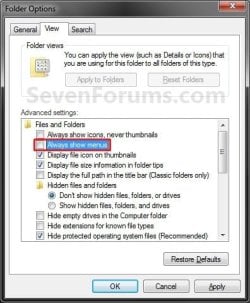
2. Through Folder Options A) Open Folder Options and click on the View tab. (See screenshot below)

B) To Turn On the Menu Bar - Check the Always show menus box.

C) To Turn Off the Menu Bar - Uncheck the Always show menus box.

D) Click on OK. Folder_Options.jpg
3. Using a REG File Download
A) To Add the Windows Explorer Menu Bar
  • Click on the download button below to download the file below.
Add_Menu_Bar.reg

Download


  • Go to step 3C.
B) To Remove the Windows Explorer Menu Bar
  • Click on the download button below to download the file below.
Remove_Menu_Bar.reg

Download


C) Click on Save, and save the .reg file to the Desktop.

D) Right click on the downloaded .reg file and click Merge.

E) Click on Run, Yes (UAC), Yes, and then OK when prompted.

F) Log off and log on, or restart the computer to apply the changes.

G) When done, you can delete the downloaded .reg file if you like.
4. Through the Local Group Policy Editor
NOTE: This option will override the options above. A) Open the all users, specific users or groups, or all users except administrators Local Group Policy Editor for how you want this policy applied.

B) In the left pane, click on to expand User Configuration, Administrative Templates, Windows Components, and Windows Explorer. (see screenshot below) GPEDIT_Menu_bar.jpg
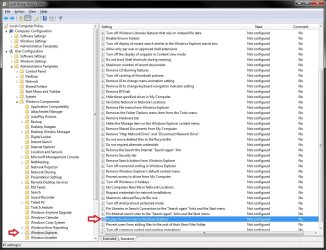
C) In the right pane, right click on Display the menu bar in Windows Explorer and click on Edit. (see screenshot above)


D) To Always Display the Windows Explorer Menu Bar
  • Select (dot) Enabled. (see screenshot below step 4F)
E) To Not Always Display the Windows Explorer Menu Bar
  • Select (dot) either Not Configured or Disabled. (see screenshot below step 4F)
    NOTE: Not Configured is the default setting.
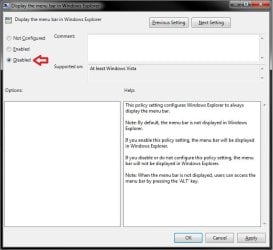
F) Click on OK. (see screenshot below) GPEDIT-2_Menu_bar.jpg
G) Close the Local Group Policy Editor window.


OPTION TWO

Turn Menu Bar On or Off in "Internet Explorer"

1. Open Internet Explorer.

2. Right click on a empty area on the tab bar area. (See red box in screenshot below) IE_Right_Click.jpg
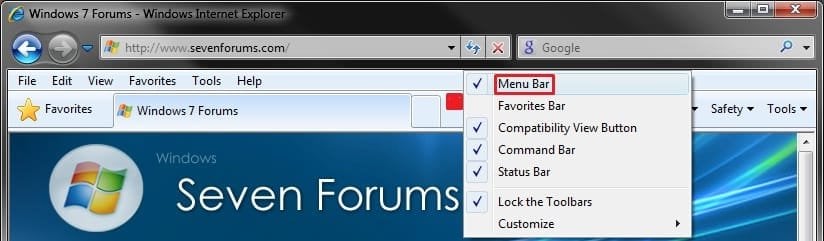
3. To Turn On the Menu Bar in Internet Explorer A) Click on Menu Bar to check it.
4. To Turn Off the Menu Bar in Internet Explorer A) Click on Menu Bar to uncheck it.
5. To Force the Menu Bar to Always be On or Off in Internet Explorer A) For how, see: How to Force Internet Explorer to Always Have the Menu Bar Turned On or Off by Default


OPTION THREE

Turn Menu Bar On or Off in "Windows Media Player"

1. Open Windows Media Player.


2. Using a Keyboard Shortcut A) You can press CTRL+M to toggle turning the Menu Bar on or off.
3. From the Tab Bar A) Right click on a empty area on the tab bar area. (See screenshot below) Windows_Media_Player.jpg
B) To Turn On the Menu Bar
  • Click on Menu Bar to check it.

C) To Turn Off the Menu Bar
  • Click on Menu Bar to uncheck it.
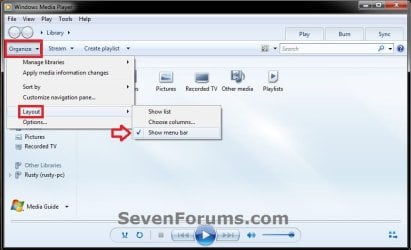
3. From the Organize Toolbar Item A) Click on Organize on the toolbar, and select Layout. (See screenshot below) WMP_Organize.jpg
B) To Turn On the Menu Bar
  • Click on Show menu bar to check it.

C) To Turn Off the Menu Bar
  • Click on Show menu bar to uncheck it.


OPTION FOUR

Turn Menu Bar On or Off in "Firefox"

1. Open Firefox.

2. Right click on a empty area to the right of the tabs. (see screenshot below) Firefox.jpg
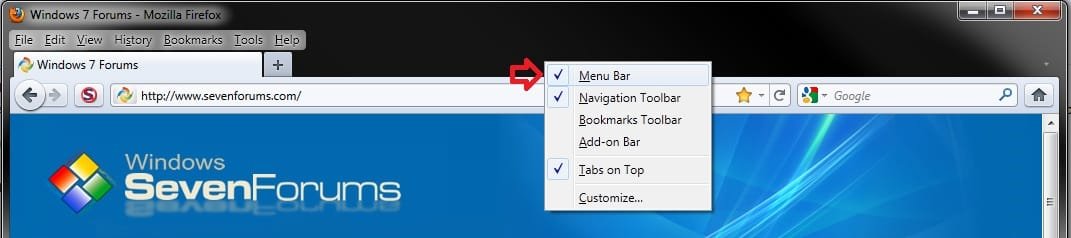
3. To Turn On the Menu Bar in Firefox A) Click on Menu Bar to check it.
4. To Turn Off the Menu Bar in Firefox A) Click on Menu Bar to uncheck it.
That's it,
Shawn


Attachments

Last edited:
yeah i tried hte reg files, they didn't work, but what's the local policy group manager? i don't have it. do i need it?
oh im trying the tutorial above, ive already tried it before i came to this thread but now i see the local policy group manager... ok
ooh, lucky i have windows 7 professional

err...r u sure it's enabled that turns it off? and disabled or not configured that turns it on? Isn't it the other way?
do you ahve to restart?
 

My Computer My Computer

At a glance

Windows 7 Professional 32-bit SP1Intel Mobile Core 2 Duo SU9600 @ 1.60GHz3.00GB Dual-Channel DDR3 @ 398MHz (6-6-6-15)Intel Mobile Intel 4 Series Express Chipset F...
Computer type
Laptop
Computer Manufacturer/Model Number
Dell Latitude XT2 Tablet PC
OS
Windows 7 Professional 32-bit SP1
CPU
Intel Mobile Core 2 Duo SU9600 @ 1.60GHz
Motherboard
Dell Inc. 0M374P (Microprocessor)
Memory
3.00GB Dual-Channel DDR3 @ 398MHz (6-6-6-15)
Graphics Card(s)
Intel Mobile Intel 4 Series Express Chipset Family (Dell)
Sound Card
High Definition Audio Device
Monitor(s) Displays
Generic PnP Monitor (1280x800@60Hz)
Screen Resolution
1280 x 800
Hard Drives
232GB TOSHIBA MK2529GSGF (SATA)
Keyboard
HID Keyboard Device; Standard PS/2 Keyboard
Mouse
HID-compliant mouse; PS/2 Compatible Mouse
Antivirus
Norton 360
Browser
Google Chrome, Mozilla Firefox
Other Info
From Piriform Speccy!
You're correct, it's the other way around. Enable=On and Not Configure/Disable=Off

You do not need to restart to apply the group policy, but you did need to restart with the REG files.
 

My Computer My Computer

At a glance

64-bit Windows 11 Pro for WorkstationsIntel i7-8700K OC'd to 5 GHz64 GB (4x16GB) G.SKILL TridentZ RGB DDR4 3600...ASUS ROG-STRIX-GTX1080TI-O11G-GAMING
Computer type
PC/Desktop
Computer Manufacturer/Model Number
Self built custom
OS
64-bit Windows 11 Pro for Workstations
CPU
Intel i7-8700K OC'd to 5 GHz
Motherboard
ASUS ROG Maximus XI Formula Z390
Memory
64 GB (4x16GB) G.SKILL TridentZ RGB DDR4 3600 MHz
Graphics Card(s)
ASUS ROG-STRIX-GTX1080TI-O11G-GAMING
Sound Card
Integrated
Monitor(s) Displays
2 x Samsung Odyssey G7 27"
Screen Resolution
2560x1440
Hard Drives
1TB Samsung 990 PRO M.2,
4TB Samsung 990 PRO PRO M.2,
TerraMaster F8 SSD Plus NAS
PSU
Seasonic Prime Titanium 850W
Case
Thermaltake Core P3
Cooling
Corsair Hydro H115i
Keyboard
Logitech wireless K800
Mouse
Logitech MX Master 4
Internet Speed
2 Gb/s Download and 100 Mb/s Upload
Antivirus
Malwarebyte Anti-Malware Premium
Browser
Google Chrome
Other Info
Logitech Z625 speaker system,
Logitech BRIO 4K Pro webcam,
HP Color LaserJet Pro MFP M477fdn,
APC SMART-UPS RT 1000 XL - SURT1000XLI,
Galaxy S23 Plus phone
Hello MihaiS, and welcome to Seven Forums.

You can do this to have the Menu Bar on top in Internet Explorer, but I have not found a way yet for Windows Explorer.

Internet Explorer Menu Bar - Vista Forums

Hope this helps,
Shawn

Being a year and a half later, has any method since been found? I feel like having the menu bar above the navigation makes sense, but I can't figure out how to do so.
 

My Computer My Computer

At a glance

Windows 74 GB
Computer Manufacturer/Model Number
Dell Inspiron 1720 Laptop
OS
Windows 7
Memory
4 GB
Monitor(s) Displays
17 in built in
Hard Drives
2 TB Western Digital External, 320 Internal.
Cooling
A fan + cut up pillo case directing airflow under the laptop
Hello Kelderic,

I'm afraid not. :(
 

My Computer My Computer

At a glance

64-bit Windows 11 Pro for WorkstationsIntel i7-8700K OC'd to 5 GHz64 GB (4x16GB) G.SKILL TridentZ RGB DDR4 3600...ASUS ROG-STRIX-GTX1080TI-O11G-GAMING
Computer type
PC/Desktop
Computer Manufacturer/Model Number
Self built custom
OS
64-bit Windows 11 Pro for Workstations
CPU
Intel i7-8700K OC'd to 5 GHz
Motherboard
ASUS ROG Maximus XI Formula Z390
Memory
64 GB (4x16GB) G.SKILL TridentZ RGB DDR4 3600 MHz
Graphics Card(s)
ASUS ROG-STRIX-GTX1080TI-O11G-GAMING
Sound Card
Integrated
Monitor(s) Displays
2 x Samsung Odyssey G7 27"
Screen Resolution
2560x1440
Hard Drives
1TB Samsung 990 PRO M.2,
4TB Samsung 990 PRO PRO M.2,
TerraMaster F8 SSD Plus NAS
PSU
Seasonic Prime Titanium 850W
Case
Thermaltake Core P3
Cooling
Corsair Hydro H115i
Keyboard
Logitech wireless K800
Mouse
Logitech MX Master 4
Internet Speed
2 Gb/s Download and 100 Mb/s Upload
Antivirus
Malwarebyte Anti-Malware Premium
Browser
Google Chrome
Other Info
Logitech Z625 speaker system,
Logitech BRIO 4K Pro webcam,
HP Color LaserJet Pro MFP M477fdn,
APC SMART-UPS RT 1000 XL - SURT1000XLI,
Galaxy S23 Plus phone
Wait, Kelderic. Do you want the menu bar ON?
Well this topic is about turning it off.
Isn't it just organize -> layout -> menu bar?
Beware, if you turn it on, you may find it impossible to turn it off which was annoying after a while
i solved the solution by reinstalling windows, great.
if you want to temporarily show the menu bar, you can do so by pressing alt


Hi Kelderic,
Oh you want to put the menu bar at the very top. I didn't really get it the first time i read it. and it was off topic. It was like adding a new topic to an existing one.
 

My Computer My Computer

At a glance

Windows 7 Professional 32-bit SP1Intel Mobile Core 2 Duo SU9600 @ 1.60GHz3.00GB Dual-Channel DDR3 @ 398MHz (6-6-6-15)Intel Mobile Intel 4 Series Express Chipset F...
Computer type
Laptop
Computer Manufacturer/Model Number
Dell Latitude XT2 Tablet PC
OS
Windows 7 Professional 32-bit SP1
CPU
Intel Mobile Core 2 Duo SU9600 @ 1.60GHz
Motherboard
Dell Inc. 0M374P (Microprocessor)
Memory
3.00GB Dual-Channel DDR3 @ 398MHz (6-6-6-15)
Graphics Card(s)
Intel Mobile Intel 4 Series Express Chipset Family (Dell)
Sound Card
High Definition Audio Device
Monitor(s) Displays
Generic PnP Monitor (1280x800@60Hz)
Screen Resolution
1280 x 800
Hard Drives
232GB TOSHIBA MK2529GSGF (SATA)
Keyboard
HID Keyboard Device; Standard PS/2 Keyboard
Mouse
HID-compliant mouse; PS/2 Compatible Mouse
Antivirus
Norton 360
Browser
Google Chrome, Mozilla Firefox
Other Info
From Piriform Speccy!
From a minimalistic point of view, it'd be so cool if we could disable menu bars in each program. I wish someday an application like ObjectBar could be developed to manage all the menu bars from every program.. Damn, somebody needs a mac here :o
 

My Computer My Computer

At a glance

windows 7
OS
windows 7
Thanks Brink! I have been searching for the "move to folder" item for months! I didn't know I just had to turn on the menu bar. :)
 

My Computer My Computer

At a glance

windows 7 Home Premium x64
OS
windows 7 Home Premium x64
You're most welcome Laurie. :)
 

My Computer My Computer

At a glance

64-bit Windows 11 Pro for WorkstationsIntel i7-8700K OC'd to 5 GHz64 GB (4x16GB) G.SKILL TridentZ RGB DDR4 3600...ASUS ROG-STRIX-GTX1080TI-O11G-GAMING
Computer type
PC/Desktop
Computer Manufacturer/Model Number
Self built custom
OS
64-bit Windows 11 Pro for Workstations
CPU
Intel i7-8700K OC'd to 5 GHz
Motherboard
ASUS ROG Maximus XI Formula Z390
Memory
64 GB (4x16GB) G.SKILL TridentZ RGB DDR4 3600 MHz
Graphics Card(s)
ASUS ROG-STRIX-GTX1080TI-O11G-GAMING
Sound Card
Integrated
Monitor(s) Displays
2 x Samsung Odyssey G7 27"
Screen Resolution
2560x1440
Hard Drives
1TB Samsung 990 PRO M.2,
4TB Samsung 990 PRO PRO M.2,
TerraMaster F8 SSD Plus NAS
PSU
Seasonic Prime Titanium 850W
Case
Thermaltake Core P3
Cooling
Corsair Hydro H115i
Keyboard
Logitech wireless K800
Mouse
Logitech MX Master 4
Internet Speed
2 Gb/s Download and 100 Mb/s Upload
Antivirus
Malwarebyte Anti-Malware Premium
Browser
Google Chrome
Other Info
Logitech Z625 speaker system,
Logitech BRIO 4K Pro webcam,
HP Color LaserJet Pro MFP M477fdn,
APC SMART-UPS RT 1000 XL - SURT1000XLI,
Galaxy S23 Plus phone
W7 Menu Bar

Thanks Brink - was battling with this one for a while - appreciate it, S
 

My Computer My Computer

At a glance

Windows 7 Home x64
OS
Windows 7 Home x64
You're most welcome Sean. I'm glad it could help. :)
 

My Computer My Computer

At a glance

64-bit Windows 11 Pro for WorkstationsIntel i7-8700K OC'd to 5 GHz64 GB (4x16GB) G.SKILL TridentZ RGB DDR4 3600...ASUS ROG-STRIX-GTX1080TI-O11G-GAMING
Computer type
PC/Desktop
Computer Manufacturer/Model Number
Self built custom
OS
64-bit Windows 11 Pro for Workstations
CPU
Intel i7-8700K OC'd to 5 GHz
Motherboard
ASUS ROG Maximus XI Formula Z390
Memory
64 GB (4x16GB) G.SKILL TridentZ RGB DDR4 3600 MHz
Graphics Card(s)
ASUS ROG-STRIX-GTX1080TI-O11G-GAMING
Sound Card
Integrated
Monitor(s) Displays
2 x Samsung Odyssey G7 27"
Screen Resolution
2560x1440
Hard Drives
1TB Samsung 990 PRO M.2,
4TB Samsung 990 PRO PRO M.2,
TerraMaster F8 SSD Plus NAS
PSU
Seasonic Prime Titanium 850W
Case
Thermaltake Core P3
Cooling
Corsair Hydro H115i
Keyboard
Logitech wireless K800
Mouse
Logitech MX Master 4
Internet Speed
2 Gb/s Download and 100 Mb/s Upload
Antivirus
Malwarebyte Anti-Malware Premium
Browser
Google Chrome
Other Info
Logitech Z625 speaker system,
Logitech BRIO 4K Pro webcam,
HP Color LaserJet Pro MFP M477fdn,
APC SMART-UPS RT 1000 XL - SURT1000XLI,
Galaxy S23 Plus phone
Hello to everyone
I have a problem.
My menu bar is always show and when I uncheck the Always show menus box do not work.
How can I restore it to original mode that when I press ALT show it.
Thanks
 

My Computer My Computer

At a glance

Windows 7 Home Premium x64Core i5SamsungNVidia
Computer type
Laptop
Computer Manufacturer/Model Number
Samsung
OS
Windows 7 Home Premium x64
CPU
Core i5
Motherboard
Samsung
Memory
Samsung
Graphics Card(s)
NVidia
Hard Drives
Hitachi
Antivirus
Eset
Browser
Chrome
Hello to everyone
I have a problem.
My menu bar is always show and when I uncheck the Always show menus box do not work.
How can I restore it to original mode that when I press ALT show it.
Thanks

Hello desperanish, and welcome to Seven Forums. :-)

Which menu is this for and which program?

Please post a screenshot showing this menu to see if anything may standout.
 

My Computer My Computer

At a glance

64-bit Windows 11 Pro for WorkstationsIntel i7-8700K OC'd to 5 GHz64 GB (4x16GB) G.SKILL TridentZ RGB DDR4 3600...ASUS ROG-STRIX-GTX1080TI-O11G-GAMING
Computer type
PC/Desktop
Computer Manufacturer/Model Number
Self built custom
OS
64-bit Windows 11 Pro for Workstations
CPU
Intel i7-8700K OC'd to 5 GHz
Motherboard
ASUS ROG Maximus XI Formula Z390
Memory
64 GB (4x16GB) G.SKILL TridentZ RGB DDR4 3600 MHz
Graphics Card(s)
ASUS ROG-STRIX-GTX1080TI-O11G-GAMING
Sound Card
Integrated
Monitor(s) Displays
2 x Samsung Odyssey G7 27"
Screen Resolution
2560x1440
Hard Drives
1TB Samsung 990 PRO M.2,
4TB Samsung 990 PRO PRO M.2,
TerraMaster F8 SSD Plus NAS
PSU
Seasonic Prime Titanium 850W
Case
Thermaltake Core P3
Cooling
Corsair Hydro H115i
Keyboard
Logitech wireless K800
Mouse
Logitech MX Master 4
Internet Speed
2 Gb/s Download and 100 Mb/s Upload
Antivirus
Malwarebyte Anti-Malware Premium
Browser
Google Chrome
Other Info
Logitech Z625 speaker system,
Logitech BRIO 4K Pro webcam,
HP Color LaserJet Pro MFP M477fdn,
APC SMART-UPS RT 1000 XL - SURT1000XLI,
Galaxy S23 Plus phone
Hello dear friends, thanks
That's windows explorer menu bar.

Windows7Menubar_thumb.jpg
 

My Computer My Computer

At a glance

Windows 7 Home Premium x64Core i5SamsungNVidia
Computer type
Laptop
Computer Manufacturer/Model Number
Samsung
OS
Windows 7 Home Premium x64
CPU
Core i5
Motherboard
Samsung
Memory
Samsung
Graphics Card(s)
NVidia
Hard Drives
Hitachi
Antivirus
Eset
Browser
Chrome

My Computer My Computer

At a glance

64-bit Windows 11 Pro for WorkstationsIntel i7-8700K OC'd to 5 GHz64 GB (4x16GB) G.SKILL TridentZ RGB DDR4 3600...ASUS ROG-STRIX-GTX1080TI-O11G-GAMING
Computer type
PC/Desktop
Computer Manufacturer/Model Number
Self built custom
OS
64-bit Windows 11 Pro for Workstations
CPU
Intel i7-8700K OC'd to 5 GHz
Motherboard
ASUS ROG Maximus XI Formula Z390
Memory
64 GB (4x16GB) G.SKILL TridentZ RGB DDR4 3600 MHz
Graphics Card(s)
ASUS ROG-STRIX-GTX1080TI-O11G-GAMING
Sound Card
Integrated
Monitor(s) Displays
2 x Samsung Odyssey G7 27"
Screen Resolution
2560x1440
Hard Drives
1TB Samsung 990 PRO M.2,
4TB Samsung 990 PRO PRO M.2,
TerraMaster F8 SSD Plus NAS
PSU
Seasonic Prime Titanium 850W
Case
Thermaltake Core P3
Cooling
Corsair Hydro H115i
Keyboard
Logitech wireless K800
Mouse
Logitech MX Master 4
Internet Speed
2 Gb/s Download and 100 Mb/s Upload
Antivirus
Malwarebyte Anti-Malware Premium
Browser
Google Chrome
Other Info
Logitech Z625 speaker system,
Logitech BRIO 4K Pro webcam,
HP Color LaserJet Pro MFP M477fdn,
APC SMART-UPS RT 1000 XL - SURT1000XLI,
Galaxy S23 Plus phone
Yes Allow Me To Uncheck it But Not In Real.
I Check And Uncheck it But Not Difference Between Them...
 
Last edited:

My Computer My Computer

At a glance

Windows 7 Home Premium x64Core i5SamsungNVidia
Computer type
Laptop
Computer Manufacturer/Model Number
Samsung
OS
Windows 7 Home Premium x64
CPU
Core i5
Motherboard
Samsung
Memory
Samsung
Graphics Card(s)
NVidia
Hard Drives
Hitachi
Antivirus
Eset
Browser
Chrome
??

587d1226699475-menu-bar-turn-off-organize_button.jpg
 

My Computer My Computer

At a glance

64-bit Windows 11 Pro for WorkstationsIntel i7-8700K OC'd to 5 GHz64 GB (4x16GB) G.SKILL TridentZ RGB DDR4 3600...ASUS ROG-STRIX-GTX1080TI-O11G-GAMING
Computer type
PC/Desktop
Computer Manufacturer/Model Number
Self built custom
OS
64-bit Windows 11 Pro for Workstations
CPU
Intel i7-8700K OC'd to 5 GHz
Motherboard
ASUS ROG Maximus XI Formula Z390
Memory
64 GB (4x16GB) G.SKILL TridentZ RGB DDR4 3600 MHz
Graphics Card(s)
ASUS ROG-STRIX-GTX1080TI-O11G-GAMING
Sound Card
Integrated
Monitor(s) Displays
2 x Samsung Odyssey G7 27"
Screen Resolution
2560x1440
Hard Drives
1TB Samsung 990 PRO M.2,
4TB Samsung 990 PRO PRO M.2,
TerraMaster F8 SSD Plus NAS
PSU
Seasonic Prime Titanium 850W
Case
Thermaltake Core P3
Cooling
Corsair Hydro H115i
Keyboard
Logitech wireless K800
Mouse
Logitech MX Master 4
Internet Speed
2 Gb/s Download and 100 Mb/s Upload
Antivirus
Malwarebyte Anti-Malware Premium
Browser
Google Chrome
Other Info
Logitech Z625 speaker system,
Logitech BRIO 4K Pro webcam,
HP Color LaserJet Pro MFP M477fdn,
APC SMART-UPS RT 1000 XL - SURT1000XLI,
Galaxy S23 Plus phone

My Computer My Computer

At a glance

Windows 7 Home Premium x64Core i5SamsungNVidia
Computer type
Laptop
Computer Manufacturer/Model Number
Samsung
OS
Windows 7 Home Premium x64
CPU
Core i5
Motherboard
Samsung
Memory
Samsung
Graphics Card(s)
NVidia
Hard Drives
Hitachi
Antivirus
Eset
Browser
Chrome
Temporarily restore the command bar to set this??
 

My Computer My Computer

At a glance

64-bit Windows 11 Pro for WorkstationsIntel i7-8700K OC'd to 5 GHz64 GB (4x16GB) G.SKILL TridentZ RGB DDR4 3600...ASUS ROG-STRIX-GTX1080TI-O11G-GAMING
Computer type
PC/Desktop
Computer Manufacturer/Model Number
Self built custom
OS
64-bit Windows 11 Pro for Workstations
CPU
Intel i7-8700K OC'd to 5 GHz
Motherboard
ASUS ROG Maximus XI Formula Z390
Memory
64 GB (4x16GB) G.SKILL TridentZ RGB DDR4 3600 MHz
Graphics Card(s)
ASUS ROG-STRIX-GTX1080TI-O11G-GAMING
Sound Card
Integrated
Monitor(s) Displays
2 x Samsung Odyssey G7 27"
Screen Resolution
2560x1440
Hard Drives
1TB Samsung 990 PRO M.2,
4TB Samsung 990 PRO PRO M.2,
TerraMaster F8 SSD Plus NAS
PSU
Seasonic Prime Titanium 850W
Case
Thermaltake Core P3
Cooling
Corsair Hydro H115i
Keyboard
Logitech wireless K800
Mouse
Logitech MX Master 4
Internet Speed
2 Gb/s Download and 100 Mb/s Upload
Antivirus
Malwarebyte Anti-Malware Premium
Browser
Google Chrome
Other Info
Logitech Z625 speaker system,
Logitech BRIO 4K Pro webcam,
HP Color LaserJet Pro MFP M477fdn,
APC SMART-UPS RT 1000 XL - SURT1000XLI,
Galaxy S23 Plus phone

My Computer My Computer

At a glance

Windows 7 Home Premium x64Core i5SamsungNVidia
Computer type
Laptop
Computer Manufacturer/Model Number
Samsung
OS
Windows 7 Home Premium x64
CPU
Core i5
Motherboard
Samsung
Memory
Samsung
Graphics Card(s)
NVidia
Hard Drives
Hitachi
Antivirus
Eset
Browser
Chrome
Did you already try toggling it on and off to see if that may allow it to stay off afterwards?

Are you using a 3rd party program to customize Windows Explorer? If so, it may be causing this, and may have a setting for it.
 

My Computer My Computer

At a glance

64-bit Windows 11 Pro for WorkstationsIntel i7-8700K OC'd to 5 GHz64 GB (4x16GB) G.SKILL TridentZ RGB DDR4 3600...ASUS ROG-STRIX-GTX1080TI-O11G-GAMING
Computer type
PC/Desktop
Computer Manufacturer/Model Number
Self built custom
OS
64-bit Windows 11 Pro for Workstations
CPU
Intel i7-8700K OC'd to 5 GHz
Motherboard
ASUS ROG Maximus XI Formula Z390
Memory
64 GB (4x16GB) G.SKILL TridentZ RGB DDR4 3600 MHz
Graphics Card(s)
ASUS ROG-STRIX-GTX1080TI-O11G-GAMING
Sound Card
Integrated
Monitor(s) Displays
2 x Samsung Odyssey G7 27"
Screen Resolution
2560x1440
Hard Drives
1TB Samsung 990 PRO M.2,
4TB Samsung 990 PRO PRO M.2,
TerraMaster F8 SSD Plus NAS
PSU
Seasonic Prime Titanium 850W
Case
Thermaltake Core P3
Cooling
Corsair Hydro H115i
Keyboard
Logitech wireless K800
Mouse
Logitech MX Master 4
Internet Speed
2 Gb/s Download and 100 Mb/s Upload
Antivirus
Malwarebyte Anti-Malware Premium
Browser
Google Chrome
Other Info
Logitech Z625 speaker system,
Logitech BRIO 4K Pro webcam,
HP Color LaserJet Pro MFP M477fdn,
APC SMART-UPS RT 1000 XL - SURT1000XLI,
Galaxy S23 Plus phone
Back
Top