How to Turn the Menu Bar On or Off in Windows 7
Information
This will show you how to turn the Menu Bar on or off in Windows 7 for Windows Explorer, Internet Explorer, Firefox, and Windows Media Player. The Menu bar is turned off by default in Windows 7.
Tip
The Menu Bar includes the File, Edit, View, Favorites (In IE only), Tools, and Help menu items.
Pressing the ALT key will temporarily display the Menu Bar as well. You can then press ALT + the underlined letter of the menu item. For example ALT + F to open the File menu etc....
Pressing the ALT key will temporarily display the Menu Bar as well. You can then press ALT + the underlined letter of the menu item. For example ALT + F to open the File menu etc....
Note
The N and KN editions of Windows 7 have all the features that normally come with each individual Windows 7 edition, except for Windows Media Player 12 and related programs, such as Windows Media Center or Windows DVD Maker.
The N editions of Windows 7 allow you to choose your own media player and software required to manage and play CDs, DVDs, and other digital media files. If you choose to use Windows Media Player 12, downloading it, along with related software, is free. Download Media Feature Pack for Windows 7 N with Service Pack 1 and Windows 7 KN with Service Pack 1 (KB968211) from Official Microsoft Download Center
The N editions of Windows 7 allow you to choose your own media player and software required to manage and play CDs, DVDs, and other digital media files. If you choose to use Windows Media Player 12, downloading it, along with related software, is free. Download Media Feature Pack for Windows 7 N with Service Pack 1 and Windows 7 KN with Service Pack 1 (KB968211) from Official Microsoft Download Center
EXAMPLE: Menu Bar Turned On and Off in Windows Explorer


EXAMPLE: Menu Bar Turned On and Off in Internet Explorer

OPTION ONE
Turn Menu Bar On or Off in "Windows Explorer"
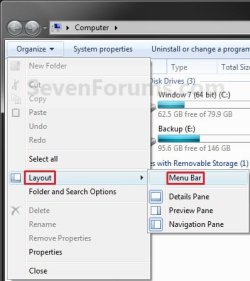
B) Click on the Organize button and Layout. (See screenshot below)
C) To Turn On the Menu Bar - Click on Menu Bar to check it.
D) To Turn Off the Menu Bar - Click on Menu Bar to uncheck it.
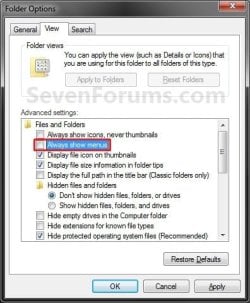
2. Through Folder Options A) Open Folder Options and click on the View tab. (See screenshot below)
B) To Turn On the Menu Bar - Check the Always show menus box.
C) To Turn Off the Menu Bar - Uncheck the Always show menus box.
D) Click on OK.
3. Using a REG File Download
A) To Add the Windows Explorer Menu Bar
- Click on the download button below to download the file below.
Download
- Go to step 3C.
- Click on the download button below to download the file below.
Download
C) Click on Save, and save the .reg file to the Desktop.
D) Right click on the downloaded .reg file and click Merge.
E) Click on Run, Yes (UAC), Yes, and then OK when prompted.
F) Log off and log on, or restart the computer to apply the changes.
G) When done, you can delete the downloaded .reg file if you like.
4. Through the Local Group Policy Editor
NOTE: This option will override the options above. A) Open the all users, specific users or groups, or all users except administrators Local Group Policy Editor for how you want this policy applied.
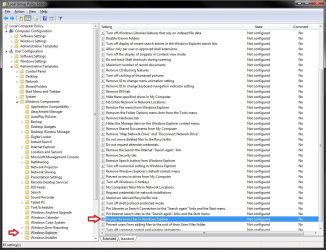
B) In the left pane, click on to expand User Configuration, Administrative Templates, Windows Components, and Windows Explorer. (see screenshot below)
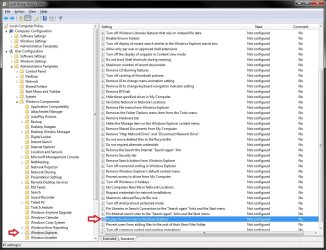
C) In the right pane, right click on Display the menu bar in Windows Explorer and click on Edit. (see screenshot above)
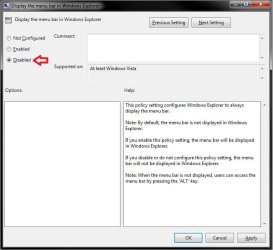
D) To Always Display the Windows Explorer Menu Bar
- Select (dot) Enabled. (see screenshot below step 4F)
- Select (dot) either Not Configured or Disabled. (see screenshot below step 4F)
NOTE: Not Configured is the default setting.
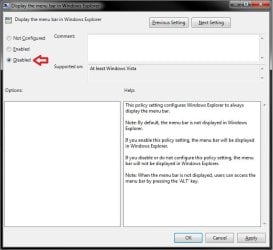
G) Close the Local Group Policy Editor window.
OPTION TWO
Turn Menu Bar On or Off in "Internet Explorer"
2. Right click on a empty area on the tab bar area. (See red box in screenshot below)
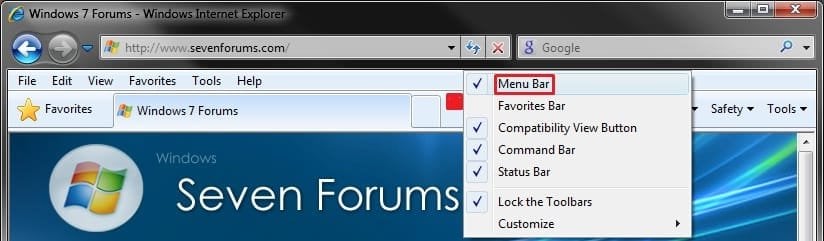
3. To Turn On the Menu Bar in Internet Explorer A) Click on Menu Bar to check it.
4. To Turn Off the Menu Bar in Internet Explorer A) Click on Menu Bar to uncheck it.
5. To Force the Menu Bar to Always be On or Off in Internet Explorer A) For how, see: How to Force Internet Explorer to Always Have the Menu Bar Turned On or Off by Default
OPTION THREE
Turn Menu Bar On or Off in "Windows Media Player"
2. Using a Keyboard Shortcut A) You can press CTRL+M to toggle turning the Menu Bar on or off.
3. From the Tab Bar A) Right click on a empty area on the tab bar area. (See screenshot below)

B) To Turn On the Menu Bar
- Click on Menu Bar to check it.
C) To Turn Off the Menu Bar
- Click on Menu Bar to uncheck it.
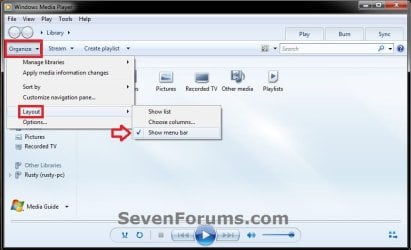
B) To Turn On the Menu Bar
- Click on Show menu bar to check it.
C) To Turn Off the Menu Bar
- Click on Show menu bar to uncheck it.
OPTION FOUR
Turn Menu Bar On or Off in "Firefox"
2. Right click on a empty area to the right of the tabs. (see screenshot below)
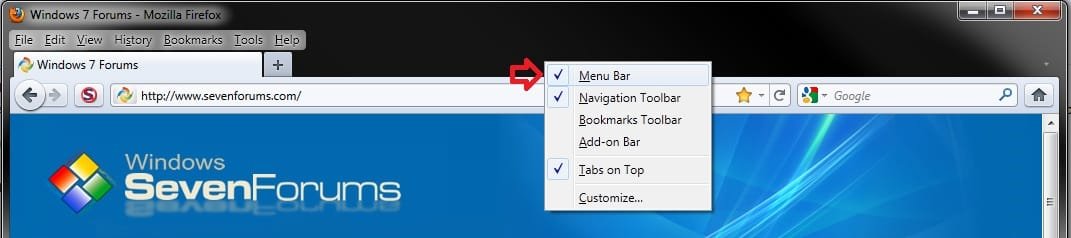
3. To Turn On the Menu Bar in Firefox A) Click on Menu Bar to check it.
4. To Turn Off the Menu Bar in Firefox A) Click on Menu Bar to uncheck it.
That's it,
Shawn
Related Tutorials
- How to Speed up the Menu Show Delay Time in Windows 7
- How to Set Windows 7 Menus to Open to the Left or Right Side
- How to Add or Remove the Windows 7 Internet Explorer Command Bar
- How to Change the Size of the Windows 7 Explorer Address and Search Bar
- How to Turn the Navigation Pane On or Off in Windows 7
- How to Turn the Details Pane On or Off in Windows 7
- How to Turn the Preview Pane On or Off in Windows 7
- How to Turn the Library Pane On or Off in Windows 7
- How to Turn the Windows Explorer Status Bar On or Off in Windows 7
- How to Force Internet Explorer to Always Have the Menu Bar Turned On or Off by Default
- How to Put the Menu Bar Always on Top in Internet Explorer
- How to Restore or Remove "File" from the Windows Explorer Menu Bar
- How to Move Stop and Refresh Buttons to Left or Right of Address Bar in IE9 and IE10
- How to Turn the Command Bar On or Off in IE9 and IE10
- How to Customize the Commmand Bar in Internet Explorer 9
Attachments

Last edited: