
How to Turn Windows Firewall On or Off in Windows 7 and Windows 8
Information
Windows Firewall can help prevent hackers or malicious software from gaining access to your computer through the Internet or network.
This tutorial will show you how to turn Windows Firewall on or off for each type of network location (ex: Private or Public) that you use in Windows 7 and Windows 8.
This tutorial will show you how to turn Windows Firewall on or off for each type of network location (ex: Private or Public) that you use in Windows 7 and Windows 8.
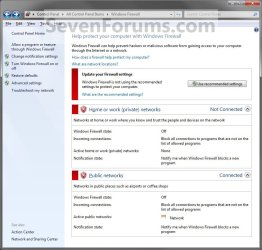
EXAMPLE: Windows Firewall On and Off
NOTE: Notice that there is a option for Windows Firewall to be on or off with Private networks and Public networks. If you have Inactive showing on a network location, this means that you do not have a network connection for that type of network location. Active means that you do.

Here's How:
1. Open the Control Panel (Icons View) in Windows 7 and Windows 8.
2. Click/tap on the Windows Firewall icon.
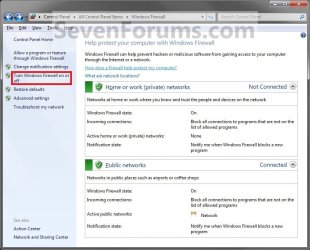
3. Click/tap on the Turn Windows Firewall on or off link in the left pane. (See screenshot below)
OPTION ONE
Home or Work (Private) Network Location Settings
4. To Turn On Windows Firewall
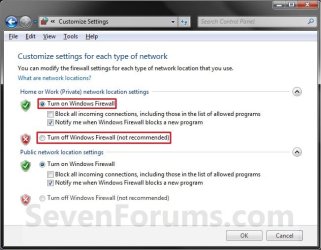
A) Select (dot) Turn on Windows Firewall. (See screenshot below step 5)
B) If prompted by UAC, then click/tap on Yes.
C) Change the Windows Firewall notifications settings you want. (See screenshot below step 5)
D) Go to OPTION TWO below.
5. To Turn Off Windows Firewall
A) Select (dot) Turn off Windows Firewall. (See screenshot below)
B) If prompted by UAC, then click/tap on Yes.
C) Go to OPTION TWO below.
OPTION TWO
Public Network Location Settings
6. To Turn On Windows Firewall
A) Select (dot) Turn on Windows Firewall. (See screenshot below step 7)
B) If prompted by UAC, then click/tap on Yes.
C) Change the Windows Firewall notifications settings you want. (See screenshot below step 7)
D) Go to step 8below.
7. To Turn Off Windows Firewall
A) Select (dot) Turn off Windows Firewall. (See screenshot below)
B) If prompted by UAC, then click/tap on Yes.
C) Go to step 8 below.

8. Click/tap on OK. (See screenshot above)
9. Close the Windows Firewall window when done. (See screenshot below step 3)
That's it,
Shawn
Related Tutorials
- How to Create a "Turn Windows Firewall On or Off" Shortcut
- How to Change Windows Firewall Notification Settings in Windows 7 and Windows 8
- How to Restore Default Windows Firewall Settings in Windows 7 and Windows 8
- How to Add or Remove a Windows Firewall Exception in Windows 7
- How to Create a Windows Firewall Shortcut in Windows 7
- How to Backup and Restore All Windows Firewall Settings
Last edited:


