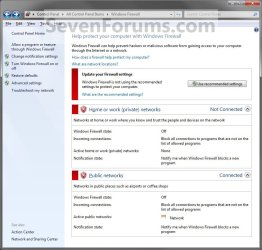
Windows Firewall - Turn On or Off

How to Turn Windows Firewall On or Off in Windows 7 and Windows 8


   Information
Windows Firewall can help prevent hackers or malicious software from gaining access to your computer through the Internet or network.

This tutorial will show you how to turn Windows Firewall on or off for each type of network location (ex: Private or Public) that you use in Windows 7 and Windows 8.


EXAMPLE: Windows Firewall On and Off
NOTE: Notice that there is a option for Windows Firewall to be on or off with Private networks and Public networks. If you have Inactive showing on a network location, this means that you do not have a network connection for that type of network location. Active means that you do.
Windows_Firewall_On.jpg

Windows_Firewall_Off.jpg

Here's How:
1. Open the Control Panel (Icons View) in Windows 7 and Windows 8.

2. Click/tap on the Windows Firewall icon.

3. Click/tap on the Turn Windows Firewall on or off link in the left pane. (See screenshot below)
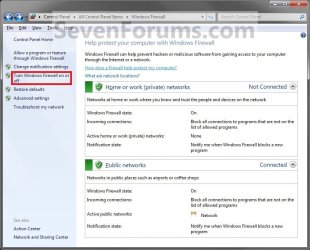
Windows_Firewall.jpg


OPTION ONE

Home or Work (Private) Network Location Settings


4. To Turn On Windows Firewall
A) Select (dot) Turn on Windows Firewall. (See screenshot below step 5)

B) If prompted by UAC, then click/tap on Yes.

C) Change the Windows Firewall notifications settings you want. (See screenshot below step 5)

D) Go to OPTION TWO below.
5. To Turn Off Windows Firewall
A) Select (dot) Turn off Windows Firewall. (See screenshot below)

B) If prompted by UAC, then click/tap on Yes.

C) Go to OPTION TWO below.
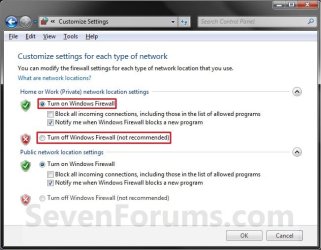
Private_Settings.jpg


OPTION TWO

Public Network Location Settings


6. To Turn On Windows Firewall
A) Select (dot) Turn on Windows Firewall. (See screenshot below step 7)

B) If prompted by UAC, then click/tap on Yes.

C) Change the Windows Firewall notifications settings you want. (See screenshot below step 7)

D) Go to step 8below.
7. To Turn Off Windows Firewall
A) Select (dot) Turn off Windows Firewall. (See screenshot below)

B) If prompted by UAC, then click/tap on Yes.

C) Go to step 8 below.

Public_Settings.jpg


8. Click/tap on OK. (See screenshot above)

9. Close the Windows Firewall window when done. (See screenshot below step 3)

That's it,
Shawn


Last edited:
Hello Brink, i want ask a similiar question about KIS and Windows Firewall, then if like that, can i turn on windows firewall too? Or just let it disable? I already try enable it, then what do you think? Just turn on KIS Firewall or can i turn on windows Firewall too? If just KIS Firewall, can you tell me how to disable windows Firewall?
 

My Computer

OS
Windows 7 Home Premium 64bit
Hello sle3pingz,

You should never have two software firewalls running at the same time since they could conflict with each other and cause unknown issues in Windows. When you turn off Windows Firewall, that is the same as disabling it.

Hope this helps,
Shawn
 

My Computer

Computer type
PC/Desktop
Computer Manufacturer/Model Number
Self built custom
OS
64-bit Windows 11 Pro for Workstations
CPU
Intel i7-8700K OC'd to 5 GHz
Motherboard
ASUS ROG Maximus XI Formula Z390
Memory
64 GB (4x16GB) G.SKILL TridentZ RGB DDR4 3600 MHz
Graphics Card(s)
ASUS ROG-STRIX-GTX1080TI-O11G-GAMING
Sound Card
Integrated
Monitor(s) Displays
2 x Samsung Odyssey G7 27"
Screen Resolution
2560x1440
Hard Drives
1TB Samsung 990 PRO M.2,
4TB Samsung 990 PRO PRO M.2,
TerraMaster F8 SSD Plus NAS
PSU
Seasonic Prime Titanium 850W
Case
Thermaltake Core P3
Cooling
Corsair Hydro H115i
Keyboard
Logitech wireless K800
Mouse
Logitech MX Master 4
Internet Speed
2 Gb/s Download and 100 Mb/s Upload
Antivirus
Malwarebyte Anti-Malware Premium
Browser
Google Chrome
Other Info
Logitech Z625 speaker system,
Logitech BRIO 4K Pro webcam,
HP Color LaserJet Pro MFP M477fdn,
APC SMART-UPS RT 1000 XL - SURT1000XLI,
Galaxy S23 Plus phone
Umm, then you think we must disable the windows firewall? Can you tell me how?
 

My Computer

OS
Windows 7 Home Premium 64bit
When you turn off Windows Firewall for both Private and Public, that is the same as disabling it. The tutorial on the first page of this thread can help show you how to. :)
 

My Computer

Computer type
PC/Desktop
Computer Manufacturer/Model Number
Self built custom
OS
64-bit Windows 11 Pro for Workstations
CPU
Intel i7-8700K OC'd to 5 GHz
Motherboard
ASUS ROG Maximus XI Formula Z390
Memory
64 GB (4x16GB) G.SKILL TridentZ RGB DDR4 3600 MHz
Graphics Card(s)
ASUS ROG-STRIX-GTX1080TI-O11G-GAMING
Sound Card
Integrated
Monitor(s) Displays
2 x Samsung Odyssey G7 27"
Screen Resolution
2560x1440
Hard Drives
1TB Samsung 990 PRO M.2,
4TB Samsung 990 PRO PRO M.2,
TerraMaster F8 SSD Plus NAS
PSU
Seasonic Prime Titanium 850W
Case
Thermaltake Core P3
Cooling
Corsair Hydro H115i
Keyboard
Logitech wireless K800
Mouse
Logitech MX Master 4
Internet Speed
2 Gb/s Download and 100 Mb/s Upload
Antivirus
Malwarebyte Anti-Malware Premium
Browser
Google Chrome
Other Info
Logitech Z625 speaker system,
Logitech BRIO 4K Pro webcam,
HP Color LaserJet Pro MFP M477fdn,
APC SMART-UPS RT 1000 XL - SURT1000XLI,
Galaxy S23 Plus phone
Still having problems...

I have gone through many youtube videos and even ur guide. well , i still am having problems as i still have a "network problem" i dont know why. it is the same as the photo no. 2 , but my case is that the left column , most of them are in bold and i am unable to turn on or off my firewall. what can i do? i really am confused and i dont know if it is just my computer that is having such problems
 

My Computer

OS
windows 7 home premium 64bit
Hello whyhitme, and welcome to Seven Forums. :)

Could you post a screenshot of this to see if anything may be revealed as a cause?

Are you getting any error messages?

Did you install a 3rd party Firewall program that is being used instead of Windows Firewall?
 

My Computer

Computer type
PC/Desktop
Computer Manufacturer/Model Number
Self built custom
OS
64-bit Windows 11 Pro for Workstations
CPU
Intel i7-8700K OC'd to 5 GHz
Motherboard
ASUS ROG Maximus XI Formula Z390
Memory
64 GB (4x16GB) G.SKILL TridentZ RGB DDR4 3600 MHz
Graphics Card(s)
ASUS ROG-STRIX-GTX1080TI-O11G-GAMING
Sound Card
Integrated
Monitor(s) Displays
2 x Samsung Odyssey G7 27"
Screen Resolution
2560x1440
Hard Drives
1TB Samsung 990 PRO M.2,
4TB Samsung 990 PRO PRO M.2,
TerraMaster F8 SSD Plus NAS
PSU
Seasonic Prime Titanium 850W
Case
Thermaltake Core P3
Cooling
Corsair Hydro H115i
Keyboard
Logitech wireless K800
Mouse
Logitech MX Master 4
Internet Speed
2 Gb/s Download and 100 Mb/s Upload
Antivirus
Malwarebyte Anti-Malware Premium
Browser
Google Chrome
Other Info
Logitech Z625 speaker system,
Logitech BRIO 4K Pro webcam,
HP Color LaserJet Pro MFP M477fdn,
APC SMART-UPS RT 1000 XL - SURT1000XLI,
Galaxy S23 Plus phone
Hi, Brink.

My windows firewall is disabled as I'm running MSE, but I keep getting these annoying pop-ups at startup. They state that win fw is off and that it thus cannot be started.
I've briefed through both the services and the programs in msconfig w/o finding the source, as well as googled for an answer, but I'm at a loss.
 

My Computer

OS
Win 7 x64 Home (Swe)
Hello Adesme, and welcome to Seven Forums.

MSE only turns off Windows Defender, and doesn't disable Windows Firewall.

Do you have any other 3rd party firewall program installed?

Double check to make sure that the Windows Firewall service is set to "Started" and "Automatic", then try to turn Windows Firewall on as per the tutorial on the first page.

Hope this helps for now, :)
Shawn
 

My Computer

Computer type
PC/Desktop
Computer Manufacturer/Model Number
Self built custom
OS
64-bit Windows 11 Pro for Workstations
CPU
Intel i7-8700K OC'd to 5 GHz
Motherboard
ASUS ROG Maximus XI Formula Z390
Memory
64 GB (4x16GB) G.SKILL TridentZ RGB DDR4 3600 MHz
Graphics Card(s)
ASUS ROG-STRIX-GTX1080TI-O11G-GAMING
Sound Card
Integrated
Monitor(s) Displays
2 x Samsung Odyssey G7 27"
Screen Resolution
2560x1440
Hard Drives
1TB Samsung 990 PRO M.2,
4TB Samsung 990 PRO PRO M.2,
TerraMaster F8 SSD Plus NAS
PSU
Seasonic Prime Titanium 850W
Case
Thermaltake Core P3
Cooling
Corsair Hydro H115i
Keyboard
Logitech wireless K800
Mouse
Logitech MX Master 4
Internet Speed
2 Gb/s Download and 100 Mb/s Upload
Antivirus
Malwarebyte Anti-Malware Premium
Browser
Google Chrome
Other Info
Logitech Z625 speaker system,
Logitech BRIO 4K Pro webcam,
HP Color LaserJet Pro MFP M477fdn,
APC SMART-UPS RT 1000 XL - SURT1000XLI,
Galaxy S23 Plus phone
Apparently I mis-remembered my problem. The pop-up was related to Windows Defender, stating something along the lines of "Another program is being used instead [of Defender]".

Re-activating WF worked like a charm, though. ;)

Any tips for the next problem in line?
 

My Computer

OS
Win 7 x64 Home (Swe)
Good. One down, and one to go. ;)

Double check to make sure that the Windows Defender service is enabled, but only set to "Manual" and not started.

You shouldn't be getting a message from Action Center about Windows Defender since you have MSE installed. You might see if reinstalling the latest version of MSE may stop it. If not, then please a screenshot of the message for this in Action Cente. It'll be like the orange security one below, but may be a different color (ex: red).

338d1228749419-action-center-change-message-settings-windows_solution_center2.jpg
 

My Computer

Computer type
PC/Desktop
Computer Manufacturer/Model Number
Self built custom
OS
64-bit Windows 11 Pro for Workstations
CPU
Intel i7-8700K OC'd to 5 GHz
Motherboard
ASUS ROG Maximus XI Formula Z390
Memory
64 GB (4x16GB) G.SKILL TridentZ RGB DDR4 3600 MHz
Graphics Card(s)
ASUS ROG-STRIX-GTX1080TI-O11G-GAMING
Sound Card
Integrated
Monitor(s) Displays
2 x Samsung Odyssey G7 27"
Screen Resolution
2560x1440
Hard Drives
1TB Samsung 990 PRO M.2,
4TB Samsung 990 PRO PRO M.2,
TerraMaster F8 SSD Plus NAS
PSU
Seasonic Prime Titanium 850W
Case
Thermaltake Core P3
Cooling
Corsair Hydro H115i
Keyboard
Logitech wireless K800
Mouse
Logitech MX Master 4
Internet Speed
2 Gb/s Download and 100 Mb/s Upload
Antivirus
Malwarebyte Anti-Malware Premium
Browser
Google Chrome
Other Info
Logitech Z625 speaker system,
Logitech BRIO 4K Pro webcam,
HP Color LaserJet Pro MFP M477fdn,
APC SMART-UPS RT 1000 XL - SURT1000XLI,
Galaxy S23 Plus phone
Tried setting back the service from disables to manual and also reinstalled MSE - Neither worked. Then I uninstalled MSE, updated Defender and deactivated it through its settings, but that did not work either.
I think this thread had the solution to my problem in post #10, but the link is dead...
http://www.sevenforums.com/system-security/81936-windows-defender-keeps-bugging-me.html

Oh, and nothing looks amiss in the action center (no orange or red or anything).
 

My Computer

OS
Win 7 x64 Home (Swe)

My Computer

Computer type
PC/Desktop
Computer Manufacturer/Model Number
Self built custom
OS
64-bit Windows 11 Pro for Workstations
CPU
Intel i7-8700K OC'd to 5 GHz
Motherboard
ASUS ROG Maximus XI Formula Z390
Memory
64 GB (4x16GB) G.SKILL TridentZ RGB DDR4 3600 MHz
Graphics Card(s)
ASUS ROG-STRIX-GTX1080TI-O11G-GAMING
Sound Card
Integrated
Monitor(s) Displays
2 x Samsung Odyssey G7 27"
Screen Resolution
2560x1440
Hard Drives
1TB Samsung 990 PRO M.2,
4TB Samsung 990 PRO PRO M.2,
TerraMaster F8 SSD Plus NAS
PSU
Seasonic Prime Titanium 850W
Case
Thermaltake Core P3
Cooling
Corsair Hydro H115i
Keyboard
Logitech wireless K800
Mouse
Logitech MX Master 4
Internet Speed
2 Gb/s Download and 100 Mb/s Upload
Antivirus
Malwarebyte Anti-Malware Premium
Browser
Google Chrome
Other Info
Logitech Z625 speaker system,
Logitech BRIO 4K Pro webcam,
HP Color LaserJet Pro MFP M477fdn,
APC SMART-UPS RT 1000 XL - SURT1000XLI,
Galaxy S23 Plus phone
I'm not sure what the screenshot used to be of, but I would imagine that it was to check and see if Windows Defender real-time protection was turned off, and Windows Defender was turned off.

http://www.sevenforums.com/tutorials/6399-windows-defender-real-time-protection-turn-off.html

http://www.sevenforums.com/tutorials/6397-windows-defender-turn-off.html

What do you have listed in your Startup tab in msconfig? There may be something from Windows Defender in it still.

That's my assumption as well, but as that didn't work ...


Windows-related progs would be: Script host, DDK driver, SkyDrive, Security Client, Operating system -- Oh, wait. That looks suspect. And it's run with %ProgramFiles%\Windows Defender\MSASCui.exe -hide

Let's see.

--

Worked like a charm! Cheers! :)

Oh, and I also changed the service to not restart if crashed. Not sure if it helped/will help out but, why not...
 
Last edited:

My Computer

OS
Win 7 x64 Home (Swe)
That's great news Adesme. :)
 

My Computer

Computer type
PC/Desktop
Computer Manufacturer/Model Number
Self built custom
OS
64-bit Windows 11 Pro for Workstations
CPU
Intel i7-8700K OC'd to 5 GHz
Motherboard
ASUS ROG Maximus XI Formula Z390
Memory
64 GB (4x16GB) G.SKILL TridentZ RGB DDR4 3600 MHz
Graphics Card(s)
ASUS ROG-STRIX-GTX1080TI-O11G-GAMING
Sound Card
Integrated
Monitor(s) Displays
2 x Samsung Odyssey G7 27"
Screen Resolution
2560x1440
Hard Drives
1TB Samsung 990 PRO M.2,
4TB Samsung 990 PRO PRO M.2,
TerraMaster F8 SSD Plus NAS
PSU
Seasonic Prime Titanium 850W
Case
Thermaltake Core P3
Cooling
Corsair Hydro H115i
Keyboard
Logitech wireless K800
Mouse
Logitech MX Master 4
Internet Speed
2 Gb/s Download and 100 Mb/s Upload
Antivirus
Malwarebyte Anti-Malware Premium
Browser
Google Chrome
Other Info
Logitech Z625 speaker system,
Logitech BRIO 4K Pro webcam,
HP Color LaserJet Pro MFP M477fdn,
APC SMART-UPS RT 1000 XL - SURT1000XLI,
Galaxy S23 Plus phone
Hello Brink,
I'm new to this lol. I was trying to install my printer but it says I need to turn on the firewall. But when I try I get the Error code 0x8007042c. I got this computer from my sister who didn't have an antivirus on it. I downloaded Avast and ran the scan. Of course it's infected. I really could use some help:cry:
 

My Computer

OS
Windows 7 Home Premium 64 bit
Hello lilredneckbit, and welcome to Seven Forums.

Personally, when comes to viruses, I prefer to format and start over. :(
 

My Computer

Computer type
PC/Desktop
Computer Manufacturer/Model Number
Self built custom
OS
64-bit Windows 11 Pro for Workstations
CPU
Intel i7-8700K OC'd to 5 GHz
Motherboard
ASUS ROG Maximus XI Formula Z390
Memory
64 GB (4x16GB) G.SKILL TridentZ RGB DDR4 3600 MHz
Graphics Card(s)
ASUS ROG-STRIX-GTX1080TI-O11G-GAMING
Sound Card
Integrated
Monitor(s) Displays
2 x Samsung Odyssey G7 27"
Screen Resolution
2560x1440
Hard Drives
1TB Samsung 990 PRO M.2,
4TB Samsung 990 PRO PRO M.2,
TerraMaster F8 SSD Plus NAS
PSU
Seasonic Prime Titanium 850W
Case
Thermaltake Core P3
Cooling
Corsair Hydro H115i
Keyboard
Logitech wireless K800
Mouse
Logitech MX Master 4
Internet Speed
2 Gb/s Download and 100 Mb/s Upload
Antivirus
Malwarebyte Anti-Malware Premium
Browser
Google Chrome
Other Info
Logitech Z625 speaker system,
Logitech BRIO 4K Pro webcam,
HP Color LaserJet Pro MFP M477fdn,
APC SMART-UPS RT 1000 XL - SURT1000XLI,
Galaxy S23 Plus phone
Thank you for the reply but when it comes to computers I'm not the best haha. I know that when my sister bought this laptop it already came with windows installed. Then shortly after she bought it, it pops up saying windows is not genuine. She tried all the tech support through Microsoft and they never got it figured out. They tell her that the activation key(?) is already being used. Which yeah it is because she was the one that bought the computer lol. Does this mean I need to buy a new Windows program to fix my problem? She also told me about a program Linux that her friend swears by. Any good? I know I have many questions but I'm just trying to get this thing back in good shape since I don't have the money for a new one quite yet. I really appreciate you taking the time to try to help me
 

My Computer

OS
Windows 7 Home Premium 64 bit
She might try doing a factory recovery/restore to see if that may help. She should be able to activate it using the product key number on the COA sticker on the laptop.
 

My Computer

Computer type
PC/Desktop
Computer Manufacturer/Model Number
Self built custom
OS
64-bit Windows 11 Pro for Workstations
CPU
Intel i7-8700K OC'd to 5 GHz
Motherboard
ASUS ROG Maximus XI Formula Z390
Memory
64 GB (4x16GB) G.SKILL TridentZ RGB DDR4 3600 MHz
Graphics Card(s)
ASUS ROG-STRIX-GTX1080TI-O11G-GAMING
Sound Card
Integrated
Monitor(s) Displays
2 x Samsung Odyssey G7 27"
Screen Resolution
2560x1440
Hard Drives
1TB Samsung 990 PRO M.2,
4TB Samsung 990 PRO PRO M.2,
TerraMaster F8 SSD Plus NAS
PSU
Seasonic Prime Titanium 850W
Case
Thermaltake Core P3
Cooling
Corsair Hydro H115i
Keyboard
Logitech wireless K800
Mouse
Logitech MX Master 4
Internet Speed
2 Gb/s Download and 100 Mb/s Upload
Antivirus
Malwarebyte Anti-Malware Premium
Browser
Google Chrome
Other Info
Logitech Z625 speaker system,
Logitech BRIO 4K Pro webcam,
HP Color LaserJet Pro MFP M477fdn,
APC SMART-UPS RT 1000 XL - SURT1000XLI,
Galaxy S23 Plus phone
Back
Top