Windows 7 Forums Search
Welcome to Windows 7 Forums. Our forum is dedicated to helping you find solutions with any problems, errors or issues you are experiencing with Windows 7. The Windows 7 forum also covers news and updates and has an extensive Windows 7 tutorial section that covers a wide range of tips and tricks.


Windows 7 - Windows Firewall - Turn On or Off


Windows Firewall - Turn On or Off

How to Turn Windows Firewall On or Off in Windows 7
Published by Brink
11-15-2008
Default Windows Firewall - Turn On or Off

How to Turn Windows Firewall On or Off in Windows 7

information   Information
Windows Firewall can help prevent hackers or malicious software from gaining access to your computer through the Internet or network.

This will show you how to to turn Windows Firewall On or Off for each type of network location (ex: Private or Public) that you use in Windows 7. Windows Firewall is turned on by default in Windows 7.

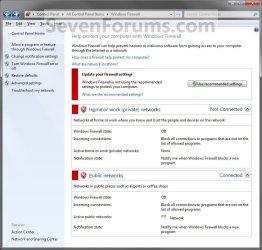
EXAMPLE: Windows Firewall On and Off
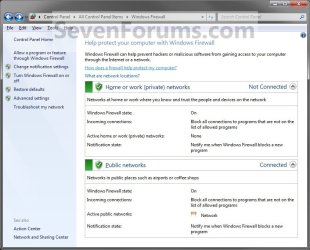
NOTE: Notice that there is a option for Windows Firewall to be on or off with Private networks and Public networks. If you have Inactive showing on a network location, this means that you do not have a network connection for that type of network location. Active means that you do.
Windows Firewall - Turn On or Off-windows_firewall_on.jpgWindows Firewall - Turn On or Off-windows_firewall_off.jpg

Here's How:
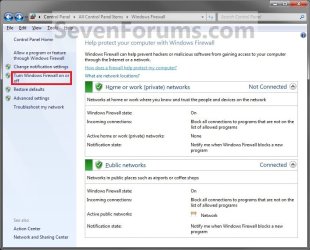
1. Open the Control Panel (All Items View).

2. Click on the Windows Firewall icon.

3. Click on the Turn Windows Firewall on or off link in the left blue pane. (See screenshot below)
Windows Firewall - Turn On or Off-windows_firewall.jpg


OPTION ONE

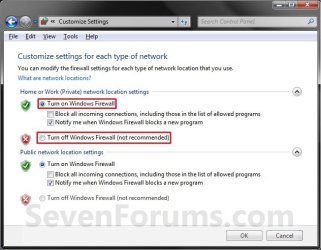
Home or Work (Private) Network Location Settings
4. To Turn On Windows Firewall
A) Select (dot) Turn on Windows Firewall. (See screenshot below step 5)

B) If prompted by UAC, then click on Yes.

C) Check the Windows Firewall notifications settings you want. (See screenshot below step 5)

D) Go to OPTION TWO below.
5. To Turn Off Windows Firewall
A) Select (dot) Turn off Windows Firewall. (See screenshot below)

B) If prompted by UAC, then click on Yes.

C) Go to OPTION TWO below.
Windows Firewall - Turn On or Off-private_settings.jpg


OPTION TWO

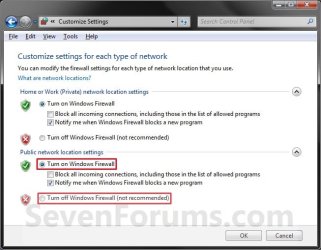
Public Network Location Settings
6. To Turn On Windows Firewall
A) Select (dot) Turn on Windows Firewall. (See screenshot below step 7)

B) If prompted by UAC, then click on Yes.

C) Check the Windows Firewall notifications settings you want. (See screenshot below step 7)

D) Go to OPTION TWO below.
7. To Turn Off Windows Firewall
A) Select (dot) Turn off Windows Firewall. (See screenshot below)

B) If prompted by UAC, then click on Yes.

C) Go to OPTION TWO below.
Windows Firewall - Turn On or Off-public_settings.jpg
8. Click on OK. (See screenshot above)

9. Close the Windows Firewall window when done. (See screenshot below step 3)

That's it,
Shawn


Published by
Brink's Avatar
Administrator

Join Date: Oct 2008
Location: Texas
Posts: 37,303

Tutorial Tools
01-10-2009   #1
bmb


Windows 7


Thanks for Tutorial Brink
I installed Kaspersky Internet Security and when i installed KIS automatically disabled Windows firewall but in Control panel nowhere shows i have firewall (Vista Shows if any other Firewall or Anti virus / antispyware installed in system).
Your first screen shot both is green but my one is RED.
Any advice...........

My System SpecsSystem Spec
01-10-2009   #2
Brink


Windows 7 Ultimate x64 SP1


Hello Bmb, and welcome to Seven Forums.

Kaspersky has a firewall included in it, so when you installed it, it disabled the Windows Firewall since you should only have one firewall installed and running at one time. That is why this is red for you. Nothing to worry about since you have Kaspersky firewall installed.

Shawn
My System SpecsSystem Spec
01-11-2009   #3
bmb


Windows 7


Thanks Brink for your help but just wonder i mentioned in my previous post in Vista it showed everything what Firewall Anti virus Spyware installed in System Security Control panel if in Windows 7 u can check that way ......( I know myself what i installed and its not big issue but just for curiosity)
My System SpecsSystem Spec
.


01-11-2009   #4
Brink


Windows 7 Ultimate x64 SP1


You're welcome bmb. I miss them being listed on Security Center as well for quick reference.
My System SpecsSystem Spec
12-26-2009   #5
juiby


windows 7


a

whenever i try to turn it off the tab that say "Turn windows fir wall on or off" cannot be click and i know for a fact im the administrator cuz im the only account on the computer??
My System SpecsSystem Spec
12-26-2009   #6
Brink


Windows 7 Ultimate x64 SP1


Hello Juiby, and welcome to Seven Forums.

Could you post a screenshot of this?

In the mean time, go ahead and run a sfc /scannow command to see if that may be able to help.
My System SpecsSystem Spec
01-27-2010   #7
Tanuki


Windows 7 Home Premium 64 bit


I have the same problem with juiby. I need to turn off Windows Firewall in order to download video files from my company's website but the option to do so is not clickable. I also log in as an Administrator. I'm attaching the screenshot so please help me with this.
My System SpecsSystem Spec
01-27-2010   #8
Brink


Windows 7 Ultimate x64 SP1


Hello Tanuki, and welcome to Seven Forums.

Did you have that screenshot?
My System SpecsSystem Spec
01-31-2010   #9
Tanuki


Windows 7 Home Premium 64 bit


Thank you, Brink. I thought I attached the screeshot. Now that I'm going to do it again, I don't know how to. Please let me know. Thank you so much.
My System SpecsSystem Spec
Comment

 Windows Firewall - Turn On or Off problems?


Tutorial Tools


Similar Threads for: Windows Firewall - Turn On or Off
Windows 7 Tutorial Category
Cant turn on/update Windows Firewall error 0x8007042c System Security
How to turn on firewall log Network & Sharing
Solved Action Center can't turn on Windows Firewall System Security
Cannot Turn off Windows Firewall System Security
Cannot turn firewall off System Security


All times are GMT -5. The time now is 02:42 AM.


Windows 7 Forums is an independent web site and has not been authorized,
sponsored, or otherwise approved by Microsoft Corporation.
"Windows 7" and related materials are trademarks of Microsoft Corp.
© Designer Media Ltd
  

1 2 3 4 5 6 7 8 9 10 11 12 13 14 15 16 17 18 19 20 21 22 23 24 25 26 27 28 29 30