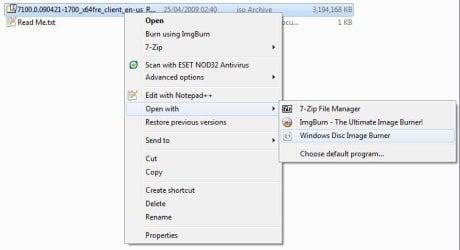
| Windows 7: Burn Disc Image - ISO or IMG file |
16 Nov 2008
|
#9 | | 64-bit Windows 7 Ultimate SP1 & Windows 8 Enterprise Texas |
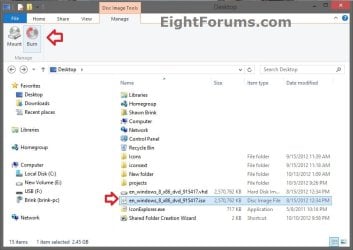
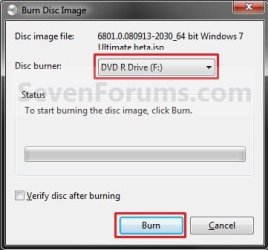
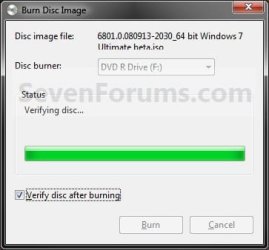
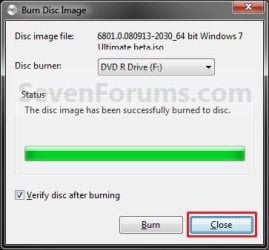
Burn Disc Image - ISO or IMG file How to Burn a "ISO" or "IMG" Disc Image file to a CD/DVD in Windows 7 and Windows 8
Last edited by Brink; 11 Dec 2012 at 11:47 PM..
| My System Specs |
| Computer type PC/Desktop System Manufacturer/Model Number Self built custom OS 64-bit Windows 7 Ultimate SP1 & Windows 8 Enterprise CPU Intel i7-3930K 3.2 Ghz (O/C 4 Ghz) Motherboard ASRock X79 Extreme11 Memory 32 GB (8GBx4) G.SKILL DDR3 Quad PC3-19200 2400MHz Graphics Card Sapphire HD5870 Eyefinity 6 2GB Sound Card SB Recon 3Di Integrated Chip Monitor(s) Displays 3x 27" Asus VE278Q Screen Resolution 1920x1080 Keyboard Logitech Cordless Desktop MX 5500 Revolution Mouse Logitech Cordless Desktop MX 5500 Revolution PSU OCZ Series Gold OCZZ1000M 1000W Case Thermaltake Level 10 GT Snow Edition Cooling Corsair Hydro H100 Hard Drives 256GB OCZ Vector
160GB OCZ RevoDrive X2
2 x 1TB Samsung HDD HD154UI SATA Internet Speed 50 Mb/s Download and 2 Mb/s Upload Other Info Microsoft LifeCam Cinema
Lite-On iHBS212 12x BD Writer
Samsung CLX-3175FW Printer
Netgear WNDR3800 Router
Motorola SBG6580 Cable Modem
2x APC Back-UPS XS 1500 |
12 Feb 2009
|
#10 | | Vista Ult SP2/Win 7 Ult SP1/Win 8 Pro w/MC/x64/XP SP3 x86 in VM Toronto, Canada |
Hmm, which one though? I don't have any ISO burning programme installed or even Nero for that matter. Only 1-Click DVD Copy and AnyDVD.
Anyway, thanks for the help. | My System Specs |
| System Manufacturer/Model Number Alienware® ALX X58 OS Vista Ult SP2/Win 7 Ult SP1/Win 8 Pro w/MC/x64/XP SP3 x86 in VM CPU Intel® Core™ i7-975 Extreme O/C to 4.02 GHz, 8MB Cache Motherboard Asus® P6T Deluxe V2 X58 LGA1366 Memory 12GB DDR3 SDRAM at 1600MHz - 6 x 2048MB Graphics Card 1792 MB NVIDIA® GeForce® GTX 295/Hauppauge HVR2250 TV Tuner Sound Card Onboard Soundmax® High-Definition 7.1 Performance Audio Monitor(s) Displays Samsung XL2370 LED backlit 23" W/S 2ms response time Screen Resolution 1920 X 1080 Keyboard Microsoft® Wireless Entertainment 8000 + Logitech® G15 Wired Mouse Microsoft® Wireless Laser 8000 + Logitech® G9 Wired PSU Alienware® 1200 Watt Multi-GPU Case Alienware® P2 ALX Chassis with AlienIce™ 3.0 Video Cooling Cooling Alienware® High-Perf. Liquid Cooling + Acoustic Dampening Hard Drives 2 x 500gb SATA II
1 x 1TB SATA II
1 external eSATA LaCie 1TB
(Non-RAID) Internet Speed 45mbps Other Info Using non-RAID on purpose as I find RAID to be too temperamental.
I've noticed no difference since switching. |
12 Feb 2009
|
#11 | | 64-bit Windows 7 Ultimate SP1 & Windows 8 Enterprise Texas |
You're welcome Peter.
That is a mystery, but most likely one of those. | My System Specs | | Computer type PC/Desktop System Manufacturer/Model Number Self built custom OS 64-bit Windows 7 Ultimate SP1 & Windows 8 Enterprise CPU Intel i7-3930K 3.2 Ghz (O/C 4 Ghz) Motherboard ASRock X79 Extreme11 Memory 32 GB (8GBx4) G.SKILL DDR3 Quad PC3-19200 2400MHz Graphics Card Sapphire HD5870 Eyefinity 6 2GB Sound Card SB Recon 3Di Integrated Chip Monitor(s) Displays 3x 27" Asus VE278Q Screen Resolution 1920x1080 Keyboard Logitech Cordless Desktop MX 5500 Revolution Mouse Logitech Cordless Desktop MX 5500 Revolution PSU OCZ Series Gold OCZZ1000M 1000W Case Thermaltake Level 10 GT Snow Edition Cooling Corsair Hydro H100 Hard Drives 256GB OCZ Vector
160GB OCZ RevoDrive X2
2 x 1TB Samsung HDD HD154UI SATA Internet Speed 50 Mb/s Download and 2 Mb/s Upload Other Info Microsoft LifeCam Cinema
Lite-On iHBS212 12x BD Writer
Samsung CLX-3175FW Printer
Netgear WNDR3800 Router
Motorola SBG6580 Cable Modem
2x APC Back-UPS XS 1500 |
12 Feb 2009
|
#12 | | Vista Ult SP2/Win 7 Ult SP1/Win 8 Pro w/MC/x64/XP SP3 x86 in VM Toronto, Canada |
Being as neither can handle .iso or .img files, it is rather weird. Maybe one of them just grabbed every related file type regardless.... although I didn't see either listed in the Default Program list. | My System Specs | | System Manufacturer/Model Number Alienware® ALX X58 OS Vista Ult SP2/Win 7 Ult SP1/Win 8 Pro w/MC/x64/XP SP3 x86 in VM CPU Intel® Core™ i7-975 Extreme O/C to 4.02 GHz, 8MB Cache Motherboard Asus® P6T Deluxe V2 X58 LGA1366 Memory 12GB DDR3 SDRAM at 1600MHz - 6 x 2048MB Graphics Card 1792 MB NVIDIA® GeForce® GTX 295/Hauppauge HVR2250 TV Tuner Sound Card Onboard Soundmax® High-Definition 7.1 Performance Audio Monitor(s) Displays Samsung XL2370 LED backlit 23" W/S 2ms response time Screen Resolution 1920 X 1080 Keyboard Microsoft® Wireless Entertainment 8000 + Logitech® G15 Wired Mouse Microsoft® Wireless Laser 8000 + Logitech® G9 Wired PSU Alienware® 1200 Watt Multi-GPU Case Alienware® P2 ALX Chassis with AlienIce™ 3.0 Video Cooling Cooling Alienware® High-Perf. Liquid Cooling + Acoustic Dampening Hard Drives 2 x 500gb SATA II
1 x 1TB SATA II
1 external eSATA LaCie 1TB
(Non-RAID) Internet Speed 45mbps Other Info Using non-RAID on purpose as I find RAID to be too temperamental.
I've noticed no difference since switching. |
15 Mar 2009
|
#13 | | Windows 7 Ultimate build7232 x64 |
What speed is it burning the image ?
pity it hasnt got a speed option.
is this a reliable image burner , have you have successful burns shawn? | My System Specs | | OS Windows 7 Ultimate build7232 x64 CPU PhenomII 940 BE Motherboard DFI DK 790FX M2RS Memory 2x2GB Corsair XMS2 Graphics Card Nvidia 8600GT Monitor(s) Displays SONY TFT Keyboard Microsoft Wireless 6000v3 Mouse Microsoft Laser Mouse 5000 PSU ANTEC 550W Earthwatts Case Antec 900 Gamers Hard Drives 2x WD 500GB AAK
1 TB WD Elements -USB
1 500GB WD Elements -USB Internet Speed 16 MB |
15 Mar 2009
|
#14 | | 64-bit Windows 7 Ultimate SP1 & Windows 8 Enterprise Texas |
Hello Skyfly,
Yes, it has worked perfectly for me.
You can adjust the burn speed in Windows Media Player: - Click on Tools (menu bar) and Options.
- Click on the Burn tab.
- Under General section, select the Burn speed you like.
Hope this helps,
Shawn | My System Specs | | Computer type PC/Desktop System Manufacturer/Model Number Self built custom OS 64-bit Windows 7 Ultimate SP1 & Windows 8 Enterprise CPU Intel i7-3930K 3.2 Ghz (O/C 4 Ghz) Motherboard ASRock X79 Extreme11 Memory 32 GB (8GBx4) G.SKILL DDR3 Quad PC3-19200 2400MHz Graphics Card Sapphire HD5870 Eyefinity 6 2GB Sound Card SB Recon 3Di Integrated Chip Monitor(s) Displays 3x 27" Asus VE278Q Screen Resolution 1920x1080 Keyboard Logitech Cordless Desktop MX 5500 Revolution Mouse Logitech Cordless Desktop MX 5500 Revolution PSU OCZ Series Gold OCZZ1000M 1000W Case Thermaltake Level 10 GT Snow Edition Cooling Corsair Hydro H100 Hard Drives 256GB OCZ Vector
160GB OCZ RevoDrive X2
2 x 1TB Samsung HDD HD154UI SATA Internet Speed 50 Mb/s Download and 2 Mb/s Upload Other Info Microsoft LifeCam Cinema
Lite-On iHBS212 12x BD Writer
Samsung CLX-3175FW Printer
Netgear WNDR3800 Router
Motorola SBG6580 Cable Modem
2x APC Back-UPS XS 1500 |
01 Apr 2009
|
#15 | | Windows 7x64 + XP Mode Cambridge, UK |
With a thread this old I'm not sure whether to reply or start afresh, but here goes.
I followed Shawn's tutorial to the letter, trying to burn the x64 ISO of build 7068 to a DVD, but I've still got only a read-me that gives the dread message, 'This disc contains a "UDF" file system and requires an operating system
that supports the ISO-13346 "UDF" file system specification.'
Oh, and an ini file that contains:
[.ShellClassInfo]
LocalizedResourceName=@%SystemRoot%\system32\shell32.dll,-21815
What should I try next?
Thanks | My System Specs | | System Manufacturer/Model Number self-built OS Windows 7x64 + XP Mode CPU i7-740 Motherboard Asus P6T Deluxe Memory 12 GB DDR3 Graphics Card Sapphire Radeon HD 4870 Sound Card on board Monitor(s) Displays Eizo 30" CG301; Dell 20" 2007FP, Screen Resolution Eizo: 2560x1600; Dell: 1600x1024 Keyboard Logitech G11 Mouse Logitech cordless PSU Zalman ZM850 Case Coolermaster ATCS 840 Cooling Swiftech H20-220 watercooling kit Hard Drives 3 x WD Velociraptors, 320 GB
2 x Seagate Barracuda 1.5 GB Internet Speed slow broadband |
01 Apr 2009
|
#16 | | 64-bit Windows 7 Ultimate SP1 & Windows 8 Enterprise Texas |
Hello Mary,
The DVD will need to be a blank unformatted DVD to burn the ISO file to it. If it is, then you may have a bad ISO file. | My System Specs | | Computer type PC/Desktop System Manufacturer/Model Number Self built custom OS 64-bit Windows 7 Ultimate SP1 & Windows 8 Enterprise CPU Intel i7-3930K 3.2 Ghz (O/C 4 Ghz) Motherboard ASRock X79 Extreme11 Memory 32 GB (8GBx4) G.SKILL DDR3 Quad PC3-19200 2400MHz Graphics Card Sapphire HD5870 Eyefinity 6 2GB Sound Card SB Recon 3Di Integrated Chip Monitor(s) Displays 3x 27" Asus VE278Q Screen Resolution 1920x1080 Keyboard Logitech Cordless Desktop MX 5500 Revolution Mouse Logitech Cordless Desktop MX 5500 Revolution PSU OCZ Series Gold OCZZ1000M 1000W Case Thermaltake Level 10 GT Snow Edition Cooling Corsair Hydro H100 Hard Drives 256GB OCZ Vector
160GB OCZ RevoDrive X2
2 x 1TB Samsung HDD HD154UI SATA Internet Speed 50 Mb/s Download and 2 Mb/s Upload Other Info Microsoft LifeCam Cinema
Lite-On iHBS212 12x BD Writer
Samsung CLX-3175FW Printer
Netgear WNDR3800 Router
Motorola SBG6580 Cable Modem
2x APC Back-UPS XS 1500 |
01 Apr 2009
|
#17 | | Windows 7x64 + XP Mode Cambridge, UK |
Brink,
Thanks for the tip. It was a bad ISO. I got another, burned it, and I'm ready to roll.
Oh no I'm not. What I burned has files/folders and setup.exe, all with 0 bytes. I downloaded from Mininova, using my GetRight download manager set as default for bittorrents, but it's not a procedure I'm used to. I somehow managed to download/burn the 7000 beta, so I know it's possible, but I've lost track.
This is obviously not the right forum for advice on how to download bit torrents, so I'll look round online and see what advice turns up.
Thanks anyhow,
Mary
Last edited by MBernard; 01 Apr 2009 at 04:17 PM..
| My System Specs | | System Manufacturer/Model Number self-built OS Windows 7x64 + XP Mode CPU i7-740 Motherboard Asus P6T Deluxe Memory 12 GB DDR3 Graphics Card Sapphire Radeon HD 4870 Sound Card on board Monitor(s) Displays Eizo 30" CG301; Dell 20" 2007FP, Screen Resolution Eizo: 2560x1600; Dell: 1600x1024 Keyboard Logitech G11 Mouse Logitech cordless PSU Zalman ZM850 Case Coolermaster ATCS 840 Cooling Swiftech H20-220 watercooling kit Hard Drives 3 x WD Velociraptors, 320 GB
2 x Seagate Barracuda 1.5 GB Internet Speed slow broadband |
01 Apr 2009
|
#18 | | 64-bit Windows 7 Ultimate SP1 & Windows 8 Enterprise Texas |
Mary, I'm happy to hear that you got it sorted.
You can ask general questions about the bit torrent program in the Software forum though. | My System Specs | | Computer type PC/Desktop System Manufacturer/Model Number Self built custom OS 64-bit Windows 7 Ultimate SP1 & Windows 8 Enterprise CPU Intel i7-3930K 3.2 Ghz (O/C 4 Ghz) Motherboard ASRock X79 Extreme11 Memory 32 GB (8GBx4) G.SKILL DDR3 Quad PC3-19200 2400MHz Graphics Card Sapphire HD5870 Eyefinity 6 2GB Sound Card SB Recon 3Di Integrated Chip Monitor(s) Displays 3x 27" Asus VE278Q Screen Resolution 1920x1080 Keyboard Logitech Cordless Desktop MX 5500 Revolution Mouse Logitech Cordless Desktop MX 5500 Revolution PSU OCZ Series Gold OCZZ1000M 1000W Case Thermaltake Level 10 GT Snow Edition Cooling Corsair Hydro H100 Hard Drives 256GB OCZ Vector
160GB OCZ RevoDrive X2
2 x 1TB Samsung HDD HD154UI SATA Internet Speed 50 Mb/s Download and 2 Mb/s Upload Other Info Microsoft LifeCam Cinema
Lite-On iHBS212 12x BD Writer
Samsung CLX-3175FW Printer
Netgear WNDR3800 Router
Motorola SBG6580 Cable Modem
2x APC Back-UPS XS 1500 |
06 Apr 2009
|
#19 | | |
Dual layer? Does anyone know if the iso burner is capable of burning to dvd+r dual layer discs? I have a 7.xGB iso file and was wondering if I'd need to install my 3rd party software or not. Thanks for any info guys. | My System Specs | | Burn Disc Image - ISO or IMG file problems? All times are GMT -5. The time now is 06:03 AM. | |