Windows Mail

How to Reinstate Windows Mail in Windows 7

   Warning
Microsoft no longer supports Windows Mail, aka WinMail. It's recommended you use another well known supported email client. This Tutorial is for Advanced users who importantly have the Technical Ability to make the changes, have backups of everything including your OS, and to be your own tech support for WinMail going forward. If you decide to complete this tutorial you accept the fact that you are using WinMail as-is. It might be necessary to uninstall other email clients to resolve any WinMail conflicts in some environments. Understand it's likely that new OS updates from Microsoft will break WinMail's operation, and to fix make it necessary to rerun the tutorial again to reinstate it. With those things in mind, this tutorial was written so that you can rerun it without affecting WinMail user data.
Please see this Errata (Bug List) post before you install, to be aware of the current information about known issues using WinMail within Windows 7, these issues are programmatic and in most cases cannot be resolved by this tutorial, and will never be fixed.

Having said all of that disclaimer, if you have the technical ability, and can put up with the annoying minor byproduct bugs, then like so many of us still enjoy using WinMail on Windows 7 ...ymmv!


   Tip
As of January, 2025, the instructions given here supersede all other instructions given in forthcoming older posts. Realize some of the posts that follow are over 16 years old, and many of the link pointers within have become mislinked over time, many of the files or information within them is outdated, incomplete, or superseded with more accurate information - and so be careful. However you can always be sure that the latest info from all research is incorporated into this tutorial post, and its downloads are the latest available. This post is continuously kept up-to-date, and so..
...Always refer to this Tutorial post for the very latest updated information

This is the 4th iteration of the Windows 7, WinMail tutorial.

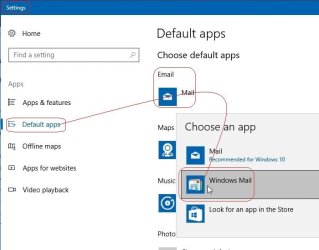
The process of this tutorial Will Not work to reinstate WinMail on Windows 8/10 !
Windows 8/10 users please go Here


Start here
  1. Download tutorial package TutReWinMail.zip

    Download

  2. Extract the TutReWinMail.zip into your user Downloads folder
    • Note: Be sure once extracted this is the address of the ''TutReWinMail'' folder:
    • C:\Users\username\Downloads\TutReWinMail... ... (if it's not there please put it there)
  3. Navigate to your user Downloads\TutReWinMail folder to be sure the above is correct.
    • (..if you need more verbose install instructions to follow, download this WinMail Local Tutorial.zip)
    • Advanced Users can proceed below:
      (..log in for Full Access, being able to get support, remove ads, like, and even to post, etc..)
Advanced Users: ..use this easy excellent overview of the steps in the local tutorial:
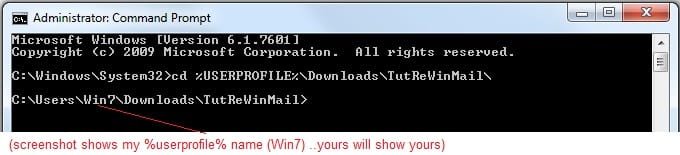
  • Open an Administrator Command Prompt. (screenshot showing in Administrator mode)
  • copy/paste this line into the command prompt: cd %USERPROFILE%\Downloads\TutReWinMail\
  • Your command prompt must now be showing you are at That Same Folder Address ..which contains the tutorial files that the batch file in the next step executes programs and copies files specifically from that folder address - if it's not there the batch file will fail since it cannot find what it needs!
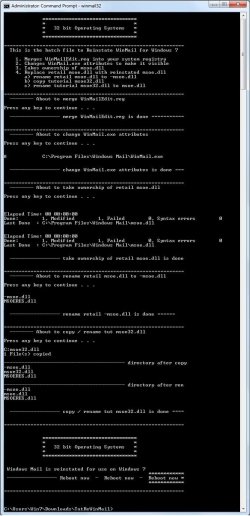
  • Next type in either winmail32 or win64mail <matching OS bit, to interactively process These Next Steps
  • If you've finished to the bottom as shown in last screenshot, restart your machine (sets registry)
  • Create a shortcut from WinMail.exe to your Desktop
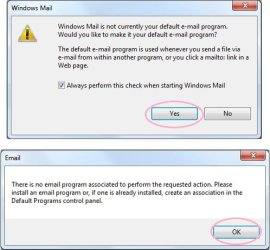
  • Open WinMail - it may prompt you one (or both) of These Two Notices ..click yes, and okay.
  • They now should be already set, but you can manually check/set at any time These Default Settings
  • That's pretty much all there is to it, and from here you setup the rest of the Windows Mail client (aka: WinMail) as normal within its various tab menus for Accounts, Options, Layout, etc, etc, to suit your individual needs.
  • Lastly, but should be the First thing you do, is to Create A WinMail Backup (new version) ..Go to this next link and when you get there scroll down to the heading: Backup/Restore Procedures for further instructions.
   Information
See How to open an elevated Administrator Command Prompt
Important: The exact text provided by the tutorial must be entered into the Administrator Command Prompt.
Hint: to avoid typos, copy/paste the entire line containing the command into the Command Prompt window.
Also see: How to Enable Copy to Clipboard from the Windows 7 Command Prompt

Every effort has been made to make this a step-by-step process, however, it is beyond the scope of a single tutorial to provide information on every command or concept. Search the Main Tutorial Section if you need greater detail on a concept or command presented in this tutorial.


Good luck, and long live WinMail :thumbsup:


   Note
Made possible by members:
Mark (aka Mr GRiM) - provided the original tutorial
Poppa Bear - continued Mark's work within the 2nd version
endeavor - provided continuous feedback, changes, invaluable testing instrumental to tutorial operations
EKManitis - propose the batch code that made operations easier
Slartybart - updated, tested, and consolidated all of the above into the 3rd version
endeavor - reviewed, updated, tested, and incorporated all of the above into this 4th version
...and also a special thanks to All the other members who presented discovery for this project


Attachments

  • TutReWinMail.zip
    TutReWinMail.zip
    1.8 MB · Views: 4,994
  • msoe_32.zip
    msoe_32.zip
    404 bytes · Views: 1,052
  • msoe_64.zip
    msoe_64.zip
    404 bytes · Views: 1,531
  • WinMailEdit.zip
    WinMailEdit.zip
    404 bytes · Views: 6
  • Win74umsZip.zip
    Win74umsZip.zip
    404 bytes · Views: 106
  • ACP.jpg
    ACP.jpg
    19.6 KB · Views: 1,083
  • DefaultClickYes-OkayAssociation.jpg
    DefaultClickYes-OkayAssociation.jpg
    52.8 KB · Views: 899
  • ProcessingBatch.jpg
    ProcessingBatch.jpg
    194.2 KB · Views: 1,147
  • PasteCDCommand.jpg
    PasteCDCommand.jpg
    33.1 KB · Views: 696
  • WinMail_Local_Tutorial.zip
    WinMail_Local_Tutorial.zip
    6.1 KB · Views: 1,202
  • FolderOptionsSet.jpg
    FolderOptionsSet.jpg
    61.5 KB · Views: 695
  • WinMailAdvanceOptionsBlank.jpg
    WinMailAdvanceOptionsBlank.jpg
    276.4 KB · Views: 93
  • Win7x64AdvancedTab+FileVersions.jpg
    Win7x64AdvancedTab+FileVersions.jpg
    298.9 KB · Views: 112
  • AdvancedTabBefore&After_fixed.jpg
    AdvancedTabBefore&After_fixed.jpg
    106.9 KB · Views: 50
  • CheckManually.jpg
    CheckManually.jpg
    209.5 KB · Views: 136
  • Win10_SetDefault.jpg
    Win10_SetDefault.jpg
    66.2 KB · Views: 33
Last edited by a moderator:
pb, lol, I edited my last post. Please read it for clarity. Oh but I do love Red in the Crimson color, as in
R o l l T i d e !
You'd have to be from bama to understand that one.
 

My Computer

Computer Manufacturer/Model Number
Averatec 6130HS-20
OS
Windows 7 Professional 32-bit (6.1, Build 7600)
CPU
Intel(R) Pentium(R) 4 3.00 GHz HT
Memory
2.0 GB
Graphics Card(s)
ATI Mobility Radeon 9600 64MB
Sound Card
Realtek AC'97 Audio
Screen Resolution
1280 x 800
Hard Drives
Seagate 96023A 60GB 7200RPM -
Seagate FreeAgentDesktop 250GB
Cooling
20 Inch Box Fan
Mouse
Targus PAWM10 Wireless Optical Laptop Mouse
Probably should add that into my Techspot Guide? What do you think? Safe to do so, or would it confuse the masses?

Cheers PB
Yes, it's safe to do it. It's only the one key and that key is specific to only two files
msoe.dll <--- the main and only one that causes the problem
MSOERES.dll <--- makes no diff, it's the original

Also, who would care anyway? All the files are original except msoe.dll. Most people that do this should have a backup of the original Windows Mail folder. The only other thing that could be added, is right click the key that we are deleting and select export, save it for safe keeping. I did and can post the original reg for it here for other in the future in case they want to merge back.

The deleted and original reg file below

Code:
Windows Registry Editor Version 5.00
[HKEY_LOCAL_MACHINE\SOFTWARE\Microsoft\Windows\CurrentVersion\SideBySide\Winners\x86_microsoft-windows-mail-core-dll_31bf3856ad364e35_none_67a2bdecbd5f60de]
@="6.1"
[HKEY_LOCAL_MACHINE\SOFTWARE\Microsoft\Windows\CurrentVersion\SideBySide\Winners\x86_microsoft-windows-mail-core-dll_31bf3856ad364e35_none_67a2bdecbd5f60de\6.1]
"6.1.7600.16385"=hex:01
@="6.1.7600.16385"
 

My Computer

Computer Manufacturer/Model Number
Averatec 6130HS-20
OS
Windows 7 Professional 32-bit (6.1, Build 7600)
CPU
Intel(R) Pentium(R) 4 3.00 GHz HT
Memory
2.0 GB
Graphics Card(s)
ATI Mobility Radeon 9600 64MB
Sound Card
Realtek AC'97 Audio
Screen Resolution
1280 x 800
Hard Drives
Seagate 96023A 60GB 7200RPM -
Seagate FreeAgentDesktop 250GB
Cooling
20 Inch Box Fan
Mouse
Targus PAWM10 Wireless Optical Laptop Mouse
To GregS re:
Oh but I do love Red in the Crimson color, as in
R o l l T i d e !
You'd have to be from bama to understand that one.
OffTopic: Never been to 'bama, in fact never been outside Aussie, but one of my favorite songs is "Sweet Home Alabama"... where the skies are so blue! (Lynyrd Skynyrd). Hell ya almost got me singing! LOL! Thought crossed my mind when you mentioned the red fetish that maybe it was said tongue in cheek.

Re
If you also can confirm that it works, then the steps for making it work are down to just a few.
1)Unhide and lose the attributes of WinMail.exe
2)Copy and paste Vista version of msoe.dll
3)Delete the reg key
4)Merge your 2 winmail reg keys on your other site

I would assume step 4 would still be needed, not for sure on that.
That sounds good to me, and would make everything a lot simpler. Unless you're importing a 32 bit to a 64 bit version, in which case I imagine you'd need the full Vista WinMail folder to put in the X86 Program Files, because the registry change for msoe.dll would only apply to the 64 bit program files... or would it?

Unfortunately, I don't have a 64 bit version of Win7 to play around with. I did have the beta version but it no longer works. Must be outdated. Consequently I haven't been able to confirm first hand that importing WinMail from a 32 bit Vista system to a 64 bit Win7 and putting it in x86 Program Files works. However, it seemed to be the case in Meriu's post, and worked OK ---> post #187 page 19.

I wonder if the 32 bit msoe.dll would work if used to replace the msoe.dll in a 64 bit Windows Mail folder in program files?

Re step 4, I suspect that would still be needed, but how would you merge the two regedit files, Windows Mail.reg and Windows Mail2.reg? Do you open each one as a text file, and copy one into the other file and save as .reg file?

To test all this out I'll have to reload Win7 as I didn't keep a back up of the original Windows Mail in Win7.

Update 1: Have since reloaded Win7 and used the four steps as you suggested. After doing the first three steps WinMail worked fine, but couldn't open .eml files on desktop. Then ran the 2 registry edit files, (Windows Mail.reg and Windows Mail2.reg), to allow .eml files to open on desktop, but then Windows Mail wouldn't work at all.

Replaced WinMail.exe file with the Vista WinMail.exe file, and then everything worked again, but had to run the "open with" option on a .eml file on the desktop, and choose WinMail to open it as default. Prior to replacing the WinMail.exe, WinMail was not offered as an option with which to open .eml files.

Don't understand the mechanics of why this all happened, but maybe you could try it and see if you get same results?

Update 2: Found a work around to the above problem. If all the other steps are done first, and msoe.dll replaced last, everything works; including opening .eml files on desktop; and there's no need to copy/paste WinMail.exe from Vista; and no need to choose WinMail as default to open .eml files.

So the final process becomes:

  • Unhide and delete the attributes of WinMail.exe by the run Cmd: "attrib -s -h WinMail.exe"
  • Delete the reg key to stop sfc /scannow problem: "HKEY_LOCAL_MACHINE\SOFTWARE\Microsoft\Windows\CurrentVersion\SideBySide\Winners\x86_microsoft-windows-mail-core-dll_31bf3856ad364e35_none_67a2bdecbd5f60de"
  • Merge the 2 winmail reg keys: "Windows Mail.reg" & "Windows Mail2.reg"
  • Take ownership of msoe.dll in WinMail in Win7 program files
  • Paste "msoe.dll" from Vista WinMail into WinMail in Win7 Program files
  • Disable splash screen at startup
  • Import WinCal from Vista
  • Run regedit files to enable WinCal to work in WinMail
What do you think, does that cover all the bases? Have to say it again Greg, you've done fantastic work sorting all that out. :thumbsup:

Cheers Bernie
 
Last edited:

My Computer

Computer Manufacturer/Model Number
Self-assembled
OS
Win7 Ultimate 64bit Retail
CPU
Intel i7 960 quad core
Motherboard
Intel DX58SO2 Extreme
Memory
12 GB Kingston DDR 3 1300
Graphics Card(s)
PCI Express Gigabyte GTX 550 Ti
Sound Card
Gigabyte GTX 550 Ti Graphics/5 Sound card
Monitor(s) Displays
Samsung WS Syncmaster S23A350H
Screen Resolution
1920 x 1080
Hard Drives
OS on 128 GB Corsair SSD SATA 3 + Storage on 1 TB Western Digital Black SATA 2
Case
Cooler Master CM690 II Advanced Mid Tower
Cooling
CPU, top, front and rear extractor fans
Keyboard
Microsoft Intellitype Wireless Multimedia
Mouse
Microsoft Intellipoint2 Wireless
Internet Speed
100 MB/sec Theoretical max. Actual average 0.5MB/sec
Other Info
Back-up PC with Vista Ultimate OEM 32bit. Intel i5 2400 Quad Core CPU, DH67CL mobo, 8 GB Kingston DDR3 1300 RAM,
To test all this out I'll have to reload Win7 as I didn't keep a back up of the original Windows Mail in Win7.

Update: Have since reloaded Win7 and used the four steps as you suggested. After doing the first three steps WinMail worked fine, but couldn't open .eml files on desktop. Then ran the 2 registry edit files, (Windows Mail.reg and Windows Mail2.reg), to allow .eml files to open on desktop, but then Windows Mail wouldn't work at all.

Replaced WinMail.exe file with the Vista WinMail.exe file, and then everything worked again, but had to run the "open with" option on a .eml file on the desktop, and choose WinMail to open it as default. Prior to replacing the WinMail.exe, WinMail was not offered as an option with which to open .eml files.

Don't understand the mechanics of why this all happened, but maybe you could try it and see if you get same results?

Cheers Bernie

Here's the order that I used,
1) ran your 2 regedits
2) ran elevated command prompt at Windows Mail directory, attrib -s -h WinMail.exe
3) replaced msoe.dll
4) deleted the reg key, HKEY_LOCAL_MACHINE\SOFTWARE\Microsoft\Windows\CurrentVersion\SideBySide\Winners\x86_microsoft-windows-mail-core-dll_31bf3856ad364e35_none_67a2bdecbd5f60de

All worked as it should for me. At some point, I did select Windows Mail as the default program from default programs control panel. If I'm not mistaken, it was missing one of it's three defaults, I can't remember now which one it was. The missing default had to do with the two reg files are not complete. I found that out after doing a side by side comparison of the two reigstry's. I can look to see if I exported/saved them but I'm thinking that I manually edited them. I'm pretty sure they were default name and descriptions of Windows Mail.
 

My Computer

Computer Manufacturer/Model Number
Averatec 6130HS-20
OS
Windows 7 Professional 32-bit (6.1, Build 7600)
CPU
Intel(R) Pentium(R) 4 3.00 GHz HT
Memory
2.0 GB
Graphics Card(s)
ATI Mobility Radeon 9600 64MB
Sound Card
Realtek AC'97 Audio
Screen Resolution
1280 x 800
Hard Drives
Seagate 96023A 60GB 7200RPM -
Seagate FreeAgentDesktop 250GB
Cooling
20 Inch Box Fan
Mouse
Targus PAWM10 Wireless Optical Laptop Mouse
What do you think, does that cover all the bases? Have to say it again Greg, you've done fantastic work sorting all that out. :thumbsup:


Cheers Bernie

Ah we posted at the same time seems like,lol

yes see my post above which is pretty much same as yours. Sorry, I had to work late today
 

My Computer

Computer Manufacturer/Model Number
Averatec 6130HS-20
OS
Windows 7 Professional 32-bit (6.1, Build 7600)
CPU
Intel(R) Pentium(R) 4 3.00 GHz HT
Memory
2.0 GB
Graphics Card(s)
ATI Mobility Radeon 9600 64MB
Sound Card
Realtek AC'97 Audio
Screen Resolution
1280 x 800
Hard Drives
Seagate 96023A 60GB 7200RPM -
Seagate FreeAgentDesktop 250GB
Cooling
20 Inch Box Fan
Mouse
Targus PAWM10 Wireless Optical Laptop Mouse
To GregS re:
Ah we posted at the same time seems like,lol

yes see my post above which is pretty much same as yours. Sorry, I had to work late today
Yep, we must of posted together, or close to... no drama! :D I just amended mine a minute ago to tidy it up and give an overall summary. As mentioned a couple of posts up, didn't need to set any defaults, it did it all automatically, including opening .eml files on the desktop.

Will have to go back now and change Techspot Guide... Groan! Just one small thing. In the Vista WinMail folder it incldues a couple of files that aren't in the WinMail folder from Win7. Do you think they're needed? They are:

WindowsMailGadget, & OEMSpamFilter.
 

My Computer

Computer Manufacturer/Model Number
Self-assembled
OS
Win7 Ultimate 64bit Retail
CPU
Intel i7 960 quad core
Motherboard
Intel DX58SO2 Extreme
Memory
12 GB Kingston DDR 3 1300
Graphics Card(s)
PCI Express Gigabyte GTX 550 Ti
Sound Card
Gigabyte GTX 550 Ti Graphics/5 Sound card
Monitor(s) Displays
Samsung WS Syncmaster S23A350H
Screen Resolution
1920 x 1080
Hard Drives
OS on 128 GB Corsair SSD SATA 3 + Storage on 1 TB Western Digital Black SATA 2
Case
Cooler Master CM690 II Advanced Mid Tower
Cooling
CPU, top, front and rear extractor fans
Keyboard
Microsoft Intellitype Wireless Multimedia
Mouse
Microsoft Intellipoint2 Wireless
Internet Speed
100 MB/sec Theoretical max. Actual average 0.5MB/sec
Other Info
Back-up PC with Vista Ultimate OEM 32bit. Intel i5 2400 Quad Core CPU, DH67CL mobo, 8 GB Kingston DDR3 1300 RAM,
To GregS re:
Ah we posted at the same time seems like,lol

yes see my post above which is pretty much same as yours. Sorry, I had to work late today
Yep, we must of posted together, or close to... no drama! :D I just amended mine a minute ago to tidy it up and give an overall summary. As mentioned a couple of posts up, didn't need to set any defaults, it did it all automatically, including opening .eml files on the desktop.

Will have to go back now and change Techspot Guide... Groan! Just one small thing. In the Vista WinMail folder it incldues a couple of files that aren't in the WinMail folder from Win7. Do you think they're needed? They are:

WindowsMailGadget, & OEMSpamFilter.
I deleted the WindowsMailGadget.exe and WindowsMailGadget.exe.mui. I don't have anything that would take advantage of Windows SideShow capable devices. I left the spammer files because even though they're not updated from the net, I don't know if it's using it for spam. I have hunch that it is not using. I do know that the Junk Email options do work as far as blocked and safe senders but I don't know if it adds to the spammer files that you mention. About your two regfiles, you should be able to copy one and paste into the other making it one file.

Also on the reg key that gets deleted, you can test it if you want, but this possibly could be added to the single reg file. To test it, you would have to merge the original reg file back into the registry, find it in the registry, delete the value in the right hand pane, then delete the subkey that is under it leaving you with nothing but the original key name. When that's all you have, right click that key and export. Open it up in notepad and copy what's in it, and paste it into the other two regfiles that you converted into one. Did that make sense? I can do it for you if needed

If you combine your two reg files into one, here is what you would add/paste into the one file to delete the key that needs deleting.
Code:
Windows Registry Editor Version 5.00
[-HKEY_LOCAL_MACHINE\SOFTWARE\Microsoft\Windows\CurrentVersion\SideBySide\Winners\x86_microsoft-windows-mail-core-dll_31bf3856ad364e35_none_67a2bdecbd5f60de]
@="6.1"
[-HKEY_LOCAL_MACHINE\SOFTWARE\Microsoft\Windows\CurrentVersion\SideBySide\Winners\x86_microsoft-windows-mail-core-dll_31bf3856ad364e35_none_67a2bdecbd5f60de\6.1]
"6.1.7600.16385"=hex:01
@="6.1.7600.16385"
 
Last edited:

My Computer

Computer Manufacturer/Model Number
Averatec 6130HS-20
OS
Windows 7 Professional 32-bit (6.1, Build 7600)
CPU
Intel(R) Pentium(R) 4 3.00 GHz HT
Memory
2.0 GB
Graphics Card(s)
ATI Mobility Radeon 9600 64MB
Sound Card
Realtek AC'97 Audio
Screen Resolution
1280 x 800
Hard Drives
Seagate 96023A 60GB 7200RPM -
Seagate FreeAgentDesktop 250GB
Cooling
20 Inch Box Fan
Mouse
Targus PAWM10 Wireless Optical Laptop Mouse
Hi Greg, re:
Also on the reg key that gets deleted, you can test it if you want, but this possibly could be added to the single reg file. To test it, you would have to merge the original reg file back into the registry, find it in the registry, delete the value in the right hand pane, then delete the subkey that is under it leaving you with nothing but the original key name. When that's all you have, right click that key and export. Open it up in notepad and copy what's in it, and paste it into the other two regfiles that you converted into one. Did that make sense? I can do it for you if needed

Thanks for that info. Yes it makes sense, and I will have a go at combining all three regedit .reg files, but since it will be going into a guide, I'd feel a lot safer if you would be good enough to do it for me so I can check out my work against yours to make sure I did it right, before putting it out there, lest it wreck someone's PC.

This would mean that once all the regedit keys are combined the final one would run both the ones needed to make .eml files readable on the desktop, and delete the key to make sfc /scannow safe.

To make it complete, could something be added to amend the value data of the key referred to in my guide:

  • HKEY_CURRENT_USER ==> Software ==> Classes ==> eml_auto_file ==> shell ==> open ==> command
  • Highlight: Command ==> In the right panel double click: Default ==> Copy and paste the following key into "Value Data":
    "C:\Program Files\Windows Mail\winmail.exe" /eml:%1
Since this key is only there if WinMailLive has been installed on the OS, and the amendment ignored if it's not there; would such an addition cause any damage, because it would try to add an amended key for one that didn't exist? Maybe it's best to just leave it as a manual edit if needed?

Re deleted reg key, I have already tested it and no problems. Just to check I'm on the same page as you, is it correct that the purpose in deleting that key is to prevent problems when running "sfc /scannow"? Also, while I know how to delete attributes, I don't really understand the purpose in doing so... pardon my ignorance, but could you please explain that to me again?

Update: It was no problem using the .reg file to restore the deleted key:

HKEY_LOCAL_MACHINE\SOFTWARE\Microsoft\Windows\CurrentVersion\SideBySide\Winners \x86_microsoft-windows-mail-core-dll_31bf3856ad364e35_none_67a2bdecbd5f60de

However, when I go to it I can only highlight the part of the key shown in brown above. It has no sub-key, nor value in the right pane that I can see. It's just one of mega keys under SidebySide\Windows. Or did you mean to delete every sub-entry under Windows\ ???

Have successfully merged all the regedit files for WinCal into one file. Ditto for the files: Windows Mail.reg, Windows Mail2.reg + the .reg file that deletes the key; and it appears to all work OK. At least I know it deleted the reg key. And since that was the last entry in the combined file, assume the others worked. No error messages. Will give it the final test by reloading Win7 and starting from scratch.

The only difference I can see in the syntax of the two .reg files that delete or restore the key, is that the delete one has a minus sign inside the first square bracket.

Cheers PB
 
Last edited:

My Computer

Computer Manufacturer/Model Number
Self-assembled
OS
Win7 Ultimate 64bit Retail
CPU
Intel i7 960 quad core
Motherboard
Intel DX58SO2 Extreme
Memory
12 GB Kingston DDR 3 1300
Graphics Card(s)
PCI Express Gigabyte GTX 550 Ti
Sound Card
Gigabyte GTX 550 Ti Graphics/5 Sound card
Monitor(s) Displays
Samsung WS Syncmaster S23A350H
Screen Resolution
1920 x 1080
Hard Drives
OS on 128 GB Corsair SSD SATA 3 + Storage on 1 TB Western Digital Black SATA 2
Case
Cooler Master CM690 II Advanced Mid Tower
Cooling
CPU, top, front and rear extractor fans
Keyboard
Microsoft Intellitype Wireless Multimedia
Mouse
Microsoft Intellipoint2 Wireless
Internet Speed
100 MB/sec Theoretical max. Actual average 0.5MB/sec
Other Info
Back-up PC with Vista Ultimate OEM 32bit. Intel i5 2400 Quad Core CPU, DH67CL mobo, 8 GB Kingston DDR3 1300 RAM,
Hi pb,
yes you can add whatever you want to the regfile and it shouldn't be a problem. I posted earlier the reg code for deleting the correct key as well as the one to restore it. I may have led you wrong on how to do it. It appears that Registry Editor doesn't add the minus sign and somehow I thought that it would. That's why I posted both the delete and restore reg codes, because I was initially wrong at what I thought would be the easiest way to get it. Sorry about that. The only other thing that I have not tested is MRT which comes through WinUpdates or it can be run manually by typing it into the Run box. I'm only adding this because I had an issue after the last WinUpdate which I attributed to MRT.

Horse Hockey: I just now have seen that you've got it all sorted,lol.
 

My Computer

Computer Manufacturer/Model Number
Averatec 6130HS-20
OS
Windows 7 Professional 32-bit (6.1, Build 7600)
CPU
Intel(R) Pentium(R) 4 3.00 GHz HT
Memory
2.0 GB
Graphics Card(s)
ATI Mobility Radeon 9600 64MB
Sound Card
Realtek AC'97 Audio
Screen Resolution
1280 x 800
Hard Drives
Seagate 96023A 60GB 7200RPM -
Seagate FreeAgentDesktop 250GB
Cooling
20 Inch Box Fan
Mouse
Targus PAWM10 Wireless Optical Laptop Mouse
Hi Greg,

Horse hockey? Would that be a 'bama euphemism for "horse manure"? LOL! Got a genuine laugh outa me with that one!

Re:
The only other thing that I have not tested is MRT which comes through WinUpdates or it can be run manually by typing it into the Run box. I'm only adding this because I had an issue after the last WinUpdate which I attributed to MRT.
I ran MRT using Run cmd after installing all latest updates, and it came up with zero infections, and made no difference to WinMail. However, that's running it on the full WinMail folder imported from Vista. Might be a different result if run on import of msoe.dll only?

Can you help me with this one. I have put both WinMailEdit.reg and WinCalEdit.reg files on Uploading.com which can be downloaded by clicking here & here respectively. However, when you go to the download site, if you're not a member you have to wait 60 seconds before downloading. Do you know how to put a link in a post which gives an instant direct download to a file? This is one such link here in my Techspot guide which I copied from another post. But I don't know how to do such a link from scratch for my own files. Any help would be really appreciated.

Update: No need to worry about that last question. By zipping the two files above I was able to add them as an attachment, then use the paper clip icon to insert a link to the attachment in the main body of the text. Viewers of the post can then click the file name and download without going to a 3rd party upload web site.

Also I've copied the two attachment links and pasted them into my guide, and it works as a direct download of the file.

These two files are attached

I've completely re-written my Techspot Guide based on all the various things you have worked out. If I'm not imposing on you, I'd be very grateful if you could check out my guide to see if it seems OK.

Cheers PB
 
Last edited by a moderator:

My Computer

Computer Manufacturer/Model Number
Self-assembled
OS
Win7 Ultimate 64bit Retail
CPU
Intel i7 960 quad core
Motherboard
Intel DX58SO2 Extreme
Memory
12 GB Kingston DDR 3 1300
Graphics Card(s)
PCI Express Gigabyte GTX 550 Ti
Sound Card
Gigabyte GTX 550 Ti Graphics/5 Sound card
Monitor(s) Displays
Samsung WS Syncmaster S23A350H
Screen Resolution
1920 x 1080
Hard Drives
OS on 128 GB Corsair SSD SATA 3 + Storage on 1 TB Western Digital Black SATA 2
Case
Cooler Master CM690 II Advanced Mid Tower
Cooling
CPU, top, front and rear extractor fans
Keyboard
Microsoft Intellitype Wireless Multimedia
Mouse
Microsoft Intellipoint2 Wireless
Internet Speed
100 MB/sec Theoretical max. Actual average 0.5MB/sec
Other Info
Back-up PC with Vista Ultimate OEM 32bit. Intel i5 2400 Quad Core CPU, DH67CL mobo, 8 GB Kingston DDR3 1300 RAM,
I've completely re-written my Techspot Guide based on all the various things you have worked out. If I'm not imposing on you, I'd be very grateful if you could check out my guide to see if it seems OK.

Cheers PB
How to enable Windows Mail app to operate in Windows 7 - TechSpot OpenBoards
It worked for me. I would say that you've really shortened the process and eliminated the gotchas of msoe.dll being replaced. I'm happy with it. Prior to this WinMail thingy, I was using Gmail Notifier Plus and Gmail Notifier, not the official Google one but from someone else. Each one had features that I liked. GNP, made use of the jumplists but even though you were logged in to Gamil, clicking a jumplist item sent you to Gmail Login. It also wouldn't show the mail count on the taskbar icon if one was using the smaller taskbar. GN, didn't make use of the jumplist but wanted to poll the server every 2 minutes and was unchangeable. Long story short, WinMail.exe is set to startup minimized and warns in my task tray with an icon when new mail is present and that's good enough for me.
 

My Computer

Computer Manufacturer/Model Number
Averatec 6130HS-20
OS
Windows 7 Professional 32-bit (6.1, Build 7600)
CPU
Intel(R) Pentium(R) 4 3.00 GHz HT
Memory
2.0 GB
Graphics Card(s)
ATI Mobility Radeon 9600 64MB
Sound Card
Realtek AC'97 Audio
Screen Resolution
1280 x 800
Hard Drives
Seagate 96023A 60GB 7200RPM -
Seagate FreeAgentDesktop 250GB
Cooling
20 Inch Box Fan
Mouse
Targus PAWM10 Wireless Optical Laptop Mouse
To GregS re:
How to enable Windows Mail app to operate in Windows 7 - TechSpot OpenBoards
It worked for me. I would say that you've really shortened the process and eliminated the gotchas of msoe.dll being replaced. I'm happy with it. Prior to this WinMail thingy, I was using Gmail Notifier Plus and Gmail Notifier, not the official Google one but from someone else. Each one had features that I liked. GNP, made use of the jumplists but even though you were logged in to Gamil, clicking a jumplist item sent you to Gmail Login. It also wouldn't show the mail count on the taskbar icon if one was using the smaller taskbar. GN, didn't make use of the jumplist but wanted to poll the server every 2 minutes and was unchangeable. Long story short, WinMail.exe is set to startup minimized and warns in my task tray with an icon when new mail is present and that's good enough for me.
Hey Greg, mega thanks for all your help. You were really the driving force behind the edit of my guide. I wouldn't have even known where to start to do the regedits that you came up with. I hereby confer the official title on you of: "Master Tinkerer"! I'll be happy to settle for "Apprentice Tinkerer" for myself. LOL!

I think the guide is a lot less cluttered now, and certainly more functional in removing the bugs of msoe.dll as you say. Also combining the 2 WinMail.reg files, removal of the reg key, and disable splash screen all into one click is great. Plus there's the bonus not in original guide of adding WinCalendar and making it operational in WinMail with one click of the regedit file you sourced out. All good.

To cover all bases I did a virgin install of Win7; installed then un-installed WinLiveMail; and followed the steps of guide. Surprisingly, "Take Ownership" worked on msoe.dll in a bare bones installation of Win7. All the links worked, and WinMail.exe ran flawless at the end with .eml files auto opening on desktop. And not even necessary to manually make WinMail default, since when it's first run the prompt offers to make it default.

Last but not least, Junk Filter works without adding OEMSpamFilter files. And running MRT via Run box caused no problems.

And so there ends the workshop. Great effort on your part. Been a pleasure working with you.

Cheers Bernie (PB) :thumbsup:
 

My Computer

Computer Manufacturer/Model Number
Self-assembled
OS
Win7 Ultimate 64bit Retail
CPU
Intel i7 960 quad core
Motherboard
Intel DX58SO2 Extreme
Memory
12 GB Kingston DDR 3 1300
Graphics Card(s)
PCI Express Gigabyte GTX 550 Ti
Sound Card
Gigabyte GTX 550 Ti Graphics/5 Sound card
Monitor(s) Displays
Samsung WS Syncmaster S23A350H
Screen Resolution
1920 x 1080
Hard Drives
OS on 128 GB Corsair SSD SATA 3 + Storage on 1 TB Western Digital Black SATA 2
Case
Cooler Master CM690 II Advanced Mid Tower
Cooling
CPU, top, front and rear extractor fans
Keyboard
Microsoft Intellitype Wireless Multimedia
Mouse
Microsoft Intellipoint2 Wireless
Internet Speed
100 MB/sec Theoretical max. Actual average 0.5MB/sec
Other Info
Back-up PC with Vista Ultimate OEM 32bit. Intel i5 2400 Quad Core CPU, DH67CL mobo, 8 GB Kingston DDR3 1300 RAM,
To cover all bases I did a virgin install of Win7; installed then un-installed WinLiveMail; and followed the steps of guide. Surprisingly, "Take Ownership" worked on msoe.dll in a bare bones installation of Win7.
.......

And so there ends the workshop. Great effort on your part. Been a pleasure working with you.

Cheers Bernie (PB) :thumbsup:
Same here, I enjoyed it! As to the "Take Ownership", It works perfect for files but does not for Folders. I think it may have something to do with my UAC settings which are at the highest possible level and SRP with the same level of protection, meaning full deny for all with no exclusions other than .lnk. Well I do have a few apps with allow rules.
 

My Computer

Computer Manufacturer/Model Number
Averatec 6130HS-20
OS
Windows 7 Professional 32-bit (6.1, Build 7600)
CPU
Intel(R) Pentium(R) 4 3.00 GHz HT
Memory
2.0 GB
Graphics Card(s)
ATI Mobility Radeon 9600 64MB
Sound Card
Realtek AC'97 Audio
Screen Resolution
1280 x 800
Hard Drives
Seagate 96023A 60GB 7200RPM -
Seagate FreeAgentDesktop 250GB
Cooling
20 Inch Box Fan
Mouse
Targus PAWM10 Wireless Optical Laptop Mouse
Last edited:

My Computer

Computer type
PC/Desktop
Computer Manufacturer/Model Number
Alienware® ALX X58
OS
Win 7 Ult SP1/Win 10 Pro (all x64)
CPU
Intel® Core™ i7-975 Extreme O/C to 4.02 GHz, 8MB Cache
Motherboard
Asus® P6T Deluxe V2 X58 LGA1366
Memory
24GB Corsair Vengeance DDR3 SDRAM at 1600MHz - 6 x 4096MB
Graphics Card(s)
1792 MB NVIDIA® GeForce® GTX 295 Dual Core
Sound Card
Onboard Soundmax® High-Definition 7.1 Performance Audio
Monitor(s) Displays
Samsung XL2370 LED backlit 23" W/S 2ms response time
Screen Resolution
1920 X 1080
Hard Drives
2 x 500gb SATA II
1 x 1TB SATA II
1 external eSATA LaCie 3TB
(Non-RAID)
PSU
Alienware® 1200 Watt Multi-GPU
Case
Alienware® P2 ALX Chassis with AlienIce™ 3.0 Video Cooling
Cooling
Alienware® High-Perf. Liquid Cooling + Acoustic Dampening
Keyboard
Microsoft® Wireless Entertainment 8000 + Logitech® G15 Wired
Mouse
Microsoft® Wireless Laser 8000 + Logitech® G9 Wired
Internet Speed
1Gb/s
Antivirus
McAfee LiveSafe
Browser
Firefox - latest
Other Info
Using non-RAID on purpose as I find RAID to be too temperamental.
Now set to AHCI
Hi,

As a system builder i'm fed up of having to install Windows Mail on Windows 7.

So many people want it installed, people have said to me "I don't want Win7 if it doesn't come with Windows Mail.

So i've created an installer for myself to speed things up and here it is.

http://www.welcomecomputing.co.uk/downloads/WinMailFix.exe

Save to desktop, right click > Run As Administrator.

It will install WinMail on 32bit and 64bit Windows 7 computers.

Uncheck the box that asked you if you want Windows Mail to check if its your default mail client!!!!!!

Mark
 

My Computer

OS
SuSE Linux - Windows 7 Home Different Boxes
Mark,

There are 30 pages of blogs here describing all kinds of issues with trying to get the Windows Mail to run correctly. Can you go into some detail on what we can expect from your installer. Issues I have run into with Windows Mail include not being able to make it the default, not being able to access mail using Internet Explorer email link, help menu not working. I finally got tired of the problems and installed Thunderbird.
 

My Computer

OS
Win 7 Professional and Windows 8 Professional
This installer will install Windows Mail on 32bit and 64bit computers!

You can't make it your default mailing client if its the only mailing client installed, uncheck the box that asks you if you want Windows Mail to check if its the default mailing client. Problem sorted!

Unless of course somebody can let me have the registry information required to achieve this then i,ll add it to the installer.

It does allow you to click on a mailing link in Internet explorer and it will open a new email using Windows Mail.

This installer will not be perfect "It is not a Microsoft Installer".

Help menu will not work, this is for people that are already using or used to using Windows Mail and Outlook Express.

If somebody knows where the Help Files are and the registry information required to make these files usable i'll add them to my fix I personally have never needed them!

Don't anybody that understands any Microsoft Help files and tutorials anyway.........I Don't!!!!!!!!!!!!

This Installer contains the 32bit and the 64bit Windows Mail files taken from WinVista, they are unzipped to the location C:\WinMailFix\cab files\**bit.cab

Mark
 

My Computer

OS
SuSE Linux - Windows 7 Home Different Boxes
Having researched for help files for Windows Mail i discover that in Windows Vista the windows Mail help information is integrated into a much larger generic help source file.

The Windows Mail help info has been stripped out of this larger help resource for Wiun7 and therefore not available in Win7.

To move over this much larger help file would overwrite the Win7 help file and you will loose all the win7 information because you would be using a WinVista help file.

This isn't going to happen, so if you require help with WinMail on Win7 look online for help with Windows Mail as if you are using WinVista.
 

My Computer

OS
SuSE Linux - Windows 7 Home Different Boxes
Having researched for help files for Windows Mail i discover that in Windows Vista the windows Mail help information is integrated into a much larger generic help source file.

The Windows Mail help info has been stripped out of this larger help resource for Wiun7 and therefore not available in Win7.

To move over this much larger help file would overwrite the Win7 help file and you will loose all the win7 information because you would be using a WinVista help file.

This isn't going to happen, so if you require help with WinMail on Win7 look online for help with Windows Mail as if you are using WinVista.

I've already mentioned this earlier. Even if you delete the Win 7 Win Mail help file and replace it with the one from Vista, it will not work.
 

My Computer

Computer Manufacturer/Model Number
Averatec 6130HS-20
OS
Windows 7 Professional 32-bit (6.1, Build 7600)
CPU
Intel(R) Pentium(R) 4 3.00 GHz HT
Memory
2.0 GB
Graphics Card(s)
ATI Mobility Radeon 9600 64MB
Sound Card
Realtek AC'97 Audio
Screen Resolution
1280 x 800
Hard Drives
Seagate 96023A 60GB 7200RPM -
Seagate FreeAgentDesktop 250GB
Cooling
20 Inch Box Fan
Mouse
Targus PAWM10 Wireless Optical Laptop Mouse
To GregS re:
Same here, I enjoyed it! As to the "Take Ownership", It works perfect for files but does not for Folders. I think it may have something to do with my UAC settings which are at the highest possible level and SRP with the same level of protection, meaning full deny for all with no exclusions other than .lnk. Well I do have a few apps with allow rules.
Howdy Greg. Haven't been online for awhile as busy with life issues, like paying bills, food shopping, cooking and all those other unimportant, trivial matters... LOL! Sorry for being a bit slow in the uptake, but if you have a free minute, could you explain to me what UAC and SRO stands for, where they're located and how to set them at different security levels.

Re:
WinMail.exe is set to startup minimized and warns in my task tray with an icon when new mail is present and that's good enough for me.
Could you also please point out where you go to in WinMail to set this option?

After all our hard work, Akwexavante's installer, (back one page), will probably make my Guide redundant! In fairness to anyone reading my post, to make it more user friendly, I should really refer them to his installer link. I'll also be interested to test it and see if it has any issues with other mail programs installed like WinLiveMail, or with running sfc /scannow or MRT.

Even if it does replace it, it's been a really educational experience working out the various registry issues, and I've learned heaps from you. But even if nothing else had come out of it, I learned how to disable the WinMail splash screen.

Cheers PB
 

My Computer

Computer Manufacturer/Model Number
Self-assembled
OS
Win7 Ultimate 64bit Retail
CPU
Intel i7 960 quad core
Motherboard
Intel DX58SO2 Extreme
Memory
12 GB Kingston DDR 3 1300
Graphics Card(s)
PCI Express Gigabyte GTX 550 Ti
Sound Card
Gigabyte GTX 550 Ti Graphics/5 Sound card
Monitor(s) Displays
Samsung WS Syncmaster S23A350H
Screen Resolution
1920 x 1080
Hard Drives
OS on 128 GB Corsair SSD SATA 3 + Storage on 1 TB Western Digital Black SATA 2
Case
Cooler Master CM690 II Advanced Mid Tower
Cooling
CPU, top, front and rear extractor fans
Keyboard
Microsoft Intellitype Wireless Multimedia
Mouse
Microsoft Intellipoint2 Wireless
Internet Speed
100 MB/sec Theoretical max. Actual average 0.5MB/sec
Other Info
Back-up PC with Vista Ultimate OEM 32bit. Intel i5 2400 Quad Core CPU, DH67CL mobo, 8 GB Kingston DDR3 1300 RAM,
Back
Top