| | Welcome to Windows 7 Forums. Our forum is dedicated to helping you find solutions with any problems, errors or issues you are experiencing with Windows 7. The Windows 7 forum also covers news and updates and has an extensive Windows 7 tutorial section that covers a wide range of tips and tricks. | Windows 7 - Log On Screen Saver - Enable or Disable
Log On Screen Saver - Enable or Disable How to Enable or Disable the Windows 7 Log On Screen Saver
Published by Brink
01-15-2010
| Log On Screen Saver - Enable or Disable How to Enable or Disable the Windows 7 Log On Screen Saver  Information By default the log on screen saver is disabled in Windows 7. This will show you how to enable a blank screen saver to run at the log on screen after an amount of idle time that you specify. This affects all log on screens in Windows 7 including the Welcome, Lock computer, Log off, and Switch User log on screens.  Note Enabling the log on screen saver will add these registry entries, and disabling it will remove them. 
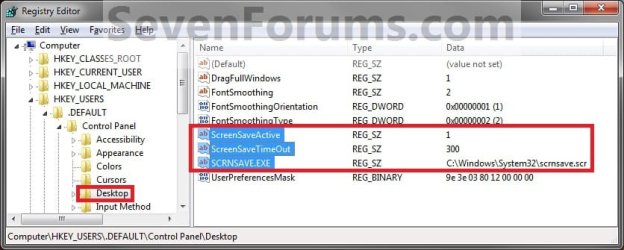
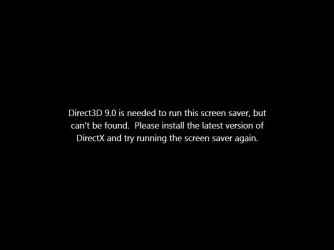
This will only work using the blank black C:\Windows\System32\scrnsave.scr screen saver as the value for SCRNSAVE.EXE. Using any other screen saver will result in this error below when it tries to run from the log on screen. 
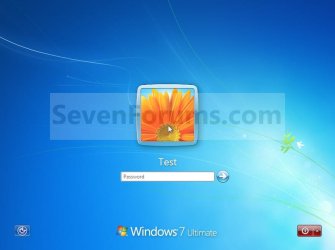
 Warning You can only do this tutorial while logged on as an administrator. EXAMPLE: Log On Screen Saver in Windows 7 NOTE: This is the log on screen (left screenshot below) and the blank log on screen saver (right screenshot below).   STEP ONE Enable or Disable the Log On Screen Saver 1. To Enable the Log On Screen Saver NOTE: This will enable the log on screen saver with a 300 second (5 minute) idle wait time. If you would like to change this wait time to what you would like instead, then see the STEP TWO section below after finishing this STEP ONE section to change it.A) Click on the Download button below to download the file below. Enable_Log_on_Screen_Saver.reg  B) Go to step 3. 2. To Disable the Log On Screen SaverA) Click on the Download button below to download the file below.Disable_Log_on_Screen_Saver.reg 
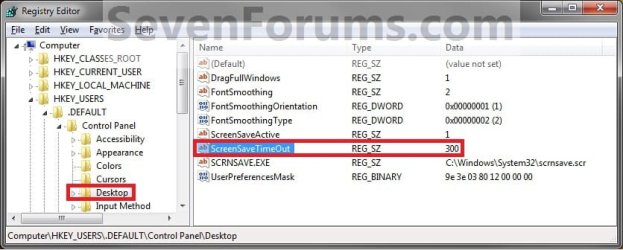
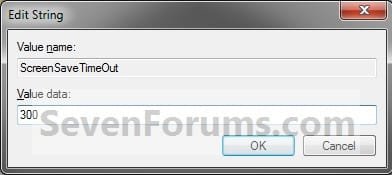
3. Click on Save, and save the .reg file to the desktop. 4. Right click on the downloaded .reg file and click on Merge. 5. Click on Run, Yes, Yes, and OK when prompted. 6. Log off to test the screen saver. 7. When done, you can delete the downloaded .reg file on the desktop if you like. STEP TWO Change the Log On Screen Saver Wait Time NOTE: After you have enabled the log on screen saver in the STEP ONE section above, you can change the 300 second (5 minutes) idle wait time to what you would like it to be instead if you would like to. 1. Open the Start Menu, and type regedit in the search box and press enter. 2. If prompted by UAC, then click on Yes. 3. In regedit, navigate to: (see screenshot below)HKEY_USERS\.DEFAULT\Control Panel\Desktop  4. In the right pane, right click on ScreenSaveTimeOut and click on Modify. (see screenshot above) 5. Type in how long you want the idle wait time to be for in seconds (60 seconds = 1 minute) before the screen saver will run, then click on OK. (see screenshot below) 6. Close regedit. 7. Log off to test the screen saver. That's it,
Shawn |  Published by | | Administrator Join Date: Oct 2008 Location: Texas Posts: 34,826 | |
 Tutorial Tools | | | | | | | | | |
02-16-2010
|
#1 | | Windows 7 Home Premium 32bit |
I found the following instructions elsewhere which differ from yours in a couple of areas. First choose the screensaver you want. Look in C:\WINDOWS\SYSTEM32 for files with the .SCR extension. Typically there are the following . . . - SSTEXT3D - 3D Text
- BUBBLES.SCR - Bubbles
- MYSTIFY.SCR - Mystify
- PHOTOSCREENSAVER.SCR - Photos
- RIBBONS.SCR - Ribbons If you do not want to use one of the above, add one you like to System32 and name it LogOn.scr or a name of your choice. Once you have your screensaver, open your registry editor and navigate to the following key: HKEY_USERS \ .Default \ Control Panel \ Desktop Below this key create the following REG_SZ values SCRNSAVE.EXE = C:\WINDOWS\SYSTEM32\LOGON.SCR (or whatever your file is called).
ScreenSaveActive = 1
ScreenSaveIsSecure = 0
ScreenSaveTimeOut = 60 (or whatever timeout you want in seconds)
First, you say to only use the blank one, screensave.scr, where the other says to choose one. If I were to choose the blank one, and change the registry settings as you show, what will appear on the blank screen besides a blank screen since nothing has been added to it?
The second difference I noticed is this other one contains: ScreenSaveIsSecure = 0 Hope you understand what I am attempting to explain.
| My System Specs | | System Manufacturer/Model Number Visionman Slim Intel Desktop Computer OS Windows 7 Home Premium 32bit CPU Intel Pentium Dual Core E2180 Motherboard Biostar P4M900-M7 SE Memory 2GB DDR2-667 Graphics Card NVIDIA 8400GS 256MB Sound Card Realtek Monitor(s) Displays Viewsonic VX1940w LCD Display Screen Resolution 1280 x 800 Keyboard Kensington Comfort Type (ergonomic) Mouse I have mice.....a collection. Hard Drives WD 250GB SATA-2 HDD |
02-16-2010
|
#2 | | Windows 7 Ultimate x64 SP1 |
Hello Kitti,
If you choose another screen saver other than the solid black blank screensave.scr one, you will get the black message screenshot in the blue NOTE box at the top of the tutorial instead of a solid black blank screen. ScreenSaveIsSecure = 0 is to enable (1) or disable (o) the screen saver password. Since it will not work at log on anyway, it is not necessary to have that DWORD value added. | My System Specs | | System Manufacturer/Model Number Self built custom OS Windows 7 Ultimate x64 SP1 CPU Intel i7-980X 3.3 Ghz (3.48 Ghz OC'd) Motherboard ASUS P6X58D Premium Memory 12 GB (2GBx6) DDR3 PC3-16000 2000 MHz Kingston HyperX Graphics Card Sapphire HD5870 Eyefinity 6 2GB Sound Card Realtek HD Audio ALC889 Integrated Chip Monitor(s) Displays 3x 27" Asus VE278Q Screen Resolution 1920x1080 Keyboard Logitech Cordless Desktop MX 5500 Revolution Mouse Logitech Cordless Desktop MX 5500 Revolution PSU OCZ Series Gold OCZZ1000M 1000W Case Corsair Obsidian 800D Cooling Thermalright Ultra 120 Extreme Copper CPU heat sink w/120 MM Hard Drives 160GB OCZ RevoDrive X2
** 2 x 1TB Samsung HDD HD154UI SATA Internet Speed 50 Mb/s Download and 2 Mb/s Upload Other Info Microsoft LifeCam Cinema
** Lite-On iHBS212 12x BD Writer
** Samsung CLX-3175FW Printer
** Netgear WNDR3800 Router
** Motorola SBG6580 Cable Modem
** 2x APC Back-UPS XS 1500 |
02-16-2010
|
#3 | | Windows 7 Home Premium 32bit |
Brink:
Ok, you've made that part clear. However, if I use the blank one, there will be no animation on the page to act as a screensaver. Is that correct?
Kitti | My System Specs | | System Manufacturer/Model Number Visionman Slim Intel Desktop Computer OS Windows 7 Home Premium 32bit CPU Intel Pentium Dual Core E2180 Motherboard Biostar P4M900-M7 SE Memory 2GB DDR2-667 Graphics Card NVIDIA 8400GS 256MB Sound Card Realtek Monitor(s) Displays Viewsonic VX1940w LCD Display Screen Resolution 1280 x 800 Keyboard Kensington Comfort Type (ergonomic) Mouse I have mice.....a collection. Hard Drives WD 250GB SATA-2 HDD |
02-16-2010
|
#4 | | Windows 7 Ultimate x64 SP1 |
Correct. By default, you have no screen saver at log on. With this, you only have the option of a black blank screen saver instead if one is wanted or needed at log on.
The ability to use any other, or animated screen savers, at log on has been removed by Microsoft. | My System Specs | | System Manufacturer/Model Number Self built custom OS Windows 7 Ultimate x64 SP1 CPU Intel i7-980X 3.3 Ghz (3.48 Ghz OC'd) Motherboard ASUS P6X58D Premium Memory 12 GB (2GBx6) DDR3 PC3-16000 2000 MHz Kingston HyperX Graphics Card Sapphire HD5870 Eyefinity 6 2GB Sound Card Realtek HD Audio ALC889 Integrated Chip Monitor(s) Displays 3x 27" Asus VE278Q Screen Resolution 1920x1080 Keyboard Logitech Cordless Desktop MX 5500 Revolution Mouse Logitech Cordless Desktop MX 5500 Revolution PSU OCZ Series Gold OCZZ1000M 1000W Case Corsair Obsidian 800D Cooling Thermalright Ultra 120 Extreme Copper CPU heat sink w/120 MM Hard Drives 160GB OCZ RevoDrive X2
** 2 x 1TB Samsung HDD HD154UI SATA Internet Speed 50 Mb/s Download and 2 Mb/s Upload Other Info Microsoft LifeCam Cinema
** Lite-On iHBS212 12x BD Writer
** Samsung CLX-3175FW Printer
** Netgear WNDR3800 Router
** Motorola SBG6580 Cable Modem
** 2x APC Back-UPS XS 1500 |
02-16-2010
|
#5 | | Windows 7 Home Premium 32bit |
At least I know I'm not as dumb as I was beginning to think. Microsoft sure knows how to screw up that which could be good. Thanks again for your help.
Kitti | My System Specs | | System Manufacturer/Model Number Visionman Slim Intel Desktop Computer OS Windows 7 Home Premium 32bit CPU Intel Pentium Dual Core E2180 Motherboard Biostar P4M900-M7 SE Memory 2GB DDR2-667 Graphics Card NVIDIA 8400GS 256MB Sound Card Realtek Monitor(s) Displays Viewsonic VX1940w LCD Display Screen Resolution 1280 x 800 Keyboard Kensington Comfort Type (ergonomic) Mouse I have mice.....a collection. Hard Drives WD 250GB SATA-2 HDD |
02-16-2010
|
#6 | | Windows 7 Ultimate x64 SP1 |
It was removed back since Vista SP2 for security purposes to prevent a screen saver that may have malware in it from running before the OS and bypassing all security measures (ex: antivirus program) and causing more security risks. It may be less customizable, but it is a very good move for security purposes. | My System Specs | | System Manufacturer/Model Number Self built custom OS Windows 7 Ultimate x64 SP1 CPU Intel i7-980X 3.3 Ghz (3.48 Ghz OC'd) Motherboard ASUS P6X58D Premium Memory 12 GB (2GBx6) DDR3 PC3-16000 2000 MHz Kingston HyperX Graphics Card Sapphire HD5870 Eyefinity 6 2GB Sound Card Realtek HD Audio ALC889 Integrated Chip Monitor(s) Displays 3x 27" Asus VE278Q Screen Resolution 1920x1080 Keyboard Logitech Cordless Desktop MX 5500 Revolution Mouse Logitech Cordless Desktop MX 5500 Revolution PSU OCZ Series Gold OCZZ1000M 1000W Case Corsair Obsidian 800D Cooling Thermalright Ultra 120 Extreme Copper CPU heat sink w/120 MM Hard Drives 160GB OCZ RevoDrive X2
** 2 x 1TB Samsung HDD HD154UI SATA Internet Speed 50 Mb/s Download and 2 Mb/s Upload Other Info Microsoft LifeCam Cinema
** Lite-On iHBS212 12x BD Writer
** Samsung CLX-3175FW Printer
** Netgear WNDR3800 Router
** Motorola SBG6580 Cable Modem
** 2x APC Back-UPS XS 1500 |
04-03-2010
|
#7 | | Windows 7 Home Premium 32bit |
Wanted to let you know, I finally got around to trying the instructions highlighted in my first post. I typed in the name of one of my own screensavers in place of the LOGON.SCR in the referenced instructions above and it works as any normal animated screensaver. Try it and you will see for yourself. | My System Specs | | System Manufacturer/Model Number Visionman Slim Intel Desktop Computer OS Windows 7 Home Premium 32bit CPU Intel Pentium Dual Core E2180 Motherboard Biostar P4M900-M7 SE Memory 2GB DDR2-667 Graphics Card NVIDIA 8400GS 256MB Sound Card Realtek Monitor(s) Displays Viewsonic VX1940w LCD Display Screen Resolution 1280 x 800 Keyboard Kensington Comfort Type (ergonomic) Mouse I have mice.....a collection. Hard Drives WD 250GB SATA-2 HDD |
04-03-2010
|
#8 | | Windows 7 Ultimate x64 SP1 |
Hello Kitti,
Sorry, but I still get the screen in the NOTE box at the top of the tutorial instead. It does not work for me. | My System Specs | | System Manufacturer/Model Number Self built custom OS Windows 7 Ultimate x64 SP1 CPU Intel i7-980X 3.3 Ghz (3.48 Ghz OC'd) Motherboard ASUS P6X58D Premium Memory 12 GB (2GBx6) DDR3 PC3-16000 2000 MHz Kingston HyperX Graphics Card Sapphire HD5870 Eyefinity 6 2GB Sound Card Realtek HD Audio ALC889 Integrated Chip Monitor(s) Displays 3x 27" Asus VE278Q Screen Resolution 1920x1080 Keyboard Logitech Cordless Desktop MX 5500 Revolution Mouse Logitech Cordless Desktop MX 5500 Revolution PSU OCZ Series Gold OCZZ1000M 1000W Case Corsair Obsidian 800D Cooling Thermalright Ultra 120 Extreme Copper CPU heat sink w/120 MM Hard Drives 160GB OCZ RevoDrive X2
** 2 x 1TB Samsung HDD HD154UI SATA Internet Speed 50 Mb/s Download and 2 Mb/s Upload Other Info Microsoft LifeCam Cinema
** Lite-On iHBS212 12x BD Writer
** Samsung CLX-3175FW Printer
** Netgear WNDR3800 Router
** Motorola SBG6580 Cable Modem
** 2x APC Back-UPS XS 1500 |
04-03-2010
|
#9 | | Windows 7 Home Premium 32bit |
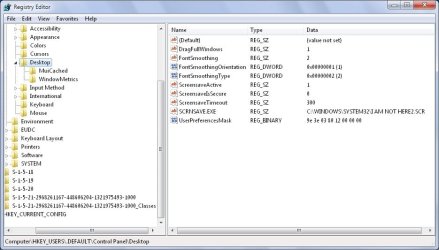
More info Make sure a copy of the preferred screensaver has been added to System 32. Here is a copy of the registry changes made. | My System Specs | | System Manufacturer/Model Number Visionman Slim Intel Desktop Computer OS Windows 7 Home Premium 32bit CPU Intel Pentium Dual Core E2180 Motherboard Biostar P4M900-M7 SE Memory 2GB DDR2-667 Graphics Card NVIDIA 8400GS 256MB Sound Card Realtek Monitor(s) Displays Viewsonic VX1940w LCD Display Screen Resolution 1280 x 800 Keyboard Kensington Comfort Type (ergonomic) Mouse I have mice.....a collection. Hard Drives WD 250GB SATA-2 HDD Log On Screen Saver - Enable or Disable problems? All times are GMT -5. The time now is 12:48 AM. |  |