
How to Enable or Disable Windows 7 Taskbar Pinned Programs
Information
This will allow you to enable and disable the ability for specific or all users to pin a program to the taskbar, and allow or prevent pinned programs from being shown on the taskbar for all users in Windows 7. Pin to Taskbar and pinned programs is enable by default in Windows 7.
EXAMPLE: Taskbar with Pinned Programs Enable and Disabled
NOTE: Top screenshot is enabled, and bottom screenshot is disabled.


OPTION ONE
Using a REG File Download
1. To Enable Taskbar Pinned Programs for Only Current User
A) Click on the Download button below to download the file below.
Enable_Taskbar_Pinned_Programs.reg
Download
B) Go to step 3.
2. To Disable Taskbar Pinned Programs for Only Current User
A) Click on the Download button below to download the file below.
Disable_Taskbar_Pinned_Programs.reg
Download
3. Click on Save, and save the .reg file to the desktop.
4.Right click on the downloaded .reg file and click on Merge.
5. Click on Run, Yes, Yes, and OK when prompted.
6. When done, you can delete the downloaded .reg file if you like.
7. Log off and log on, or restart the computer to apply.
OPTION TWO
Through the Local Group Policy Editor
1. Open the all users, specific users or groups, or all users except administrators Local Group Policy Editor for how you want this policy applied.
2. In the left pane, click on to expand User Configuration, Administrative Templates, and Start Menu and Taskbar. (See screenshot below)
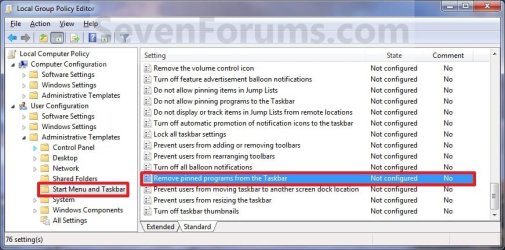
3. In the right pane, right click on Remove pinned programs from the taskbar and click on Edit. (See screenshot above)
4. To Enable Taskbar Pinned Programs
A) Select (dot) either Not Configured or Disabled. (See screenshot below step 6)
B) Go to step 6.
5. To Disable Taskbar Pinned Programs
A) Select (dot) Enabled. (See screenshot below step 6)
6. Click on OK. (See screenshot below)

7. Close the Local Group Policy Editor window.
8. Log off and log on, or restart the computer to apply.
That's it,
Shawn
Related Tutorials
- How to Pin or Unpin a Program to the Windows 7 Taskbar
- How to Backup and Restore Pinned Taskbar Items in Windows 7
- How to Reset and Clear All Pinned Items on the Taskbar in Windows 7
- How to Pin the Recycle Bin to the Windows 7 Taskbar
- How to Pin Your User Files Folder to the Windows 7 Taskbar
- How to Pin the Control Panel to the Windows 7 Taskbar
- How to Pin Computer to the Windows 7 Taskbar
- How to Restore Missing "Pin to Taskbar" and "Pin to Start Menu" Context Menu Items in Windows 7 Shortcuts
- How to Add or Remove "Pin to Taskbar" from Context Menu in Windows 7 and Windows 8
Attachments


Last edited:


