
Windows 7 Forums Search

Go Back Windows 7 Forums > Seven Forums > Tutorials » Start Menu - Add Search Internet Link


Welcome to Windows 7 Forums. Our forum is dedicated to helping you find solutions with any problems, errors or issues you are experiencing with Windows 7. The Windows 7 forum also covers news and updates and has an extensive Windows 7 tutorial section that covers a wide range of tips and tricks.
RB

Windows 7 - Start Menu - Add Search Internet Link


Start Menu - Add Search Internet Link

How to Add Search Internet to the Windows 7 Start Menu
Published by Mr GRiM
11-17-2008
Default Start Menu - Add Search Internet Link

How to Add Search Internet to the Windows 7 Start Menu
Information
This will show you how to add a Search the Internet link to the Windows 7 Start Menu.
Note
When you type something in the Start Menu search line and click on the Search the Internet link, it will search the internet by opening your default web browser and using the default search engine (ex: Google).
RELATED LINKS:
EXAMPLE: Start Menu with Search the Internet link
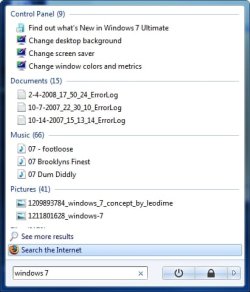
Start Menu - Add Search Internet Link-2008-11-17_233355.jpg

OPTION ONE:
Through a Download
1. To Add Search Internet Link to Start Menu -
A) Click on the Download button below to download the
Add_Start_Menu_Search_Internet.zip file below.
download
B) Go to step 3.
2. To Remove Search Internet Link from Start Menu -
A) Click on the Download button below to download the
Remove_Start_Menu_Search_Internet.zip file below.
download
3. Click on Save, and save the .zip file to the desktop.

4. Open the .zip file and extract the .reg file to the desktop.

5. Right click the .reg file (On Desktop) and click on Merge.

6. Click on Run, Yes, Yes, and OK when prompted.

7. When done, you can delete the downloaded .reg and .zip files on the desktop if you like.

8. Log off and log on, or restart the computer to apply.


OPTION TWO:
Through the Local Group Policy Editor
1. Open the Local Group Policy Editor.


2. In the left pane, click on User Configuration, Administrative Templates and Start Menu and Taskbar. (See screenshot below)
Start Menu - Add Search Internet Link-group_policy.jpg

3. In the right pane, right click on Add Search Internet Link to Start Menu and click on Edit. (See screenshot above)


4. To Add Search Internet Link to Start Menu -
A) Dot Enabled and click on OK. (See screenshot below)
Start Menu - Add Search Internet Link-properties.jpg

B) Go to step 6.


5. To Remove Search Internet Link from Start Menu -
A) Dot Disabled or Not Configured and click on OK. (See screenshot above)
B) Go to step 6.
6. Close the Local Group Policy Editor window.
.
Published by
Mr GRiM's Avatar
Moderator


Join Date: Oct 2008
Location: QLD, Cairns
Posts: 4,651
Mr GRiM has a reputation beyond reputeMr GRiM has a reputation beyond reputeMr GRiM has a reputation beyond reputeMr GRiM has a reputation beyond reputeMr GRiM has a reputation beyond reputeMr GRiM has a reputation beyond reputeMr GRiM has a reputation beyond reputeMr GRiM has a reputation beyond reputeMr GRiM has a reputation beyond reputeMr GRiM has a reputation beyond reputeMr GRiM has a reputation beyond reputeMr GRiM has a reputation beyond repute

Tutorial Tools
11-17-2008   #1
Ex_Brit's Avatar
Ex_Brit


Vista Ultimate SP2/Windows 7 Ultimate x64/XP SP3 in VM
Toronto, Canada


Excellent, keep up the good work Mr. GRiM.

One thing I miss from right-clicking the orb, "Open All Users".

Off to some digging for info on that.

My System SpecsSystem Spec
10-26-2009   #2
BFG's Avatar
BFG


Windows 7 Professional 32 Bit
Orlando


how do I change the default windows search provider

if I search through explorer it goes to bing. I turned off internet explorer, so I'm only using Firefox
My System SpecsSystem Spec
11-14-2009   #3
Baxter


Windows 7


ex brit, would love to hear what you find on the open all users. I't s possible to find it by right-clicking on All Programs and then hitting all users, but I want to be able to do it from the little Start Menu Orb.

The internet search in the tab is nice!
Might want to mention it's only available in Windows 7 PRO, ENTERPRISE, OR ULTIMATE though. I really wish they would just release two versions. Student, and Regular. Gah Microsoft and their silly antics.
I found out about the version compatibility here.
My System SpecsSystem Spec
Comment

Tutorial Tools


Similar Threads for: Start Menu - Add Search Internet Link
Windows 7 Tutorial Category
Start Menu - Customize Tutorials
Start Menu All Programs - Add or Delete Shortcuts Tutorials
Menu Bar - Turn On or Off Tutorials
IE7Pro Search As Default Network & Sharing


All times are GMT -5. The time now is 01:38 AM.


Windows 7 Forums is an independent web site and has not been authorized,
sponsored, or otherwise approved by Microsoft Corporation.
"Windows 7" and related materials are trademarks of Microsoft Corp.
© Designer Media Ltd
Windows 7 Tutorial powered by GARS 2.1.9 ©2005-2006

1 2 3 4 5 6 7 8 9 10 11 12 13 14 15 16 17 18 19 20 21 22 23 24 25 26