Windows 7 Forums


Windows 7: User Account Password - Change from WinRE

20 Jan 2010   #19
Dinesh

Windows® 8 Pro (64-bit)
Mumbai, India
 
 
User Account Password - Change from WinRE

How to Change the User Account Password if Unable to Login to Windows

...


Last edited by Brink; 20 Feb 2013 at 06:14 PM..
My System SpecsSystem Spec

28 Mar 2010   #20
iseeuu


Quote   Quote: Originally Posted by TheTalker View Post
Quote   Quote: Originally Posted by iseeuu View Post
Quote   Quote: Originally Posted by TheTalker View Post
But my question is this: If this account ever has a problem with it's password to where I can't get in will I be able to use the password reset disk to reset the password instead of needing to access the Hidden Admin account?
Yes. As a matter of fact, it is safer and would be a better choice to use a reset disk instead of forcing a password change from a different account.

Cheers!
Robert
I knew it would be safer but will it work in all situations? Like, will resetting the password work even if the current password is corrupted?
That is the purpose of the reset disk. I can not answer in any further depth as I have not ever had a corrupted password or account, and have never had to use the password reset disk. Perhaps there is a member here at Seven Forums that has had this experience and will post here?

Cheers!
Robert
My System SpecsSystem Spec

28 Mar 2010   #21
TheTalker

Windows 7 Ultimate x64


Quote   Quote: Originally Posted by iseeuu View Post
Quote   Quote: Originally Posted by TheTalker View Post
Quote   Quote: Originally Posted by iseeuu View Post
Yes. As a matter of fact, it is safer and would be a better choice to use a reset disk instead of forcing a password change from a different account.

Cheers!
Robert
I knew it would be safer but will it work in all situations? Like, will resetting the password work even if the current password is corrupted?
That is the purpose of the reset disk. I can not answer in any further depth as I have not ever had a corrupted password or account, and have never had to use the password reset disk. Perhaps there is a member here at Seven Forums that has had this experience and will post here?

Cheers!
Robert
Alrighty, thank you the information you provided. Like you said, that is the purpose of a reset disk so it should work. I'll just keep this backup stored safely away.

But if someone else does post here with an in depth reply then I'll gladly read it.

Thanks again for the information Iseeuu.


Thank you for the great guide Dinesh!
My System SpecsSystem Spec
29 Mar 2010   #22
Dinesh

Windows® 8 Pro (64-bit)
Mumbai, India


You're welcome.
My System SpecsSystem Spec
26 May 2010   #23
Ruivo

Windows Seven


I hope never need it :P

It's a very good post,

Thanks
My System SpecsSystem Spec
.


26 May 2010   #24
Dinesh

Windows® 8 Pro (64-bit)
Mumbai, India


You are welcome Ruivo.
My System SpecsSystem Spec
16 Jun 2010   #25
macyy

Toshiba Windows 7 Home Prem OA
Illinois
 
 
i only have on account. and its the administrator

i just got this lap top like 5 months ago for graduation and i changed my password to something new and then i just totally forgot it. ive been trying everything. and see this would seem to help me except that i only have one account. and its the administrator. and my lap top doesnt have a disk loader. its a toshiba windows 7 home prem OA. Satellite T135D-S1320. i just really want to get back on if there is any way that you guys can help. i dont care if i get any lost data or have to start all over for that matter. so if any of you know how to help me id really appreicate it. thanksss. macy.
My System SpecsSystem Spec
16 Jun 2010   #26
iseeuu


Quote   Quote: Originally Posted by macyy View Post
i just got this lap top like 5 months ago for graduation and i changed my password to something new and then i just totally forgot it. ive been trying everything. and see this would seem to help me except that i only have one account. and its the administrator. and my lap top doesnt have a disk loader. its a toshiba windows 7 home prem OA. Satellite T135D-S1320. i just really want to get back on if there is any way that you guys can help. i dont care if i get any lost data or have to start all over for that matter. so if any of you know how to help me id really appreicate it. thanksss. macy.
Hello macyy, and welcome to Windows Seven Forums.

Your Toshiba Satellite uses "Memory Cards". You can pick some up cheap at Wal-Mart or Best Buy locally, and use them like floppies, CDs or DVDs:

Buy Memory Stick - Best Memory Stick prices - Shopper.com

Since you did not create a "System Repair" CD, you will need to go to the web site in the link (with instructions) below and download a copy onto one of your new memory cards. Then reboot the laptop, boot to the memory card with the "System Repair" on it, and you should be able to use Dinesh's Tutorial just like if you had a CD.

Here are some other links that might help you get back going:

System Repair Disc - Create

This link (and some others like it) explain how to use the Vista or Windows 7 ISO type file to make a bootable installation memory card. In your case, you would use the "System Repair" ISO file you download instead, but the instructions will work for any ISO type file.

Windows 7 USB/DVD Download Tool

USB Bootable Vista Installation Flash Thumb Drive - Vista Forums

Forgot the Administrator's Password? - Windows Password Recovery - Windows Password Reset

Cheers!
Robert

My System SpecsSystem Spec
13 Nov 2010   #27
ayteidaa

Windows 7 Ultimate x86
 
 
syskey protection

how to login to a computer when syskey is enabled... and it is asking for a password.. how to disable or reset the password of syskey from registry or elevated command prompt
My System SpecsSystem Spec
17 Jun 2011   #28
stabesh

Windows 7 Home Premium


very very thanks
My System SpecsSystem Spec
01 Aug 2011   #29
jenniferg

Windows 7
 
 
Please help!

I was trying to password protect my computer with my username and I use the same password that I always use, a series of numbers, letters and symbols. Apparently, I typed it in wrong, twice, the same way because now I can not logon to my computer.

I've tried the steps above, but I still cannot get in.
I can not get to the command prompt screen.
I boot the computer and click F8.
This brings me to the Advanced Boot Options Screen.
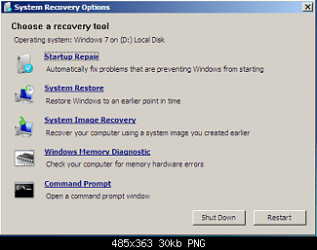
If I click "Repair Your Computer", it takes me to a a box where it asks me to Select a Language, I click Next>then it asks me to access recovery options, log on as a local user. To access the command prompt as well, log on using an administrator account. The only User Name is the dropdown box is Jennifer and if I try to click OK without a password, it says "The user name or the password is incorrect."

If I click on "Safe Mode with Command Prompt", it takes me to the login screen, which I can't login to because I don't know the password.

If anyone out there can help me, I would be so grateful to you.
My System SpecsSystem Spec
Comment

 User Account Password - Change from WinRE problems?


Tutorial Tools


Similar help and support threads for: User Account Password - Change from WinRE
Windows 7 Tutorial Category
Solved Password For The User-Administrator Account System Security
Solved Change User Account Password Settings? System Security
User Account Password - Remove Tutorials
Administrator Password In User Account General Discussion
User Account Password - Change Tutorials


All times are GMT -5. The time now is 03:23 PM.


Seven Forums Android App Seven Forums IOS App Follow us on Facebook

Windows 7 Forums is an independent web site and has not been authorized,
sponsored, or otherwise approved by Microsoft Corporation.
"Windows 7" and related materials are trademarks of Microsoft Corp.
© Designer Media Ltd
  

1 2 3 4 5 6 7 8 9 10 11 12 13 14 15 16 17 18 19 20 21 22 23 24 25 26 27 28 29 30 31 32