Windows 7 Forums


Windows 7: User Account Password - Change from WinRE


User Account Password - Change from WinRE

How to Change the User Account Password if Unable to Login to Windows
Published 20 Jan 2010
Published by

Featured Tutorial

Chrome GPU Hardware Acceleration - Turn On or Off

How to Turn GPU "Hardware Acceleration" On or Off in Chrome

Microsoft Accounts - Link

How to Link your Microsoft Accounts

Dual Boot - Windows 7 and Linux

How to Correctly Setup a Dual Boot with Windows 7 and LinuxMint13

Screen Capture and Video Editing in High Quality


User Profiles - Create and Move During Windows 7 Installation

How to Create User Accounts on another Partition or Disk During Windows 7 Installation

Peppermint3 - Create Live CD/DVD/USB To Use For Emergency Backup

How to Perform an Emergency Data Backup When Windows 7 Will Not Boot
How to Change the User Account Password if Unable to Login to Windows

information   Information
This tutorial will help you remove the existing user account password and set up a new password incase you have forgotten the user password using WinRE (Windows Recovery Environment)


Here's how:
1. Boot to WinRE (Windows Recovery Environment).
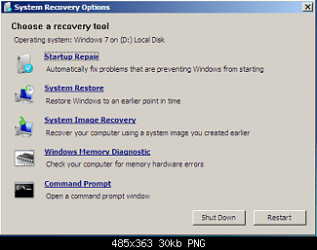
Name:  1.png
Views: 38063
Size:  70.0 KB
2. Click on the Command Prompt option.


3. Type the following commands and press enter after each one:
  • C:
  • CD Windows\system32
  • ren cmd.exe cmd.old
  • ren magnify.exe cmd.exe
  • ren cmd.old magnify.exe
4. Restart computer.

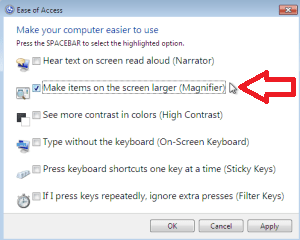
5. Click on Easy of Access centre left side bottom à Choose Magnify option.

Name:  2.png
Views: 37881
Size:  39.4 KB
Name:  3.png
Views: 37941
Size:  40.4 KB
6. A Command prompt opens up

7. Type: net user administrator /active:yes and press enter.

8. Restart the computer.

9. Logon on to the "Administrator" account, and then using User Accounts page in the Control Panel, remove or change the password of the other account.

10. Type Magnify.exe in Start Menu search box and press enter and open it.

11. Command prompt opens up

12. Type: net user administrator /active:no and press enter.

13. Restart the computer
NOTE: This will disable the administrator account.

14. Now, Boot to winRE again, and click on the Command Prompt option.


15. Type the following commands and press enter after each one:
  • C:
  • CD Windows\system32
  • ren magnify.exe cmd.old
  • ren cmd.exe magnify.exe
  • ren cmd.old cmd.exe
  • exit
16. Restart the computer system logs on to the User account without asking for password provided there is only one user account.
That's it.
Special thanks for iseeuu for providing the screenshots.


Related Tutorials

Need more help? Try searching our extensive help and support site.
Loading
20 Jan 2010   #1
derekimo

Windows 7 Pro 64 SP1
East Bay Area, CA


Nice work Dinesh, I've seen the need for this lately.

My System SpecsSystem Spec

20 Jan 2010   #2
Dinesh

Windows® 8 Pro (64-bit)
Mumbai, India


Thanks mate.
My System SpecsSystem Spec
20 Jan 2010   #3
derekimo

Windows 7 Pro 64 SP1
East Bay Area, CA


Quote   Quote: Originally Posted by Dinesh View Post
Thanks mate.
You're welcome.
My System SpecsSystem Spec
.


09 Feb 2010   #4
parkerfarms

Windows 7


Beautiful! This was exactly what I needed. Thank you so much.
My System SpecsSystem Spec
09 Feb 2010   #5
Dinesh

Windows® 8 Pro (64-bit)
Mumbai, India


You are welcome parkerfarms.
My System SpecsSystem Spec
24 Mar 2010   #6
TheTalker

Windows 7 Ultimate x64


Now, what if there was a password created will this guide still work? Like, what if the user forgot the password? Will using this guide help?

Thank you very much for the information by the way.

Edit: I read the title: "This tutorial will help you remove the existing user account password and set up a new password incase you have forgotten the user password using WinRE (Windows Recovery Environment)"

That answers my question.

Thank you very much for this guide!
My System SpecsSystem Spec
24 Mar 2010   #7
Dinesh

Windows® 8 Pro (64-bit)
Mumbai, India


You are welcome mate.
My System SpecsSystem Spec
25 Mar 2010   #8
mckillwashere

Windows 7 x86/x64, Server 2008r2, Web Server 2008


Great Tutorial...
Also bad if it fell in the wrong hands....

I am going to throw this out there...
DO NOT CHANGE THE ADMINISTRATOR PASSWORD.
It will make you not able to do some things on your machine and you will hate yourself...
It was the same way in Vista.
My System SpecsSystem Spec
25 Mar 2010   #9
TheTalker

Windows 7 Ultimate x64


I have a question about the guide.

"16. Restart the computer system logs on to the User account without asking for password provided there is only one user account. "

Could you please elaborate a bit? Provided there is only one user account. What does that mean exactly? There can only be one account and not two accounts? On my PC I've got the admin account and the offline Guest account.

Quote   Quote: Originally Posted by mckillwashere View Post
Great Tutorial...
Also bad if it fell in the wrong hands....

I am going to throw this out there...
DO NOT CHANGE THE ADMINISTRATOR PASSWORD.
It will make you not able to do some things on your machine and you will hate yourself...
It was the same way in Vista.
For real? What kind of bad things? That's scary because I have a password on mine.

Last edited by TheTalker; 25 Mar 2010 at 10:25 AM..
My System SpecsSystem Spec
Comment

 User Account Password - Change from WinRE problems?


Tutorial Tools


Similar help and support threads for: User Account Password - Change from WinRE
Windows 7 Tutorial Category
Solved Password For The User-Administrator Account System Security
Solved Change User Account Password Settings? System Security
User Account Password - Remove Tutorials
Administrator Password In User Account General Discussion
User Account Password - Change Tutorials


All times are GMT -5. The time now is 09:41 PM.


Seven Forums Android App Seven Forums IOS App Follow us on Facebook

Windows 7 Forums is an independent web site and has not been authorized,
sponsored, or otherwise approved by Microsoft Corporation.
"Windows 7" and related materials are trademarks of Microsoft Corp.
© Designer Media Ltd
  

1 2 3 4 5 6 7 8 9 10 11 12 13 14 15 16 17 18 19 20 21 22 23 24 25 26 27 28 29 30 31 32