
Information
Windows 7 has some fine in-built diagnostic tools to help you troubleshoot Windows Media Player issues, which you may be facing. This tutorial will give you some steps to fix common problem you might encounter with Windows Media Player 12.
Note
The N and KN editions of Windows 7 have all the features that normally come with each individual Windows 7 edition, except for Windows Media Player 12 and related programs, such as Windows Media Center or Windows DVD Maker.
The N editions of Windows 7 allow you to choose your own media player and software required to manage and play CDs, DVDs, and other digital media files. If you choose to use Windows Media Player 12, downloading it, along with related software, is free. Download Media Feature Pack for Windows 7 N with Service Pack 1 and Windows 7 KN with Service Pack 1 (KB968211) from Official Microsoft Download Center
The N editions of Windows 7 allow you to choose your own media player and software required to manage and play CDs, DVDs, and other digital media files. If you choose to use Windows Media Player 12, downloading it, along with related software, is free. Download Media Feature Pack for Windows 7 N with Service Pack 1 and Windows 7 KN with Service Pack 1 (KB968211) from Official Microsoft Download Center
To open these specific troubleshooting & diagnostic modules do the following:

1. Type msdt.exe -id WindowsMediaPlayerConfigurationDiagnostic in Start Search and hit Enter to open the troubleshooting wizard which will help you reset WMP to default settings.
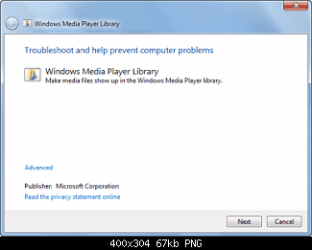
2. Type msdt.exe -id WindowsMediaPlayerLibraryDiagnostic in Start Search and hit Enter to open the troubleshooting wizard which will help make Media files show up in WMP library.
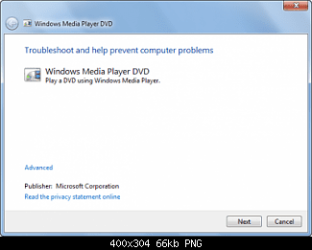
4. Type msdt.exe -id WindowsMediaPlayerDVDDiagnostic in Start Search and hit Enter to open the troubleshooting wizard which will help trouble-shoot DVD playing problems.
5. You could also use the Fix WMP Utility from thewindowsclub, which re-registers all concerned dll’s required for the smooth functioning of Windows Media Player.
6. Lets reinstall Windows Media Player 12
7. Click “Start” button, type “windows features” in the program search box and hit enter.
8. In the “Windows Features” dialog box, look for “Media Features” and expand it.
9. Clear “Windows Media Player” check box.
10. As soon as you clear the check box, you will see a pop-up saying that “The following Windows features will also be turned off because they are dependent on Windows Media Player.” The listed program is “Windows Media Center”.
11. Go ahead and click “Yes”. Windows will now begin uninstalling WMP12.
12. You to restart Windows for the uninstallation to complete.
13. Click “Start” button, type “windows features” in the program search box and hit enter.
14. In the “Windows Features” dialog box, look for “Media Features” and expand it.
15. Check boxes “Windows Media Player” and “Windows Media Center”.
16. Click “OK”. Windows will take some time in reinstalling them. Wait for the process to finish.
17. You to restart Windows for the installation to complete.
Hope this helps,
Captain
Related Tutorials
- How to Open Troubleshooting in Windows 7
- How to Change Windows 7 Troubleshooting Settings
- How to Create a Windows Media Player Library Troubleshoot Shortcut in Windows 7
- How to Create a Windows Media Player Settings Troubleshoot Shortcut in Windows 7
- How to Create a Windows Media Player DVD Troubleshoot Shortcut in Windows 7
Last edited by a moderator:


