


General Troubleshooting to Fix System Restore Issues
InformationIf the System is not able to create System restore point try to Create the restore point manually. If you are unable to create a system restore point manually then you could try these steps
1. Make sure that System Restore is enabled
2. Make sure that you have sufficient disk space on all the drives where System Restore is enabled
3. Try creating a System Restore point manually and making a note of the Error Message you get. If you don't get one, check if one has been created or not.
4. Next set would be to Check the Event Viewer
Type Event Viewer in Start Menu Search Box, hit Enter. Expand Windows Logs then click on Application. Look for Errors if your find any codes post it here or search in Google for that Error codes.
5. Type Services in Start Menu Search Box, hit Enter. Make sure that the Volume Shadow Copy Service is Running if its not running then double click on it.
- If the Start up type is set to Disabled or Manually
- click the Drop down and Select to Automatic and click on start
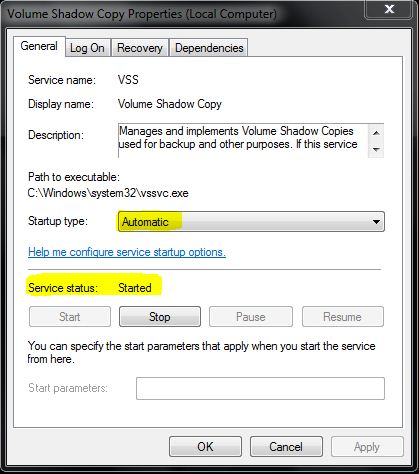
- Apply it then Click OK
6. Also make sure RPC, Task Scheduler and all service related to DCOM is started
7. Next step we could try to Rebuild the WMI components
- Close all open programs.
- Download the WMI.bat from from here
- Right Click on WMI.bat file and Run as administrator.
- The Command Prompt window will open. When prompted, type Y to continue.
- Allow the Command Prompt to finish and automatically close.
8. Then next step would be to try to create the Restore point in Selective Startup
9. Try to Login under Safe Mode then try to Create a restore point
10. Try to Turn off the System Restore and turn it back on
11. Remove restore points:
- In Computer (Computer), right-click on C, then Properties (properties), click Disk Cleanup (Disk Cleanup), then clean the system files (Clean up system files)
- which shows the More Options tab (More Options)
- By clicking on Clean (Clean up) under System Restore and Shadow (System Restore and Shadow Copies), restore points will be removed, except the most recent.
12. Run System File Checker
- Start type cmd then Right Click and Run as administrator
- Type in SFC/ SCANNOW
13. If that also didn’t fix then the next option would be to perform Repair Install
Hope this helps,
Captain
System Restore General Troubleshooting to Fix Issues
-
-
New #2
Hy!!!
I think I tried all of those things and it still doesn't work... I have the same problem. The restore points desappear when I reboot... Any other ideas? Thank you
-
New #3
Excellent tutorial. Thanks.
-
-
-
New #6
I haven't tried it yet the repair install... I'm afraid I will have to reinstall many things... I'm not sure what will it be and if I still have all the needed drivers...
-
-
New #8
Got a question, sys rest won't work since an update got "stuck", anything in your arsenal to clean out, reset or reinstall Windows Update agent short of a Repair install?
-
New #9
G'day, mate....If I delete SR points as described in your para 11, they all delete (as advertised) except for the System Image Restore Points. How do I get rid of them?


 Quote
Quote
Related Discussions