
How to Create a New Library in Windows 7
Information
This will show you how to create a new library in the Windows 7 Libraries window.
Note
Libraries let you access and arrange items from one or more folders quickly without moving them from their original location. Libraries themselves don't store your files or folders. Instead, they point to different locations on a hard disk or external drive attached to your computer. This gives you easy access to a category of files no matter where they are stored. For instance, if you have music files on your hard disk and on an external drive, you can access all of your music files from within the "Music" library.
For more information about Windows 7 Libraries see:
For more information about Windows 7 Libraries see:
Tip
The full path to the hidden Libraries folder is below.
C:\Users\(User-Name)\AppData\Roaming\Microsoft\Windows\Libraries
OR
%AppData%\Microsoft\Windows\Libraries
C:\Users\(User-Name)\AppData\Roaming\Microsoft\Windows\Libraries
OR
%AppData%\Microsoft\Windows\Libraries
Warning
To be able to search in libraries, the Windows Search service needs to be Started and set to Automatic. Libraries require it's included folders to also be added to the index to be tracked properly even though they will still open properly.
OPTION ONE
From the Context Menu
1. In Windows Exporer, navigate to the folder that you want to create a New Library with that folder included in it.
2. Right click on the folder and click on Include in Library and Create new library. (See screeshot below)
NOTE: I will use the C:\Users\Downloads folder as an example here.
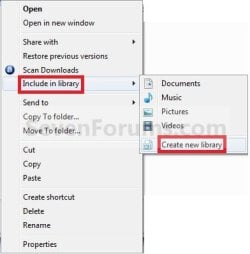
3. You will now have a new Library with the folder (step 1) included. (See screenshot below)

OPTION TWO
From the Libraries Window
1. Open a Windows Explorer window.
2. In the Navigation Pane, click on Libraries. (See screenshot below)
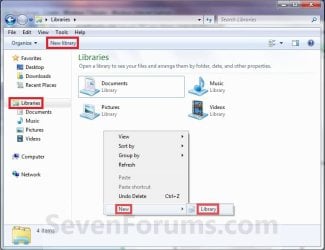
3. Click on the New Library toolbar button. (See screenshot above)
A) Go to step 6.
OR
4. Right click on a empty space in the main window and click on New and Library. (See screenshot below step 2)
A) Go to step 6.
OR
5. In the Navigation Pane, right click on Libraries and click on New and Library. (See screenshot below step 2)
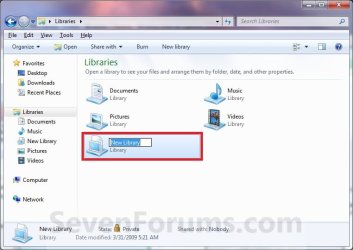
6. Type in a name for the new library and press Enter. (See screenshot below)
OPTION THREE
From Include in Library
1. Open a Windows Explorer window.
2. Select any folder to highlight it.
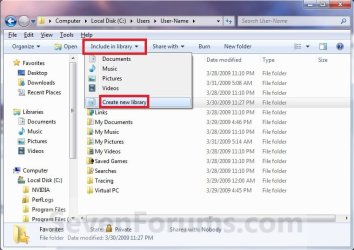
3. Click on the Include in library toolbar button, and click on Create new library. (See screenshot below)
4. In the Navigation Pane, click on Libraries. (See screenshot below step 5)
5. Right click on the New Library and click on Rename, then type in a name you want for the new library and press Enter. (See screenshot below)
That's it,
Shawn
Related Tutorials
- How to Change the Default New Library Icon in Windows 7
- User Folders in Windows 7 Libraries
- How to Restore the Default Libraries in Windows 7
- How to Fix Libraries when Hidden and Empty in Windows 7
- How to Hide or Show a Library in the Windows 7 Navigation Pane
- How to Include a Folder in a Library in Windows 7
- How to Include a Network Drive or Folder in a Library in Windows 7
- How to Remove a Included Folder from a Library in Windows 7
- How to Set the Default Save Folder for a Library in Windows 7
- How to Change a Library Icon in Windows 7
- How to Create a Windows 7 Downloads Library with the Correct Icon
- How to Create a Windows 7 Games Library with the Correct Icon
- How to Create a Windows 7 Favorites Library with the Correct Icon
- How to Create a Windows 7 "Searches" Library with the Correct Icon
- How to Create a Windows 7 "Links" Library with the Correct Icon
- How to Change the Default Libraries Icon in Windows 7
- How to Remove and Restore the Default Windows 7 New Context Menu Items
- How to Turn the Library Pane On or Off in Windows 7
Last edited:

