
Windows Key Shortcuts - Enable or Disable

How to Enable or Disable Windows Key Shortcuts in Vista, Windows 7, and Windows 8

   Information
This tutorial will allow you to enable or disable all Windows Key + key shortcut hotkeys for all or specific users in Vista, Windows 7, Windows 8, and Windows 8.1.

You must be logged in as an administrator to be able to do the steps in this tutorial.

   Note
Pressing the Windows Key by itself will still open the Start menu even when Windows key shortcut hotkeys are set to disabled.


OPTION ONE

Enable or Disable Windows Key Hotkeys using a REG File

1. Do step 2 or 3 below for what you would like to do.

2. To Enable Windows Key Hotkeys for All Users
NOTE: This is the default setting. A) Click/tap on the Download button below to download the file below, and go to step 4 below. Enable_Windows_Key_Hotkeys.zip

Download


3. To Disable Windows Key Hotkeys for All Users A) Click/tap on the Download button below to download the file below, and go to step 4 below. Disable_Windows_Key_Hotkeys.zip

Download


4. Save the .reg file to your desktop.

5.Double click/tap on the downloaded .reg file to merge it.

6. Click/tap on Run, Yes (UAC - Windows 7/8) or Continue (UAC- Vista), Yes, and OK when prompted.

7. When done, you can delete the downloaded .reg and .zip files if you like.

8. Log off and log on, or restart the computer to apply.


OPTION TWO

Enable or Disable Windows Key Hotkeys in Group Policy

1. Open the all users, specific users or groups, or all users except administrators Local Group Policy Editor for how you want this policy applied.

2. In the left pane, click/tap on to expand User Configuration, Administrative Templates, Windows Components, and Windows Explorer (Vista/Windows 7) or File Explorer (Windows 8). (see screenshot below) Group_Policy.jpg
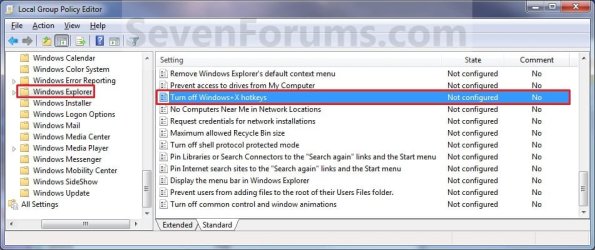
3. In the right pane, double click/tap on Turn off Windows + X hotkeys to edit it. (see screenshot above)

4. Do step 5 or 6 below for what you would like to do.


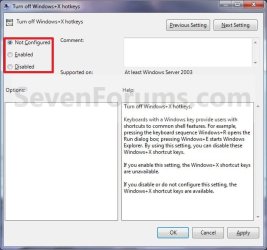
5. To Enable Windows Key Hotkeys A) Select (dot) either Not Configured or Disabled, and go to step 7 below. (see screenshot below step 7)
NOTE: Not Configured is the default setting.
6. To Disable Windows Key Hotkeys A) Select (dot) Enabled, and go to step 7 below. (see screenshot below step 7)
7. Click/tap on OK. (See screenshot below) Properties.jpg
8. Close the Local Group Policy Editor window.

9. Log off and log on, or restart the computer to apply.
That's it,
Shawn


Attachments

Last edited:
Hi Shawn, Many thanks for your quick response. I shall try and do a system restore as suggested by you, however in the above thread people also had problem with alt+tab not working and your solution has helped them, however I am not sure which option to choose. So I need your help to choose any of the best option, after I have tried system restore and if still problem exists.
Thanks and Regards,
Deepak
 

My Computer

Computer type
PC/Desktop
Computer Manufacturer/Model Number
custom build
OS
Windows 7
CPU
Core 2 Duo
Memory
3 GB
Deepak,

Without knowing what may have disabled your Alt+tab keys, a system restore would be the easiest and quickest way to hopefully fix this without having to do anything else.
 

My Computer

Computer type
PC/Desktop
Computer Manufacturer/Model Number
Self built custom
OS
64-bit Windows 11 Pro for Workstations
CPU
Intel i7-8700K OC'd to 5 GHz
Motherboard
ASUS ROG Maximus XI Formula Z390
Memory
64 GB (4x16GB) G.SKILL TridentZ RGB DDR4 3600 MHz
Graphics Card(s)
ASUS ROG-STRIX-GTX1080TI-O11G-GAMING
Sound Card
Integrated
Monitor(s) Displays
2 x Samsung Odyssey G7 27"
Screen Resolution
2560x1440
Hard Drives
1TB Samsung 990 PRO M.2,
4TB Samsung 990 PRO PRO M.2,
TerraMaster F8 SSD Plus NAS
PSU
Seasonic Prime Titanium 850W
Case
Thermaltake Core P3
Cooling
Corsair Hydro H115i
Keyboard
Logitech wireless K800
Mouse
Logitech MX Master 4
Internet Speed
2 Gb/s Download and 100 Mb/s Upload
Antivirus
Malwarebyte Anti-Malware Premium
Browser
Google Chrome
Other Info
Logitech Z625 speaker system,
Logitech BRIO 4K Pro webcam,
HP Color LaserJet Pro MFP M477fdn,
APC SMART-UPS RT 1000 XL - SURT1000XLI,
Galaxy S23 Plus phone
Hi Shawn, Thanks for your quick response. Well i tried System restore, however it didn't work either. Since Windows 7 has introduced the WindowsKey+Tab for 3D window selection, maybe we need to give that a try n see whether we get used to it as we did with Alt+Tab. Lets see how it works.
 

My Computer

Computer type
PC/Desktop
Computer Manufacturer/Model Number
custom build
OS
Windows 7
CPU
Core 2 Duo
Memory
3 GB

My Computer

Computer type
PC/Desktop
Computer Manufacturer/Model Number
Self built custom
OS
64-bit Windows 11 Pro for Workstations
CPU
Intel i7-8700K OC'd to 5 GHz
Motherboard
ASUS ROG Maximus XI Formula Z390
Memory
64 GB (4x16GB) G.SKILL TridentZ RGB DDR4 3600 MHz
Graphics Card(s)
ASUS ROG-STRIX-GTX1080TI-O11G-GAMING
Sound Card
Integrated
Monitor(s) Displays
2 x Samsung Odyssey G7 27"
Screen Resolution
2560x1440
Hard Drives
1TB Samsung 990 PRO M.2,
4TB Samsung 990 PRO PRO M.2,
TerraMaster F8 SSD Plus NAS
PSU
Seasonic Prime Titanium 850W
Case
Thermaltake Core P3
Cooling
Corsair Hydro H115i
Keyboard
Logitech wireless K800
Mouse
Logitech MX Master 4
Internet Speed
2 Gb/s Download and 100 Mb/s Upload
Antivirus
Malwarebyte Anti-Malware Premium
Browser
Google Chrome
Other Info
Logitech Z625 speaker system,
Logitech BRIO 4K Pro webcam,
HP Color LaserJet Pro MFP M477fdn,
APC SMART-UPS RT 1000 XL - SURT1000XLI,
Galaxy S23 Plus phone
No luck yet

64bit Win Ultimate

Windows+ hotkeys still don't work after using using the enable hotkeys registry edit.
 

My Computer

Computer type
PC/Desktop
Computer Manufacturer/Model Number
Custom
OS
Windows 7 Ultimate x64
CPU
AMD FX 8320
Motherboard
ASUS M5A97 R2.0
Memory
HyperXBlack 8GB DDR3 SDRAM 1600
Graphics Card(s)
EVGA GTX 760
Hard Drives
Samsung 840 EVO 250 SATA 6GB/s SSD
PSU
Corsair CX Modular CX 750M 750W ATX PSU
Case
Fractal Design Define R4
Antivirus
Avast! Free
Browser
Chrome
Hello trippdup, and welcome to Seven Forums.

You, someone, or some tweak program may have used some other method than group policy to disable the Windows hotkey.

If this has just recently started to not work, then you might see if doing a system restore using a restore point (if available) dated before this happened to hopefully fix it for you.

Hope this helps, :)
Shawn
 

My Computer

Computer type
PC/Desktop
Computer Manufacturer/Model Number
Self built custom
OS
64-bit Windows 11 Pro for Workstations
CPU
Intel i7-8700K OC'd to 5 GHz
Motherboard
ASUS ROG Maximus XI Formula Z390
Memory
64 GB (4x16GB) G.SKILL TridentZ RGB DDR4 3600 MHz
Graphics Card(s)
ASUS ROG-STRIX-GTX1080TI-O11G-GAMING
Sound Card
Integrated
Monitor(s) Displays
2 x Samsung Odyssey G7 27"
Screen Resolution
2560x1440
Hard Drives
1TB Samsung 990 PRO M.2,
4TB Samsung 990 PRO PRO M.2,
TerraMaster F8 SSD Plus NAS
PSU
Seasonic Prime Titanium 850W
Case
Thermaltake Core P3
Cooling
Corsair Hydro H115i
Keyboard
Logitech wireless K800
Mouse
Logitech MX Master 4
Internet Speed
2 Gb/s Download and 100 Mb/s Upload
Antivirus
Malwarebyte Anti-Malware Premium
Browser
Google Chrome
Other Info
Logitech Z625 speaker system,
Logitech BRIO 4K Pro webcam,
HP Color LaserJet Pro MFP M477fdn,
APC SMART-UPS RT 1000 XL - SURT1000XLI,
Galaxy S23 Plus phone
greetings!

many thanks for this helpful thread, it allowed me to resolve... HALF the problem. ;)

in a nutshell, i'd like an application i'm running to be able to act on all 'win'-key shortcuts. i've disabled win-key interception using the local group policy editor, as described in this thread. this seems to have allowed the application to receive most win-key combinations, but for some reason, the following shortcuts still can't be recognized by the application -win-b
win-c
win-h
win-l
win-p
win-u
to top it off, win-l locks my login, win-p displays an option window for projecting the display onto an external projector, and win-u pops up a convenience window -- which i'm assuming is standard behavior for these shortcuts.

is there any way to allow these key combinations to be used by an application, rather than having windows intercept them?

thanks,
dave
 

My Computer

OS
Windows 7 Enterprise SP1 64-bit
Hello Dave,

I'm not sure it's possible, but you might check the free AutoHotkey program to see if it may be able to help any.
 

My Computer

Computer type
PC/Desktop
Computer Manufacturer/Model Number
Self built custom
OS
64-bit Windows 11 Pro for Workstations
CPU
Intel i7-8700K OC'd to 5 GHz
Motherboard
ASUS ROG Maximus XI Formula Z390
Memory
64 GB (4x16GB) G.SKILL TridentZ RGB DDR4 3600 MHz
Graphics Card(s)
ASUS ROG-STRIX-GTX1080TI-O11G-GAMING
Sound Card
Integrated
Monitor(s) Displays
2 x Samsung Odyssey G7 27"
Screen Resolution
2560x1440
Hard Drives
1TB Samsung 990 PRO M.2,
4TB Samsung 990 PRO PRO M.2,
TerraMaster F8 SSD Plus NAS
PSU
Seasonic Prime Titanium 850W
Case
Thermaltake Core P3
Cooling
Corsair Hydro H115i
Keyboard
Logitech wireless K800
Mouse
Logitech MX Master 4
Internet Speed
2 Gb/s Download and 100 Mb/s Upload
Antivirus
Malwarebyte Anti-Malware Premium
Browser
Google Chrome
Other Info
Logitech Z625 speaker system,
Logitech BRIO 4K Pro webcam,
HP Color LaserJet Pro MFP M477fdn,
APC SMART-UPS RT 1000 XL - SURT1000XLI,
Galaxy S23 Plus phone
Hello Dave,

I'm not sure it's possible, but you might check the free AutoHotkey program to see if it may be able to help any.
thanks, brink. i did download autohotkey and try it out. it'll disable those key combinations ok, but doesn't seem like it'll allow them to be used by an application. i.e., win-p no longer pulls up the windows projection menu, but it's still not seen by the application.

i'll post more once i get a more definite handle on what's happening w/autohotkey.
 

My Computer

OS
Windows 7 Enterprise SP1 64-bit
Is it possible to disable only certain Windows Key combinations?

Hi Brink,

I've been reading through this thread and tried to the registry settings, and they work well. A little too well. :) I noticed that it disabled ALL my Windows key combinations.

I'm curious ... is it possible to disable certain Windows keys (such as: Win-1, Win-RightArrow) and leave other Windows keys intact (such as: Win-E, Win-R)?

Thanks!
- Bob
 

My Computer

Computer type
PC/Desktop
OS
Win7 enterprise 64 bit
Hi Brink,

I've been reading through this thread and tried to the registry settings, and they work well. A little too well. :) I noticed that it disabled ALL my Windows key combinations.

I'm curious ... is it possible to disable certain Windows keys (such as: Win-1, Win-RightArrow) and leave other Windows keys intact (such as: Win-E, Win-R)?

Thanks!
- Bob

Hello Bob, and welcome to Seven Forums.

I'm sorry, but no. It's an all or none setting. :(
 
Last edited:

My Computer

Computer type
PC/Desktop
Computer Manufacturer/Model Number
Self built custom
OS
64-bit Windows 11 Pro for Workstations
CPU
Intel i7-8700K OC'd to 5 GHz
Motherboard
ASUS ROG Maximus XI Formula Z390
Memory
64 GB (4x16GB) G.SKILL TridentZ RGB DDR4 3600 MHz
Graphics Card(s)
ASUS ROG-STRIX-GTX1080TI-O11G-GAMING
Sound Card
Integrated
Monitor(s) Displays
2 x Samsung Odyssey G7 27"
Screen Resolution
2560x1440
Hard Drives
1TB Samsung 990 PRO M.2,
4TB Samsung 990 PRO PRO M.2,
TerraMaster F8 SSD Plus NAS
PSU
Seasonic Prime Titanium 850W
Case
Thermaltake Core P3
Cooling
Corsair Hydro H115i
Keyboard
Logitech wireless K800
Mouse
Logitech MX Master 4
Internet Speed
2 Gb/s Download and 100 Mb/s Upload
Antivirus
Malwarebyte Anti-Malware Premium
Browser
Google Chrome
Other Info
Logitech Z625 speaker system,
Logitech BRIO 4K Pro webcam,
HP Color LaserJet Pro MFP M477fdn,
APC SMART-UPS RT 1000 XL - SURT1000XLI,
Galaxy S23 Plus phone
Yeah, that's what I thought. Thanks for the quick reply.
- Bob
 

My Computer

Computer type
PC/Desktop
OS
Win7 enterprise 64 bit
I tried your fix. But no changes. Win+tab, Win+M, Win+L and Win+D works. But I cannot get Win+R and Win+E working. Any thoughts on this?
 

My Computer

Computer type
Laptop
Computer Manufacturer/Model Number
Lenovo
OS
Windows 7 Professional 64-bit
CPU
Core i3-4030U
Memory
4 GB
Graphics Card(s)
ATI Radeon 2 GB
Hello vishnusoman, and welcome to Seven Forums. :)

Do you have any 3rd party program installed that may have disabled them.?
 

My Computer

Computer type
PC/Desktop
Computer Manufacturer/Model Number
Self built custom
OS
64-bit Windows 11 Pro for Workstations
CPU
Intel i7-8700K OC'd to 5 GHz
Motherboard
ASUS ROG Maximus XI Formula Z390
Memory
64 GB (4x16GB) G.SKILL TridentZ RGB DDR4 3600 MHz
Graphics Card(s)
ASUS ROG-STRIX-GTX1080TI-O11G-GAMING
Sound Card
Integrated
Monitor(s) Displays
2 x Samsung Odyssey G7 27"
Screen Resolution
2560x1440
Hard Drives
1TB Samsung 990 PRO M.2,
4TB Samsung 990 PRO PRO M.2,
TerraMaster F8 SSD Plus NAS
PSU
Seasonic Prime Titanium 850W
Case
Thermaltake Core P3
Cooling
Corsair Hydro H115i
Keyboard
Logitech wireless K800
Mouse
Logitech MX Master 4
Internet Speed
2 Gb/s Download and 100 Mb/s Upload
Antivirus
Malwarebyte Anti-Malware Premium
Browser
Google Chrome
Other Info
Logitech Z625 speaker system,
Logitech BRIO 4K Pro webcam,
HP Color LaserJet Pro MFP M477fdn,
APC SMART-UPS RT 1000 XL - SURT1000XLI,
Galaxy S23 Plus phone
Thank you for the welcome, Sir.

I installed Lenovo Service Bridge, Lenovo Solution Center and Adobe AIR today, because I am facing some other issues with my keyboard. Also I opted for Avast's free program for 20 days today, after which I was asked to restart the computer.

The funny thing is, I can get Win+R and Win+E to work using my wireless keyboard! Still these combinations do not work from on-device keyboard. :cry:
 

My Computer

Computer type
Laptop
Computer Manufacturer/Model Number
Lenovo
OS
Windows 7 Professional 64-bit
CPU
Core i3-4030U
Memory
4 GB
Graphics Card(s)
ATI Radeon 2 GB
Hmm, odd that it'll work one and not the other. That seems to lead to some issue with the on-device keyboard.

If the on-device keyboard has any OEM software installed for it, then you might see if it may have anything in it's settings that could change or disable these keystrokes.
 

My Computer

Computer type
PC/Desktop
Computer Manufacturer/Model Number
Self built custom
OS
64-bit Windows 11 Pro for Workstations
CPU
Intel i7-8700K OC'd to 5 GHz
Motherboard
ASUS ROG Maximus XI Formula Z390
Memory
64 GB (4x16GB) G.SKILL TridentZ RGB DDR4 3600 MHz
Graphics Card(s)
ASUS ROG-STRIX-GTX1080TI-O11G-GAMING
Sound Card
Integrated
Monitor(s) Displays
2 x Samsung Odyssey G7 27"
Screen Resolution
2560x1440
Hard Drives
1TB Samsung 990 PRO M.2,
4TB Samsung 990 PRO PRO M.2,
TerraMaster F8 SSD Plus NAS
PSU
Seasonic Prime Titanium 850W
Case
Thermaltake Core P3
Cooling
Corsair Hydro H115i
Keyboard
Logitech wireless K800
Mouse
Logitech MX Master 4
Internet Speed
2 Gb/s Download and 100 Mb/s Upload
Antivirus
Malwarebyte Anti-Malware Premium
Browser
Google Chrome
Other Info
Logitech Z625 speaker system,
Logitech BRIO 4K Pro webcam,
HP Color LaserJet Pro MFP M477fdn,
APC SMART-UPS RT 1000 XL - SURT1000XLI,
Galaxy S23 Plus phone
I had to download and install the drivers as the machine came with DOS. Since then it was working fine until today. There are some other problems, like the home key getting stuck or the touchpad getting stuck owing to the home key. I did not change any settings too.

I just uninstalled Adobe AIR and Lenovo softwares and restarted the system. But that did not fix the issue. Should I try uninstalling Avast, now?
 

My Computer

Computer type
Laptop
Computer Manufacturer/Model Number
Lenovo
OS
Windows 7 Professional 64-bit
CPU
Core i3-4030U
Memory
4 GB
Graphics Card(s)
ATI Radeon 2 GB
I don't think Avast would be the issue.

It's starting to sound like some sort of incompatible hardware or drive issue. Did you check to see if anything sticky may be under the keys causing issues?

If it was working fine before, then you could see if doing a system restore using a restore point dated when it did work may help.

http://www.sevenforums.com/tutorials/700-system-restore.html
 

My Computer

Computer type
PC/Desktop
Computer Manufacturer/Model Number
Self built custom
OS
64-bit Windows 11 Pro for Workstations
CPU
Intel i7-8700K OC'd to 5 GHz
Motherboard
ASUS ROG Maximus XI Formula Z390
Memory
64 GB (4x16GB) G.SKILL TridentZ RGB DDR4 3600 MHz
Graphics Card(s)
ASUS ROG-STRIX-GTX1080TI-O11G-GAMING
Sound Card
Integrated
Monitor(s) Displays
2 x Samsung Odyssey G7 27"
Screen Resolution
2560x1440
Hard Drives
1TB Samsung 990 PRO M.2,
4TB Samsung 990 PRO PRO M.2,
TerraMaster F8 SSD Plus NAS
PSU
Seasonic Prime Titanium 850W
Case
Thermaltake Core P3
Cooling
Corsair Hydro H115i
Keyboard
Logitech wireless K800
Mouse
Logitech MX Master 4
Internet Speed
2 Gb/s Download and 100 Mb/s Upload
Antivirus
Malwarebyte Anti-Malware Premium
Browser
Google Chrome
Other Info
Logitech Z625 speaker system,
Logitech BRIO 4K Pro webcam,
HP Color LaserJet Pro MFP M477fdn,
APC SMART-UPS RT 1000 XL - SURT1000XLI,
Galaxy S23 Plus phone
I have not disassembled my keys yet. Having something sticky under the Home button might be causing the 'getting stuck' issue. But the Win+R/E issue? It began today.

Downloaded the driver again from Lenovo's website and while trying to update the driver it says the driver I have installed is up-to-date.
 

My Computer

Computer type
Laptop
Computer Manufacturer/Model Number
Lenovo
OS
Windows 7 Professional 64-bit
CPU
Core i3-4030U
Memory
4 GB
Graphics Card(s)
ATI Radeon 2 GB
If an available option, I'd try system restore first.
 

My Computer

Computer type
PC/Desktop
Computer Manufacturer/Model Number
Self built custom
OS
64-bit Windows 11 Pro for Workstations
CPU
Intel i7-8700K OC'd to 5 GHz
Motherboard
ASUS ROG Maximus XI Formula Z390
Memory
64 GB (4x16GB) G.SKILL TridentZ RGB DDR4 3600 MHz
Graphics Card(s)
ASUS ROG-STRIX-GTX1080TI-O11G-GAMING
Sound Card
Integrated
Monitor(s) Displays
2 x Samsung Odyssey G7 27"
Screen Resolution
2560x1440
Hard Drives
1TB Samsung 990 PRO M.2,
4TB Samsung 990 PRO PRO M.2,
TerraMaster F8 SSD Plus NAS
PSU
Seasonic Prime Titanium 850W
Case
Thermaltake Core P3
Cooling
Corsair Hydro H115i
Keyboard
Logitech wireless K800
Mouse
Logitech MX Master 4
Internet Speed
2 Gb/s Download and 100 Mb/s Upload
Antivirus
Malwarebyte Anti-Malware Premium
Browser
Google Chrome
Other Info
Logitech Z625 speaker system,
Logitech BRIO 4K Pro webcam,
HP Color LaserJet Pro MFP M477fdn,
APC SMART-UPS RT 1000 XL - SURT1000XLI,
Galaxy S23 Plus phone
Back
Top