Windows 7 Forums


Windows 7: Windows Key Shortcuts - Enable or Disable


Windows Key Shortcuts - Enable or Disable

How to Enable or Disable Windows Key Shortcuts in Windows 7
Published 26 Mar 2009
Published by

Featured Tutorial

Microsoft Outlook Desktop Shortcut - Create

How to Create a Special Outlook Desktop (Office XP style) Shortcut

Dual Boot - Windows 7 and Linux

How to Correctly Setup a Dual Boot with Windows 7 and LinuxMint13

System Preparation Tool - Use to Customize Windows

How to Use Sysprep to Customize Windows 7 and Windows 8

Bootmgr - Move to C:\ with EasyBCD

How to Move Bootmgr to C:\ with EasyBCD

Emergency Kit - save your files from a dead OS

How to Create and Use a Linux Mint Mate USB Flash Drive to Recover your Files

Screen Capture and Video Editing in High Quality


How to Enable or Disable Windows Key Shortcuts in Windows 7

information   Information
This will allow you to enable or disable all Windows Key + key shortcut hotkeys for all users in Windows. Windows key shortcut hotkeys are enabled by default on Windows 7.
Note   Note
Pressing the Windows Key by itself will still open the Start menu even when Windows key shortcut hotkeys are set to disabled.


OPTION ONE
Using a REG File Download
1. To Enable Windows Key Hotkeys
A) Click on the Download button below to download the file below.
Enable_Windows_Key_Hotkeys.zip
download
B) Go to step 3.
2. To Disable Windows Key Hotkeys
A) Click on the Download button below to download the file below.
Disable_Windows_Key_Hotkeys.zip
download
3. Click on Save, and save the .zip file to the desktop.

4. Open the downloaded .zip file and extract (drag and drop) the .reg file to the desktop.

5. Right click on the extracted .reg file and click on Merge.

6. Click on Run, Yes, Yes, and OK when prompted.

7. When done, you can delete the downloaded .reg and .zip files if you like.

8. Log off and log on, or restart the computer to apply.


OPTION TWO
Through the Local Group Policy Editor
1. Open the all users, specific users or groups, or all users except administrators Local Group Policy Editor for how you want this policy applied.

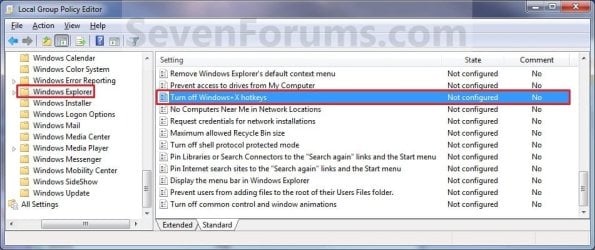
2. In the left pane, click on to expand User Configuration, Administrative Templates, Windows Components, and Windows Explorer. (see screenshot below)
Windows Key Shortcuts - Enable or Disable-group_policy.jpg
3. In the right pane, right click on Turn off Windows + X hotkeys and click on Edit. (see screenshot above)

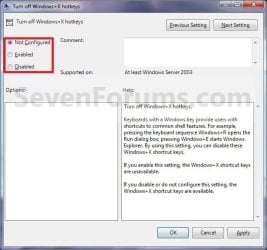
4. To Enable Windows Key Hotkeys
A) Select (dot) either Not Configured or Disabled. (see screenshot below step 6)

B) Go to step 6.
5. To Disable Windows Key Hotkeys
A) Select (dot) Enabled. (see screenshot below step 6)
6. Click on OK. (See screenshot below)
Windows Key Shortcuts - Enable or Disable-properties.jpg
7. Close the Local Group Policy Editor window.

8. Log off and log on, or restart the computer to apply.
That's it,
Shawn


Need more help? Try searching our extensive help and support site.
Loading
30 Mar 2010   #1
b0dhi

Windows 7
 
 
doesnt work for me

Hi I have an alienware laptop with windows 7 home premium 64. Neither of these options work for me.


Any ideas?
My System SpecsSystem Spec

30 Mar 2010   #2
Brink

64-bit Windows 7 Ultimate SP1 & Windows 8 Enterprise
Texas


Hello b0dhi, and welcome to Seven Forums.

If Alienware has some proprietary program that comes preinstalled on their systems that uses the Windows Key, then it may not work with on that program since it may override this.

This doesn't disable the Windows Key completely, only the Windows Key + key keyboard shortcuts used by Windows 7.

Hope this helps,
Shawn
My System SpecsSystem Spec
26 May 2010   #3
Azure Prower

Windows 7


Wish there was a way to disable the windows key itself from popping up the start menu.
My System SpecsSystem Spec
.


26 May 2010   #4
Brink

64-bit Windows 7 Ultimate SP1 & Windows 8 Enterprise
Texas


Hello Azure,

You could completely disable the Windows Key if that would work for you.

Windows Key - Enable or Disable

Hope this helps,
Shawn
My System SpecsSystem Spec
27 May 2010   #5
Azure Prower

Windows 7


Thanks Shawn.

That's exactly what I'm looking for. How ever the link for the Disable_Windows_Key.reg file is broken.
My System SpecsSystem Spec
27 May 2010   #6
Brink

64-bit Windows 7 Ultimate SP1 & Windows 8 Enterprise
Texas


Umm, strange. It's fixed now.
My System SpecsSystem Spec
28 May 2010   #7
Azure Prower

Windows 7


Thanks again. Working as intended.
My System SpecsSystem Spec
28 May 2010   #8
Brink

64-bit Windows 7 Ultimate SP1 & Windows 8 Enterprise
Texas


You're welcome Azure.
My System SpecsSystem Spec
18 Jul 2010   #9
alexandra


Psssst

Hey Brink, I'm here for the same reason as everyone else, and I'd love to use your method. However, the link for Disable_Windows_Hotkey is broken. Enable_ works though.

Can you fix it, or send the file to my account's associated email address? I keep alt-tabbing out of games and its awfullll.

Edit: Also, I would simply use your Method#2, but I unfortunately listened to the computer shop guys and bought Home Premium, so I don't have the gpedit.msc function.
My System SpecsSystem Spec
Comment

 Windows Key Shortcuts - Enable or Disable problems?


Tutorial Tools


Similar help and support threads for: Windows Key Shortcuts - Enable or Disable
Windows 7 Tutorial Category
GUI Boot - Enable or Disable in Windows Tutorials
How to disable windows from verifying shortcuts in startmenu / desktop General Discussion
How to re-enable shortcuts to Windows Explorer history in Start Menu? General Discussion
Windows Key - Enable or Disable Tutorials
Disable Keyboard Shortcuts in Windows Media Center? Media Center


All times are GMT -5. The time now is 09:12 PM.


Seven Forums Android App Seven Forums IOS App Follow us on Facebook

Windows 7 Forums is an independent web site and has not been authorized,
sponsored, or otherwise approved by Microsoft Corporation.
"Windows 7" and related materials are trademarks of Microsoft Corp.
© Designer Media Ltd
  

1 2 3 4 5 6 7 8 9 10 11 12 13 14 15 16 17 18 19 20 21 22 23 24 25 26 27 28 29 30 31 32