
How to Create a Force "Shut Down" Computer Shortcut in Windows
Information
This will show you how to create or download a force Shut Down computer shortcut with or without a time-out delay and custom shutdown message before the computer shuts down and powered off.
Note
The time-out period can also be for how many seconds you have to use the Abort shortcut to abort the computer from shutting down after using this Shut Down Computer shortcut.
EXAMPLE: Shut Down Computer Time-Out Period Message
NOTE: This is with a 30 second time-out period. If you would like to have a custom shutdown message instead of the default message in the dialog box below, then you can use step 3 in OPTION TWO below to do so.

OPTION ONE
To Download a Force "Shut Down" Shortcut
1. For an Instant Forced Shut Down Computer Shortcut
A) Click on the download button below to download the file below.
Instant_Shut_Down_Computer.zip
Download
2. For a Forced Shut Down Computer Shortcut with 30 Second Delay
NOTE: If you would like to use a different amount of time delay, then see OPTION TWO below for how.
A) Click on the download button below to download the file below.
30-second_Shut_Down_Computer.zip
Download
3. Click on Save, and save the .zip file to the desktop.
4. Open the .zip file and extract the Shut Down Computer shortcut to the desktop.
5. Right click on the Shut Down Computer shortcut, and click on Properties, General tab, and on the Unblock button.
NOTE: If you do not have a Unblock button under the General tab, then the shortcut is already unblocked and you can continue on to step 6.
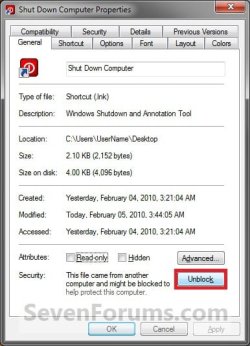
6. Go to step 6 in OPTION TWO below to add the icon you would like to use.
7. You can now Pin to Taskbar or Pin to Start Menu this shortcut, assign a keyboard shortcut to it, or move it where you like for easy use.
8. When done, you can delete the downloaded .zip file on the desktop if you like, or save it to use again.
OPTION TWO
To Manually Create a Custom Force "Shut Down" Shortcut
1. Right click on a empty area on desktop, and click on New and Shortcut.
2. For an Instant Shut Down Computer Shortcut
A) Type the location below into the location area, and click on the Next button. (See screenshot below)
shutdown -s -f -t 00
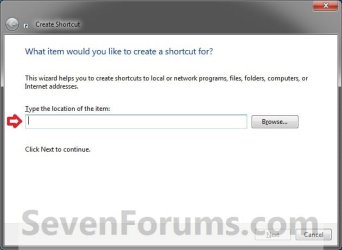
B) Go to step 4.
3. For a Shut Down Computer Shortcut with Specified Time Delay and Message
A) Type the location below into the location area, and click on the Next button. (See screenshot above)
Note
Substitute ## in the command below with a number between 0-315360000 for how many seconds you want the time-out period to be before shutdown.
Substitute Your message here in the command below with a shutdown message up to 512 characters within quotes that you would like to see in the pop-up dialog when using the shutdown shortcut. The message will only be seen for however long you set the time delay to be.
Substitute Your message here in the command below with a shutdown message up to 512 characters within quotes that you would like to see in the pop-up dialog when using the shutdown shortcut. The message will only be seen for however long you set the time delay to be.
shutdown -s -f -t ## -c "Your message here"
FOR EXAMPLE: I would type this below exactly to have a 30 second time delay with a Don't forget to turn off mouse message.
shutdown -s -f -t 30 -c "Don't forget to turn off mouse"
4. Type Shut Down Computer for the name, and click on the Finish button. (See screenshot below)
NOTE: You can name this anything you would like though.
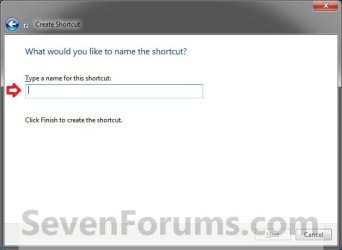
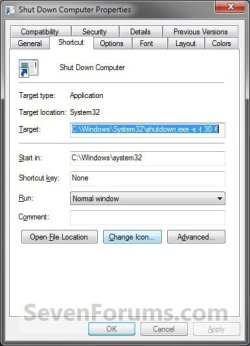
5. Right click on the new Shut Down Computer shortcut on the Desktop and click on Properties.
6. Click on the Shortcut tab, then click on the Change Icon button. (See screenshot below)
7. Click on OK. (See screenshot below)
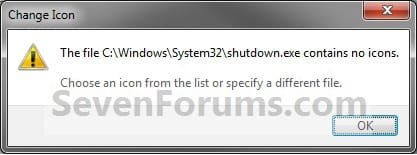
8. To Download a Custom Icon to Use
A) Click on the Download button below to download a custom Shut_Down.ico file in a ZIP file, and save it to your desktop.
Download

B) Open the downloaded ZIP file, extract (drag and drop) the Shut_Down.ico file to your desktop.
C) Right click on the Shut_Down.ico file, and click on Properties, General tab, and on the Unblock button. (see screenshot below)
NOTE: If you do not have a Unblock button under the General tab, then the shortcut is already unblocked and you can continue on.
D) Save the Shut_Down.ico file to where you like to store it at on your Windows drive for use as the shortcut's icon.
NOTE: The icon will need to remain saved at the same location for the icon to continue to display on the shortcut.
E) Go to step 10 to select this Shut_Down.ico file at the location you saved it at.
9. To Use Your Own Custom Icon
A) In the line under "Look for icons in this file", click on Browse and navigate to the location of the 256x256 pixel icon your want to use. (See screenshot below)
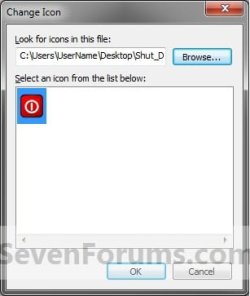
10. Select the icon and click on OK. (See screenshot above)
11. Click on OK. (See screenshot below)
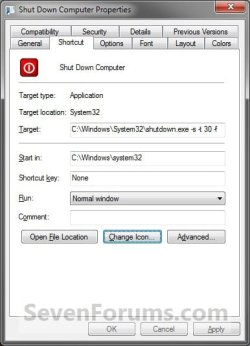
12. You can now Pin to Taskbar or Pin to Start Menu this shortcut, assign a keyboard shortcut to it, or move it where you like for easy use.
That's it,
Shawn
Related Tutorials
- How to Change the Default Action of the Windows 7 Alt+F4 Shut Down Window
- How to Speed Up the Shut Down Time in Windows 7
- How to See What Your Windows 7 Restart Time is
- How to Create a "Restart" Computer Shortcut in Windows
- How to Create a "Lock" Computer Shortcut on Your Windows 7 Desktop
- How to Create a "Log Off" Shortcut in Windows
- How to Create a "Shut Down Windows" Shortcut in Windows 7
- How to Create a "Abort" Shortcut in Windows
- How to Create a "Switch User" Shortcut in Windows 7
- How to Create a Hibernate Shortcut in Windows
- How to Create a Sleep Shortcut in Windows
- How to Create a Task that will Shut Down the PC Automatically
- How to Enable or Disable Shut Down without Having to Log On
- How to Change the "Logging off..." Text Message at Shut Down in Windows 7 and Vista
- How to Change the "Shutting down..." Text Message at Shut Down in Windows 7 and Vista
- How to Allow or Prevent Users and Groups to Shut Down the Computer
- How to Add or Remove the Shut Down, Restart, Sleep, and Hibernate Commands in Windows 7
- How to See the Last Shutdown Time of Your Windows PC
- How to Create a "Remote Shutdown Dialog" Shortcut
- How to Add "Shut Down" Computer to the Desktop Context Menu in Windows 7
- How to Add a "Power" Cascading Desktop Context Menu in Windows 7
- How to Add or Remove "Enable forced button/lid shutdown" in Power Options
Attachments
Last edited:


