Switch User Shortcut - Create

How to Create a "Switch User" Shortcut in Windows 7

   Information
Fast User Switching or Switch User is a feature in the Windows 7 Home Basic, Home Premium, Professional, Ultimate, and Enterprise editions that allows you to switch to a different user account on your computer without having to close any programs and files first in the user account that you are currently logged on to, and then be able to switch right back where you left off. This makes it easier to share a computer with other users on the same computer.

This will show you how to create or download a Switch User shortcut.

   Tip
"Switch User" Keyboard Shortcut

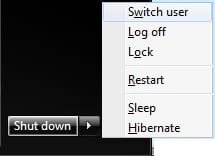
Press the keys below one at a time, and not together, to open the Start Menu, navigate to "Switch User", and use it by pressing W.

Windows :orb:, Right Arrow, Right Arrow, W

shortcut.jpg

   Warning
Standard users must double click on the Switch User shortcut for it to work for them.

The Windows 7 Starter edition does not support this shortcut since it does not have the Fast User Switching feature included in it.

The only alternative for the Windows 7 Starter edition is to log off the user account from the Start Menu arrow menu, then select another user account in the log on screen to log on to instead.


EXAMPLE: Switch User
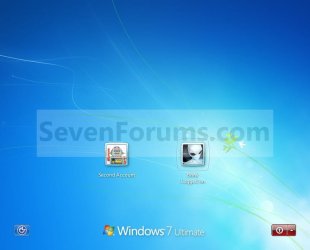
Switch_User.jpg


BEFORE doing OPTION ONE or OPTION TWO below

ONLY if you have the Windows 7 Home Basic or Home Premium Edition


   Note
If you have the Windows 7 Home Basic or Home Premium edition installed, then you will need to download the tsdiscon.exe file to add it. These editions do not have the C:\Windows\System32\tsdiscon.exe file that is required for this shortcut to work in them.

If you have the Windows 7 Professional, Ultimate, or Enterprise edition installed, then you need to skip this section and go directly to OPTION ONE or OPTION TWO below. These editions have the C:\Windows\System32\tsdiscon.exe file included by default.

1. Click on the download button below to download the latest tsdiscon.zip file version to use with your 32-bit or 64-bit Windows 7 Home Basic or Home Premium edition.
NOTE: Use the latest version first. If it does not work for you, then try one of the other older versions.
Windows 7 - tsdiscon.exe 6.1.7600.16385 version

Download


Windows 7 - tsdiscon.exe 6.1.7601.16562 version

Download


Windows 7 - (latest) tsdiscon.exe 6.1.7601.17514 version

Download


2. Click on Save, and save the .zip file to the desktop.

3. Open the .zip file and extract the tsdiscon.exe file to the desktop.

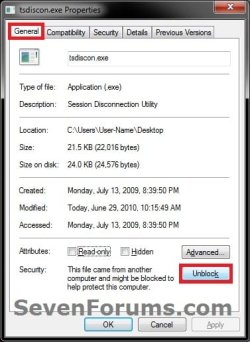
4. Right click on the tsdiscon.exe file, and click on Properties, General tab, on the Unblock button, and on OK. (see screenshot below)
NOTE: If you do not have a Unblock button under the General tab, then the shortcut is already unblocked and you can continue on to step 5.
Unblock.jpg
5. Move the tsdiscon.exe file into the C:\Windows\System32 folder.

6. When done, you can delete the downloaded .zip file on the desktop if you like, or save it to use again.

7. You can now proceed to do either OPTION ONE or OPTION TWO below to get the Switch User shortcut.


OPTION ONE

To Download the "Switch User" Shortcut


1. Click on the Download button below to download the Switch_User.zip file.

Download


2. Click on Save, and save the .zip file to the desktop.

3. Open the .zip file and extract the Switch User shortcut to the desktop.

4. Right click on the Switch User shortcut, and click on Properties, General tab, on the Unblock button, and on OK. (See screenshot below)
NOTE: If you do not have a Unblock button under the General tab, then the shortcut is already unblocked and you can continue on to step 5.
Unblock.jpg
5. You can now Pin to Taskbar or Pin to Start Menu this shortcut, assign a keyboard shortcut to it, or move it where you like for easy use.

6. When done, you can delete the downloaded .zip file on the desktop if you like, or save it to use again.


OPTION TWO

To Manually Create the "Switch User" Shortcut


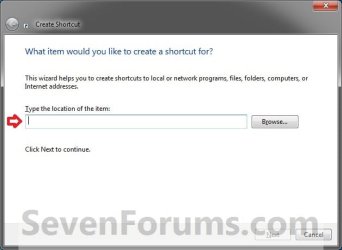
1. Right click on a empty area on desktop, and click on New and Shortcut.

2. Copy and paste the command below into the location area, and click on the Next button. (See screenshot below)
%windir%\System32\tsdiscon.exe
Step1.jpg
3. Type Switch User for the name, and click on the Finish button. (See screenshot below)
NOTE: You can name this anything you would like though.
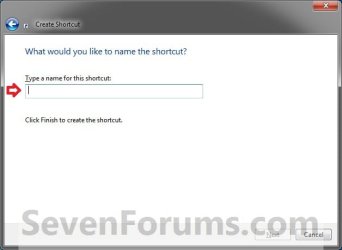
Step2.jpg
4. Right click on the new Switch User shortcut on the Desktop and click on Properties.

5. Click on the Shortcut tab, then click on the Change Icon button. (See screenshot below)
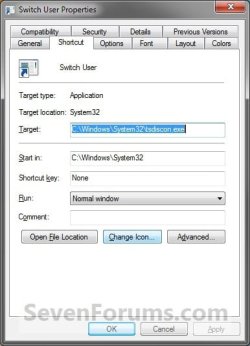
Switch_User3.jpg
6. Click on OK. (See screenshot below)
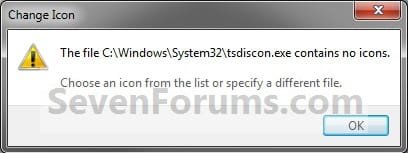
Switch_User4.jpg
7. In the line under "Look for icons in this file", copy and paste the location below and press Enter. (See screenshot below)
%windir%\System32\imageres.dll
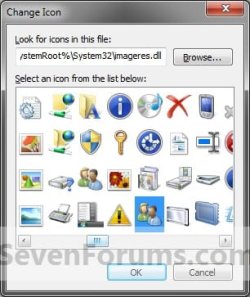
Switch_User5.jpg
8. Select the icon highlighted in blue above and click on OK. (See screenshot above)
NOTE: You can use any icon that you would like instead though.

9. Click on OK. (See screenshot below)
Switch_User6.jpg
10. You can now Pin to Taskbar or Pin to Start Menu this shortcut, assign a keyboard shortcut to it, or move it where you like for easy use.

That's it,
Shawn


Attachments

Last edited:
You're welcome Ron. Please let us know if you find anything. :)
 

My Computer My Computer

Computer type
PC/Desktop
Computer Manufacturer/Model Number
Self built custom
OS
64-bit Windows 11 Pro for Workstations
CPU
Intel i7-8700K OC'd to 5 GHz
Motherboard
ASUS ROG Maximus XI Formula Z390
Memory
64 GB (4x16GB) G.SKILL TridentZ RGB DDR4 3600 MHz
Graphics Card(s)
ASUS ROG-STRIX-GTX1080TI-O11G-GAMING
Sound Card
Integrated
Monitor(s) Displays
2 x Samsung Odyssey G7 27"
Screen Resolution
2560x1440
Hard Drives
1TB Samsung 990 PRO M.2,
4TB Samsung 990 PRO PRO M.2,
TerraMaster F8 SSD Plus NAS
PSU
Seasonic Prime Titanium 850W
Case
Thermaltake Core P3
Cooling
Corsair Hydro H115i
Keyboard
Logitech wireless K800
Mouse
Logitech MX Master 4
Internet Speed
2 Gb/s Download and 100 Mb/s Upload
Antivirus
Malwarebyte Anti-Malware Premium
Browser
Google Chrome
Other Info
Logitech Z625 speaker system,
Logitech BRIO 4K Pro webcam,
HP Color LaserJet Pro MFP M477fdn,
APC SMART-UPS RT 1000 XL - SURT1000XLI,
Galaxy S23 Plus phone
this only seems to work on my admin account not on the other 4 accounts, im using win 7 64bit, can you please advise?
thank you
 

My Computer My Computer

OS
windows 7 extreme 64bit
Hello Adam, and welcome to Seven Forums.

It works in standard user accounts as well, but they must double click on the shortcut for it to work for them while an administrator only has to click on it once. Not sure why it works like that though.
 
Last edited:

My Computer My Computer

Computer type
PC/Desktop
Computer Manufacturer/Model Number
Self built custom
OS
64-bit Windows 11 Pro for Workstations
CPU
Intel i7-8700K OC'd to 5 GHz
Motherboard
ASUS ROG Maximus XI Formula Z390
Memory
64 GB (4x16GB) G.SKILL TridentZ RGB DDR4 3600 MHz
Graphics Card(s)
ASUS ROG-STRIX-GTX1080TI-O11G-GAMING
Sound Card
Integrated
Monitor(s) Displays
2 x Samsung Odyssey G7 27"
Screen Resolution
2560x1440
Hard Drives
1TB Samsung 990 PRO M.2,
4TB Samsung 990 PRO PRO M.2,
TerraMaster F8 SSD Plus NAS
PSU
Seasonic Prime Titanium 850W
Case
Thermaltake Core P3
Cooling
Corsair Hydro H115i
Keyboard
Logitech wireless K800
Mouse
Logitech MX Master 4
Internet Speed
2 Gb/s Download and 100 Mb/s Upload
Antivirus
Malwarebyte Anti-Malware Premium
Browser
Google Chrome
Other Info
Logitech Z625 speaker system,
Logitech BRIO 4K Pro webcam,
HP Color LaserJet Pro MFP M477fdn,
APC SMART-UPS RT 1000 XL - SURT1000XLI,
Galaxy S23 Plus phone
i think you misunderstand what i mean, the icon works fine and then i switch onto another user account and it does not appear on the desktop, in order to add it where is the location via browse?

many thanks
 

My Computer My Computer

OS
windows 7 extreme 64bit
Adam,

Yep, it sure does seem that way.

While in your administrator account, you could copy the "Switch User" shortcut into any C:\Users\(user-name)\Desktop folder that you want the shortcut to be on.

Hope this helps. :)
 
Last edited:

My Computer My Computer

Computer type
PC/Desktop
Computer Manufacturer/Model Number
Self built custom
OS
64-bit Windows 11 Pro for Workstations
CPU
Intel i7-8700K OC'd to 5 GHz
Motherboard
ASUS ROG Maximus XI Formula Z390
Memory
64 GB (4x16GB) G.SKILL TridentZ RGB DDR4 3600 MHz
Graphics Card(s)
ASUS ROG-STRIX-GTX1080TI-O11G-GAMING
Sound Card
Integrated
Monitor(s) Displays
2 x Samsung Odyssey G7 27"
Screen Resolution
2560x1440
Hard Drives
1TB Samsung 990 PRO M.2,
4TB Samsung 990 PRO PRO M.2,
TerraMaster F8 SSD Plus NAS
PSU
Seasonic Prime Titanium 850W
Case
Thermaltake Core P3
Cooling
Corsair Hydro H115i
Keyboard
Logitech wireless K800
Mouse
Logitech MX Master 4
Internet Speed
2 Gb/s Download and 100 Mb/s Upload
Antivirus
Malwarebyte Anti-Malware Premium
Browser
Google Chrome
Other Info
Logitech Z625 speaker system,
Logitech BRIO 4K Pro webcam,
HP Color LaserJet Pro MFP M477fdn,
APC SMART-UPS RT 1000 XL - SURT1000XLI,
Galaxy S23 Plus phone
thank you, massive help and fantastic tool!
Many thanks guys.
 

My Computer My Computer

OS
windows 7 extreme 64bit
You're most welcome Adam. :)
 

My Computer My Computer

Computer type
PC/Desktop
Computer Manufacturer/Model Number
Self built custom
OS
64-bit Windows 11 Pro for Workstations
CPU
Intel i7-8700K OC'd to 5 GHz
Motherboard
ASUS ROG Maximus XI Formula Z390
Memory
64 GB (4x16GB) G.SKILL TridentZ RGB DDR4 3600 MHz
Graphics Card(s)
ASUS ROG-STRIX-GTX1080TI-O11G-GAMING
Sound Card
Integrated
Monitor(s) Displays
2 x Samsung Odyssey G7 27"
Screen Resolution
2560x1440
Hard Drives
1TB Samsung 990 PRO M.2,
4TB Samsung 990 PRO PRO M.2,
TerraMaster F8 SSD Plus NAS
PSU
Seasonic Prime Titanium 850W
Case
Thermaltake Core P3
Cooling
Corsair Hydro H115i
Keyboard
Logitech wireless K800
Mouse
Logitech MX Master 4
Internet Speed
2 Gb/s Download and 100 Mb/s Upload
Antivirus
Malwarebyte Anti-Malware Premium
Browser
Google Chrome
Other Info
Logitech Z625 speaker system,
Logitech BRIO 4K Pro webcam,
HP Color LaserJet Pro MFP M477fdn,
APC SMART-UPS RT 1000 XL - SURT1000XLI,
Galaxy S23 Plus phone
Please add at the top of thread, there is a hotkey to switch user:

Win button, right arrow, right arrow, w
 

My Computer My Computer

OS
Windows 7 32
Hello Emin, and welcome to Seven Forums.

Added. :)
 

My Computer My Computer

Computer type
PC/Desktop
Computer Manufacturer/Model Number
Self built custom
OS
64-bit Windows 11 Pro for Workstations
CPU
Intel i7-8700K OC'd to 5 GHz
Motherboard
ASUS ROG Maximus XI Formula Z390
Memory
64 GB (4x16GB) G.SKILL TridentZ RGB DDR4 3600 MHz
Graphics Card(s)
ASUS ROG-STRIX-GTX1080TI-O11G-GAMING
Sound Card
Integrated
Monitor(s) Displays
2 x Samsung Odyssey G7 27"
Screen Resolution
2560x1440
Hard Drives
1TB Samsung 990 PRO M.2,
4TB Samsung 990 PRO PRO M.2,
TerraMaster F8 SSD Plus NAS
PSU
Seasonic Prime Titanium 850W
Case
Thermaltake Core P3
Cooling
Corsair Hydro H115i
Keyboard
Logitech wireless K800
Mouse
Logitech MX Master 4
Internet Speed
2 Gb/s Download and 100 Mb/s Upload
Antivirus
Malwarebyte Anti-Malware Premium
Browser
Google Chrome
Other Info
Logitech Z625 speaker system,
Logitech BRIO 4K Pro webcam,
HP Color LaserJet Pro MFP M477fdn,
APC SMART-UPS RT 1000 XL - SURT1000XLI,
Galaxy S23 Plus phone
The script works great but what about a direct switch to another user ?
I got 2 users in my pc and want the shortcut to switch to the other user directly.
Is this possible ?
 

My Computer My Computer

OS
seven 64 bit
The script works great but what about a direct switch to another user ?
I got 2 users in my pc and want the shortcut to switch to the other user directly.
Is this possible ?

Hello Suoko,

As far as I know, you must go through the log on screen while switching users. :(
 
Last edited:

My Computer My Computer

Computer type
PC/Desktop
Computer Manufacturer/Model Number
Self built custom
OS
64-bit Windows 11 Pro for Workstations
CPU
Intel i7-8700K OC'd to 5 GHz
Motherboard
ASUS ROG Maximus XI Formula Z390
Memory
64 GB (4x16GB) G.SKILL TridentZ RGB DDR4 3600 MHz
Graphics Card(s)
ASUS ROG-STRIX-GTX1080TI-O11G-GAMING
Sound Card
Integrated
Monitor(s) Displays
2 x Samsung Odyssey G7 27"
Screen Resolution
2560x1440
Hard Drives
1TB Samsung 990 PRO M.2,
4TB Samsung 990 PRO PRO M.2,
TerraMaster F8 SSD Plus NAS
PSU
Seasonic Prime Titanium 850W
Case
Thermaltake Core P3
Cooling
Corsair Hydro H115i
Keyboard
Logitech wireless K800
Mouse
Logitech MX Master 4
Internet Speed
2 Gb/s Download and 100 Mb/s Upload
Antivirus
Malwarebyte Anti-Malware Premium
Browser
Google Chrome
Other Info
Logitech Z625 speaker system,
Logitech BRIO 4K Pro webcam,
HP Color LaserJet Pro MFP M477fdn,
APC SMART-UPS RT 1000 XL - SURT1000XLI,
Galaxy S23 Plus phone
I don't know if it would work or not in Windows 7, but either way, I wouldn't recommend it since this would cause a security risk without the log on screen.
 

My Computer My Computer

Computer type
PC/Desktop
Computer Manufacturer/Model Number
Self built custom
OS
64-bit Windows 11 Pro for Workstations
CPU
Intel i7-8700K OC'd to 5 GHz
Motherboard
ASUS ROG Maximus XI Formula Z390
Memory
64 GB (4x16GB) G.SKILL TridentZ RGB DDR4 3600 MHz
Graphics Card(s)
ASUS ROG-STRIX-GTX1080TI-O11G-GAMING
Sound Card
Integrated
Monitor(s) Displays
2 x Samsung Odyssey G7 27"
Screen Resolution
2560x1440
Hard Drives
1TB Samsung 990 PRO M.2,
4TB Samsung 990 PRO PRO M.2,
TerraMaster F8 SSD Plus NAS
PSU
Seasonic Prime Titanium 850W
Case
Thermaltake Core P3
Cooling
Corsair Hydro H115i
Keyboard
Logitech wireless K800
Mouse
Logitech MX Master 4
Internet Speed
2 Gb/s Download and 100 Mb/s Upload
Antivirus
Malwarebyte Anti-Malware Premium
Browser
Google Chrome
Other Info
Logitech Z625 speaker system,
Logitech BRIO 4K Pro webcam,
HP Color LaserJet Pro MFP M477fdn,
APC SMART-UPS RT 1000 XL - SURT1000XLI,
Galaxy S23 Plus phone
Switch Users Delay

Hi

great short cut works perfectly for me but I am just wondering if you could help me to add a delay to the switch users short cut so I can tab back into a window before it changes users.

Basicly the macro I wish to run doesn't work properly because I don't have time to click back onto the window its suppost to run on. I need multi users to run multi macros on the same computer please help.

thank you in advanced
 

My Computer My Computer

OS
Windows 7 premium x64
tqUQ5.png


This will switch you to another user instantly without going through login screen.

There's a non-free application for it too ** REMOVED **
 
Last edited by a moderator:

My Computer My Computer

OS
Windows 7 Home Premium x64
Hello even7ven,

Yep, you could use that method to switch between user accounts that are already logged in or connected. If a user is not logged in/connected, then they will not show up under the "Users" tab in Task Manager.
 

My Computer My Computer

Computer type
PC/Desktop
Computer Manufacturer/Model Number
Self built custom
OS
64-bit Windows 11 Pro for Workstations
CPU
Intel i7-8700K OC'd to 5 GHz
Motherboard
ASUS ROG Maximus XI Formula Z390
Memory
64 GB (4x16GB) G.SKILL TridentZ RGB DDR4 3600 MHz
Graphics Card(s)
ASUS ROG-STRIX-GTX1080TI-O11G-GAMING
Sound Card
Integrated
Monitor(s) Displays
2 x Samsung Odyssey G7 27"
Screen Resolution
2560x1440
Hard Drives
1TB Samsung 990 PRO M.2,
4TB Samsung 990 PRO PRO M.2,
TerraMaster F8 SSD Plus NAS
PSU
Seasonic Prime Titanium 850W
Case
Thermaltake Core P3
Cooling
Corsair Hydro H115i
Keyboard
Logitech wireless K800
Mouse
Logitech MX Master 4
Internet Speed
2 Gb/s Download and 100 Mb/s Upload
Antivirus
Malwarebyte Anti-Malware Premium
Browser
Google Chrome
Other Info
Logitech Z625 speaker system,
Logitech BRIO 4K Pro webcam,
HP Color LaserJet Pro MFP M477fdn,
APC SMART-UPS RT 1000 XL - SURT1000XLI,
Galaxy S23 Plus phone
Ah yes. Forgot to add in that tidbit. You already have to be logged in, you can't just williy nilly switch into any account you find on your computer, as you it said already - it'd be a huge security risk!

Also, you can open the task manager as the use you're planning on switching to (through "Run as different user") to bypass the password upon every switch entirely.
 

My Computer My Computer

OS
Windows 7 Home Premium x64
Switch user shortcut

I have followed the instructions given in this thread and successfully created the shortcut that goes straight to the window showing the users. However on my Windows 7 Pro 64 bit system there are only 2 users - myself and my wife. Is it possible to go one step further and by clicking a shortcut on one desktop to go straight to the 'enter password' for the other user? Thank you.
 

My Computer My Computer

Computer type
Laptop
Computer Manufacturer/Model Number
Toshiba
OS
Windows 7 Pro 64 bit
CPU
i5
Memory
4gb
Hello Harold, and welcome to Seven Forums.

Not that I'm aware of. :(

If it helps to know, Windows 8/8.1 has that feature built-in to switch directly to another user.
 

My Computer My Computer

Computer type
PC/Desktop
Computer Manufacturer/Model Number
Self built custom
OS
64-bit Windows 11 Pro for Workstations
CPU
Intel i7-8700K OC'd to 5 GHz
Motherboard
ASUS ROG Maximus XI Formula Z390
Memory
64 GB (4x16GB) G.SKILL TridentZ RGB DDR4 3600 MHz
Graphics Card(s)
ASUS ROG-STRIX-GTX1080TI-O11G-GAMING
Sound Card
Integrated
Monitor(s) Displays
2 x Samsung Odyssey G7 27"
Screen Resolution
2560x1440
Hard Drives
1TB Samsung 990 PRO M.2,
4TB Samsung 990 PRO PRO M.2,
TerraMaster F8 SSD Plus NAS
PSU
Seasonic Prime Titanium 850W
Case
Thermaltake Core P3
Cooling
Corsair Hydro H115i
Keyboard
Logitech wireless K800
Mouse
Logitech MX Master 4
Internet Speed
2 Gb/s Download and 100 Mb/s Upload
Antivirus
Malwarebyte Anti-Malware Premium
Browser
Google Chrome
Other Info
Logitech Z625 speaker system,
Logitech BRIO 4K Pro webcam,
HP Color LaserJet Pro MFP M477fdn,
APC SMART-UPS RT 1000 XL - SURT1000XLI,
Galaxy S23 Plus phone
Thank you, Brink. That is the only positive thing I've ever read about Windows 8/8.1!
 

My Computer My Computer

Computer type
Laptop
Computer Manufacturer/Model Number
Toshiba
OS
Windows 7 Pro 64 bit
CPU
i5
Memory
4gb
Back
Top